1
12
IC693ALG442 Ramp Mode Operation
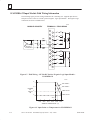
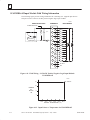
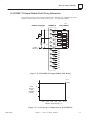
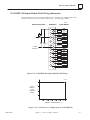
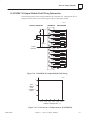
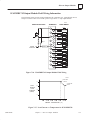
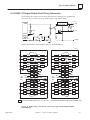
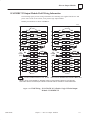
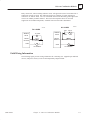
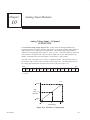
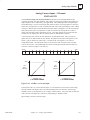
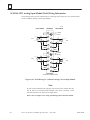
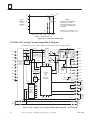
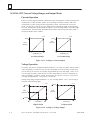
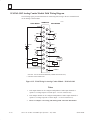
The ramp mode operation represents a separate mode of the module’s outputs. When an output
channel is not in ramp mode, new values entered in the corresponding %AQ reference cause the
output to step to the commanded values as shown in Figure 3-52. When an output channel is in
ramp mode, new values entered in the corresponding %AQ reference cause the output to ramp
to the given values using ramp variables which have been assigned to the channel using ladder
logic. The ramp is composed of output steps taken every 1 millisecond.
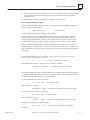
EXAMPLE OUTPUT IN RAMP MODE
OUTPUT
EXAMPLE OUTPUT IN STANDARD MODE
FINAL OUTPUT VALUE
CORRESPONDING TO
NEW %AQ VALUE
%AQ VALUE CHANGES
TIME
Figure 12-7. Output Behavior in Ramp Mode and in Standard Mode
The default mode of both outputs is standard mode. Ramp mode and ramp variables are set
using an E2 COMMREQ in ladder logic as described below. The mode of each output channel
is set independent of the mode of the other channel. When an output is in ramp mode, two
lower-level modes can be used to specify the ramp slope: time mode, in which the user
provides the total ramp time in milliseconds, and step mode, in which the user provides the step
in %AQ counts that will be taken every 1 millisecond.
Setting the Ramp Mode
An E2 COMMREQ is used to change the ramp mode of an output channel. This is the same
COMMREQ that is used to change the input alarm limits of the module and clear the %I error
code. When the module receives the COMMREQ, the first word, or command word, is checked
to determine whether the ramp settings or alarm limits are being changed or whether the %I
error code is being cleared.
When step mode is specified, the second COMMREQ data word contains the ramp step in
%AQ counts. Valid step values range from 1 to 32000. The direction of the ramp is determined
when the value of the corresponding %AQ reference changes. Once the ramp mode and step
have been set, changing the corresponding %AQ value causes the output to ramp to the new
value.
When time mode is specified, the second COMMREQ data word contains the total time in
milliseconds it will take for the output to ramp from the present output value to the final output
value. The present and final values are specified by the old and new values of the
corresponding %AQ reference. Valid ramp time values range from 1 to 32000, which
correspond to ramp times of 1 millisecond to 32 seconds. Once the ramp mode and time have
been set, changing the corresponding %AQ value causes the output to ramp to the new value.
If an E2 COMMREQ is issued to the module to change the ramp settings while the indicated
output is in the process of ramping, the new ramp settings will take effect as follows:
12-18
Series 90–30 PLC I/O Module Specifications – July 2000
GFK–0898F