1
FAQ (Frequently Asked Questions) Section
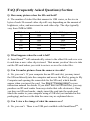
Q. How many pictures does the SD card hold?
A: The number of video files that amount to 1GB varies, as the size in
bytes of each 20-second video clip will vary depending on the amount of
brightness, color, and movement in each video clip. The clips typically
vary from 2MB to 8MB.
SD Card
1G
1G
2G
2G
64G
64G
File Size
2Mb
8Mb
2Mb
8Mb
2Mb
8Mb
Q’ty of File(approx.)
500
125
1000
250
32000
8000
Q. What happens when the card is full?
A: SmartGuardTM will automatically return to the oldest file and save over
it each time a new video clip is stored. That means you don’t have to take
out the SD card unless you wish to review or save the video files.
Q. Can I transfer pictures from the camera via cable?
A: No, you can’t. If your computer has an SD card slot, you may insert
the SD card directly into the computer and access the files by going to My
Computer and opening the removable for the SD card, which should
appear when you insert the card. See Step 6 “Viewing video” in your
instruction manual for details. If you don’t have an SD card slot, you may
purchase an SD card reader from any retailer that sells electronics. Once
you have an SD card reader, simply insert the card into the reader and
attach the reader to your computer using a USB slot (not included in this
packaging), and access the data the same way as explained above.
Q. Can I view a live image of what the camera sees?
A: No, you can’t. There is no USB port available with SmartGuardTM.
13