1
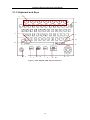
12-Channel Electrocardiograph User Manual
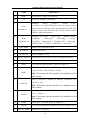
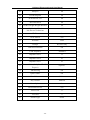
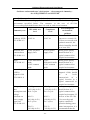
Name
Explanation
A
Function Key
B
Delete
Deleting characters
C
Enter
Confirming operation
D
Moving cursor
Tab
E
Fn
F
Spacebar
G
Shift
H
Power On/Off
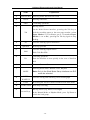
J
Used for entering special characters
Inserting spacebar
Used for entering capital letters
Shift+Tab=BackTab
Draw the baseline to zero quickly in the case of baseline
drift
Power-on/Power-off
Selecting Work mode: Manual, Auto, Rhythm
MODE
K
SLEEP/
WAKE UP
L
COPY
M
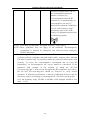
On the Main Screen interface, pressing the Tab key to
feed the recording paper to the next paper marker, (when
Paper Marker is set as Yes)or get to 2.5cm(when Paper
Marker is set as No), pressing the Tab key again to stop
feeding.
Canceling operation
Esc
I
Selecting menu functions on screen
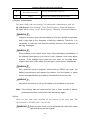
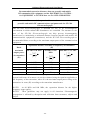
Note: Only in the Work Mode Setup interface can R-R
mode be selected.
Used for resting and wakening electrocardiograph
Reviewing the last ECG data recorded in the Auto mode
START/STOP Start/Stop recording
N
Moving cursor (Up, Down, Left, Right)
Arrow Keys
In the Manual Mode or Rhythm Mode, press Up/Down to
switch the lead group.
-14-