1
Developing software with GNU
Developing software with GNU
An introduction to the GNU development tools
This is edition 0.1.5
Last updated, 26 March 1999
Eleftherios Gkioulekas
Department of Applied Mathematics
University of Washington
[email protected]
This edition of the manual is consistent with:
Autoconf 2.13, Automake 1.4, Libtool 1.3,
Autotools 0.11, Texinfo 3.12b, Emacs 20.3.
Published on the Internet
http://www.amath.washington.edu/~lf/tutorials/autoconf/
c 1998, 1999 Eleftherios Gkioulekas. All rights reserved.
Copyright Permission is granted to make and distribute verbatim copies of this manual provided the
copyright notice and this permission notice are preserved on all copies.
Permission is granted to copy and distribute modied versions of this manual under the
conditions for verbatim copying, provided that they are marked clearly as modied versions,
that the authors' names and title are unchanged (though subtitles and additional authors'
names may be added), and that other clearly marked sections held under separate copyright
are reproduced under the conditions given withinthem, and that the entire resulting derived
work is distributed under the terms of a permission notice identical to this one.
Permission is granted to copy and distribute translations of this manual into another language, under the above conditions for modied versions, except that this permission notice
may be stated in a translation approved by the Free Software Foundation.
i
Short Contents
Preface . . . . . . . . . . . . . . . . . . . . . . . . . . . . . . . . . . . . . . . . . 1
Copying . . . . . . . . . . . . . . . . . . . . . . . . . . . . . . . . . . . . . . . . . 5
Acknowledgements . . . . . . . . . . . . . . . . . . . . . . . . . . . . . . . . . 7
1 Installing GNU software . . . . . . . . . . . . . . . . . . . . . . . . . . 9
2 Using GNU Emacs . . . . . . . . . . . . . . . . . . . . . . . . . . . . . 17
3 Compiling with Makeles . . . . . . . . . . . . . . . . . . . . . . . . . 39
4 The GNU build system . . . . . . . . . . . . . . . . . . . . . . . . . . 57
5 Using Automake . . . . . . . . . . . . . . . . . . . . . . . . . . . . . . . 75
6 Using Libtool . . . . . . . . . . . . . . . . . . . . . . . . . . . . . . . . . 95
7 Using C eectively . . . . . . . . . . . . . . . . . . . . . . . . . . . . . 97
8 Using Fortran eectively . . . . . . . . . . . . . . . . . . . . . . . . . 99
9 Internationalization . . . . . . . . . . . . . . . . . . . . . . . . . . . . 105
10 Maintaining Documentation . . . . . . . . . . . . . . . . . . . . . . 107
11 Portable shell programming . . . . . . . . . . . . . . . . . . . . . . 109
12 Writing Autoconf macros . . . . . . . . . . . . . . . . . . . . . . . . 111
Appendix A Legal issues with Free Software . . . . . . . . . . . . . 113
Appendix B Philosophical issues . . . . . . . . . . . . . . . . . . . . . 117
Appendix C Licensing Free Software . . . . . . . . . . . . . . . . . . . 131
Appendix D GNU GENERAL PUBLIC LICENSE . . . . . . . . . 137
ii
Developing software with GNU
Table of Contents
Preface . . . . . . . . . . . . . . . . . . . . . . . . . . . . . . . . . . . . . . . 1
Copying . . . . . . . . . . . . . . . . . . . . . . . . . . . . . . . . . . . . . . 5
Acknowledgements . . . . . . . . . . . . . . . . . . . . . . . . . . . . 7
1 Installing GNU software . . . . . . . . . . . . . . . . . . . 9
1.1
1.2
1.3
1.4
1.5
Installing a GNU package . . . . . . . . . . . . . . . . . . . . . . . . . . . . . . . . 9
The Makele standards . . . . . . . . . . . . . . . . . . . . . . . . . . . . . . . . . 10
Conguration options . . . . . . . . . . . . . . . . . . . . . . . . . . . . . . . . . . . 12
Doing a VPATH build . . . . . . . . . . . . . . . . . . . . . . . . . . . . . . . . . . 13
Making a binary distribution . . . . . . . . . . . . . . . . . . . . . . . . . . . . 14
2 Using GNU Emacs . . . . . . . . . . . . . . . . . . . . . . . . 17
2.1
2.2
2.3
2.4
2.5
2.6
2.7
2.8
2.9
2.10
Installing GNU Emacs . . . . . . . . . . . . . . . . . . . . . . . . . . . . . . . . . .
Basic Emacs concepts . . . . . . . . . . . . . . . . . . . . . . . . . . . . . . . . . .
Conguring GNU Emacs . . . . . . . . . . . . . . . . . . . . . . . . . . . . . . . .
Using vi emulation . . . . . . . . . . . . . . . . . . . . . . . . . . . . . . . . . . . . .
Navigating source code . . . . . . . . . . . . . . . . . . . . . . . . . . . . . . . . .
Using Emacs as an email client . . . . . . . . . . . . . . . . . . . . . . . . . .
Handling patches . . . . . . . . . . . . . . . . . . . . . . . . . . . . . . . . . . . . . . .
Inserting copyright notices with Emacs . . . . . . . . . . . . . . . . . . .
Hacker sanity with Emacs . . . . . . . . . . . . . . . . . . . . . . . . . . . . . . .
Further reading on Emacs . . . . . . . . . . . . . . . . . . . . . . . . . . . . .
17
18
21
25
28
31
34
35
35
36
3 Compiling with Makeles . . . . . . . . . . . . . . . . . 39
3.1
3.2
3.3
3.4
3.5
3.6
3.7
3.8
Compiling simple programs . . . . . . . . . . . . . . . . . . . . . . . . . . . . .
Programs with many source les . . . . . . . . . . . . . . . . . . . . . . . . .
Building libraries . . . . . . . . . . . . . . . . . . . . . . . . . . . . . . . . . . . . . . .
Dealing with header les . . . . . . . . . . . . . . . . . . . . . . . . . . . . . . . .
The GPL and libraries . . . . . . . . . . . . . . . . . . . . . . . . . . . . . . . . . .
The language runtime libraries. . . . . . . . . . . . . . . . . . . . . . . . . . .
Basic Makele concepts . . . . . . . . . . . . . . . . . . . . . . . . . . . . . . . . .
More about Makeles . . . . . . . . . . . . . . . . . . . . . . . . . . . . . . . . . . .
39
40
42
43
46
47
49
51
iii
4 The GNU build system . . . . . . . . . . . . . . . . . . . 57
4.1
4.2
4.3
4.4
4.5
4.6
4.7
4.8
4.9
4.10
Introducing the GNU tools . . . . . . . . . . . . . . . . . . . . . . . . . . . . . .
Installing the GNU build system . . . . . . . . . . . . . . . . . . . . . . . .
Hello world example with Autoconf and Automake . . . . . . . .
Understanding the hello world example . . . . . . . . . . . . . . . . . .
Using conguration headers . . . . . . . . . . . . . . . . . . . . . . . . . . . . .
Maintaining the documentation les . . . . . . . . . . . . . . . . . . . . .
Organizing your project in subdirectories . . . . . . . . . . . . . . . . .
Applying the GPL . . . . . . . . . . . . . . . . . . . . . . . . . . . . . . . . . . . . .
Handling version numbers . . . . . . . . . . . . . . . . . . . . . . . . . . . . . . .
Hello world with acmkdir . . . . . . . . . . . . . . . . . . . . . . . . . . . . . .
57
58
59
62
64
66
69
70
71
72
5 Using Automake . . . . . . . . . . . . . . . . . . . . . . . . . . 75
5.1
5.2
5.3
5.4
5.5
5.6
5.7
5.8
5.9
5.10
5.11
Simple use of Automake . . . . . . . . . . . . . . . . . . . . . . . . . . . . . . . .
General Automake principles . . . . . . . . . . . . . . . . . . . . . . . . . . . .
Installation standard directories . . . . . . . . . . . . . . . . . . . . . . . . .
Libraries with Automake . . . . . . . . . . . . . . . . . . . . . . . . . . . . . . . .
Applications with Automake . . . . . . . . . . . . . . . . . . . . . . . . . . . .
Dealing with built sources . . . . . . . . . . . . . . . . . . . . . . . . . . . . . .
Embedded text with Automake . . . . . . . . . . . . . . . . . . . . . . . . . .
Scripts with Automake . . . . . . . . . . . . . . . . . . . . . . . . . . . . . . . . .
Emacs Lisp with Automake . . . . . . . . . . . . . . . . . . . . . . . . . . . . .
Guile with Automake . . . . . . . . . . . . . . . . . . . . . . . . . . . . . . . . . .
Data les with Automake . . . . . . . . . . . . . . . . . . . . . . . . . . . . . .
75
77
80
83
83
83
84
87
91
92
93
6 Using Libtool . . . . . . . . . . . . . . . . . . . . . . . . . . . . . 95
7 Using C eectively . . . . . . . . . . . . . . . . . . . . . . . . 97
8 Using Fortran eectively . . . . . . . . . . . . . . . . . . 99
8.1
8.2
8.3
8.4
8.5
Fortran compilers and linkage . . . . . . . . . . . . . . . . . . . . . . . . . . . 99
Walkthrough a simple example . . . . . . . . . . . . . . . . . . . . . . . . . 102
Portability problems with Fortran . . . . . . . . . . . . . . . . . . . . . . 102
Other Fortran dialects . . . . . . . . . . . . . . . . . . . . . . . . . . . . . . . . . 103
Popular free software in Fortran . . . . . . . . . . . . . . . . . . . . . . . . 104
9 Internationalization . . . . . . . . . . . . . . . . . . . . . . 105
iv
Developing software with GNU
10 Maintaining Documentation . . . . . . . . . . . . . 107
10.1
10.2
10.3
10.4
10.5
10.6
10.7
10.8
10.9
Browsing documentation . . . . . . . . . . . . . . . . . . . . . . . . . . . . . .
Writing proper manuals . . . . . . . . . . . . . . . . . . . . . . . . . . . . . .
Introduction to Texinfo . . . . . . . . . . . . . . . . . . . . . . . . . . . . . . .
Markup in Texinfo . . . . . . . . . . . . . . . . . . . . . . . . . . . . . . . . . . .
GNU Emacs support for Texinfo . . . . . . . . . . . . . . . . . . . . . .
Writing man pages . . . . . . . . . . . . . . . . . . . . . . . . . . . . . . . . . . .
Writing documentation with LaTeX . . . . . . . . . . . . . . . . . . .
Creating a LaTeX package . . . . . . . . . . . . . . . . . . . . . . . . . . . .
Further reading about LaTeX . . . . . . . . . . . . . . . . . . . . . . . . .
107
107
107
107
107
107
107
107
107
11 Portable shell programming . . . . . . . . . . . . . 109
12 Writing Autoconf macros . . . . . . . . . . . . . . . 111
Appendix A Legal issues with Free Software
.......................................
113
A.1 Understanding Copyright . . . . . . . . . . . . . . . . . . . . . . . . . . . . . . 113
A.2 Software patents . . . . . . . . . . . . . . . . . . . . . . . . . . . . . . . . . . . . . . 114
A.3 Export restrictions on encryption software . . . . . . . . . . . . . . 115
Appendix B Philosophical issues . . . . . . . . . . . 117
B.1
B.2
B.3
B.4
B.5
B.6
The Right to Read . . . . . . . . . . . . . . . . . . . . . . . . . . . . . . . . . . . .
What is Free Software . . . . . . . . . . . . . . . . . . . . . . . . . . . . . . . . .
Why software should not have owners . . . . . . . . . . . . . . . . . .
Why free software needs free documentation . . . . . . . . . . . .
Categories of software . . . . . . . . . . . . . . . . . . . . . . . . . . . . . . . . .
Confusing words . . . . . . . . . . . . . . . . . . . . . . . . . . . . . . . . . . . . . .
117
120
120
124
126
129
Appendix C Licensing Free Software . . . . . . . . 131
C.1 What is Copyleft . . . . . . . . . . . . . . . . . . . . . . . . . . . . . . . . . . . . . 131
C.2 Why you should use the GPL . . . . . . . . . . . . . . . . . . . . . . . . . . 132
C.3 The LGPL vs the GPL . . . . . . . . . . . . . . . . . . . . . . . . . . . . . . . . 134
Appendix D GNU GENERAL PUBLIC
LICENSE . . . . . . . . . . . . . . . . . . . . . . . . . . . . . . 137
D.1 Preamble . . . . . . . . . . . . . . . . . . . . . . . . . . . . . . . . . . . . . . . . . . . . 137
D.2 TERMS AND CONDITIONS FOR COPYING,
DISTRIBUTION AND MODIFICATION . . . . . . . . . . . . . . . 138
D.3 Appendix: How to Apply These Terms to Your New
Programs . . . . . . . . . . . . . . . . . . . . . . . . . . . . . . . . . . . . . . . . . . . . . 142
Preface
1
Preface
The GNU project was founded in 1984 by Richard Stallman in response to the increasing
obstacles to cooperation imposed on the computing community by the owners of proprietary
software. The goal of the GNU project is to remove these obstacles by developing a complete
software system, named GNU1 and distributing it as free software. GNU is not about
software that costs $0. It is about software that gives to all its users the freedom to use,
modify and redistribute it. These freedoms are essential to building a community based on
cooperation and the open sharing of ideas.
Today, millions of people use GNU/Linux, a combination of the GNU system and the
popular Linux kernel that was developed since 1991 by Linus Torvalds and a group of
volunteers. The GNU project's kernel, the Hurd, is also in service but it is not yet suÆciently
developed for widespread use. Technically, Unix and GNU have many similarities, and it is
very easy to port software from Unix to GNU or use GNU software on Unix systems.
Because GNU is a community eort, it provides very powerful development tools that
enable every user to contribute to the community by writing free software. The GNU development tools include the GNU compilers, the GNU build system and Emacs. Proprietary
systems often do not bundle such tools with their distributions because their developers
regard the users as a market that buys software licenses and treats the computer as an
appliance.2
This manual will introduce you to the development tools that are used in the GNU
system. These tools can also be used to develop software with GNU/Linux and Unix. This
manual will not teach you how to use C, or any other programming language. It is assumed
that you are already familiar with C. This manual will also not cover every detail about the
tools that we discuss. Each tool has its own reference manual, and you should also read
these manuals, sooner or later, if you want to learn more. This manual aims to be a practical
introduction to the GNU development tools that will show you how to use them together
to accomplish specic common tasks. The intended audience is a programmer that has
learned programming in C, and would now like to learn everything else that person needs
to know to develop software that conforms to the GNU coding standards. So, we will tell
you what to need to know, and then you can read the specic reference manuals to learn
everything that you can possibly learn.
Note on terminology
There is a growing concern among womyn that there are important gender issues with the
English language. As a result, it became common to use terms such as \chairperson" instead
of \chairman". In this manual we will use the words person, per, pers and perself. These
words are used just like the words she, her, hers, herself. For example, we will say: \person
wrote a manual to feel good about perself, and to encourage per potential signicant other's
heart to become pers". These terms were introduced, and perhaps invented, by Marge
Piercy, and have been rst used in software documentation and email correspondance by
1
2
The acronym GNU means, \GNU's Not Unix"
One very popular operating system actually bundles advertising icons on the standard
conguration of their desktop system. This is sick.
2
Developing software with GNU
Richard Stallman. By using these terms, we hope to make this manual less threatening to
womyn and to encourage our womyn readers to join the free software community.
Roadmap to manual
This manual was written as a tutorial and not a reference manual, so in general, it
works to read the chapters in the order in which they are presented. If you came fresh
from your CS courses with a good knowledge of C, but have learned nothing about the
GNU development tools, reading all the chapters in order is probably what you should do.
However, if you are already familiar with some of the topics that we discuss, you might
want to skip a few chapters to get to the material that is new to you.
For example, many readers are already familiar with Emacs and Makeles, and they just
want to get started with learning about Autoconf and Automake. In that case, you can skip
to Chapter 4 [The GNU build system], page 57, and start reading from there. If you are a
vi user and are not interested in learning Emacs, please reconsider (see Section 2.4 [Using
vi emulation], page 25). You will nd some of the other development tools, especially the
Texinfo documentation system, much easier to use with Emacs than without it.
Here's a brief outline of the chapters in this manual, and what is covered by each chapter.
Chapter 1 [Installing GNU software], page 9, explains how to install free software that
is distributed in autoconguring source distributions. The rest of the manual will tell
you what you need to know to make your software autoconguring as well.
Chapter 2 [Using GNU Emacs], page 17, shows you how to install and congure Emacs,
and how to use it to develop and maintain your software.
Chapter 3 [Compiling with Makeles], page 39, introduces the compiler and the `make'
utility and explains how to write Makeles.
Chapter 4 [The GNU build system], page 57, explains how to develop simple programs
with Automake and Autoconf.
Chapter 5 [Using Automake], page 75, explains in a lot more detail how to write
sophisticated `Makefile.am' les.
Chapter 6 [Using Libtool], page 95, explains how to use Libtool to write portable source
distributions that compile shared libraries both on GNU and Unix.
Chapter 7 [Using C eectively], page 97, explains how to make the best use of the GNU
build system to develop C programs.
Chapter 8 [Using Fortran eectively], page 99, explains how to write programs that use
both Fortran and C.
Chapter 9 [Internationalization], page 105, explains how to write programs whose user
interface can be translated to foreign languages.
Chapter 10 [Maintaining Documentation], page 107, explains how to document your
software using Texinfo, LaTeX and man pages.
Chapter 11 [Portable shell programming], page 109, explains how to write portable
shell scripts. This is essential to writing your own Autoconf macros.
Chapter 12 [Writing Autoconf macros], page 111, explains how to write your own
Autoconf macros.
Preface
3
Appendix A [Legal issues with Free Software], page 113, discusses legal issues such as
software copyrights, patents and governmental stupidity. Understanding these issues is
essential in keeping your free software free and protecting it from hoarders. If you are
publishing free software to our community it is very important to understand the law,
even if in your country copyrights and patents are not strictly enforced.
Appendix B [Philosophical issues], page 117, is a collection of articles by Richard Stallman that discuss the free software philosophy. Our philosophy is very important,
because it is what will motivate us to keep free software free, and defend our freedom
now that the free software movement has been noticed by the mainstream media.
Appendix C [Licensing Free Software], page 131, is another collection of articles that
contain advice about licensing free software. Most of these articles, except for one,
have also been written by Richard Stallman.
4
Developing software with GNU
Copying
5
Copying
This book that you are now reading is actually free. The information in it is freely
available to anyone. The machine readable source code for the book is freely distributed on
the internet and anyone may take this book and make as many copies as they like. (take a
moment to check the copying permissions on the Copyright page). If you paid money for
this book, what you actually paid for was the book's nice printing and binding, and the
publisher's associated costs to produce it.
The GNU development tools include Automake, Autoconf, Libtool, Make, Emacs, Texinfo and the GNU C and C++ compilers. These programs are \free"; this means that
everyone is free to use them and free to redistribute them on a free basis. These programs
are not in the public domain; they are copyrighted and there are restrictions on their distribution, but these restrictions are designed to permit everything that a good cooperating
citizen would want to do. What is not allowed is to try to prevent others from further
sharing any version of these programs that they might get from you.
Specically, we want to make sure that you have the right to give away copies of the
programs and documents that relate to them, that you receive source code or else can get
it if you want it, that you can change these programs or use pieces of them in new free
programs, and that you know you can do these things.
To make sure that everyone has such rights, we don't allow you to deprive anyone else
of these rights. For example, if you distribute copies of the code related to the GNU
development tools, you must give the recipients all the rights that you have. You must
make sure that they, too, can get the source code. And you must tell them their rights.
Also for our own protection, we must make certain that everyone nds out that there is
no warranty for the programs that relate to the GNU development tools. If these programs
are modied by someone else and passed on, we want their recipients to know that what
they have is not what we distributed, so that any problems introduced by others will not
reect on our reputation.
The precise conditions of the licenses for the GNU development tools are found in the
General Public Licenses that accompany them.
6
Developing software with GNU
Acknowledgements
7
Acknowledgements
This manual was written and is being maintained by Eleftherios Gkioulekas. Many
people have contributed to this eort in various ways. Here is a list of these contributions.
Please help me keep it complete and exempt of errors.
Appendix B [Philosophical issues], page 117, and Appendix C [Licensing Free Software],
page 131, were written by Richard Stallman. Richard has also contributed many useful
review comments and helped me with the legal paperwork.
Section 5.3 [Installation standard directories], page 80, was adapted from The GNU
coding standards.
Section 4.6 [Maintaining the documentation les], page 66, was adapted from an unnished draft of The GNITS coding standards, which was developed by the members
of the GNITS-pickers gang: Francois Pinard, Tom Tromey, Jim Meyering, Aharon
Robbins, Ulrich Drepper, Karl Berry, Greg McGary.
Most of the material in Chapter 8 [Using Fortran eectively], page 99, is based on my
studying of GNU Octave's source code, written by John Eaton. John is the rst free
software developer, to the best of my knowledge, that has written an extensive project
that combines Fortran, C and C++ so eectively.
8
Developing software with GNU
Chapter 1: Installing GNU software
9
1 Installing GNU software
Free software is distributed in source code distributions. Many of these programs are
diÆcult to install because they use system dependent features, and they require the user
to edit makeles and conguration headers. By contrast, the software distributed by the
GNU project is autoconguring; it is possible to compile it from source code and install it
automatically, without any tedious user intervention.
In this chapter we discuss how to compile and install autoconguring software written
by others. In the subsequent chapters we discuss how to use the development tools that
allow you to make your software autoconguring as well.
1.1 Installing a GNU package
Autoconguring software is distributed with packaged source code distributions. These
are big les with lenames of the form:
package-version.tar.gz
For example, the le `autoconf-2.13.tar.gz' contains version 2.13 of GNU Autoconf. We
often call these les source distributions; sometimes we simply call them packages.
The steps for installing an autoconguring source code distribution are simple, and if
the distribution is not buggy, can be carried out without substantial user intervention.
1. First, you have to unpack the package to a directory:
% gunzip foo-1.0.tar.gz
% tar xf foo-1.0.tar
This will create the directory `foo-1.0' which contains the package's source code and
documentation. Look for the les `README' to see if there's anything that you should
do next. The `README' le might suggest that you need to install other packages before
installing this one, or it might suggest that you have to do unusual things to install
this package. If the source distribution conforms to the GNU coding standards, you
will nd many other documentation les like `README'. See Section 4.6 [Maintaining
the documentation les], page 66, for an explanation of what these les mean.
2. Congure the source code. Once upon a time that used to mean that you have to edit
makeles and header les. In the wonderful world of Autoconf, source distributions
provide a `configure' script that will do that for you automatically. To run the script
type:
% ./configure
3. Now you can compile the source code. Type:
% cd foo-1.0
% make
and if the program is big, you can make some coee. After the program compiles, you
can run its regression test-suite, if it has one, by typing
% make check
4. If everything is okey, you can install the compiled distribution with:
% su
# make install
10
Developing software with GNU
The `make' program launches the shell commands necessary for compiling, testing and
installing the package from source code. However, `make' has no knowledge of what it is
really doing. It takes its orders from makeles, les called `Makefile' that have to be present
in every subdirectory of your source code directory tree. From the installer perspective, the
makeles dene a set of targets that correspond to things that the installer wants to do.
The default target is always compiling the source code, which is what gets invoked when you
simply run make. Other targets, such as `install', `check' need to be mentioned explicitly.
Because `make' takes its orders from the makele in the current directory, it is important
to run it from the correct directory. See Chapter 3 [Compiling with Makeles], page 39, for
the full story behind `make'.
The `configure' program is a shell script that probes your system through a set of tests
to determine things that it needs to know, and then uses the results to generate `Makefile'
les from templates stored in les called `Makefile.in'. In the early days of the GNU
project, developers used to write `configure' scripts by hand. Now, no-one ever does that
any more. Now, `configure' scripts are automatically generated by GNU Autoconf from
an input le `configure.in'. GNU Autoconf is part of the GNU build system and we rst
introduce in in Chapter 4 [The GNU build system], page 57.
As it turns out, you don't have to write the `Makefile.in' templates by hand either.
Instead you can use another program, GNU Automake, to generate `Makefile.in' templates
from higher-level descriptions stored in les called `Makefile.am'. In these les you describe
what is being created by your source code, and Automake computes the makele targets for
compiling, installing and uninstalling it. Automake also computes targets for compiling and
running test suites, and targets for recursively calling make in subdirectories. The details
about Automake are rst introduced in Chapter 5 [Using Automake], page 75.
1.2 The Makele standards
The GNU coding standards are a document that describes the requirements that must
be satised by all GNU programs. These requirements are driven mainly by technical ocnsiderations, and they are excellent advice for writing good software. The makele standards,
a part of the GNU coding standards, require that your makeles do a lot more than simply
compile and install the software.
One requirement is cleaning targets; these targets remove the les that were generated
while installing the package and restore the source distribution to a previous state. There
are three cleaning targets that corresponds to three levels of cleaning: clean, distclean,
maintainer-clean.
clean
distclean
Cleans up all the les that were generated by make and make check, but not
the les that were generated by running configure. This targets cleans the
build, but does not undo the source conguration by the congure script.
Cleans up all the les generated by make and make check, but also cleans the
les that were generated by running configure. As a result, you can not invoke
any other make targets until you run the congure script again. This target
reverts your source directory tree back to the state in which it was when you
rst unpacked it.
Chapter 1: Installing GNU software
11
maintainer-clean
Cleans up all the les that distclean cleans. However it also removes les
that the developers have automatically generated with the GNU build system.
Because users shouldn't need the entire GNU build system to install a package,
these les should not be removed in the nal source distribution. However, it
is occasionally useful for the maintainer to remove and regenerate these les.
Another type of cleaning that is required is erasing the package itself from the installation
directory; uninstalling the package. To uninstall the package, you must call
% make uninstall
from the toplevel directory of the source distribution. This will work only if the source
distribution is congured rst. It will work best only if you do it from the same source
distribution, with the same conguration, that you've used to install the package in the
rst place.
When you install GNU software, archive the source code to all the packages that you
install in a directory like `/usr/src' or `/usr/local/src'. To do that, rst run make clean
on the source distribution, and then use a recursive copy to copy it to `/usr/src'. The
presense of a source distribution in one of these directories should be a signal to you that
the corresponding package is currently installed.
Francois Pinard came up with a cute rule for remembering what the cleaning targets do:
If configure or make did it, make distclean undoes it.
If make did it, make clean undoes it.
If make install did it, make uninstall undoes it.
If you did it, make maintainer-clean undoes it.
GNU standard compliant makeles also have a target for generating tags. Tags are
les, called `TAGS', that are used by GNU Emacs to allow you to navigate your source
distribution more eÆciently. More specically, Emacs uses tags to take you from a place
where a C function is being used in a le, to the le and line number where the function is
dened. To generate the tags call:
% make tags
Tags are particularly useful when you are not the original author of the code you are working
on, and you haven't yet memorized where everything is. See Section 2.5 [Navigating source
code], page 28, for all the details about navigating large source code trees with Emacs.
Finally, in the spirit of free redistributable code, there must be targets for cutting a
source code distribution. If you type
% make dist
it will rebuild the `foo-1.0.tar.gz' le that you started with. If you modied the source,
the modications will be included in the distribution (and you should probably change the
version number). Before putting a distribution up on FTP, you can test its integrity with:
% make distcheck
This makes the distribution, then unpacks it in a temporary subdirectory and tries to congure it, build it, run the test-suite, and check if the installation script works. If everything
is okey then you're told that your distribution is ready.
Writing reliable makeles that support all of these targets is a very diÆcult undertaking.
This is why we prefer to generate our makeles instead with GNU Automake.
12
Developing software with GNU
1.3 Conguration options
The `configure' script accepts many command-line ags that modify its behaviour and
the conguration of your source distribution. To obtain a list of all the options that are
available type
% ./configure --help
on the shell prompt.
The most useful parameter that the installer controls during conguration is the directory
where they want the package to be installed. During installation, the following les go to
the following directories:
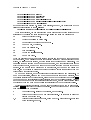
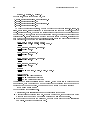
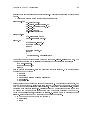
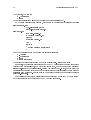
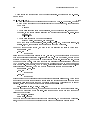
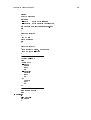
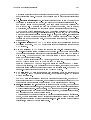
Executables
Libraries
Header files
Man pages
Info files
7!
7!
7!
7!
7!
/usr/local/bin
/usr/local/lib
/usr/local/include
/usr/local/man/man?
/usr/local/info
The `/usr/local' directory is called the prex. The default prex is always `/usr/local'
but you can set it to anything you like when you call `configure' by adding a `--prefix'
option. For example, suppose that you are not a privilidged user, so you can not install
anything in `/usr/local', but you would still like to install the package for your own use.
Then you can tell the `configure' script to install the package in your home directory
`/home/username':
% ./configure --prefix=/home/username
% make
% make check
% make install
The `--prefix' argument tells `configure' where you want to install your package, and
`configure' will take that into account and build the proper makele automatically.
If you are installing the package on a lesystem that is shared by computers that run
variations of GNU or Unix, you need to install the les that are independent of the operating
system in a shared directory, but separate the les that are dependent on the operating
systems in dierent directories. Header les and documentation can be shared. However,
libraries and executables must be installed separately. Usually the scheme used to handle
such situations is:
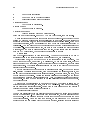
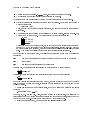
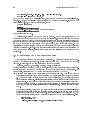
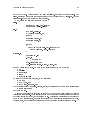
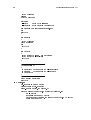
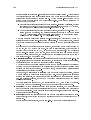
Executables 7! /usr/local/system/bin
7! /usr/local/system/lib
Libraries
Header files 7! /usr/local/include
7! /usr/local/man/mann
Man pages
7! /usr/local/info
Info files
The directory `/var/local/system' is called the executable prex, and it is usually a subdi-
rectory of the prex. In general, it can be any directory. If you don't specify the executable
prex, it defaults to being equal to the prex. To change that, use the `--exec-prefix'
ag. For example, to congure for a GNU/Linux system, you would run:
% configure --exec-prefix=/usr/local/linux
To congure for GNU/Hurd, you would run:
Chapter 1: Installing GNU software
13
% configure --exec-prefix=/usr/local/hurd
In general, there are many directories where a package may want to install les. Some of
these directories are controlled by the prex, where others are controlled by the executable
prex. See Section 5.3 [Installation standard directories], page 80, for a complete discussion
of what these directories are, and what they are for.
Some packages allow you to enable or disable certain features while you congure the
source code. They do that with ags of the form:
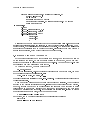
--with-package
--enable-feature
--without-package --disable-feature
The --enable ags usually control whether to enable certain optional features of the package. Support for international languages, debugging features, and shared libraries are features that are usually controlled by these options. The --with ags instead control whether
to compile and install certain optional components of the package. The specic ags that
are available for a particular source distribution should be documented in the `README' le.
Finally, configure scripts can be passed parameters via environment variables. One of
the things that configure does is decide what compiler to use and what ags to pass to
that compiler. You can overrule the decisions that configure makes by setting the ags
CC and CFLAGS. For example, to specify that you want the package to compile with full
optimization and without any debugging symbols (which is a bad idea, yet people want to
do it):
% export CFLAGS="-O3"
% ./configure
To tell configure to use the system's native compiler instead of gcc, and compile without
optimization and with debugging symbols:
% export CC="cc"
% export CFLAGS="-g"
% ./configure
This assumes that you are using the bash shell as your default shell. If you use the csh or
tcsh shellls, you need to assign environment variables with the setenv command instead.
For example:
% setenv CFLAGS "-O3"
% ./configure
Similarly, the ags CXX, CXXFLAGS control the C++ compiler.
1.4 Doing a VPATH build
Autoconguring source distributions also support vpath builds. In a vpath build, the
source distribution is stored in a, possibly read-only, directory, and the actual building takes
place in a dierent directory where all the generated les are being stored. We call the rst
directory, the source tree, and the second directory the build tree. The build tree may be
a subdirectory of the source tree, but it is better if it is a completely separate directory.
If you, the developer, use the standard features of the GNU build system, you don't need
to do anything special to allow your packages to support vpath builds. The only exception to
this is when you dene your own make rules (see Section 5.2 [General Automake principles],
page 77). Then you have to follow certain conventions to allow vpath to work correctly.
14
Developing software with GNU
You, the installer, however do need to do something special. You need to install and
use GNU make. Most Unix make utilities do not support vpath builds, or their support
doesn't work. GNU make is extremely portable, and if vpath is important to you, there is
no excuse for not installing it.
Suppose that `/sources/foo-0.1' contains a source distribution, and you want to build
it in the directory `/build/foo-0.1'. Assuming that both directories exist, all you have to
do is:
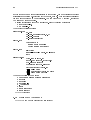
%
%
%
%
%
#
cd /build/foo-0.1
/sources/foo-0.1/configure ...options...
make
make check
su
make install
The congure script and the generated makeles will take care of the rest.
vpath builds are prefered by some people for the following reasons:
1. They prevent the build process form cluttering your source directory with all sorts of
build les.
2. To remove a build, all you have to do is remove the build directory.
3. You can build the same source multiple times using dierent options. This is very
useful if you would like to write a script that will run the test suite for a package
while the package is congured in many dierent ways (e.g. dierent features, dierent
compiler optimization, and so on). It is also useful if you would like to do the same
with releasing binary distributions of the source.
Some developers like to use vpath builds all the time. Others use them only when
necessary. In general, if a source distribution builds with a vpath build, it also builds under
the ordinary build. The opposite is not true however. This is why the distcheck target
checks if your distribution is correct by attempting a vpath build.
1.5 Making a binary distribution
After compiling a source distribution, instead of installing it, you can make a snapshot of
the les that it would install and package that snapshot in a tarball. It is often convenient
to the installers to install from such snapshots rather than compile from source, especially
when the source is extremely large, or when the amount of packages that they need to
install is large.
To create a binary distribution run the following commands as root:
# make install DESTDIR=/tmp/dist
# tar -C /tmp/dist -cvf package-version.tar
# gzip -9 package-version.tar
The variable DESTDIR species a directory, alternative to root, for installing the compiled
package. The directory tree under that directory is the exact same tree that would have
normally been installed. Why not just specify a dierent prex? Because very often, the
prex that you use to install the software aects the contents of the les that actually get
installed.
Chapter 1: Installing GNU software
15
Please note that under the terms of the GNU General Public License, if you distribute
your software as a binary distribution, you also need to provide the corresponding source
distribution. The simplest way to comply with this requirement is to distribute both distributions together.
16
Developing software with GNU
Chapter 2: Using GNU Emacs
17
2 Using GNU Emacs
Emacs is an environment for running Lisp programs that manipulate text interactively.
To call Emacs merely an editor does not do it justice, unless you redene the word \editor"
to the broadest meaning possible. Emacs is so extensive, powerful and exible, that you
can almost think of it as a self-contained \operating system" in its own right.
Emacs is a very important part of the GNU development tools because it provides an
integrated environment for software development. The simplest thing you can do with
Emacs is edit your source code. However, you can do a lot more than that. You can
run a debugger, and step through your program while Emacs showes you the corresponding
sources that you are stepping through. You can browse on-line Info documentation and man
pages, download and read your email o-line, and follow discussions on newsgroups. Emacs
is particularly helpful with writing documentation with the Texinfo documentation system.
You will nd it harder to use Texinfo, if you don't use Emacs. It is also very helpful with
editing les on remote machines over FTP, especially when your connection to the internet
is over a slow modem. Finally, and most importantly, Emacs is programmable. You can
write Emacs functions in Emacs Lisp to automate any chore that you nd particularly
useful in your own work. Because Emacs Lisp is a full programming language, there is no
practical limit to what you can do with it.
If you already know a lot about Emacs, you can skip this chapter and move on. If you are
a \vi" user, then we will assimilate you: See Section 2.4 [Using vi emulation], page 25, for
details.1 This chapter will be most useful to the novice user who would like to set per Emacs
up and running for software development, however it is not by any means comprehensive.
See Section 2.10 [Further reading on Emacs], page 36, for references to more comprehensive
Emacs documentation.
2.1 Installing GNU Emacs
If Emacs is not installed on your system, you will need to get a source code distribution
and compile it yourself. Installing Emacs is not diÆcult. If Emacs is already installed on
your GNU/Linux system, you might still need to reinstall it: you might not have the most
recent version, you might have Xemacs instead, you might not have support for internationalization, or your Emacs might not have compiled support for reading mail over POP
(a feature very useful to developers that hook up over modem). If any of these is the case,
then uninstall that version of Emacs, and reinstall Emacs from a source code distribution.
The entire Emacs source code is distributed in three separate les:
`emacs-20.3.tar.gz'
This is the main Emacs distribution. If you do not care about international
language support, you can install this by itself.
`leim-20.3.tar.gz'
This supplements the Emacs distribution with support for multiple languages.
If you develop internationalized software, it is likely that you will need this.
1
The author is also a former \vi" user that has found much happiness and bliss in Emacs
18
Developing software with GNU
`intlfonts-1.1.tar.gz'
This le contains the fonts that Emacs uses to support international languages.
If you want international language support, you will denetely need this.
Get a copy of these three les, place them under the same directory and unpack them
with the following commands:
%
%
%
%
gunzip
tar xf
gunzip
tar xf
emacs-20.3.tar.gz
emacs-20.3.tar
leim-20.3.tar.gz
leim-20.3.tar
Both tarballs will unpack under the `emacs-20.3' directory. When this is nished, congure
the source code with the following commands:
% cd emacs-20.3
% ./configure --with-pop --with-gssapi
% make
The `--with-pop' ag is almost always a good idea, especially if you are running Emacs from
a home computer that is connected to the internet over modem. It will let you use Emacs to
download your email from your internet provider and read it o-line (see Section 2.6 [Using
Emacs as an email client], page 31). Most internet providers use GSSAPI-authenticated
POP. If you need to support other authentication protocols however, you may also want to
add one of the following ags:
--with-kerberos
support Kerberos-authenticated POP
--with-kerberos5
support Kerberos version 5 authenticated POP
--with-hesiod
support Hesiod to get the POP server host
Then compile and install Emacs with:
$ make
# make install
Emacs is a very large program, so this will take a while.
To install `intlfonts-1.1.tar.gz' unpack it, and follow the instructions in the `README'
le. Alternatively, you may nd it more straightforward to install it from a Debian package.
Packages for `intlfonts' exist as of Debian 2.1.
2.2 Basic Emacs concepts
In this section we describe what Emacs is and what it does. We will not yet discuss how
to make Emacs work. That discussion is taken up in the subsequent sections, starting with
Section 2.3 [Conguring GNU Emacs], page 21. This section instead covers the fundamental
ideas that you need to understand in order to make sense out of Emacs.
You can run Emacs from a text terminal, such as a vt100 terminal, but it is usually nicer
to run Emacs under the X-windows system. To start Emacs type
Chapter 2: Using GNU Emacs
19
% emacs &
on your shell prompt. The seasoned GNU developer usually sets up per X conguration
such that it starts Emacs when person logs in. Then, person uses that Emacs process for
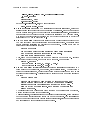
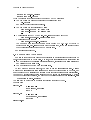
all of per work until person logs out. To quit Emacs press C-x C-c, or select
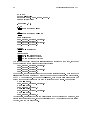
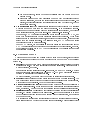
Files
7!
Exit Emacs
from the menu. The notation C-c means hCTRLi-c. The separating dash `-' means that you
press the key after the dash while holding down the key before the dash. Be sure to quit
Emacs before logging out, to ensure that your work is properly saved. If there are any les
that you haven't yet saved, Emacs will prompt you and ask you if you want to save them,
before quiting. If at any time you want Emacs to stop doing what it's doing, press C-g.
Under the X window system, Emacs controls multiple x-windows which are called franes.
Each frame has a menubar and the main editing area. The editing area is divided into windows 2 by horizontal bars, called status bars. Every status bar contains concise information
about the status of the window above the status bar. The minimal editing area has at
least one big window, where editing takes place, and a small one-line window called the
minibuer. Emacs uses the minibuer to display brief messages and to prompt the user to
enter commands or other input. The minibuer has no status bar of its own.
Each window is bound to a buer. A buer is an Emacs data structure that contains
text. Most editing commands operate on buers, modifying their contents. When a buer
is bound to a window, then you can see its contents as they are being changed. It is possible
for a buer to be bound to two windows, on dierent frames or on the same frame. Then
whenever a change is made to the buer, it is reected on both windows. It is not necessary
for a buer to be bound to a window, in order to operate on it. In a typical Emacs session
you may be manipulating more buers than the windows that you actually have on your
screen.
A buer can be visiting les. In that case, the contents of the buer reect the contents
of a le that is being editted. But buers can be associated with anything you like, so long
as you program it up. For example, under the Dired directory editor, a buer is bound to a
directory, showing you the contents of the directory. When you press hRETi while the cursor
is over a le name, Emacs creates a new buer, visits the le, and rebinds the window
with that buer. From the user's perspective, by pressing hRETi person \opened" the le
for editing. If the le has already been \opened" then Emacs simply rebinds the existing
buer for that le.
Sometimes Emacs will divide a frame to two or more windows. You can switch from
one window to another by clicking the 1st mouse button, while the mouse is inside the
destination window. To resize these windows, grab the status bar with the 1st mouse
button and move it up or down. Pressing the 2nd mouse button, while the mouse is on a
status bar, will bury the window bellow the status bar. Pressing the 3rd mouse button will
bury the window above the status bar, instead. Buried windows are not killed; they still
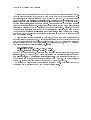
exist and you can get back to them by selecting them from the menu bar, under:
Buffers 7! name-of-buer
2
Note that in Emacs lingo a window does not correspond to an X window. It is the frame
that corresponds to an X window. A window is merely a region within the frame. And
the same Emacs process can actually be responsible for more than one frame
20
Developing software with GNU
Buers, with some exceptions, are usually named after the lenames of the les that they
correspond to.
Once you visit a le for editing, then all you need to do is to edit it! The best way to
learn how to edit les using the standard Emacs editor is by working through the on-line
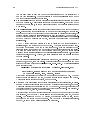
Emacs tutorial. To start the on-line tutorial type C-h t or select:
Help
7!
Emacs Tutorial
If you are a vi user, or you simply prefer to use `vi' keybindings, then read Section 2.4
[Using vi emulation], page 25.
In Emacs, every event causes a Lisp function to be executed. An event can be any
keystroke, mouse movement, mouse clicking or dragging, or a menu bar selection. The
function implements the appropriate response to the event. Almost all of these functions are
written in a variant of Lisp called Emacs Lisp. The actual Emacs program, the executable, is
an Emacs Lisp interpreter with the implementation of frames, buers, and so on. However,
the actual functionality that makes Emacs usable is implemented in Emacs Lisp.
Sometimes, Emacs will bind a few words of text to an Emacs function. For example,
when you use Emacs to browse Info documentation, certain words that corresponds to
hyperlinks to other nodes are bound to a function that makes Emacs follow the hyperlink.
When such a binding is actually installed, moving the mouse over the bound text highlights
it momentarily. While the text is highlighted, you can invoke the binding by clicking the
2nd mouse button.
Sometimes, an Emacs function might go into an innite loop, or it might start doing
something that you want to stop. You can always make Emacs abort3 the function it is
currently running by pressing C-g.
Emacs functions are usually spawned by Emacs itself in response to an event. However,
the user can also spawn an Emacs function by typing:
hALTi-x function-name hRETi
These functions can also be aborted with C-g.
It is standard in Emacs documentation to refer to the hALTi key with the letter `M'. So,
in the future, we will be refering to function invokations as:
M-x function-name
Because Emacs functionality is implemented in an event-driven fashion, the Emacs developer has to write Lisp functions that implement functionality, and then bind these functions
to events. Tables of such bindings are called keymaps.
Emacs has a global keymap, which is in eect at all times, and then it has specialized
keymaps depending on what editing mode you use. Editing modes are selected when you
visit a le depending on the name of the le. So, for example, if you visit a C le, Emacs
goes into the C mode. If you visit `Makefile', Emacs goes into makele mode. The reason
for associating dierent modes with dierent types of les is that the user's editing needs
depend on the type of le that person is editing.
You can also enter a mode by running the Emacs function that initializes the mode.
Here are the most commonly used modes:
3
Proposed Federal censorship regulations may prohibit us from giving you information
about the possibility of aborting Emacs functions. We would be required to say that
this is not an acceptable way of terminating an unwanted function
Chapter 2: Using GNU Emacs
M-x c-mode
21
Mode for editing C programs according to the GNU coding standards.
M-x c++-mode
Mode for editing C++ programs
M-x sh-mode
Mode for editing shell scripts.
M-x m4-mode
Mode for editing Autoconf macros.
M-x texinfo-mode
Mode for editing documentation written in the Texinfo formatting language.
See Section 10.3 [Introduction to Texinfo], page 107.
M-x makefile-mode
Mode for editing makeles.
As a user you shouldn't have to worry too much about the modes. The defaults do the
right thing. However, you might want to enhance Emacs to suit your needs better.
2.3 Conguring GNU Emacs
To use Emacs eectively for software development you need to congure it. Part of the
conguration needs to be done in your X-resources le. On a Debian GNU/Linux system,
the X-resources can be congured by editing
/etc/X11/Xresources
In many systems, you can congure X-resources by editing a le called `.Xresources' or
`.Xdefaults' on your home directory, but that is system-dependent. The conguration
that I use on my system is:
! Emacs defaults
emacs*Background: Black
emacs*Foreground: White
emacs*pointerColor: White
emacs*cursorColor: White
emacs*bitmapIcon: on
emacs*font: fixed
emacs*geometry: 80x40
In general I favor dark backgrounds and `fixed' fonts. Dark backgrounds make it easier to
sit in front of the monitor for a prolonged period of time. `fixed' fonts looks nice and it's
small enough to make eÆcient use of your screenspace. Some people might prefer larger
fonts however.
When Emacs starts up, it looks for a le called `.emacs' at the user's home directory,
and evaluates it's contents through the Emacs Lisp interpreter. You can customize and
modify Emacs' behaviour by adding commands, written in Emacs Lisp, to this le. Here's
a brief outline of the ways in which you can customize Emacs:
1. A common change to the standard conguration is assigning global variables to nondefault values. Many Emacs features and behaviours can be controlled and customized
this way. This is done with the `setq' command, which accepts the following syntax:
22
Developing software with GNU
(setq variable value )
For example:
(setq viper-mode t)
You can access on-line documentation for global variables by running:
M-x describe-variable
2. In some cases, Emacs depends on the values of shell environment variables. These can
be manipulated with `setenv':
(setenv "variable " "value ")
For example:
(setenv "INFOPATH" "/usr/info:/usr/local/info")
`setenv' does not aect the shell that invoked Emacs, but it does aect Emacs itself,
and shells that are run under Emacs.
3. Another way to enhance your Emacs conguration is by modifying the global keymap.
This can be done with the `global-set-key' command, which follows the following
syntax:
(global-set-key [key sequence ] 'function)
For example, adding:
(global-set-key [F12 d] 'doctor)
to `.emacs' makes the key sequence F12 d equivalent to running `M-x doctor'. Emacs
has many functions that provide all sorts of features. To nd out about specic functions, consult the Emacs user manual. Once you know that a function exists, you can
also get on-line documentation for it by running:
M-x describe-function
You can also write your own functions in Emacs Lisp.
4. It is not always good to introduce bindings to the global map. Any bindings that are
useful only within a certain mode should be added only to the local keymap of that
mode. Consider for example the following Emacs Lisp function:
(defun texi-insert-@example ()
"Insert an @example @end example block"
(interactive)
(beginning-of-line)
(insert "\n@example\n")
(save-excursion
(insert "\n")
(insert "@end example\n")
(insert "\n@noindent\n")))
We would like to bind this function to the key `F9', however we would like this binding
to be in eect only when we are within `texinfo-mode'. To do that, rst we must
dene a hook function that establishes the local bindings using `define-key':
(defun texinfo-elef-hook ()
(define-key texinfo-mode-map [F9] 'texi-insert-@example))
The syntax of `define-key' is similar to `global-set-key' except it takes the name
of the local keymap as an additional argument. The local keymap of any `name-mode'
Chapter 2: Using GNU Emacs
23
is `name-mode-map'. Finally, we must ask `texinfo-mode' to call the function
`texinfo-elef-hook'. To do that use the `add-hook' command:
(add-hook 'texinfo-mode-hook 'texinfo-elef-hook)
In some cases, Emacs itself will provide you with a few optional hooks that you can
attach to your modes.
5. You can write your own modes! If you write a program whose use involves editing some
type of input les, it is very much appreciated by the community if you also write an
Emacs mode for thet le and distribute it with your program.
With the exception of simple customizations, most of the more complicated ones require
that you write new Emacs Lisp functions, distribute them with your software and somehow
make them visible to the installer's Emacs when person installs your software. See Section 5.9 [Emacs Lisp with Automake], page 91, for more details on how to include Emacs
Lisp packages to your software.
Here are some simple customizations that you might want to add to your `.emacs' le:
Set your default background and foreground color for all your Emacs frames:
(set-background-color "black")
(set-foreground-color "white")
You can change the colors to your liking.
Tell Emacs your name and your email address. This is particularly useful when you
work on an o-line home system but you want Emacs to use the email address of your
internet provider, and your real name. Specifying your real name is necessary if you
call yourself \Skeletor" or \Dude" on your home computer.
(setq user-mail-address "[email protected]")
(setq user-full-name "President Karl Marx")
Make sure the name is your real name, and the email address that you include can
receive email 24 hours per day.
Add a few toys to the status bar. These commands tell Emacs to display a clock, and
the line and column number of your cursor's position at all times.
(display-time)
(line-number-mode 1)
(column-number-mode 1)
When you use the mouse to cut and paste text with Emacs, mouse button 1 will select
text and mouse button 2 will paste it. Unfortunately, when you click mouse button
2, emacs will rst move the cursor at the location of the mouse, and then insert the
text in that location. If you are used to editing with vi under xterms, you will instead
prefer to position the cursor yourself, and use mouse button 2 to simply cause the text
to be pasted without changing the position of the cursor. If you prefer this behaviour,
then add the following line to your `.emacs':
(global-set-key [mouse-2] 'yank)
By default, selected text in Emacs buers is highlighted with blue color. However,
you can also select and paste into an Emacs buer text that you select from other
applications, like your web browser, or your xterm.
24
Developing software with GNU
Use font-lock. Font-lock decorates your editted text with colors that make it easier to
read text with complicated syntax, such as software source codes. This is one of the
coolest features of Emacs. To use it, add the following lines to your `.emacs':
(global-font-lock-mode t)
(setq font-lock-maximum-size nil)
To get rid of the scrollbar at the left of your Emacs window, type
(setq scroll-bar-mode nil)
The only reason that the scrollbar is default is to make Emacs more similar to what
lusers are used to. It is assumed that seasoned hacker, who will be glad to see the
scrollbar bite it, will gure out how to make it go away.
With most versions of Emacs, you should add the following to your `.emacs' to make
sure that editing `configure.in' takes you to m4-mode and editing `Makefile.am' takes
you to makefile-mode.
(setq auto-mode-alist
(append '(
("configure.in" . m4-mode)
("\\.m4\\'" . m4-mode)
("\\.am\\'" . makefile-mode))
auto-mode-alist))
You will have to edit such les if you use the GNU build system. See Chapter 4 [The
GNU build system], page 57, for more details.
If you have installed Emacs packages in non-standard directories, you need to add them
to the `load-path' variable. For example, here's how to add a couple of directories:
(setq load-path
(append "/usr/share/emacs/site-lisp"
"/usr/local/share/emacs/site-site"
(expand-file-name "~lf/lisp")
load-path))
Note the use of `expand-file-name' for dealing with non-absolute directories. If you
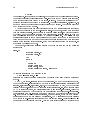
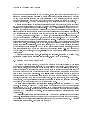
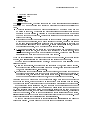
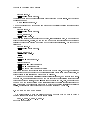
are a user in an account where you don't have root priviledge, you are very likely to
need to install your Emacs packages in a non-standard directory.
See Section 2.4 [Using vi emulation], page 25, if you would like to customize Emacs to
run a vi editor under the Emacs system.
See Section 2.5 [Navigating source code], page 28, for more details on how to customize
Emacs to make navigating a source code directory tree easier.
See Section 2.6 [Using Emacs as an email client], page 31, if you would like to set up
Emacs to process your email.
Autotools distributes two Emacs packages. One for handling copyright notices, and
another one for handling Texinfo documentation. See Section 2.8 [Inserting copyright
notices with Emacs], page 35, and See Section 10.5 [GNU Emacs support for Texinfo],
page 107, for more details.
Emacs now has a graphical user interface to customization that will write `.emacs' for
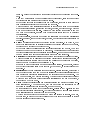
you automatically. To use it, select:
Help
7!
Customize
7!
Browse Customization Groups
Chapter 2: Using GNU Emacs
25
from the menu bar. You can also manipulate some common settings from:
Help
7!
Options
2.4 Using vi emulation
Many hackers prefer to use the `vi' editor. The `vi' editor is the standard editor on Unix.
It is also always available on GNU/Linux. Many system administrators nd it necessary to
use vi, especially when they are in the middle of setting up a system in which Emacs has
not been installed yet. Besides that, there are many compelling reasons why people like vi.
Vi requires only two special keys: the hSHIFTi key and the hESCi key. All the other keys
that you need are standard on all keyboards. You do not need hCTRLi,hALTi,the cursor
keys or any of the function keys. Some terminals that miss the escape key, usually have
the control key and you can get escape with: hCTRLi-[
Vi was designed to deal with terminals that connect to mainframes over a very slow
line. So it has been optimized to allow you to do the most editing possible with the
fewest keystrokes. This allows users to edit text very eÆciently.
Vi allows your ngers to stay at the center of the keyboard, with the occasional hop
to the escape key. It does not require you to stretch your ngers in funny control
combinations, which makes typing less tiring and more comfortable.
Because most rearrangements of nger habits are not as optimal as the vi nger habits,
most vi users react very unpleasently to other editors. For the benet of these users, in
this section we describe how to run a vi editor under the Emacs system. Similarly, users
of other editors nd the vi nger habits strange and unintuitive. For the benet of these
users we describe briey how to use the vi editor, so they can try it out if they like.
The vi emulation package for the Emacs system is called Viper. To use Viper, add the
following lines in your `.emacs':
(setq viper-mode t)
(setq viper-inhibit-startup-message 't)
(setq viper-expert-level '3)
(require 'viper)
We recommend expert level 3, as the most balanced blend of the vi editor with the Emacs
system. Most editing modes are aware of Viper, and when you begin editing the text you
are immediately thrown into Viper. Some modes however do not do that. In some modes,
like the Dired mode, this is very appropriate. In other modes however, especially custom
modes that you have added to your system, Viper does not know about them, so it does not
congure them to enter Viper mode by default. To tell a mode to enter Viper by default,
add a line like the following to your `.emacs' le:
(add-hook 'm4-mode-hook 'viper-mode)
The modes that you are most likely to use during software development are
c-mode , c++-mode , texinfo-mode
sh-mode , m4-mode , makefile-mode
Sometimes, Emacs will enter Viper mode by default in modes where you prefer to get Emacs
modes. In some versions of Emacs, the compilation-mode is such a mode. To tell a mode
not to enter Viper by default, add a line like the following to your `.emacs' le:
26
Developing software with GNU
(add-hook 'compilation-mode-hook 'viper-change-state-to-emacs)
The Emacs distribution has a Viper manual. For more details on setting Viper up, you
should read that manual.
The vi editor has these things called editing modes. An editing mode denes how the
editor responds to your keystrokes. Vi has three editing modes: insert mode, replace mode
and command mode. If you run Viper, there is also the Emacs mode. Emacs indicates which
mode you are in by showing one of `<I>', `<R>', `<V>', `<E>' on the statusbar correspondingly
for the Insert, Replace, Command and Emacs modes. Emacs also shows you the mode by
the color of the cursor. This makes it easy for you to keep track of which mode you are in.
Insert mode: When you are in insert mode, the editor simply inserts the things that
you type into the text that is being editted. If there are any characters in front of your
cursor, these characters are pushed ahead and they are not overwritten. Under Viper,
when you are in insert mode, the color of your cursor is green. The only key that has
special meaning, while you are in insert mode is hESCi. If you press the escape key, you
are taken to command mode.
Replace mode: When you are in replace mode, the editor replaces the text under the
cursor with the text that is being typed. So, you want insert mode when you want to
write over what's already written. Under Viper, when you are in replace mode, the
color of your cursor is red. The hESCi will take you to command mode.
Command mode: When you are in command mode, every letter key that you press is
a command and has a special meaning. Some of these keys allow you to navigate the
text. Other keys allow you to enter either insert or replace mode. And other keys do
various special things. Under Viper, when you are in command mode, the color of your
cursor is white.
Emacs mode: When you are in Emacs mode, then Viper is turned o on the specic
buer, and Emacs behaves as the default Emacs editor. You can switch between Emacs
mode and Command mode by pressing hCTRLi-z. So to go to Emacs mode, from Insert
of Replace mode, you need to go through Command mode. When you are dealing
with a buer that runs a special editing mode, like Dired, Emacs denes a specialized
\command mode" for manipulating that buer, that can be completely dierent from
the canonical Viper command mode. You want to be in that mode to access the
intended functionality. Occasionally however, you may like to hop to viper's command
mode to navigate the buer, do a search or save the buer's contents. When you hop
to one of the other three modes, the buer will suddendly be just text to your editor.
While you are in Command mode, you can prepend keystrokes with a number. Then the
subsequent keystroke will be executed as many times as the number. We now list the most
important keystrokes that are available to you, while you are in Viper's command mode:
The following keystrokes allow you to navigate the cursor around your text without
making any changes on the text itself
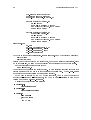
h
moves one character to the left
j
moves down one line
k
moves up one line
l
moves one character to the left
Chapter 2: Using GNU Emacs
w
moves forward one word
5w
moves forward ve words (get the idea?)
b
moves back one word
0
moves to the beginning of the current line
$
moves to the end of the current line
G
moves to the last line in the le
1G
moves to the rst line in the le
:10
moves to line 10 in the le (get the idea?)
{
moves up one paragraph
27
moves down one paragraph
The following keystrokes allow you to delete text
}
x
Deletes the character under the cursor
dd
Deletes the current line
4dd
Deletes four lines
dw
Deletes the current word
Deletes the next eight words
The following keystrokes allow you to enter Insert mode
8dw
a
Append text after the cursor position
i
Insert text at the current cursor position
o
Insert text on a new line bellow the current line
Insert text on a new line above the current line
The following keystrokes allow you to enter Replace mode.
O
R
Replace text at the cursor position and stay in Replace mode.
Replace (substitute) only the character at the cursor position, and enter
Insert mode for all subsequent characters.
The following commands handle le input/output. All of these commands are
prepended by the : character. The : character is used for commands that require
many characters to be properly expressed. The full text of these commands is entered
in the minibuer. Under viper, the minibuer itself can run under insert, replace and
command mode. By default you get insert mode, but you can switch to command
mode by pressing hESCi.
s
:w
Save the le to the disk
:w!
Force the le to be saved to disk even when le permissions do not allow
it but you have the power to overrule the permissions.
28
Developing software with GNU
:w lename <RET>
Save the le to the disk under a specic lename. When you press hSPACEi
Emacs inserts the full pathname of the current directory for you, which
you can edit if you like.
:w! lename <RET>
Force the le to be saved to the disk under a specic lename.
:r lename <RET>
Paste a le from the disk at the cursor's current position.
:W
Save all the les on all the Emacs buers that correspond to open les.
:q
Kill the buer. This does not quite the editor at expert level 3.
Kill the buer even if the contents are not saved. Use with caution!
The following commands handle search and replace
:q!
/string <RET>
Search for string.
n
Go to the next occurance of string.
N
Go to the previous occurance of string.
:%s/string1 /string2 /g <RET>
Replace all occurances of string1 with string2. Use this with extreme
caution!
The following commands handle undo
u
Undo the previous change. Press again to undo the undo
.
Press this if you want to repeat the undo further.
These are enough to get you started. Getting used to dealing with the modes and
learning the commands is a matter of building nger habits. It may take you a week or
two before you become comfortable with Viper. When Viper becomes second nature to you
however, you won't want to tolerate what you used to use before.
2.5 Navigating source code
When you develop software, you need to edit many les at the same time, and you need
an eÆcient way to switch from one le to another. The most general solution in Emacs is
by going through Dired, the Emacs Directory Editor.
To use Dired eectively, we recommend that you add the following customizations to
your `.emacs' le: First, add
(add-hook 'dired-load-hook (function (lambda () (load "dired-x"))))
(setq dired-omit-files-p t)
to activate the extended features of Dired. Then add the following key-bindings to the
global keymap:
(global-set-key [f1] 'dired)
(global-set-key [f2] 'dired-omit-toggle)
Chapter 2: Using GNU Emacs
(global-set-key
(global-set-key
(global-set-key
(global-set-key
(global-set-key
(global-set-key
29
[f3] 'shell)
[f4] 'find-file)
[f5] 'compile)
[f6] 'visit-tags-table)
[f8] 'add-change-log-entry-other-window)
[f12] 'make-frame)
If you use viper (see Section 2.4 [Using vi emulation], page 25), you should also add the
following customization to your `.emacs':
(add-hook 'compilation-mode-hook 'viper-change-state-to-emacs)
With these bindings, you can navigate from le to le or switch between editing and the
shell simply by pressing the right function keys. Here's what these key bindings do:
f1
Enter the directory editor.
f2
Toggle the omission of boring les.
f3
Get a shell at the current Emacs window.
f4
Jump to a le, by lename.
f5
Run a compilation job.
f6
Load a `TAGS' le.
f8
Update the `ChangeLog' le.
f12
Make a new frame.
When you rst start Emacs, you should create a few frames with f12 and move them around
on your screen. Then press f1 to enter the directory editor and begin navigating the le
system. To select a le for editing, move the cursor over the lename and press enter. You
can select the same le from more than one emacs window, and edit dierent parts of it in
every dierent window, or use the mouse to cut and paste text from one part of the le to
another. If you want to take a direct jump to a specic le, and you know the lename of
that le, it may be faster to press f4 and enter the lename rather than navigate your way
there through the directory editor.
To go down a directory, move the cursor over the directory lename and press enter. To
go up a few directories, press f1 and when you are prompted for the new directory, with
the current directory as the default choice, erase your way up the hierarchy and press hRETi.
To take a jump to a substantially dierent directort that you have visited recently, press f1
and then when prompted for the destination directory name, use the cursor keys to select
the directory that you want among the list of directories that you have recently visited.
While in the directory navigator, you can use the cursor keys to move to another le.
Pressing h<RET>i will bring that le up for editing. However there are many other things
that Dired will let you do instead:
Z
Compress the le. If already compressed, uncompress it.
L
Parse the le through the Emacs Lisp interpreter. Use this only on les that
contain Emacs Lisp code.
I, N
Visit the current le as an Info le, or as a man page. See Section 10.1 [Browsing
documentation], page 107.
30
Developing software with GNU
Mark the le for deletion
u
Remove a mark on the le for deletion
x
Delete all the les marked for deletion
C destination <RET>
Copy the le to destination.
R lename <RET>
Rename the le to lename.
+ directoryname <RET>
Create a directory with name directoryname.
Dired has many other features. See the GNU Emacs User Manual, for more details.
Emacs provides another method for jumping from le to le: tags. Suppose that you are
editing a C program whose source code is distributed in many les, and while editing the
source for the function foo, you note that it is calling another function gleep. If you move
your cursor on gleep, then Emacs will let you jump to the le where gleep is dened by
pressing M-.. You can also jump to other occurances in your code where gleep is invoked
by pressing M-,. In order for this to work, you need to do two things: you need to generate
a tags le, and you need to tell emacs to load the le. If your source code is maintained
with the GNU build system, you can create that tags les by typing:
d
% make tags
from the top-level directory of your source tree. Then load the tags le in Emacs by
navigating Dired to the toplevel directory of your source code, and pressing f6.
While editing a le, you may want to hop to the shell prompt to run a program. You
can do that at any time, on any frame, by pressing f3. To get out of the shell, and back
into the le that you were editing, enter the directory editor by pressing f1, and then press
<RET> repeatedly. The default selections will take you back to the le that you were most
recently editing on that frame.
One very nice feature of Emacs is that it understands tar les. If you have a tar le
`foo.tar' and you select it under Dired, then Emacs will load the entire le, parse it, and
let you edit the individual les that it includes directly. This only works, however, when
the tar le is not compressed. Usually tar les are distributed compressed, so you should
uncompress them rst with Z before entering them. Also, be careful not to load an extremely
huge tar le. Emacs may mean \eating memory and constantly swaping" to some people,
but don't push it!
Another very powerful feature of Emacs is the Ange-FTP package: it allows you to
edit les on other computers, remotely, over an FTP connection. From a user perspective,
remote les behave just like local les. All you have to do is press f1 or f4 and request a
directory or le with lename following this form:
/username @host:/pathname
Then Emacs will access for you the le `/pathname' on the remote machine host by logging
in over FTP as username. You will be prompted for a password, but that will happen only
once per host. Emacs will then download the le that you want to edit and let you make
your changes locally. When you save your changes, Emacs will use an FTP connection
again to upload the new version back to the remote machine, replacing the older version of
Chapter 2: Using GNU Emacs
31
the le there. When you develop software on a remote computer, this feature can be very
useful, especially if your connection to the Net is over a slow modem line. This way you
can edit remote les just like you do with local les. You will still have to telnet to the
remote computer to get a shell prompt. In Emacs, you can do this with M-x telnet. An
advantage to telneting under Emacs is that it records your session, and you can save it to
a le to browse it later.
While you are making changes to your les, you should also be keeping a diary of
these changes in a `ChangeLog' le (see Section 4.6 [Maintaining the documentation les],
page 66). Whenever you are done with a modication that you would like to log, press f8,
while the cursor is still at the same le, and preferably near the modication (for example,
if you are editing a C program, be inside the same C function). Emacs will split the frame
to two windows. The new window brings up your `ChangeLog' le. Record your changes
and click on the status bar that separates the two windows with the 2nd mouse button to
get rid of the `ChangeLog' le. Because updating the log is a frequent chore, this Emacs
help is invaluable.
If you would like to compile your program, you can use the shell prompt to run `make'.
However, the Emacs way is to use the M-x compile command. Press f5. Emacs will prompt
you for the command that you would like to run. You can enter something like: `configure',
`make', `make dvi', and so on (see Section 1.1 [Installing a GNU package], page 9). The
directory on which this command will run is the current directory of the current buer. If
your current buer is visiting a le, then your command will run on the same directory as
the le. If your current buer is the directory editor, then your command will run on that
directory. When you press <RET>, Emacs will split the frame into another window, and it
will show you the command's output on that window. If there are error messages, then
Emacs converts these messages to hyperlinks and you can follow them by pressing <RET>
while the cursor is on them, or by clicking on them with the 2nd mouse button. When you
are done, click on the status bar with the 2nd mouse button to get the compilation window
o your screen.
2.6 Using Emacs as an email client
You can use Emacs to read your email. If you maintain free software, or in general
maintain a very active internet life, you will get a lot of email. The Emacs mail readers
have been designed to address the needs of software developers who get endless tons of
email every day.
Emacs has two email programs: Rmail and Gnus. Rmail is simpler to learn, and it
is similar to many other mail readers. The philosophy behind Rmail is that instead of
separating messages to dierent folders, you attach labels to each message but leave the
messages on the same folder. Then you can tell Rmail to browse only messages that have
specic labels. Gnus, on the other hand, has a rather eccentric approach to email. It is
a news-reader, so it makes your email look like another newsgroup! This is actually very
nice if you are subscribed to many mailing lists and want to sort your email messages
automatically. To learn more about Gnus, read the excellent Gnus manual. In this manual,
we will only describe Rmail.
32
Developing software with GNU
When you start Rmail, it moves any new mail from your mailboxes to the le `~/RMAIL'
in your home directory. So, the rst thing you need to tell Rmail is where your mailboxes
are. To do that, add the following to your `.emacs':
(require 'rmail)
(setq rmail-primary-inbox-list
(list "mailbox1" "mailbox2" ...))
If your mailboxes are on a lesystem that is mounted to your computer, then you just have
to list the corresponding lenames. If your mailbox is on a remote computer, then you have
to use the POP protocol to download it to your own computer. In order for this to work,
the remote computer must support POP. Many hobbyist developers receive their email on
an internet provider computer that is connected to the network 24/7 and download it on
their personal computer whenever they dial up.
For example, if [email protected] is your email address at your internet provider,
and they support POP, you would have to add the following to your `.emacs':
(require 'rmail)
(setq rmail-primary-inbox-list
(list "po:karl"))
(setenv "MAILHOST" "whitehouse.gov")
(setq rmail-pop-password-required t)
(setq user-mail-address "[email protected]")
(setq user-full-name "President Karl Marx")
The string `"po:username "' is used to tell the POP daemon which mailbox you want to
download. The environment variable MAILHOST tells Emacs which machine to connect to,
to talk with a POP daemon. We also tell Emacs to prompt in the minibuer to request the
password for logging in with the POP daemon. The alternative is to hardcode the password
into the `.emacs' le, but doing so is not a very good idea: if the security of your home
computer is compromised, the cracker also gets your password for another system. Emacs
will remember the password however, after the rst time you enter it, so you won't have
to enter it again later, during the same Emacs session. Finally, we tell Emacs our internet
provider's email address and our \real name" in the internet provider's account. This way,
when you send email from your home computer, Emacs will spoof it to make it look like it
was sent from the internet provider's computer.
In addition to telling Rmail where to nd your email, you may also want to add the
following conguration options:
1. Quote messages that you respond to with the > prex:
(setq mail-yank-prefix ">")
2. Send yourself a blind copy of every message
(setq mail-self-blind t)
3. Alternatively, archive all your outgoing messages to a separate le:
(setq mail-archive-file-name "/home/username /mail/sent-mail")
4. To have Rmail insert your signature in every message that you send:
(setq mail-signature t)
and add the actual contents of your signature to `.signature' at your home directory.
Chapter 2: Using GNU Emacs
33
Once Rmail is congured, to start downloading your email, run M-x rmail in Emacs.
Emacs will load your mail, prompt you for your POP password if necessary, and download
your email from the internet provider. Then, Emacs will display the rst new message. You
may quickly navigate by pressing n to go to the next message or p to go to the previous
message. It is much better however to tell Emacs to compile a summary of your messages
and let you to navigate your mailbox using the summary. To do that, press h. Emacs will
split your frame to two windows: one window will display the current message, and the
other window the summary. A highlighted bar in the summary indicates what the current
message is. Emacs will also display any labels that you have associated with your messages.
While the current buer is the summary, you can navigate from message to message with the
cursor keys (up and down in particular). You can also run any of the following commands:
h
display a summary of all the messages
s
save any changes made to the mail box
<
go to the rst message in the summary
>
go to the last message in the summary
g
download any new email
r
reply to a message
f
forward a message
m
compose a new message
d
delete the current message
u
undelete the current message
x
expunge messages marked for deletion
a label <RET>
add the label label to the current message
k label <RET>
remove the label label from the current message
l label <RET>
display a summary only of the messages with label label
o folder <RET>
add the current message to another folder
w lename <RET>
write the body of the current message to a le
Other than browing email, here is some things that you will want to do:
Compose a message: To compose a message press m. Emacs will take you to a new
buer where you can write the actual contents of your message. Emacs separates this
buer with a line that says:
--text follows this line--
Before this line you may edit the message's headers. After this line, you edit the actual
body of the of the message. When you are done composing the message, you can do
one of the following:
34
Developing software with GNU
C-c C-w
Insert the signature
C-c C-y
Quote (yank) the current message
C-c C-c
Send the message
Mail
7! Cancel
Cancel the message
These commands are also available when you reply to or forward email messages.
Reply to a message: To reply to a message press r. Emacs will do the same thing that
it does when you ask it to compose a message. The only dierence is that it writes the
headers of the message for you automatically such that the response is sent to all the
people that have received the original message. You may edit the headers to add or
remove recipient email addresses. Emacs will not quote the message that you respond
to by default. To quote it use C-c C-y.
Forward a message: To forward a message press f. Emacs will write the headers for you
and it will also quote the message that you are forwarding, however it will not prex
it with `>' (or whatever character you use to prex messages that you reply to). The
quoted message is clearly delimited with markers that indicate that it is the forwarded
message. You can add commentary, preferably, before the markers so that the recipient
can see it before seeing the forwarded message.
In every one of these three cases you may need to edit the message's headers. The most
commonly used header entries that Emacs recognizes are:
`To:'
list address of the recipient to whom the message is directed
`Cc:'
list addresses of other recipients that need to recieve courtesy copies of the
message
`BCC:'
list addresses of other recipients to send a copy to, without showing their email
address on the actual message
`FCC:'
list folders (lenames) where you would like the outgoing message to be appended to
`Subject:'
the subject eld for the message
The elds `To:', `CC:', `BCC:' and `FCC:' can also have continuation lines: any subsequent
lines that begin with a space are considered part of the eld.
2.7 Handling patches
Believe it or not, I really don't know how to do that. I need a volunteer to explain this
to me so I can explain it then in this section
Chapter 2: Using GNU Emacs
35
2.8 Inserting copyright notices with Emacs
When you develop free software, you must place copyright notices at every le that
invokes the General Public License. If you don't place any notice whatsoever, then the
legal meaning is that you refuse to give any permissions whatsoever, and the software
consequently is not free. For more details see Section 4.8 [Applying the GPL], page 70.
Many hackers, who don't take the law seriously, complain that adding the copyright notices
takes too much typing. Some of these people live in countries where copyright is not really
enforced. Others simply ignore it.
There is an Emacs package, called `gpl', which is currently distributed with Autotools,
that makes it possible to insert and maintain copyright notices with minimal work. To
use this package, in your `.emacs' you must declare your identity by adding the following
commands:
(setq user-mail-address "[email protected]")
(setq user-full-name "My Name")
Then you must require the packages to be loaded:
(require 'gpl)
(require 'gpl-copying)
This package introduces the following commands:
gpl
Insert the standard GPL copyright notice using appropriate commenting.
gpl-fsf
Toggle FSF mode. Causes the gpl command to insert a GPL notice for software that is assigned to the Free Software Foundation. The gpl command
autodetects what type of le you are editing, from the lename, and uses the
appropriate commenting.
gpl-personal
Toggle personal mode. Causes the gpl command to insert a GPL notice for
software in which you keep the copyright.
If you are routinely assigning your software to an organization other than the Free
Software Foundation, then insert:
(setq gpl-organization "name ")
after the `require' statements in your `.emacs'.
2.9 Hacker sanity with Emacs
Every once in a while, after long heroic eorts in front of the computer monitor, a
software developer will need to some counseling to feel better about perself. In RL (real
life) counseling is very expensive and it also involves getting up from your computer and
transporting yourself to another location, which descreases your productivity. Emacs can
help you. Run M-x doctor, and you will talk to a psychiatrist for free.
Many people say that hackers work too hard and they should go out for a walk once in
a while. In Emacs, it is possible to do that without getting up from your chair. To enter
an alternate universe, run M-x dunnet. Aside from being a refreshing experience, it is also
a very eective way to procrastinate away work that you don't want to do. Why do today,
what you can postpone for tomorrow?
36
Developing software with GNU
2.10 Further reading on Emacs
This chapter should be enough to get you going with GNU Emacs. This is really all
you need to know to use Emacs to develop software. However, the more you learn about
Emacs, the more eectively you will be able to use it, and there is still a lot to learn; a lot
more than we can t in this one chapter. In this section we refer to other manuals that you
can read to learn more about Emacs. Unlike many proprietary manuals that you are likely
to nd in bookstores, these manuals are free (see Section B.4 [Why free software needs free
documentation], page 124). Whenever possible, please contribute to the GNU project by
ordering a bound copy of the free documentation from the Free Software Foundation, or by
contributing a donation.
The Free Software Foundation publishes the following manuals on Emacs:
The Emacs Editor
This manual tells you all there is to know about all the spiy things that Emacs
can do, except for a few things here and there that are so spiy that they get
to have their own separate manual. The printed version, published by the Free
Software Foundation, features our hero, Richard Stallman, riding a gnu. It also
includes the GNU Manifesto. The machine readable source for the manual is
distributed with GNU Emacs.
Programming in Emacs Lisp
A wonderful introduction to Emacs Lisp, written by Robert Chassell. If you
want to learn programming in Emacs Lisp, start by reading this manual. You
can order this manual as a bound book from the Free Software Foundation.
You can also download a machine readable copy of the manual from any GNU
ftp site. Look for `elisp-manual-20-2.5.tar.gz'.
The GNU Emacs Lisp Reference Manual
This is a comprehensive reference manual for the Emacs Lisp language. You
can also order this manual as a bound book from the Free Software Foundation.
You can also download a machine readable copy of the manual from any GNU
ftp site. Look for `emacs-lisp-intro-1.05.tar.gz'.
The following manuals are also distributed with the GNU Emacs source code and they make
for some very fun reading:
Gnus Manual
Gnus is the Emacs newsreader. You can also use it to sort out your email,
especially if you are subscribed to twenty mailing lists and receive tons of email
every day. This manual will tell you all you need to know about Gnus to use it
eectively. (`gnus.dvi')
CC Mode The Emacs C editing mode will help you write C code that is beautifully formatted and consistent with the GNU coding standards. If you develop software
for an organization that follows dierent coding standards, you will have to customize Emacs to use their standards instead. If they are lame and haven't given
you Elisp code for their standards, then this manual will show you how to roll
your own. (`cc-mode.dvi')
Chapter 2: Using GNU Emacs
37
Common Lisp Extensions
Emacs has a package that introduces many Common Lisp extensions to Emacs
Lisp. This manual describes what extensions are available and how to use them.
(`cl.dvi')
Writing Customization Denitions
Recent versions of Emacs have an elaborate user-friendly customization interface that will let users customize Emacs and update their `.emacs' les automatically for them. If you are writing large Emacs packages, it is very easy
to add a customization interface to them. This manual explains how to do it.
(`customize.dvi')
The Emacs Widget Library
It is possible to insert actual widgets in an Emacs buer that are bound to
Emacs Lisp functions. This feature of Emacs is used, for example, in the newly
introduced customization interface. This manual documents the Elisp API for
using these widgets in your own Elisp packages. (`widget.dvi')
RefTeX User Manual
If you are writing large documents with LaTeX that contain a lot of crossreferences, then the RefTeX package will make your life easier. (`reftex.dvi')
Edi User's Manual
Edi is a comprehensive package for dealing with patches under Emacs. If you
receive a lot of patches to your software projects from contributors, you can use
Edi to apply them to your source code. (`ediff.dvi')
Supercite User's Manual
If you think that quoting your responses to email messages with `>' is for lamers
and you want to be elite, then use Supercite. (`sc.dvi')
Viper Is a Package for Emacs Rebels
This manual has more than you will ever need to know about Viper, the Emacs
vi emulation. Section 2.4 [Using vi emulation], page 25, actually describes all
the features of Viper that you will ever really need. But still, it's a good reading
for a long airplane trip. (`viper.dvi')
38
Developing software with GNU
Chapter 3: Compiling with Makeles
39
3 Compiling with Makeles
In this chapter we describe how to use the compiler to compile simple software and
libraries, and how to use makeles.
3.1 Compiling simple programs
It is very easy to compile simple C programs on the GNU system. For example, consider
the famous \Hello world" program:
`hello.c'
#include <stdio.h>
int
main ()
{
printf ("Hello world\n");
}
The simplest way to compile this program is to type:
% gcc hello.c
on your shell. The resulting executable le is called `a.out' and you can run it from the
shell like this:
% ./a.out
Hello world
To cause the executable to be stored under a dierent lename pass the `-o' ag to the
compiler:
% gcc hello.c -o hello
% ./hello
Hello world
Even with simple one-le hacks like this, the GNU compiler can accept many options that
modify its behaviour:
`-g'
The `-g' ag causes the compiler to output debugging information to the executable. This way, you can step your program through a debugger if it crashes.
(FIXME: Crossreference )
`-O, -O2, -O3'
The `-O', `-O2', `-O3' ags activate optimization. The numbers are called optimization levels. When you compile your program with optimization enabled,
the compiler applies certain algorithms to the machine code output to make it
go faster. The cost is that your program compiles much more slowly and that
although you can step it through a debugger if you used the `-g' ag, things
will be a little strange. During development the programmer usually uses no
optimization, and only activates it when person is about to run the program
for a production run. A good advice: always test your code with optimization
activated as well. If optimization breaks your code, then this is telling you that
you have a memory bug. Good luck nding it.
40
Developing software with GNU
`-Wall'
The `-Wall' ag tells the compiler to issue warnings when it sees bad programming style. Some of these warning catch actual bugs, but occasionally some of
the warnings complain about something correct that you did on purpose. For
this reason this ag is feature is not activated by default.
Here are some variations of the above example:
% gcc -g -O3 hello.c hello
% gcc -g -Wall hello.c -o hello
% gcc -g -Wall -O3 hello.c -o hello
To run a compiled executable in the current directory just type its name, prepended by
`./'. In general, once you compile a useful program, you should install it so that it can
be run from any current directory, simply by typing its name without prepending `./'. To
install an executable, you need to move it to a standard directory such as `/usr/bin' or
`/usr/local/bin'. If you don't have permissions to install les there, you can instead install
them on your home directory at `/home/username/bin' where username is your username.
When you write the name of an executable, the shell looks for the executable in a set of
directories listed in the environment variable `PATH'. To add a nonstandard directory to
your path do
% export PATH="$PATH:/home/username/bin"
if you are using the Bash shell, or
% setenv PATH "$PATH:/home/username/bin"
if you are using a dierent shell.
3.2 Programs with many source les
Now let's consider the case where you have a much larger program made of source les
`foo1.c', `foo2.c', `foo3.c' and header les `header1.h' and `header2.h'. One way to
compile the program is like this:
% gcc foo1.c foo2.c foo3.c -o foo
This is ne when you have only a few les to deal with. Eventually, when you have more
than a few dozen les, it becomes wasteful to compile all of the les, all the time, every
time you make a change in only one of the les. For this reason, the compiler allows you
to compile every le separately into an intermediate le called object le, and link all the
object les together at the end. This can be done with the following commands:
%
%
%
%
gcc
gcc
gcc
gcc
-c foo1.c
-c foo2.c
-c foo3.c
foo1.o foo2.o foo3.o -o foo
The rst three commands generate the object les `foo1.o', `foo2.o', `foo3.o' and the last
command links them together to the nal executable le `foo'. The `*.o' suÆx is reserved
for use only by object les.
If you make a change only in `foo1.c', then you can rebuild `foo' like this:
% gcc -c foo1.c
% gcc foo1.o foo2.o foo3.o -o foo
Chapter 3: Compiling with Makeles
41
The object les `foo2.o' and `foo3.o' do not need to be rebuilt since only `foo1.c' changed,
so it is not necessary to recompile them.
Object les `*.o' contain denitions of variables and subroutines written out in assembly
(machine language \pseudocode"). Most of these denitions will eventually be embedded
in the nal executable program at a specic address. At this stage however these memory
addresses are not known so they are being refered to symbolically. These symbolic references
are called symbols. It is possible to list the symbols dened in an object le with the `nm'
command. For example:
% nm xmalloc.o
U error
U malloc
U realloc
00000000 D xalloc_exit_failure
00000000 t xalloc_fail
00000004 D xalloc_fail_func
00000014 R xalloc_msg_memory_exhausted
00000030 T xmalloc
00000060 T xrealloc
The rst column lists the symbol's address within the object le, when the symbol is actually
dened in that object le. The second column lists the symbol type. The third column is
the symbolic name of the symbol. In the nal executable, these names become irrelevant.
The following types commonly occur:
`T'
A function denition
`t'
A private function denition. Such functions are dened in C with the keyword
static.
`D'
A global variable
`R'
A read-only (const) global variable
`U'
A symbol used but not dened in this object le.
For more details, see the Binutils manual.
The job of the compiler is to translate all the C source les to object les containing a
corresponding set of symbolic denitions. It is the job of another program, the linker, to
put the object les together, resolve and evaluate all the symbolic addresses, and build a
complete machine language program that can actually be executed. When you ask `gcc' to
link the object les into an executable, the compiler is actually running the linker to do the
job.
During the process of linking, all the machine language instructions that refer to a specic
memory address need to be modied to use the correct addresses within the executable,
as oppposed to the addresses within their object le. This becomes an issue when you
want to your program to load and link compiled object les during run-time instead of
compile-time. To make such dynamic linking possible, your symbols need to be relocatable.
This means that your symbols denitions must be correct no matter where you place them
in memory. There should be no memory addresses that need to be modied. One way
to do this is by refering to memory addresses within the object le by giving an oset
from the refering address. Memory addresses outside the object le must be treated as
42
Developing software with GNU
interlibrary dependencies and you must tell the compiler what you expect them to be when
you attempt to build relocatable machine code. Unfortunately some avours of Unix do not
handle interlibrary dependencies correctly. Fortunately, all of this mess can be dealt with
in a uniform way, to the extent that this is possible, by using GNU Libtool. See Chapter 6
[Using Libtool], page 95, for more details.
On GNU and Unix, all compiled languages compile to object les, and it is possible,
in principle, to link object les that have originated from source les written in dierent
programming languages. For example it is possible to link source code written in Fortran
together with source code written in C or C++. In such cases, you need to know how the
compiler converts the names with which the program language calls its constructs (such as
variable, subroutines, etc.) to symbol names. Such conversions, when they actually happen,
are called name-mangling. Both C++ and Fortran do name-mangling. C however is a very
nice language, because it does absolutely no name-mangling. This is why when you want
to write code that you want to export to many programming languages, it is best to write
it in C. See Chapter 8 [Using Fortran eectively], page 99, for more details on how to deal
with the name-mangling done by Fortran compilers.
3.3 Building libraries
In many cases a collection of object les form a logical unit that is used by more than
one executable. On both GNU and Unix systems, it is possible to collect such object les
and form a library. On the GNU system, to create a library, you use the `ar' command:
ar cru libfoo.a foo1.o foo2.o foo3.o
This will create a le `libfoo.a' from the object les `foo1.o', `foo2.o' and `foo3.o'.
The suÆx `*.a' is reserved for object le libraries. Before using the library, it needs to be
\blessed" by a program called `ranlib':
% ranlib libfoo.a
The GNU system, and most Unix systems require that you run `ranlib', but there have
been some Unix systems where doing so is not necessary. In fact there are Unix systems,
like some versions of SGI's Irix, that don't even have the `ranlib' command!
The reason for this is historical. Originally ar was meant to be used merely for packaging
les together. The more well known program tar is a descendent of ar that was designed
to handle making such archives on a tape device. Now that tape devices are more or less
obsolete, tar is playing the role that was originally meant for ar. As for ar, way back, some
people thought to use it to package *.o les. However the linker wanted a symbol table
to be passed along with the archive. So the ranlib program was written to generate that
table and add it to the *.a le. Then some Unix vendors thought that if they incorporated
ranlib to ar then users wouldn't have to worry about forgetting to call ranlib. So they
provided ranlib but it did nothing. Some of the more evil ones dropped it all-together
breaking many people's scripts.
Once you have a library, you can link it with other object les just as if it were an object
le itself. For example
% gcc bar.o libfoo.a -o foo
using `libfoo.a' as dened above, is equivalent to writing
Chapter 3: Compiling with Makeles
43
% gcc bar.o foo1.o foo2.o foo3.o -o foo
Libraries are particularly useful when they are installed. To install a library you need to
move the le `libfoo.a' to a standard directory. The actual location of that directory
depends on your compiler. The GNU compiler looks for installed libraries in `/usr/lib'
and `/usr/local/lib'. Because many Unix systems also use the GNU compiler, it is safe
to say that both of these directories are standard in these systems too. However there are
some Unix compilers that don't look at `/usr/local/lib' by default. Once a library is
installed, it can be used in any project from any current directory to compile an executable
that uses the subroutines that that library provides. You can direct the compiler to link an
installed library with a set of executable les to form an executable by using the `-l' ag
like this:
% gcc -o foo bar.o -lfoo
Note that if the lename of the library is `libfoo.a', the corresponding argument to the
`-l' ag must be only the substring `foo', hence `-lfoo'. Libraries must be named with
names that have the form `lib*.a'. If you have installed the `libfoo.a' library in a nonstandard directory, you can tell the linker to look for the library in that directory as well
by using the `-L' ag. For example, if the library was installed in `/home/lf/lib' then we
would have to invoke the linking like this:
gcc -o bar bar.o -L/home/lf/lib -lfoo
The `-L' ag must appear before the `-l' ag.
Some people like to pass `-L.' to the compiler so they can link uninstalled libraries in the
current working directory using the `-l' ag instead of typing in their full lenames. The
idea is that they think \it looks better" that way. Actually this is considered bad style. You
should use the `-l' ag to link only libraries that have already been installed and use the
full pathnames to link in uninstalled libraries. The reason why this is important is because,
even though it makes no dierence when dealing with ordinary libraries, it makes a lot of
dierence when you are working with shared libraries. (FIXME: Crossreference ). It makes
a dierence whether or not you are linking to an uninstalled or installed shared library, and
in that case the `-l' semantics mean that you are linking an installed shared library. Please
stick to this rule, even if you are not using shared libraries, to make it possible to switch to
using shared libraries without too much hassle.
Also, if you are linking in more than one library, please pay attention to the order with
which you link your libraries. When the linker links a library, it does not embed into the
executable code the entire library, but only the symbols that are needed from the library.
In order for the linker to know what symbols are really needed from any given library, it
must have already parsed all the other libraries and object les that depend on that library!
This implies that you rst link your object les, then you link the higher-level libraries,
then the lower-level libraries. If you are the author of the libraries, you must write your
libraries in such a manner, that the dependency graph of your libraries is a tree. If two
libraries depend on each other bidirectionally, then you may have trouble linking them in.
This suggests that they should be one library instead!
3.4 Dealing with header les
In general libraries are composed of many `*.c' les that compile to object les, and a
few header les (`*.h'). The header les declare the resources that are dened by the library
44
Developing software with GNU
and need to be included by any source les that use the library's resources. In general a
library comes with two types of header les: public and private. The public header les
declare resources that you want to make accessible to other software. The private header
les declare resources that are meant to be used only for developing the library itself. To
make an installed library useful, it is also necessary to install the corresponding public
header les. The standard directory for installing header les is `/usr/include'. The GNU
compiler also understands `/usr/local/include' as an alternative directory. When the
compiler encounters the directive
#include <foo.h>
it searches these standard directories for `foo.h'. If you have installed the header les in
a non-standard directory, you can tell the compiler to search for them in that directory by
using the `-I' ag. For example, to build a program `bar' from a source le `bar.c' that
uses the libfoo library installed at `/home/username' you would need to do the following:
% gcc -c -I/home/lf/include bar.c
% gcc -o bar bar.o -L/home/lf/lib -lfoo
You can also do it in one step:
% gcc -I/home/lf/include -o bar bar.o -L/home/lf/lib -lfoo
For portability, it is better that the `-I' appear before the lenames of the source les that
we want to compile.
A good coding standard is to distringuish private from public header les in your source
code by including private header les like
#include "private.h"
and public header les like
#include <public.h>
in your implementation of the library, even when the public header les are not yet installed
while building the library. This way source code can be moved in or out of the library
without needing to change the header le inclusion semantics from `<..>' to `".."' back
and forth. In order for this to work however, you must tell the compiler to search for
\installed" header les in the current directory too. To do that you must pass the `-I' ag
with the current directory `.' as argument (`-I.').
In many cases a header le needs to include other header les, and it is very easy for
some header les to be included more than once. When this happens, the compiler will
complain about multiple declarations of the same symbols and throw an error. To prevent
this from happening, please surround the contents of your header les with C preprocessor
conditional like this:
#ifndef __defined_foo_h
#define __defined_hoo_h
[...contents...]
#endif
The dened macro __defined_foo_h is used as a ag to indicate that the contents of
this header le have been included. To make sure that each one of these macros is
unique to only one header le, please combine the prex __defined with the pathname
of the header le when it gets installed. If your header le is meant to be installed as
in `/usr/local/include/foo.h' or `/usr/include/foo.h' then use __defined_foo_h. If
Chapter 3: Compiling with Makeles
45
your header les is meant to be installed in a subdirectory like `/usr/include/dir/foo.h'
then please use __defined_dir_foo_h instead.
In principle, every library can be implemented using only one public header le and
perhaps only one private header le. There are problems with this approach however:
This header le grows to be very large and slows down compilation by processing
many symbols declarations that are not relevant to the specic source le that is being
compiled.
If you change the contents of the header le, it will be diÆcult to determine the minimum set of object les that need to be rebuilt since the change could reect to all of
them, in principle. So you will end up rebuilding the entire library unnecessarily.
For small libraries, these problems are not very serious. For large libraries however, you may
need to split the one large header le to many smaller les. Sometimes a good approach is
to have a matching header le for each source le, meaning that if there is a `foo.c' there
should be a `foo.h'. Some other times it is better to distribute declarations among header
les by splitting the library's provided resources to various logical categories and declaring
each category on a separate header le. It is up to the developer to decide how to do this
best.
Once this decision is made, a few issues still remain:
We don't want to burden the users of the library that use the library's features extensively with including many header les. It should be possible to declare the entire
library with only one inclusion.
The more header les we use, the more likely it is that their lenames conict with the
lenames of header les from other installed libraries.
One way of preventing the lename conicts is to install the library's header les in a subdirectory bellow the standard directory for installing header les. Then we install one header
le in the standard directory itself that includes all the header les in the subdirectory.
For example, if the Foo library wants to install headers `foo1.h', `foo2.h' and `foo3.h',
it can install them under `/usr/include/foo' and install in `/usr/include/' only a one
header le `foo.h' containing only:
#include <foo/foo1.h>
#include <foo/foo2.h>
#include <foo/foo3.h>
Please name this \central" header and the directory for the subsidiary headers consistently
after the corresponding library. So the `libfoo.a' library should install a central header
named `foo.h' and all subsidiary headers under the subdirectory `foo'.
The subsidiary header les should be guarded with preprocessor conditionals, but it is
not necessary to also guard the central header le that includes them. To make the ag
macros used in these preprocessor conditionals unique, you should include the directory
name in the ag macro's name. For example, `foo/foo1.h' should be guarded with
#ifndef __defined_foo_foo1_h
#define __defined_foo_foo1_h
[...contents...]
#endif
and similarly with `foo/foo2.h' and `foo/foo3.h'.
46
Developing software with GNU
This approach creates yet another problem that needs to be addressed. If you recall,
we suggested that you use the include "..." semantics for private header les and the
include <...> semantics for public header les. This means that when you include the
public header le `foo1.h' from one of the source les of the library itself, you should write:
#include <foo/foo1.h>
Unfortunately, if you place the `foo1.h' in the same directory as the le that attempts to
include it, using these semantics, it will not work, because there is no subdirectory `foo'
during compile time.
The simplest way to resolve this is by placing all of the source code for a given library
under a directory and all such header les in a subdirectory named `foo'. The GNU build
system in general requires that all the object les that build a specic library be under
the same directory. This means that the C les must be in the same directory. It is okey
however to place header les in a subdirectory.
This will also work if you have many directories, each containing the sources for a
separate library, and a source le in directory `bar', for example, tries to include the header
le `<foo/foo1.h>' from a directory `foo' bellow the directory containing the source code
for the library libfoo. To make it work, just pass `-I' ags to the compiler for every
directory of containing the source code of every library in the package. See Section 5.4
[Libraries with Automake], page 83, for more details. It will also work even if there are
already old versions of `foo/foo1.h' installed in a standard directory like `/usr/include',
because the compiler will rst search under the directories mentioned in the `-I' ags before
trying the standard directories.
3.5 The GPL and libraries
A very common point of contention is whether or not using a software library in your program, makes your program derived work from that library. For example, suppose that your
program uses the readline () function which is dened in the library `libreadline.a'.
To do this, your program needs to link with this library. Whether or not this makes the
program derived work makes a big dierence. The readline library is free software published
under the GNU General Public License, which requires that any derived work must also be
free software and published under the same terms. So, if your program is derived work, you
have to free it; if not, then you are not required to by the law.
When you link the library with your object les to create an executable, you are copying
code from the library and combining it with code from your object les to create a new
work. As a result, the executable is derived work. It doesn't matter if you create the
executable by hand by running an assembler and putting it together manually, or if you
automate the process by letting the compiler do it for you. Legally, you are doing the same
thing.
Some people feel that linking to the library dynamically avoids making the executable
derived work of the library. A dynamically linked executable does not embed a copy of
the library. Instead, it contains code for loading the library from the disk during runtime. However, the executable is still derived work. The law makes no distinction between
static linking and dynamic linking. So, when you compile an executable and you link it
dynamically to a GPLed library, the executable must be distributed as free software with
Chapter 3: Compiling with Makeles
47
the library. This also means that you can not link dynamically both to a GPLed library
and a proprietary library because the licenses of the two libraries conict. The best way to
resolve such conicts is by replacing the proprietary library with a free one, or by convincing
the owners of the proprietary library to license it as free software.
The law is actually pretty slimy about what is derived work. In the entertainment
industry, if you write an original story that takes placed in the established universe of a
Hollywood serial, like Star Trek, in which you use characters from that serial, like Captain
Kirk, your story is actually derived work, according to the law, and Paramount can claim
rights to it. Similarly, a dynamically linked executable does not contain a copy of the library
itself, but it does contain code that refers to the library, and it is not self-contained without
the library.
Note that there is no conict when a GPLed utility is invoked by a proprietary program
or vice versa via a system () call. There is a very specic reason why this is allowed: When
you were given a copy of the invoked program, you were given permission to run it. As a
technical matter, on Unix systems and the GNU system, using a program means forking
some process that is already running to create a new process and loading up the program
to take over the new process, until it exits. This is exactly what the system () call does,
so permission to use a program implies that you have permission to call it from any other
program via system (). This way, you can run GNU programs under a proprietary sh shell
on Unix, and you can invoke proprietary programs from a GNU program. However, a free
program that depends on a proprietary program for its operation can not be included in a
free operating system, because the proprietary program would also have to be distributed
with the system.
Because any program that uses a library becomes derived work of that library, the GNU
project occasionally uses another license, the Lesser GPL, (often called LGPL) to copyleft
libraries. The LGPL protects the freedom of the library, just like the GPL does, but allows
proprietary executables to link and use LGPLed libraries. However, this permission should
only be given when it benets the free software community, and not to be nice to proprietary
software developers. There's no moral reason why you should let them use your code if they
don't let you use theirs. See Section C.3 [The LGPL vs the GPL], page 134, for a detailed
discussion of this issue.
3.6 The language runtime libraries.
When you compile ordinary programs, like the hello world program the compiler will
automatically link to your program a library called `libc.a'. So when you type
% gcc -c hello.c
% gcc -o hello hello.o
what is actually going on behind the scenes is:
% gcc -c hello.c
% gcc -o hello hello.c -lc
To see why this is necessary, try `nm' on `hello.o':
% nm hello.o
00000000 t gcc2_compiled.
00000000 T main
48
Developing software with GNU
U printf
The le `hello.o' denes the symbol `main', but it marks the symbol `printf' as undened.
The reason for this is that `printf' is not a built-in keyword of the C programming language,
but a function call that is dened by the `libc.a' library. Most of the facilities of the C
programming language are dened by this library. The include les `stdio.h', `stdlib.h',
and so on are only header les that declare parts of the C library. You can read all about
the C library in the Libc manual.
The catch is that there are many functions that you may consider standard features of
C that are not included in the `libc.a' library itself. For example, all the math functions
that are declared in `math.h' are dened in a library called `libm.a' which is not linked
by default. So if your program is using math functions and including `math.h', then you
need to explicitly link the math library by passing the `-lm' ag. The reason for this
particular separation is that mathematicians are very picky about the way their math is
being computed and they may want to use their own implementation of the math functions
instead of the standard implementation. If the math functions were lumped into `libc.a'
it wouldn't be possible to do that.
For example, consider the following program that prompts for a number and prints its
square root:
`dude.c'
#include <stdio.h>
#include <math.h>
int
main ()
{
double a;
printf ("a = ");
scanf ("%f", &a);
printf ("sqrt(a) = %f", sqrt(a));
}
To compile this program you will need to do:
% gcc -o dude dude.c -lm
otherwise you will get an error message from the linker about sqrt being an unresolved
symbol.
On GNU, the `libc.a' library is very comprehensive. On many Unix systems however,
when you use system-level features you may need to link additional system libraries such as
`libbsd.a', `libsocket.a', `libnsl.a', etc. If you are linking C++ code, the C++ compiler
will link both `libc.a' and the C++ standard library `libstdc++.a'. If you are also using
GNU C++ features however, you will explicitly need to link `libg++.a' yourself. Also if you
are linking Fortran and C code together you must also link the Fortran run-time libraries.
These libraries have non-standard names and depend on the Fortran compiler that you
use. (see Chapter 8 [Using Fortran eectively], page 99) Finally, a very common problem
is encountered when you are writing X applications. The X libraries and header les like
to be placed in non-standard locations so you must provide system-dependent -I and -L
ags so that the compiler can nd them. Also the most recent version of X requires you to
Chapter 3: Compiling with Makeles
49
link in some additional libraries on top of libX11.a and some rare systems require you to
link some additional system libraries to access networking features (recall that X is built
on top of the sockets interface and it is essentially a communications protocol between
the computer running the program and computer that controls the screen in which the X
program is displayed.) FIXME: Crossreferences, if we explain all this in more details.
Because it is necessary to link system libraries to form an executable, under copyright
law, the executable is derived work from the system libraries. This means that you must pay
attention to the license terms of these libraries. The GNU `libc' library is under the LGPL
license which allows you to link and distribute both free and proprietary executables. The
`stdc++' library is also under terms that permit the distribution of proprietary executables.
The `libg++' library however only permits you to build free executables. If you are on a
GNU system, including Linux-based GNU systems, the legalese is pretty straightforward. If
you are on a proprietary Unix system, you need to be more careful. The GNU GPL does not
allow GPLed code to be linked against proprietary library. Because on Unix systems, the
system libraries are proprietary, their terms also may not allow you to distribute executables
derived from them. In practice, they do however, since proprietary Unix systems do want to
attract proprietary applications. In the same spirit, the GNU GPL also makes an exception
and explicitly permits the linking of GPL code with proprietary system libraries, provided
that these libraries are a major component of the operating system (i.e. they are part of
the compiler, or the kernel, and so on), unless the copy of the library itself accompanies the
executable!
This includes proprietary `libc.a' libraries, the `libdxml.a' library in Digital Unix,
proprietary Fortran system libraries like `libUfor.a', and the X11 libraries.
3.7 Basic Makele concepts
To build a very large program, you need an extended set of invocations to the `gcc'
compiler and utilities like `ar', `ranlib'. As we explained (see Section 3.2 [Programs with
many source les], page 40) if you make changes only to a few les in your source code,
it is not necessary to rebuild everything; you only need to rebuild the object les that get
to change because of your modications and link those together with all the other object
les to form an updated executable. The `make' utility was written mainly to automate
rebuilding software by determining the minimum set of commands that need to be called to
do this, and invoking them for you in the right order. It can also handle, many other tasks.
For example, you can use `make' to install your program's les in the standard directories,
and clean up the object les when you no longer need them.
To learn all about `make' and especially `GNU Make', please read the excellent GNU Make
manual. In general, to use the GNU build system you don't need to know the most esoteric
aspects of the GNU make, because makeles will be automatically compiled for you from
higher level descriptions. However it is important to understand the basic aspects of `make'
to use the GNU build system eectively. In the following sections we will explain only these
basic aspects.
The `make' utility reads its instructions from a le named `Makefile' in the current
directory. `make' itself has no knowledge about the syntax of the les that it works with,
and it relies on the instructions in `Makefile' to gure out what it needs to do. A makele
is essentially a list of rules. Each rule has the form:
50
Developing software with GNU
Target: Dependencies
TAB Command
h
i
TABi .....
hTABi .....
h
[Blank Line]
The hTABis are mandatory. The blank line at the end of the rule denition is not necessary
when using GNU make but it is a good idea if you would like backwards compatibility with
Unix.
The target is either the name of a le that is generated by a program or the name of
an action to carry out. Object les and executable les are examples of les that are
generated by other programs. Cleaning up the object les is an example of an action
that we might want to carry out. Targets that correspond to an action are sometimes
called phony targets.
In general a dependency is a le that is used as input to create a target. If a target has
more than one dependencies, they must be seperated by spaces, but they must remain
on the same line. It is possible for a target to have no dependencies. In that case, the
space after the semicolon must be left blank. It is also possible for a target, even one
that represents an action, to be a dependency for another target.
The commands following the target and the dependencies must be prepended with
hTABi. If the target is a le, then the commands explain how to create that le. If the
target is an action, then the commands describe the action. These commands are your
usual shell commands that you get to type in your prompt.
When you invoke `make' you must tell it which target you want to build. If you don't specify
a target, then `make' will build the rst target that is mentioned in the makele.
When we talk about `make' building a target, we mean that we want `make' to do the
following things:
1. Build the dependencies. If a dependency is a le written by you, this means do nothing.
If a dependency is a target dened elsewhere in the makele, this means build that target
rst, which recurses this two-step process.
2. If at least one of the dependencies is newer than the target, or the le with the name of
the target does not exist, then invoke the commands that correspond to the target. If
the target is a le, then the commands should create the le. If the target is an action,
then the commands will not create any le, but they will carry out the action.
Assuming that both a dependency and the target are les, we say that the dependency is
newer than the target, if the dependency was last modied more recently than the target.
The target then should be rebuild to reect the most recent modications of the dependency.
If the requested target exists as a le, and there are no dependencies newer than the
target, then `make' will do nothing except printing a message saying that it has nothing to
do. If the requested target is an action, no le will ever exist having the same name as the
name describing the action, so every time you ask `make' to build that target, it will always
carry out your request. If one of the dependencies is a target corresponding to an action,
`make' will always attempt to build it and consequently always carry out that action. These
three observations are only corollaries of the general algorithm.
To see how all this comes together in practice let's write a `Makefile' for compiling the
hello world program. The simplest way to do this is with the following makele:
Chapter 3: Compiling with Makeles
51
hello: hello.c
hTABi gcc -o hello hello.c
This simply says that the target `hello' is being built from the le `hello.c' by invoking
the `gcc' command
% gcc -o hello hello.c
A more complicated way of doing the same thing is by explicitly building the intermediate
object le:
hello: hello.o
hTABi gcc -o hello hello.o
hello.o: hello.c
hTABi gcc -c hello.c
Note that the target that we really want to build, `hello' is listed rst, to make sure that
it is the default target. Finally, we can add two more phony targets install and clean to
install the hello world program and clean up the build after installation. We get then the
following:
hello: hello.o
hTABi gcc -o hello hello.o
hello.o: hello.c
hTABi gcc -c hello.c
clean:
hTABi rm -f hello hello.o
install: hello
hTABi mkdir -p /usr/local/bin
hTABi rm -f /usr/local/bin
hTABi cp hello /usr/local/bin/hello
The clean needs no dependencies since it just does what it does. However, the install
target needs to rst make sure that the le `hello' exists before attempting to install it, so
it is necessary to list `hello' as a dependency to install.
Please note that this simple `Makefile' is for illustration only, and it is far from ideal.
For example, we use the `mkdir' command to make sure that the installation directory exists
before attempting an install, but the `-p' ag is not portable in Unix. Also, we usually want
to use a BSD compatible version of the `install' utility to install executables instead of
`cp'. Fortunately, you will almost never have to worry about writing `clean' and `install'
targets, because those will be generated for you automatically by Automake.
3.8 More about Makeles
Now let's consider a more complicated example. Suppose that we want to build a
program `foo' whose source code is four source les
foo1.c, foo2.c, foo3.c, foo4.c
and three header les:
52
Developing software with GNU
gleep1.h, gleep2.h, gleep3.h
Suppose also, for the sake of argument, that
1. `foo1.c' includes `gleep2.h' and `gleep3.h'
2. `foo2.c' includes `gleep1.h'
3. `foo3.c' includes `gleep1.h' and `gleep2.h'
4. `foo4.c' includes `gleep3.h'
To build the executable le `foo', we need to build the object les `foo1.o', `foo2.o',
`foo3.o' and `foo4.o' that correspond to the source les and link them together. If any of
the `*.c' les is modied, then only the corresponding object le and the executable need
to be updated. However, if one of the header les is modied, then all the object les whose
corresponding `*.c' le includes the modied header le should be rebuilt. It follows that
each of the object les depends on the corresponding `*.c' le and all the header les that
that le includes. We get then the following `Makefile':
foo: foo1.o foo2.o foo3.o foo4.o
hTABi gcc -o foo1.o foo2.o foo3.o foo4.o
foo1.o: foo1.c gleep2.h gleep3.h
hTABi gcc -c foo1.c
foo2.o: foo2.c gleep1.h
hTABi gcc -c foo2.c
foo3.o: foo3.c gleep1.h gleep2.h
hTABi gcc -c foo3.c
foo4.o: foo4.c gleep3.h
hTABi gcc -c foo4.c
clean:
hTABi rm -f foo foo1.o foo2.o foo3.o foo4.o
install: foo
hTABi mkdir -p /usr/local/bin
hTABi rm -f /usr/local/bin/foo
hTABi cp foo /usr/local/bin/foo
This idea can be easily generalized for any program. If you would like to build more than
one programs, then you should add a phony target in the beginning that depends on the
programs that you want to build. The usual way we do this is by adding a line like
all: prog1 prog2 prog3
to the beginning of the `Makefile'.
Unfortunately, this `Makefile' has a lot of unnecessary redundancy:
All object les get built the same way. It would be nice then, if we didn't have to write
a rule for every one of them and instead describe how it's done in general.
If we decide to change the compiler used, we would would need to edit the `Makefile'
in 6 places. It should be easier than that.
Chapter 3: Compiling with Makeles
53
The list of object les foo1.o, ..., foo4.o appears in at least two places.
The directory name `/usr/local/bin' appears in two places.
This redundancy can be eliminated by using makele variables and abstract rules.
Makele variables are actually more like macro denitions. The syntax for dening a
makele variable is:
variable = value
Then, in every other rule or variable denition, the symbol $(variable) is substituted
with value.
An abstract rule is a denition that explains how to build a le `*.s2' from a le `*.s1',
where s1 and s2 are suÆxes. The general syntax for an abstract rule is:
.s1.s2 :
hTABi Command
hTABi Command
hTAVi .....
where s1 is the suÆx of the source le, and s2 is the suÆx of the corresponded generated
le and Command is the set of commands that generate `*.s2' from `*.s1'. Note that
no dependencies are mentioned, because dependencies don't make sense in the general
case. They must be explicitly provided for each individual case separately.
In the context of an abstract rule, the following punctuation marks have the following
meanings:
`$<'
are the dependencies that changed causing the target to need to be rebuilt
`$@'
is the target
`$^'
are all the dependencies for the current rule
For example, the abstract rule for building an object le from a source le is:
.c.o:
TABi gcc -c $<
Similarly, the rule for building the executable le from a set of object les is:
h
.o:
TABi gcc $^ -o $@
Note that because executables don't have a suÆx, we only mention the suÆx of the object
les. When only one suÆx appears, it is assumed that it is suÆx s1 and that suÆx s2 is
the empty string.
The suÆxes involved in your abstract rules, need to be listed in a directory tha takes
the form:
.SUFFIXES: s1 s2 ... sn
where s1, s2, etc. are suÆxes. Also, if you've written an abstract rule, you still need to
write rules where you mention the specic targets and their dependencies, except that you
can omit the command-part since they are covered by the abstract rule.
Putting all of this together, we can enhance our `Makefile' like this:
h
54
Developing software with GNU
CC = gcc
CFLAGS = -Wall -g
OBJECTS = foo1.o foo2.o foo3.o foo4.o
PREFIX = /usr/local
.SUFFIXES: .c .o
.c.o:
TABi $(CC) $(CFLAGS) -c $<
h
.o:
TABi $(CC) $(CFLAGS) $^ -o $@
h
foo: $(OBJECTS)
foo1.o: foo1.c gleep2.h gleep3.h
foo2.o: foo2.c gleep1.h
foo3.o: foo3.c gleep1.h gleep2.h
foo4.o: foo4.c gleep3.h
clean:
hTABi rm -f $(OBJECTS)
install: foo
hTABi mkdir -p $(PREFIX)/bin
hTABi rm -f $(PREFIX)/bin/foo
hTABi cp foo $(PREFIX)/bin/foo
The only part of this Makele that still requires some thinking on your part, is the part
where you list the object les and their dependencies:
foo1.o:
foo2.o:
foo3.o:
foo4.o:
foo1.c
foo2.c
foo3.c
foo4.c
gleep2.h gleep3.h
gleep1.h
gleep1.h gleep2.h
gleep3.h
Note however, that in principle even that can be automatically generated. Even though the
`make' utility does not understand C source code and can not determine the dependencies,
the GNU C compiler can. If you use the `-MM' ag, then the compiler will compute and
output the dependency lines that you need to include in your Makele. For example:
% gcc -MM foo1.c
foo1.o: foo1.c gleep2.h gleep3.h
% gcc -MM foo2.c
foo2.o: foo2.c gleep1.h
% gcc -MM foo3.c
foo3.o: foo3.c gleep1.h gleep2.h
% gcc -MM foo4.c
foo4.o: foo4.c gleep3.h
Unfortunately, unlike all the other compiler features we have described up until now, this
feature is not portable in Unix. If you have installed the GNU compiler on your Unix system
however, then you can also do this.
Chapter 3: Compiling with Makeles
55
Dealing with dependencies is one of the major drawbacks of writing makeles by hand.
Another drawback is that even though we have moved many of the parameters to makele variables, these variables still need to be adjusted by somebody. There is something
rude about asking the installer to edit `Makefile'. Developers that ask their users to edit
`Makefile' make their user's life more diÆcult in an unacceptable way. Yet another annoyance is writing clean, install and such targets. Doing so every time you write a makele
gets to be tedious on the long run. Also, because these targets are, in a way, mission critical,
it is really important not to make mistakes when you are writing them. Finally, if you want
to use multiple directories for every one of your libraries and programs, you need to setup
your makeles to recursively call `make' on the subdirectories, write a whole lot of makeles,
and have a way of propagating conguration information to every one of these makeles
from a centralized source.
These problems are not impossible to deal with, but you need a lot of experience in
makele writing to overcome them. Most developers don't want to bother as much with all
this, and would rather be debugging ther source code. The GNU build system helps you
set up your source code to make this possible. For the same example, the GNU developer
only needs to write the following `Makefile.am' le:
bin_PROGRAMS = foo
foo_SOURCES = foo1.c foo2.c foo3.c foo4.c
noinst_HEADERS = gleep1.h gleep2.h gleep3.h
and set a few more things up. This le is then compiled into an intermediate le, called
`Makefile.in', by Automake, and during installation the nal `Makefile' is generated
from `Makefile.in' by a shell script called `configure'. This shell script is provided by
the developer and it is also automatically generated with Autoconf. For more details see
Section 4.3 [Hello world example with Autoconf and Automake], page 59.
In general you will not need to be writing makeles by hand. It is useful however to
understand how makeles work and how to write abstract rules.
56
Developing software with GNU
Chapter 4: The GNU build system
57
4 The GNU build system
The GNU build system has two goals. The rst is to simplify the development of portable
programs. The second is to simplify the building of programs that are distributed as source
code. The rst goal is achieved by the automatic generation of a `configure' shell script,
which congures the source code to the installer platform. The second goal is achieved
by the automatic generation of Makeles and other shell scripts that are typically used
in the building process. This way the developer can concentrate on debugging per source
code, instead of per overly complex Makeles. And the installer can compile and install the
program directly from the source code distribution by a simple and automatic procedure.
4.1 Introducing the GNU tools
When we speak of the GNU build system we refer primarily to the following four packages:
1. Autoconf produces a conguration shell script, named `configure', which probes the
installer platform for portability related information which is required to customize
makeles, conguration header les, and other application specic les. Then it proceeds to generate customized versions of these les from generic templates. This way,
the user will not need to customize these les manually.
2. Automake produces makele templates, `Makefile.in' to be used by Autoconf, from a
very high level specication stored in a le called `Makefile.am'. Automake produces
makeles that conform to the GNU makele standards, taking away the extraordinary
eort required to produce them by hand. Automake requires Autoconf in order to be
used properly.
3. Libtool makes it possible to compile position indepedent code and build shared libraries
in a portable manner. It does not require either Autoconf, or Automake and can be
used indepedently. Automake however supports libtool and interoperates with it in a
seamless manner.
4. Autotools helps you develop portable source code that conforms to the GNU coding
standards by generating various boilerplate les from which you can plunge into developing your software.
Some tasks that are simplied by the GNU build system include:
1. Building multidirectory software packages. It is much more diÆcult to use raw make
recursively. Having simplied this step, the developer is encouraged to organize per
source code in a deep directory tree rather than lump everything under the same directory. Developers that use raw make often can't justify the inconvenience of recursive
make and prefer to disorganize their source code. With the GNU tools this is no longer
necessary.
2. Automatic conguration. You will never have to tell your users that they need to edit
your Makele. You yourself will not have to edit your Makeles as you move new
versions of your code back and forth between dierent machines.
3. Automatic makele generation. Writing makeles involves a lot of repetition, and in
large projects very error-prone. Also, certain portions of a good makele, such as
the `install' and `uninstall' targets are very critical because they are run by the
58
Developing software with GNU
superuser. They must be written without any bugs! The GNU build system automates
makele writing. You are only required to write `Makefile.am' les that are much
more terse and easy to maintain.
4. Support for test suites. You can very easily write test suite code, and by adding one
extra line in your `Makefile.am' make a check target available such that you can
compile and run the entire test suite by running make check.
5. Automatic distribution building. The GNU build tools are meant to be used in the
development of free software, therefore if you have a working build system in place for
your programs, you can create a source code distribution out of it by running make
distcheck.
6. Shared libraries. Building shared libraries becomes as easy as building static libraries.
The GNU build system needs to be installed only when you are developing programs
that are meant to be distributed. To build a program from distributed source code, the
installer only needs a working make utility, a compiler, a shell, and sometimes standard Unix
utilities like sed, awk, yacc, lex. The objective is to make software installation as simple
and as automatic as possible for the installer. Also, by setting up the GNU build system
such that it creates programs that don't require the build system to be present during their
installation, it becomes possible to use the build system to bootstrap itself.
4.2 Installing the GNU build system
If you are on a Unix system, don't be surprised if the GNU development tools are not
installed. Some Unix sysadmins have never heard about them. If you do have them installed
check to see whether you have the most recent versions. To do that, type:
% autoconf --version
% automake --version
% libtool --version
This manual is current with Autoconf 2.13, Automake 1.4 and Libtool 1.3.
If you don't have any of the above packages, you need to get a copy and install them on
your computer. The distribution lenames for the GNU build tools, are:
autoconf-2.13.tar.gz
automake-1.4.tar.gz
libtool-1.3.tar.gz
autotools-0.11.tar.gz
Before installing these packages however, you will need to install the following needed packages from the FSF:
make-*.tar.gz
m4-*.tar.gz
texinfo-3.12b.tar.gz
tar-*.shar.gz
The asterisks in the version numbers mean that the version for these programs is not
critically important.
You will need the GNU versions of make, m4 and tar even if your system already has
native versions of these utilities. To check whether you do have the GNU versions see
Chapter 4: The GNU build system
59
whether they accept the --version ag. If you have proprietory versions of make or m4,
rename them and then install the GNU ones. You will also need to install Perl, the GNU
C compiler, and the TeX typesetting system. These programs are always installed on a
typical Debian GNU/Linux system.
It is important to note that the end user will only need a decent shell and a working
make to build a source code distribution. The developer however needs to gather all of these
tools in order to create the distribution.
The installation process, for all of these tools that you obtain as `*.tar.gz' distributions
is rather straightforward:
%
%
%
%
./configure
make
make check
make install
Most of these tools include documentation which you can build with
% make dvi
4.3 Hello world example with Autoconf and Automake
To get started we will show you how to do the Hello world program using `autoconf'
and `automake'. In the ne tradition of k&r, the C version of the hello world program is:
#include <stdio.h>
main()
{
printf("Howdy world!\n");
}
Call this `hello.c' and place it under an empty directory. Simple programs like this can
be compiled and ran directly with the following commands:
% gcc hello.c -o hello
% hello
If you are on a Unix system instead of a GNU system, your compiler might be called `cc'
but the usage will be pretty much the same.
Now to do the same thing the `autoconf' and `automake' way create rst the following
les:
`Makefile.am'
`configure.in'
bin_PROGRAMS = hello
hello_SOURCES = hello.c
AC_INIT(hello.c)
AM_INIT_AUTOMAKE(hello,0.1)
AC_PROG_CC
AC_PROG_INSTALL
AC_OUTPUT(Makefile)
Now run `autoconf':
60
Developing software with GNU
% aclocal
% autoconf
This will create the shell script `configure'. Next, run `automake':
% automake -a
required file
required file
required file
required file
required file
required file
required file
required file
required file
"./install-sh" not found; installing
"./mkinstalldirs" not found; installing
"./missing" not found; installing
"./INSTALL" not found; installing
"./NEWS" not found
"./README" not found
"./COPYING" not found; installing
"./AUTHORS" not found
"./ChangeLog" not found
The rst time you do this, `automake' will complain a couple of things. First it notices
that the les `install-sh', `mkinstalldirs' and `missing' are not present, and it installs
copies. These les contain boiler-plate shell scripts that are needed by the makeles that
`automake' generates. It also complains that the following les are not around:
INSTALL, COPYING, NEWS, README, AUTHORS, ChangeLog
These les are required to be present by the GNU coding standards, and we discuss them
in detail in Section 4.6 [Maintaining the documentation les], page 66. At this point, it is
important to at least touch these les, otherwise if you attempt to do a `make distcheck'
it will deliberately fail. To make these les exist, type:
% touch NEWS README AUTHORS ChangeLog
and to make Automake aware of the existence of these les, rerun it:
% automake -a
You can assume that the generated `Makefile.in' is correct, only when Automake completes without any error messages.
Now the package is exactly in the state that the end-user will nd it when person
unpacks it from a source code distribution. For future reference, we will call this state
autoconscated. Being in an autoconscated state means that, you are ready to type:
% ./configure
% make
% ./hello
to compile and run the hello world program. If you really want to install it, go ahead and
call the `install' target:
# make install
To undo installation, that is to uninstall the package, do:
# make uninstall
If you didn't use the `--prefix' argument to point to your home directory, or a directory in
which you have permissions to write and execute, you may need to be superuser to invoke
the install and uninstall commands. If you feel like cutting a source code distribution, type:
make distcheck
This will create a le called `hello-0.1.tar.gz' in the current working directory that
contains the project's source code, and test it out to see whether all the les are actually
included and whether the source code passes the regression test suite.
Chapter 4: The GNU build system
61
In order to do all of the above, you need to use the GNU `gcc' compiler. Automake
depends on `gcc''s ability to compute dependencies. Also, the `distcheck' target requires
GNiU make and GNU tar.
The GNU build tools assume that there are two types of hats that people like to wear:
the developer hat and the installer hat. Developers develop the source code and create
the source code distribution. Installers just want to compile and install a source code
distribution on their system. In the free software community, the same people get to wear
either hat depending on what they want to do. If you are a developer, then you need
to install the entire GNU build system, period (see Section 4.2 [Installing the GNU build
system], page 58). If you are an installer, then all you need to compile and install a GNU
package is a minimal `make' utility and a minimal shell. Any native Unix shell and `make'
will work.
Both Autoconf and Automake take special steps to ensure that packages generated
through the `distcheck' target can be easily installed with minimal tools. Autoconf generates `configure' shell scripts that use only portable Bourne shell features. (see Chapter 11
[Portable shell programming], page 109) Automake ensures that the source code is in an
autoconscated state when it is unpacked. It also regenerates the makeles before adding
them to the distribution, such that the installer targets (`all', `install', `uninstall',
`check', `clean', `distclean') do not depend on GNU make features. The regenerated
makeles also do not use the `gcc' cruft to compute dependencies. Instead, precomputed
dependencies are included in the regenerated makeles, and the dependencies generation
mechanism is disabled. This will allow the end-user to compile the package using a native
compiler, if the GNU compiler is not available. For future reference we will call this the
installer state.
Now wear your installer hat, and install `hello-0.1.tar.gz':
%
%
%
%
%
%
gunzip hello-0.1.tar.gz
tar xf hello-0.1.tar
cd hello-0.1
configure
make
./hello
This is the full circle. The distribution compiles, and by typing `make install' it installs.
If you need to switch back to the developer hat, then you should rerun `automake' to get
regenerate the makeles.
When you run the `distcheck' target, `make' will create the source code distribution
`hello-0.1.tar.gz' and it will pretend that it is an installer and see if it the distribution
can be unpacked, congured, compiled and installed. It will also run the test suite, if one
is bundled. If you would like to skip these tests, then run the `dist' target instead:
% make dist
Nevertheless, running `distcheck' is extremely helpful in debugging your build cruft. Please
never release a distribution without getting it through `distcheck'. If you make daily
distributions for o-site backup, please do pass them through `distcheck'. If there are
les missing from your distribution, the `distcheck' target will detect them. If you fail to
notice such problems, then your backups will be incomplete leading you to a false sense of
security.
62
Developing software with GNU
4.4 Understanding the hello world example
When you made the `hello-0.1.tar.gz' distribution, most of the les were automatically generated. The only les that were actually written by your ngers were:
`hello.c'
#include <stdio.h>
main()
{
printf("Howdy, world!\n");
}
`Makefile.am'
`configure.in'
bin_PROGRAMS = hello
hello_SOURCES = hello.c
AC_INIT(hello.cc)
AM_INIT_AUTOMAKE(hello,1.0)
AC_PROG_CC
AC_PROG_INSTALL
AC_OUTPUT(Makefile)
In this section we explain briey what the les `Makefile.am' and `configure.in' mean.
The language of `Makefile.am' is a logic language. There is no explicit statement of
execution. Only a statement of relations from which execution is inferred. On the other
hand, the language of `configure.in' is procedural. Each line of `configure.in' is a
command that is executed.
Seen in this light, here's what the `configure.in' commands shown do:
The AC_INIT command initializes the congure script. It must be passed as argument
the name of one of the source les. Any source le will do.
The AM_INIT_AUTOMAKE performs some further initializations that are related to the
fact that we are using `automake'. If you are writing your `Makefile.in' by hand,
then you don't need to call this command. The two comma-separated arguments are
the name of the package and the version number.
The AC_PROG_CC checks to see which C compiler you have.
The AC_PROG_INSTALL checks to see whether your system has a BSD compatible install
utility. If not then it uses `install-sh' which `automake' will install at the root of
your package directory if it's not there yet.
The AC_OUTPUT tells the congure script to generate `Makefile' from `Makefile.in'
The `Makefile.am' is more obvious. The rst line species the name of the program we
are building. The second line species the source les that compose the program.
For now, as far as `configure.in' is concerned you need to know the following additional
facts:
If you are building a library, then your congure script must determine how to handle
`ranlib'. To do that, add the AC_PROG_RANLIB command.
If your source code contains C++ les, you need to add the AC_PROG_CXX to your
`configure.in'.
Chapter 4: The GNU build system
63
If your source code contains `yacc' and `lex' les, then you need to add:
If your source code contains Fortran source code, you need to add `AC_PROG_FC' to
your code. If you want to mix C and Fortran, then you need to do a lot more than just
that. See Chapter 8 [Using Fortran eectively], page 99, for more details.
If you have any makeles in subdirectories you must also put them in the AC_OUTPUT
statement like this:
AC_PROG_YACC
AC_PROG_LEX
to your `configure.in'.
AC_OUTPUT(Makefile
dir1/Makefile
dir2/Makefile
)
\
\
\
Note that the backslashes are not needed if you are using the bash shell. For portability
reasons, however, it is a good idea to include them. Make sure that every subdirectory
where building takes place, is mentioned!
Now consider the commands that are used to build the hello world distribution:
%
%
%
%
%
%
aclocal
autoconf
touch README AUTHORS NEWS ChangeLog
automake -a
./configure
make
The rst three commands bring the package in autoconscated state. The remaining two
commands do the actual conguration and building. More specically:
The `aclocal' command installs a le called `aclocal.m4'. Normally, in that le you
are supposed to place the denitions of any `autoconf' macros that you've written that
happen to be in use in `configure.in'. We will teach you how to write `autoconf'
macros later. The `automake' utility uses the AM_INIT_AUTOMAKE macro which is not
part of the standard `autoconf' macros. For this reason, it's denition needs to be
placed in `aclocal.m4'. If you call `aclocal' with no arguments then it will generate
the appropriate `aclocal.m4' le. Later we will show you how to use `aclocal' to also
install your own `autoconf' macros.
The `autoconf' command combines the `aclocal.m4' and `configure.in' les and
produces the `configure' script. And now we are in bussiness.
The `touch' command makes the les `README' and friends exist. It is important that
these les exist before calling Automake, because Automake decides whether to include
them in a distribution by checking if they exist at the time that you invoke `automake'.
Automake must decide to include these les, because when you type `make distcheck'
the presense of these les will be required.
The `automake' command compiles a `Makefile.in' le from `Makefile.am' and if
absent it installs various les that are required either by the GNU coding standards or
by the makele that will be generated.
The `configure' script probes your platform and generates makeles that are customized
for building the source code on your platform. The specics of how the probing should
64
Developing software with GNU
be done are programmed in `configure.in'. The generated makeles are based on templates that appear in `Makefile.in' les. In order for these templates to cooperate with
`configure' and produce makeles that conform to the GNU coding standards they need
to contain a tedious amount of boring stu. This is where Automake comes in. Automakes
generates the `Makefile.in' les from the more terse description in `Makefile.am'. As you
have seen in the example, `Makefile.am' les can be very simple in simple cases. Once you
have customized makeles, your make utility takes over.
How does `configure' actually convert the template `Makefile.in' to the nal makele?
The `configure' script really does two things:
1. It maintains a list of substitutions that it accumulates while probing the installer
platform. Each one of these substitutions consists of a symbolic name, and the actual
text that we want to substitute. When the `configure' script runs AC_OUTPUT it
parses all of the les listed in AC_OUTPUT and every occurance of @FOO@ in these les
is substituted with the text that corresponds to FOO. For example, if you add the
following lines to `configure.in' you will cause @FOO@ to be substituted with `hello':
FOO="hello"
AC_SUBST(FOO)
This is how `configure' exports compile-time decisions to the makele, such as what
compiler to use, what ags to pass the compilers and so on. Occasionally, you want to
use `configure''s substitution capability directly on les that are not makeles. This
is why it is important to be aware of it. See Section 5.8 [Scripts with Automake],
page 87, for an example.
2. It maintains a list of C preprocessor macros with dened values that it also accumulates while probing the installer platforms. Before nishing o, `configure' will either
generate a conguration le that denes these C preprocessor macros to the desired
values, or set a ag in the generated makele (through substitution) that will pass `-D'
ags to the compiler. We discuss conguration headers in the following section.
See Chapter 12 [Writing Autoconf macros], page 111, for more details on the internals
of `configure' scripts.
4.5 Using conguration headers
If you inspect the output of `make' while compiling the hello world example, you will
see that the generated Makele is passing `-D' ags to the compiler that dene the macros
PACKAGE and VERSION. These macros are assigned the arguments that are passed to the
AM_INIT_AUTOMAKE command in `configure.in'. One of the ways in which `configure'
customizes your source code to a specic platform is by getting such C preprocessors dened.
The denition is requested by appropriate commands in the `configure.in'. The AM_INIT_
AUTOMAKE command is one such command.
The GNU build system by default implements C preprocessor macro denitions by passing `-D' ags to the compiler. When there is too many of these ags, we have two problems:
the `make' output becomes hard to read, and more importantly we are running the risk of
hitting the buer limits of braindead Unix implementations of `make'. To work around this
problem, you can ask Autoconf to use another approach in which all macros are dened in a
Chapter 4: The GNU build system
65
special header le that is included in all the sources. This header le is called a conguration
header.
A hello world program using this technique looks like this
`configure.in'
AC_INIT(hello.c)
AM_CONFIG_HEADER(config.h)
AM_INIT_AUTOMAKE(hello,0.1)
AC_PROG_CC
AC_PROG_INSTALL
AC_OUTPUT(Makefile)
`Makefile.am'
`hello.c'
bin_PROGRAMS = hello
hello_SOURCES = hello.c
#ifdef HAVE_CONFIG_H
#include <config.h>
#endif
#include <stdio.h>
main()
{
printf("Howdy, pardner!\n");
}
To request the use of a conguration header we use the AM_CONFIG_HEADER command. The
conguration header must be installed conditionally with the following three lines:
#if HAVE_CONFIG_H
#include <config.h>
#endif
It is important that `config.h' is the rst thing that gets included. Now autoconscate
the source code by typing:
%
%
%
%
%
aclocal
autoconf
touch NEWS README AUTHORS ChangeLog
autoheader
automake -a
It is important to type these commands in the order shown. The dierence between this, and
what we did in Section 4.3 [Hello world example with Autoconf and Automake], page 59, is
that we had to run a new program: `autoheader'. This program scans `configure.in' and
generates a template le `config.h.in' listing all the C preprocessor macros that might
be dened and comments that should accompany the macros describing what they do.
When you run `configure', it will load in `config.h.in' and use it to generate the nal
`config.h' that will be used by the source code during compilation.
Now you can go ahead and build the program:
% configure
% make
66
Developing software with GNU
gcc -DHAVE_CONFIG_H -I. -I. -I. -g -O2 -c hello.c
gcc -g -O2 -o hello hello.o
Note that now instead of multiple -D ags, there is only one such ag passed: -DHAVE_
CONFIG_H. Also, appropriate -I ags are passed to make sure that `hello.c' can nd and
include `config.h'. To test the distribution, type:
% make distcheck
......
========================
hello-0.1.tar.gz is ready for distribution
========================
and it should all work out.
The `config.h' les go a long way back in history. In the past, there used to be
packages where you would have to manually edit `config.h' les and adjust the macros
you wanted dened by hand. This made these packages very diÆcult to install because they
required intimate knowledge of your operating system. For example, it was not unusual to
see a comment saying \if your system has a broken vfork, then dene this macro". Many
installers found this frustrating because they didn't really know how to congure the esoteric
details of the `config.h' les. With autoconguring source code all of these details can be
taken care of automatically, shifting this burden from the installer to the developer where
it belongs.
4.6 Maintaining the documentation les
Every software project must have its own directory. A minimal \project" is the example that we described in Section 4.3 [Hello world example with Autoconf and Automake],
page 59. In general, even a minimal project must have the les:
README, INSTALL, AUTHORS, THANKS, NEWS, ChangeLog
Before distributing your source code, it is important to write the real contents of these les.
In this section we give a summary overview on how these les should be maintained. For
more details, please see the GNU coding standards as published by the FSF.
The README le: Every distribution must contain this le. This is the le that
the installer must read fully after unpacking the distribution and before conguring
it. You should briey explain the purpose of the distribution, and reference all other
documentation available. Instructions for installing the package normally belong in the
`INSTALL' le. However if you have something that you feel the installer should know
then mention it in this le. Do not make the conguration or installation process more
complex, because you fear installers will not `README' les. Assume this le is being
read.
For pretest releases, only, you might also decide to distribute a le `README-alpha'
containing special comments for your friendly pretesters. If you use the recommended
version numbering scheme (see Section 4.9 [Handling version numbers], page 71), you
can automate it's distribution by adding the following code in your `configure.in':
changequote(,)dnl
case $VERSION in
[0-9]*.[0-9]*[a-z]) DIST_ALPHA="README-alpha";;
Chapter 4: The GNU build system
67
[0-9]*.[0-9]*.[0-9]*) DIST_ALPHA="README-alpha";;
*) DIST_ALPHA=;;
esac
changequote([, ])dnl
AC_SUBST(DIST_ALPHA)
In your top-level `Makefile.am', add something like:
EXTRA_DIST = $(DIST_ALPHA)
The INSTALL le: Because the GNU installation procedure is streamlined, a standard
`INSTALL' le will be created for you automatically by Automake. If you have something
very important to say, it may be best to say it in the `README' le instead. the `INSTALL'
le is mostly for the benet of people who've never installed a GNU package before.
However, if your package is very unusual, you may decide that it is best to modify the
standard INSTALL le or write your own.
The AUTHORS le: This le should collect a trace of all the legal paperwork that
you have exchanged with contributors for your particular package. This information
is very useful for registering the copyright of your package. The le might have an
introductory blurb similar to this one:
Authors of PACKAGE
The following contributions warranted legal paper exchanges
with [the Free Software Foundation | Your Name].
Also see files ChangeLog and THANKS
Then, list who the contributors are and what les they have worked on. Indicate
whether they created the le, or whether they modied it. For example:
Random J. Hacker:
entire files -> foo1.c , foo2.c , foo3.c
modifications -> foo4.c , foo5.c
The THANKS le: All distributions should contain a `THANKS' le containing a two
column list of the contributors, one per line, alphabetically sorted. The left column
gives the contributor's name, while the right column gives the last known good email
address for this contributor. This list should be introduced with a wording similar to
this one:
PACKAGE THANKS file
PACKAGE has originally been written by ORIGINAL AUTHOR. Many
people further contributed to PACKAGE by reporting problems,
suggesting various improvements or submitting actual code.
Here is a list of these people. Help me keep it complete and
exempt of errors.
The easiest policy with this le is to thank everyone who contributes to the project,
without judging the value of the contribution.
Unlike `AUTHORS', the `THANKS' le is not maintained for legal reasons. It is maintained
to thank all the contributors that helped you out in your project. The `AUTHORS' le
can not be used for this purpose because certain contributions, like bug reports or ideas
and suggestions do not require legal paper exchanges.
68
Developing software with GNU
You can also decide to send some kind of special greeting when you initially add a
name to your `THANKS' le. The mere presense of a name in `THANKS' is then a ag to
you that the initial greeting has been sent.
The NEWS le: List the major new features of this distribution and identify the version
that they pertain to. Don't discard items from previous versions. Leave them in the
le after the newer items, so that a user upgrading from any previous version can see
what is new.
The ChangeLog le: Use this le to record all the changes that you make to your source
code. If your source code is distributed among many subdirectories, and there is reason enough to think of the contents of the subdirectories as dierent subpackages,then
please maintain a separate `ChangeLog' le for each subdirectory. For example, although there is usually no need to maintain a `ChangeLog' for your documentation,
if you do decide to maintain one anyway, it should be separate from your sources
`ChangeLog'.
The GNU coding standards explain in a lot of detail how you should structure a
`ChangeLog', so you should read about it there. The basic idea is to record semipermenant modications you make to your source code. It is not necessary to continuously record changes that you make while you are experimenting with something.
But once you decide that you got a modication worked out, then you should record
Please do record version releases on the central `ChangeLog' (see Section 4.9 [Handling
version numbers], page 71). This way, it will be possible to tell what changes happened
between versions.
You can automate `ChangeLog' maintainance with emacs. See Section 2.5 [Navigating
source code], page 28, for more details. Recently versions of Emacs use the ISO 8601
standard for dates which is: YYYY-MM-DD (year-month-date). A typical `ChangeLog'
entry looks like this:
1998-05-17 Eleftherios Gkioulekas <[email protected]>
* src/acmkdir.sh: Now acmkdir will put better default content
to the files README, NEWS, AUTHORS, THANKS
Every entry contains all the changes you made within the period of a day. The most
recent changes are listed at the top, the older changes slowly scroll to the bottom.
Changes are sorted together in groups, per day of work.
COPYING This le contains the copyright permissions for your distribution, in particular the General Public License (see Appendix C [Licensing Free Software], page 131).
This le is generated automatically for you by Automake. However, it requires that
you insert copyright headers in your source code that refer to this le. See Section 4.8
[Applying the GPL], page 70, for more details.
Copyright is one of the many legal concerns that you need to be aware of if you develop
free software. See Appendix A [Legal issues with Free Software], page 113, for more
details. The philosophy of the GNU project, that software should be free, is very
important to the future of our community. See Appendix B [Philosophical issues],
page 117, to read Richard Stallman's essays on this topic.
Chapter 4: The GNU build system
69
4.7 Organizing your project in subdirectories
If your program is very small, you can place all your les in the top-level directory, like
we did in the Hello World example (see Section 4.3 [Hello world example with Autoconf
and Automake], page 59). Such packages are called shallow.
In general, it is prefered to organize your package as a deep package. In a deep package,
the documentation les
README, INSTALL, AUTHORS, THANKS, ChangeLog, COPYING
as well as the build cruft are placed at the top-level directory, and the rest of the les are
placed in subdirectories. It is standard practice to use the following subdirectories:
`src'
The actual source code that gets compiled. Every library should have it's
own subdirectory. Executables should get their own directory as well. If each
executable corresponds only to one or two les then it is sensible to put them
all under the same directory. If your executables need more source les, or they
can be seperated in distinct classes of functionalities you may like to regroup
them under multiple directories. Feel free to use your judgement on how to
do this best. It is easiest to place the library test suites on the same directory
with the library source code. If that does not sit well with you however, you
should put the test suite for each library in subdirectories under that library's
directory. It is a massively bad idea to put the test suites for dierent libraries
under the same directory.
`lib'
An optional directory where you put portability-related source code. This is
mainly replacement implementation for system calls that are unavailable on
some systems. You can also put tools here that you commonly use accross
many dierent packages, tools that are too simple to just make libraries out of
every one of them. Common les encountered here are les that replace system
calls to the GNU C library that are not available in proprietary C libraries.
`doc'
A directory containing the documentation for your package. You have the
creative freedom to present the documentation in any way that is eective.
However the prefered way to document software is by using Texinfo. Texinfo
has the advantage that you can produce both on-line help as well as nice printed
books from the same source. Documentation is discussed in more detail in See
Chapter 10 [Maintaining Documentation], page 107.
`m4'
A directory containing `m4' les that you package may need to install. These
les dene new `autoconf' macros that you should make available to other
developers who want to use your libraries. This is discussed in more detail in
FIXME: crossreference.
`intl'
A directory containing boilerplate portability source code that allows your program to speak in many human languages. The contents of this directory are
automatically maintained by `gettext'. (FIXME: crossreference)
`po'
A directory containing message catalogs for your software package. This is
where the maintainer places the translations of per software in multiple human
languages. (FIXME: crossreference)
70
Developing software with GNU
Automake makes it very easy to maintain multidirectory source code packages, so you
shouldn't shy away from taking advantage of it. Multidirectory packages are more convenient for most projects.
4.8 Applying the GPL
The General Public License (GPL) is the legal implementation of the idea that the
program, to which it is applied, belongs to the public. It means that the public is free to
use it, free to modify it and redistribute it. And it also means that no-one can steal it from
the public and use it to create a derived work that is not free. This is dierent from public
domain, where anyone can take a work, make a few changes, slap a copyright notice on it,
and forbid the public to use the resulting work without a proprietary license. The idea,
that a work is owned by the public in this sense, is often called copyleft.
Unfortunately our legal system does not recognize this idea properly. Every work must
have an owner, and that person or entity is the only one that can enforce per copyright. As
a result, when a work is distributed under the GPL, with the spirit that it belongs to the
public, only the nominal \owner" has the right to sue hoarders that use the work to create
proprietary products. Unfortunately, the law does not extend that right to the public.
Despite this shortcoming, the GPL has proven to be a very eective way to distribute free
software. Almost all of the components of the GNU system are distributed under the GPL.
To apply the GPL to your programs you need to do the following things:
1. Attach a copy of the GNU general public license to the toplevel directory of your source
code in a le called `COPYING'.
2. Include a legal notice to every le that you want covered by the GPL, saying that it
is covered by the GPL. It is important that all les that constitute source code must
include this notice, including `Makefile.am', `configure.in' les and shell scripts.
The legal notice should look like this:
Copyright (C) (years) (Your Name) <[email protected]>
This program is free software; you can redistribute it and/or
modify it under the terms of the GNU General Public License
as published by the Free Software Foundation; either
version 2 of the License, or (at your option) any later
version.
This program is distributed in the hope that it will be useful,
but WITHOUT ANY WARRANTY; without even the implied warranty of
MERCHANTABILITY or FITNESS FOR A PARTICULAR PURPOSE. See the
GNU General Public License for more details.
You should have received a copy of the GNU General Public License
along with this program; if not, write to the Free Software
Foundation, Inc., 675 Mass Ave, Cambridge, MA 02139, USA.
If you have assigned your copyright to an organization, like the Free Software Foundation, then you should probably fashion your copyright notice like this:
Copyright (C) (years) Free Software Foundation
Chapter 4: The GNU build system
71
(your name) <[email protected]> (initial year)
etc...
This legal notice works like a subroutine. By invoking it, you invoke the full text of
the GNU General Public License which is too lengthy to include in every source le.
Where you see `(years)' you need to list all the years in which you nished preparing
a version that was actually released, and which was an ancestor to the current version.
This list is not the list of years in which versions were released. It is a list of years in
which versions, later released, were completed. If you nish a version on Dec 31, 1997
and release it on Jan 1, 1998, you need to include 1997, but you do not need to include
1998. This rule is complicated, but it is dictated by international copyright law.
Some developers don't like inserting a proper legal notice to every le in their source
code, because they don't want to do the typing. However, it is not suÆcient to just
say something like \this le is GPLed". You have to make an unambiguous and exact
statement, and you have to include the entire boilerplate text to do that. Fortunately,
you can save typing by having Emacs insert copyright notices for you. See Section 2.8
[Inserting copyright notices with Emacs], page 35, for more details.
3. Use the `AUTHORS' le to keep records of who wrote what. See Section 4.6 [Maintaining
the documentation les], page 66, for details.
4. If you modify someone else's GPL covered le make sure to comply with section 2 of
the GPL. To do that place notices stating that you changed the le and the date of
the change. Also your program should advertise the fact that it is free software, that
there is no warranty and that it can be redistributed under the condition of the GPL.
A standard way of doing this is to make your program output this notice when it is
passed the --version command-line ag.
5. Finally, help others to use and improve your program by writing documentation. A
free software project is not truly complete without documentation. To make it possible
for your users to update the documentation to reect the changes that they make, it
is necessary to make the documentation free too. However, the issues for writings are
dierent from the issues for software. See Section B.4 [Why free software needs free
documentation], page 124, for a discussion of these issues. See Chapter 10 [Maintaining
Documentation], page 107, for the technical details on how to write documentation for
your programs.
4.9 Handling version numbers
The number `0.1' in the lename `hello-0.1.tar.gz' is called the version number of
the source code distribution. The purpose of version numbers is to label the various releases
of a source code distribution so that it's development can be tracked. If you use the GNU
build system, then the name of the package and the version number are specied in the line
that invokes the `AM_INIT_AUTOMAKE' macro. In the hello world example (see Section 4.3
[Hello world example with Autoconf and Automake], page 59) we used the following line to
set the version number equal to 0.1:
AM_INIT_AUTOMAKE(hello,0.1)
Whenever you publish a new version of your program, you must increase the version number.
We also recommend that you note on `ChangeLog' the release of the new version. This way,
72
Developing software with GNU
when someone inspects your `ChangeLog', person will be able to determine what changes
happened between any two specic versions.
To release the current version of your source code, run
% make distcheck
to build the distribution and apply the test suite to validate it. Once you get this to work,
change your version number in `configure.in', record an entry in `ChangeLog' saying that
you are cutting the new version, and update the `NEWS' le. Without making any other
changes, do
% make dist
to rebuild the distribution without having to wait for the test suite to run all over again.
Most packages declare their version with two integers: a major number and a minor
number that are separated by a dot in the middle. In our example above, the major
number is 0 and the minor number is 1. The minor number should be increased when
you release a version that contains new features and improvements over the old version
that you want your users to upgrade to. The major number should be increased when the
incremental improvements bring your porgram into a new level of maturity and stability.
A major number of 0 indicates that your software is still experimental and not ready for
prime time. When you release version 1.0, you are telling people that your software has
developed to the point that you recommend it for general use. Releasing version 2.0 means
that your software has signicantly matured from user feedback.
Before releasing a new major version, it is a good idea to publish a prerelease to your
beta-testers. In general, the prerelease for version 1.0 is labeled 0.90 regardless of what the
previous minor number was.1 When releasing a 0.90 version, development should freeze,
and you should only be xing bugs. If the prerelease turns out to be stable, it becomes the
stable version. If not, you may need to release further bug-xing prereleases: 0.91, 0.92,
etc.
Many maintainers like to publish working versions of their code, so that contributors can
donate code against the most recent version of the source code. These unoÆcial versions
should only be used by people who are interested in contributing to the project, and not
by end users. It is useful to use a third integer for writing the version numbers for these
\unoÆcial" releases. Please use only two integers for oÆcial releases so that it is easy to
distinguish them from unoÆcial releases. A possible succession of version numbers might
look like this:
0.1, 0.1.1, 0.1.2, ... , 0.2, ..., 0.3, ..., 0.90, ..., 1.0
It is always a good idea to maintain an archive of at least all the oÆcial releases that you
ever publish.
4.10 Hello world with acmkdir
Whenever you start out a new programming project, there is quite a bit of overhead
setup that you need to do in order to use the GNU build system. You need to install the
documentation les described in Section 4.6 [Maintaining the documentation les], page 66,
1
In the event that the minor number has already grown larger than 90, I guess you can
call your prerelease 0.900
Chapter 4: The GNU build system
73
and set up the directory structure described in Section 4.7 [Organizing your project in
subdirectories], page 69. In the quest for never-ending automation, you can do these tasks
automatically with the `acmkdir' utility.
Start by typing the following command on the shell:
% ackdir hello
`acmkdir' will ask you to enter the name of your program, your name and your email
address. When you are done, `acmkdir' will ask you if you really want to go for it. Say `y'.
Then, `acmkdir' will do the following routine work for you:
Create the `hello-0.1' directory and the `doc', `m4' and `src' subdirectories.
Generate the following `configure.in':
AC_INIT
AM_CONFIG_HEADER(config.h)
AM_INIT_AUTOMAKE(test,0.1)
AC_PROG_CC
AC_PROG_CXX
AC_PROG_RANLIB
AC_OUTPUT(Makefile doc/Makefile m4/Makefile src/Makefile)
By default, both the C and C++ compilers are initialized, but you can take out
`AC_PROG_CXX' if you don't plan to use C++. You can edit and customize this le
to your needs. More specically, you will need to update the version number in
`AM_INIT_AUTOMAKE' everytime you cut a new distribution (see Section 4.9 [Handling
version numbers], page 71). You should also make sure to list all the subdirectories
that have a `Makefile.am' in `AC_OUTPUT'.
Place boilerplate `Makefile.am' les on the toplevel directory as well as the `doc', `m4'
and `src' subdirectories. The toplevel `Makefile.am' contains:
EXTRA_DIST = reconf configure
SUBDIRS = m4 doc src
The ones in the src and doc subdirectories are empty. The one in `m4' contains a
template `Makefile.am' which you should edit if you want to add new Autoconf macros.
(FIXME: Crossreference )
Create the les `COPYING', `INSTALL', `AUTHORS', `NEWS', `README', `THANKS' and
`ChangeLog' and generate their default contents which you should edit further as
you develop your package. (see Section 4.6 [Maintaining the documentation les],
page 66)
Create a `reconf' script for reconguring your package every time you make a change
in `configure.in'. Running `reconf' is equivalent to running the following commands
on the shell from the top-level directory:
%
%
%
%
%
%
%
rm -f config.cache
rm -f acconfig.h
aclocal -I m4
autoconf
acconfig
autoheader
automake -a
Before `acmkdir' exits, it will call the `reconf' script for you once to set things up.
74
Developing software with GNU
At this point, you can run
% ./configure
% make
but nothing interesting will happen because the package is still empty.
To add a simple hello world program, all you need to do is create the following two les:
`src/Makefile.am'
bin_PROGRAMS = hello
hello_SOURCES = hello.c
`src/hello.c'
#if HAVE_CONFIG_H
# include <config.h>
#endif
#include <stdio.h>
int
main ()
{
printf ("Hello world\n");
}
and type the following commands from the toplevel directory:
%
%
%
%
./reconf
./configure
make
make distcheck
to compile the hello world program and build a distribution. It's that simple!
In general, to develop simple programs with the GNU build system you setup the project
directory tree with `acmkdir', you write your source code, you put together the necessary
`Makefile.am' and update `configure.in' and you are set to go. In fact, at this point you
practically know all you need to know to develop source code distributions that compile and
install simple C programs. All you need to do is write the source code and list the source
les in `*_SOURCES'.
In the following chapters we will explain in more detail how to use the GNU build system
to develop software that conforms to the GNU coding standards.
Chapter 5: Using Automake
75
5 Using Automake
5.1 Simple use of Automake
When you develop an extensive software package, you should write all the source code under the `src' directory (see Section 4.7 [Organizing your project in subdirectories], page 69).
Every library should be placed in a separate subdirectory under `src' named after the library, as we explained in Section 3.4 [Dealing with header les], page 43. It is okey for
applications to share a directory, especially if they need to share source code. Sometimes,
it may be more practical if each applications has its own directory. Every one of these
directories needs a `Makefile.am' le and all of these directories must be mentioned at the
end of `configure.in' in the `AC_OUTPUT' invocation.
A typical `Makefile.am' is a list of assigments of the form:
variable = value
`Makefile.am' can also contain target denitions, using the same syntax as with ordinary
makeles and abstract rules.
Most `Makefile.am' les begin with assigning values to the following variables:
INCLUDES = -I/dir1 -I/dir2 ...
Insert the -I ags that you want to pass to your compiler when it builds object
les. Automake will automatically insert for you ags that point to the current
source directory, its parent directory and the top-level source code directory.
Please use `$(top_srcdir)' to build a path to a directory within your source
code distribution. For example, to make the contents of `src/foo/bar' available
use:
INCLUDES = -I$(top_srcdir)/src/foo/bar
If you want to refer to directories outside your source code distribution's hierarchy, please use absolute pathnames.
LDFLAGS = -L/dir1 -L/dir2 ...
Insert the -L ags that you want to pass to your compiler when it builds exe-
cutables. Please don't use this ag to make directories within the source code
distribution accessible. Please refer to uninstalled libraries that interest you
with absolute pathnames instead.
LDADD = foo.o ... $(top_builddir)/dir1/libfoo.a ... -lfoo ...
List a set of object les, uninstalled libraries and installed libraries that you
want to link in with all of your executables. Please refer to uninstalled libraries with absolute pathnames. Because uninstalled libraries are built les,
you should start your path with `$(top_builddir)'. For example, to refer to
the library `libfoo.a' under `src/foo' write:
$(top_builddir)/src/foo/libfoo.a
The dierence between `$(top_srcdir)' and `$(top_builddir)' is explained
in FIXME: Where?.
Next we list the targets that we want to build in this directory level:
76
Developing software with GNU
EXTRA_DIST = le1 le2 ...
List any les that you want to include into your source code distribution. See
Section 5.8 [Scripts with Automake], page 87, for an example that uses this
assignment.
SUBDIRS = dir1 dir2 ...
List all the subdirectories that we want to build before building this directory.
`make' will recursively invoke itself in each subdirectory before doing anything
on the current directory. For example, this is particularly useful when writing
the `Makefile.am' for the `src' directory itself. In that le you should list all
the subdirectories that you have created under `src'. If you mention the current
directory `.' in `SUBDIRS' then the current directory will be built rst, and the
subdirectories will be build afterwords.
bin_PROGRAMS = prog1 prog2 ....
Lists the executable les that will be compiled with `make' and installed with
`make install' under `/prefix/bin', where `prefix' is usually `/usr/local'.
lib_LIBRARIES = libfoo1.a libfoo2.a ...
Lists all the library les that will be compiled with make and installed with
make install under `/prefix/lib'.
check_PROGRAMS = prog1 prog2 ...
Lists the executable les that are not compiled with a simple `make' but
only when you type `make check'. These programs are usually test programs that you use to verify pieces of your code. Mentioning a program
in `check_PROGRAMS' will not cause the program to be automatically executed
during `make check'.
TESTS = prog1 prog2 ....
Lists executable les that should be executed when you run make check. In
order for these les to be compiled in the rst place, you must also mention
them in `check_PROGRAMS'. It is common to set
TESTS = $(check_PROGRAMS)
This way by commenting the line in and out, you can modify the behaviour
of make check. While debugging your test suite, you will want to comment
out this line so that make check doesn't run the entire test suite all the time.
However, in the end product, you will want to comment it back in. For more
about using test suites for debugging see Section 5.4 [Libraries with Automake],
page 83.
include_HEADERS = foo1.h foo2.h ....
List all the public header les in this directory that you want to install to
`/prefix/include'.
For every program and library we must state information that will allow Automake and
Make to infer the building process.
For each Program: You need to declare the set of les that are sources of the program,
the set of libraries that must be linked with the program and (optionally) a set of
dependencies that need to be built before the program is built. To do this, you need
to write in the `Makefile.am' the following assignments:
Chapter 5: Using Automake
77
prog_SOURCES = foo1.c foo2.c ... header1.h header2.h ....
List all the les that compose the source code of the program, including
header les. The presense of a header le here does not cause the lke
to be installed at `/prefix/include' but it does cause it to be added
to the distribution when you do make dist. To cause public les to be
installed you must mention them in `include_HEADERS'. Automake will
generate abstract rules for building C, C++ and Fortran les. For any
other programming languages, you must provide your own abstract rules.
(FIXME: Crossreference )
prog_LDADD = $(top_builddir)/dir1 /libfoo.a -lbar1 -lbar2 ...
List the libraries that need to be linked with your source code. Installed
libraries should be mentioned using `-l' ags. Uninstalled libraries must
be mentioned using absolute pathnames, just like with the global LDADD
mentioned earlier.
prog_LDFLAGS = -L/dir1 -L/dir2 -L/dir3 ...
Add the `-L' ags that are needed to nd the installed libraries that you
want to link in `prog_LDADD'.
prog_DEPENDENCIES = dep1 dep2 dep3 ...
List any targets that you want to build before building this program.
In each one of these assignments substitute prog with the name of the program that
you are building as it appeared in `bin_PROGRAMS' or `check_PROGRAMS'.
This is all you need to do. There is no need to write an extended Makele with all the
targets, dependencies and rules for building the program. All of these are computed
for you by Automake. Also, the targets `dist', `distcheck', `install', `uninstall',
`clean', `distclean' are setup to handle the program.
For each library: You need to make the following four assignments:
libfoo_a_SOURCES = foo1.c foo2.c foo.h ...
List all the source les that compose the library, including the private
header les. You can list the public header les as well, if you like, and
perhaps you should for documentation, but you don't have to. Public
header les are required to be listed only in `include_HEADERS' so that
Automake knows that it must get them installed in `/prefix/include'.
libfoo_a_LIBADD = obj1.o obj2.o obj3.o ...
List any other object les that you want to include in the library. This
feature is rarely used in cases where an object le is obtained through an
explicitly stated makele rule.
Note that if the name of the library is `libfoo.a' the prex that appears in the above
variables that are related with the library is `libfoo_a_'
5.2 General Automake principles
In the previous section we described how to use Automake to compile programs, libraries
and test suites. To exploit the full power of Automake however, it is important to understand
the fundamental ideas behind it.
78
Developing software with GNU
The simplest way to look at a `Makefile.am' is as a collection of assignments which infer
a set of Makele rules, which in turn infer the building process. There are three types of
such assignments:
Global assignments modify the behaviour of the entire Makele for the given subdirectory. Examples of such assignments are `INCLUDES', `LDADD', `LDFLAGS', `TESTS'. These
assignments aect the behaviour of the Makele in the given directory indepedent of
what gets built. In order for an assignment to be global, the name of the variable to
which you are assigning must have a special meaning to Automake. If it does not, then
the assignment has no eect, but it may be used as a variable in other assignments.
Primitive assignments declare the primitives that we want to build. Such assignments
are `bin_PROGRAMS', `lib_LIBRARIES', and others. The general pattern of these assignments is two words seperated by an underscore. The second word is always in
all-caps, it is the type of the primitive being built, and it aects what Makele rules
are generated for building the primitive. The rst word contains information about
where to install the primitive once its built, so it aects the Makele rules that handle
the `install' and `uninstall' targets. The way this works is that for `bin' there
corresponds a global assignment for `bindir' containing the installation directory. For
example the symbols `bin', `lib', `include' have the following default assignments:
bindir
= $(prefix)/bin
libdir
= $(prefix)/lib
includedir = $(prefix)/include
These are the directories where you install executables, libraries and public header les.
You can override the defaults by inserting dierent assignments in your `Makefile.am',
but please don't do that. Instead dene new assignments. For example, if you do
foodir = $(prefix)/foo
then you can use `foo_PROGRAMS', `foo_LIBRARIES', etc. to list programs and libraries
that you want installed in `/prefix/foo'. The symbols `check' and `noinst' have
special meanings and you should not ever try to assign to `checkdir' and `noinstdir'.
The `check' symbol, suggests that the primitive should only be built when the
user invokes `make check' and it should not be installed. It is only meant to be
executed as part of a test suite and then get scrapped.
The `noinst' symbol, suggests that the primitive should not be installed. It will
be built however normally, when you invoke `make'. You could use this to build
convenience libraries which you intend to link in statically to executables which you
do plan to install. You could also use this to build executables which will generate
source code that will subsequently be used to build something installable.
Usually, you should install executables in `/prefix/bin', libraries in `/prefix/lib'
and public header les in `/prefix/include'. In general however, the GNU coding
standards suggest a dozen of dierent places on which you may want to install les.
For more details See Section 5.3 [Installation standard directories], page 80.
Property assignments dene the properties for every primitive that you declare. A
property is also made of two words that are seperated by an underscore. The rst
word names the primitive to which the property refers to. The second word names the
name of the property itself. For example when you dene
Chapter 5: Using Automake
79
bin_PROGRAMS = hello
this means that you can then say:
hello_SOURCES = ...
hello_LDADD = ...
and so on. The `SOURCES' and `LDADD' are properties of `hello' which is a `PROGRAMS'
primitive.
In addition to assignments, it is also possible to include ordinary targets and abstract
targets in a `Makefile.am' just as you would in an ordinary `Makefile.am'. This can be
particularly useful in situations like the following:
You may want to have some of your C, C++ or Fortran source code written by another
program. See Section 5.6 [Dealing with built sources], page 83.
You may want to generate object les from an obscure kind of source le. For example,
see Section 5.7 [Embedded text with Automake], page 84.
You may want to write programs as shell scripts in Bash, Perl or in Guile. See Section 5.8 [Scripts with Automake], page 87, and Section 5.10 [Guile with Automake],
page 92.
You may want to install data les that are generated during compile-time from a
program distributed with your software package. See Section 5.11 [Data les with
Automake], page 93.
Ordinary rules simply build things. Abstract rules however have a special meaning
to Automake. If you dene an abstract rule that compiles les with an arbitrary suÆx
into `*.o' an object le, then les with such a suÆx can appear in the `*_SOURCES' of
programs and libraries. You must however write the abstract rule early enough in your
`Makefile.am' for Automake to parse it before encountering a sources assignment in which
such les appear. You must also mention all the additional suÆxes by assigning the variable
`SUFFIXES'. Automake will use the value of that variable to put together the .SUFFIXES
construct (see Section 3.8 [More about Makeles], page 51).
If you need to write your own rules or abstract rules, then check at some point that your
distribution builds properly with `make distcheck'. It is very important, when you dene
your own rules, to follow the following guidelines:
Prepend all the les that you wrote, both in the dependencies and the rules, with
`$(srcdir)'. This variable points to the directory where your source code is located
during the current building. Note that this may not be necessarily the same directory
as the one returned by ``pwd`' if you are doing a VPATH build (see Section 1.4 [Doing a
VPATH build], page 13). During a build, the current working directory is the directory
in which les are written, not the directory from which les are read. If you mess this
up, then you will know when make distcheck fails, which attempts to do a VPATH
build.
Files that in an ordinary build are written by a program in the same directory as the
corresponding `Makefile.am', in general, are written in the current working directory
during a VPATH build. Therefore, you can refer to such les in the same `Makefile.am'
as `./filename'.
80
Developing software with GNU
If you need to refer to any les under the top-level directory of your project, use $(top_
srcdir) for les which you write (and your compiler tools read ) and $(top_builddir)
for les which the compiler tools write.
The symbols `$<', `$@', `$^' don't need to prepended with anything, unlike ordinary
lenames. GNU make will handle these symbols correctly during a VPATH build. Also
see Section 3.8 [More about Makeles], page 51.
For your rules use only the following commands directory:
ar cat chmod cmp cp diff echo egrep expr false grep ls
mkdir mv pwd rm rmdir sed sleep sort tar test touch true
Any other programs that you want to use, you must use them through make variables.
That includes programs such as these:
awk bash bison cc flex install latex ld ldconfig lex ln make
makeinfo perl ranlib shar texi2dvi yacc
The make variables can be dened through Autoconf in your `configure.in'. For
special-purpose tools, use the AC PATH PROGS macro. For example:
AC_PATH_PROGS(BASH, bash)
AC_PATH_PROGS(PERL, perl perl5)
Some special tools have their own autoconf macros:
AC_PROG_MAKE_SET
AC_PROG_RANLIB
AC_PROG_AWK
AC_PROG_LEX
AC_PROG_YACC
AC_PROG_LN_S
7!
7!
7!
7!
7!
7
!
$(MAKE)
$(RANLIB)
$(AWK)
$(LEX)
$(YACC)
$(LN_S)
7!
7!
7!
7!
7!
7
!
make
ranlib
mawk |
flex |
'bison
ln -s
| (do-nothing)
gawk | nawk | awk
lex
-y' | byacc | yacc
See the Autoconf manual for more information.
5.3 Installation standard directories
Previously, we mentioned that the symbols `bin', `lib' and `include' refer to installation
locations that are dened respectively by the variables `bindir', `libdir' and `includedir'.
For completeness, we will now list the installation locations available by default by Automake and describe their purpose.
All installation locations are placed under one of the following directories:
`prefix' The default value of `$(prefix)' is `/usr/local' and it is used to construct
installation locations for machine-indepedent les. The actual value is specied
at congure-time with the `--prefix' argument. For example:
configure --prefix=/home/lf
`exec_prefix'
The default value of `$(exec_prefix)' is `$(prefix)' and it used to construct
installation location for machine-dependent les. The actual value is specied
at congure-time with the `--exec-prefix' argument. For example:
configure --prefix=/home/lf --exec-prefix=/home/lf/gnulinux
The purpose of using a seperate location for machine-dependent les is because
then it makes it possible to install the software on a networked le server and
Chapter 5: Using Automake
81
make that available to machines with dierent architectures. To do that there
must be seperate copies of all the machine-dependent les for each architecture
in use.
The GNU coding standards describe in detail the standard directories in which you
should install your les. All of these standard locations are supported by Automake. So,
for example, you can write things like
sbin_PROGRAMS = prog ...
sharedstate_DATA = foo ...
....
without having to dene the variables `sbindir', `sharedstatedir' and so on.
1. Program-related les are installed in one of the following locations:
bindir = $(exec_prefix)/bin
The directory for installing executable programs that users can run. The
default value for this directory is `/usr/local/bin'.
sbindir = $(exec_prefix)/sbin
The directory for installing executable programs that can be run from the
shell, but are only generally useful to system administrators. The default
value for this directory is `/usr/local/sbin'.
libexecdir = $(exec_prefix)/libexec
The directory for installing executable programs to be run by other
programs rather than by users. The default value for this directory is
`/usr/local/libexec'.
libdir = $(exec_prefix)/lib
The directory for installing libraries to be linked by other programs. The
default value for this directory is `/usr/local/lib'. Please don't use this
directory to install data les.
includedir = $(prefix)/include
The directory for installing public header les that declare the symbols of
installed libraries.
2. Data les should be installed in one of the following directories:
datadir = $(prefix)/share
The directory for installing read-only architecture independent data les.
The default value for this directory is `/usr/local/share'. Usually, most
data les that you would like to install will have to go under this directory.
These les are part of the program implementation and should not be
modied.
sysconfdir = $(prefix)/etc
The directory for installing read-only data les that pertain to a single
machine's conguration. Even though applications should only read, and
not modify, these les, the user may have to modify these les to congure
the application. Examples of les that belong in this directory are mailer
and network conguration les, password les and so on. Do not install
les that are modied in the normal course of their use (programs whose
82
Developing software with GNU
purpose is to change the conguration of the system excluded). Those
probably belond in `localstatedir'.
sharedstatedir = $(prefix)/com
The directory for installing architecture-independent data les which the
programs modify while they run. The default value for this directory is
`/usr/local/com'.
localstatedir = $(prefix)/var
The directory for installing data les which the programs modify while they
run, and that pertain to one specic machine. Users should never have to
modify the les in this directory to congure the package's operation. The
default value for this directory is `/usr/local/var'. System logs and mail
spools are examples of data les that belong in this directory.
3. Then there are some directories for developing various eccentric types of les:
lispdir = $(datadir)/emacs/site-lisp
The directory for installing Emacs Lisp les. The default value of this
directory is
`/usr/local/share/emacs/site-lisp'.
This directory is not automatically dened by Automake. To dene it, you
must invoke
AM_PATH_LISPDIR
from Autoconf. See Section 5.9 [Emacs Lisp with Automake], page 91.
m4dir = $(datadir)/aclocal
The directory for installing Autoconf macros. This directory is not
automatically dened by Automake so you will have to add a line in
`Makefile.am':
m4dir = $(datadir)/aclocal
to dene it yourself. See Chapter 12 [Writing Autoconf macros], page 111.
4. Documentation should be installed in the following directories:
infodir = $(prefix)/info
The directory for installing the Info les for this package. The default value
for this directory is `/usr/local/info'. See Section 10.3 [Introduction to
Texinfo], page 107.
mandir = $(prefix)/man
The top-level directory for installing the man pages (if any) for this package.
The default value for this directory is `/usr/local/man'. See Section 10.6
[Writing man pages], page 107.
man1dir = $(prefix)/man1
The top-level directory for installing section 1 man pages.
man2dir = $(prefix)/man2
The top-level directory for installing section 2 man pages.
Automake also denes the following subdirectories for your convenience:
Chapter 5: Using Automake
83
pkglibdir
= $(libdir)/@PACKAGE@
pkgincludedir = $(includedir)/@PACKAGE@
pkgdatadir
= $(datadir)/@PACKAGE@
These subdirectories are useful for segregating the les of your package from other packages.
Of these three, you are most likely to want to use pkgincludedir to segragate public header
les, as we discussed in Section 3.4 [Dealing with header les], page 43. For similar reasons
you might like to segregate your data les. The only reason for using pkglibdir is to
install dynamic libraries that are meant to be loaded only at run-time while an application
is running. You should not use a subdirectory for libraries that are linked to programs,
even dynamically, while the programs are being compiled, because that will make it more
diÆcult to compile your programs. However, things like plug-ins, widget themes and so on
should have their own directory.
5.4 Libraries with Automake
A good example, and all about how libraries should be tested and documented. Needs
thinking.
5.5 Applications with Automake
Needs thinking.
5.6 Dealing with built sources
In some complicated packages, you want to generate part of their source code by executing a program at compile time. For example, in one of the packages that I wrote for an
assignment, I had to generate a le `incidence.out' that contained a lot of hairy matrix
denitions that were too ugly to just compute and write by hand. That le was then included by `fem.cc' which was part of a library that I wrote to solve simple nite element
problems, with a preprocessor statement:
#include "incidence.out"
All source code les that are to be generated during compile time should be listed in the
global denition of `BUILT_SOURCES'. This will make sure that these les get compiled
before anything else. In our example, the le `incidence.out' is computed by running a
program called `incidence' which of course also needs to be compiled before it is run. So
the `Makefile.am' that we used looked like this:
noinst_PROGRAMS = incidence
lib_LIBRARIES = libpmf.a
incidence_SOURCES = incidence.cc mathutil.h
incidence_LDADD = -lm
incidence.out: incidence
./incidence > incidence.out
BUILT_SOURCES = incidence.out
84
Developing software with GNU
libpmf_a_SOURCES = laplace.cc laplace.h fem.cc fem.h mathutil.h
check_PROGRAMS = test1 test2
TESTS = $(check_PROGRAMS)
test1_SOURCES = test1.cc
test1_LDADD = libpmf.a -lm
test2_SOURCES = test2.cc
test2_LDADD = libpmf.a -lm
Note that because the executable `incidence' has been created at compile time, the correct
path is `./incidence'. Always keep in mind, that the correct path to source les, such as
`incidence.cc' is `$(srcdir)/incidence.cc'. Because the `incidence' program is used
temporarily only for the purposes of building the `libpmf.a' library, there is no reason to
install it. So, we use the `noinst' prex to instruct Automake not to install it.
5.7 Embedded text with Automake
In some cases, we want to embed text to the executable le of an application. This
may be on-line help pages, or it may be a script of some sort that we intend to execute by
an interpreter library that we are linking with, like Guile or Tcl. Whatever the reason, if
we want to compile the application as a stand-alone executable, it is necessary to embed
the text in the source code. Autotools provides with the build tools necessary to do this
painlessly.
As a tutorial example, we will write a simple program that prints the contents of the
GNU General Public License. First create the directory tree for the program:
% acmkdir foo
Enter the directory and create a copy of the txtc compiler:
% cd foo-0.1
% mktxtc
Then edit the le `configure.in' and add a call to the LF_PROG_TXTC macro. This macro
depends on
AC_PROG_CC
AC_PROG_AWK
so make sure that these are invoked also. Finally add `txtc.sh' to your AC_OUTPUT. The
end-result should look like this:
AC_INIT(reconf)
AM_CONFIG_HEADER(config.h)
AM_INIT_AUTOMAKE(foo,0.1)
AC_PROG_CC
AC_PROG_RANLIB
AC_PROG_AWK
LF_PROG_TXTC
AC_OUTPUT(Makefile txtc.sh doc/Makefile m4/Makefile src/Makefile)
In the `src' directory use Emacs to create a le `src/text.txt' containing some random
text. The `text.txt' le is the text that we want to print. You can substitute it with
Chapter 5: Using Automake
85
any text you want. This le will be compiled into `text.o' during the build process. The
`text.h' le is a header le that gives access to the symbols dened by `text.o'. The le
`copyleft.cc' is where the main will be written.
Next, create the following les with Emacs:
text.h
extern int text_txt_length;
extern char *text_txt[];
foo.c
#if HAVE_CONFIG_H
# include <config.h>
#endif
#include <stdio.h>
#include "text.h"
main()
{
for (i = 1; i<= text_txt_length; i++)
printf ("%s\n", text_txt[i]);
}
Makele.am
SUFFIXES = .txt
.txt.o:
$(TXTC) $<
bin_PROGRAMS = foo
foo_SOURCES = foo.c text.h text.txt
and now you're set to build. Go back to the toplevel directory and go for it:
$
$
$
$
$
cd ..
reconf
configure
make
src/foo | less
To verify that this works properly, do the following:
$ cd src
$ foo > foo.out
$ diff text.txt foo.out
The two les should be identical. Finally, convince yourself that you can make a distribution:
$ make distcheck
and there you are.
Note that in general the text le, as encoded by the text compiler, will not be always
identical to the original. There is one and only one modication being made: If any line has
any blank spaces at the end, they are trimmed o. This feature was introduced to deal with
a bug in the Tcl interpreter, and it is in general a good idea since it conserves a few bytes,
it never hurts, and additional whitespace at the end of a line shouldn't really be there.
86
Developing software with GNU
This magic is put together from many dierent directions. It begins with the LF_PROG_
TXTC macro:
LF PROG TXTC
Macro
This macro will dene the variable TXTC to point to a Text-to-C compiler. To create
a copy of the compiler at the toplevel directory of your source code, use the mktxtc
command:
% mktxtc
The compiler is implemented as a shell script, and it depends on sed, awk and the C
compiler, so you should call the following two macros before invoking AC_PROG_TXTC:
AC_PROG_CC
AC_PROG_AWK
The compiler is intended to be used as follows:
$(TXTC) text1.txt text2.txt text3.txt ...
such that given the les `text1.txt', `text2.txt', etc. object les `text1.o',
`text2.o', etc, are generated that contains the text from these les.
From the Automake point of view, you need to add the following two lines to Automake:
SUFFIXES = .txt
.txt.o:
$(TXTC) $<
assuming that your text les will end in the .txt suÆx. The rst line informs Automake
that there exist source les using non-standard suÆxes. Then we describe, in terms of an
abstract Makele rule, how to build an object le from these non-standard suÆxes. Recall
the use of the symbol $<. Also note that it is not necessary to use $(srcdir) on $< for
VPATH builds. If you embed more than one type of les, then you may want to use more
than one suÆxes. For example, you may have `.hlp' les containing online help and `.scm'
les containing Guile code. Then you want to write a rule for each suÆx as follows:
SUFFIXES = .hlp .scm
.hlp.o:
$(TXTC) $<
.scm.o:
$(TXTC) $<
It is important to put these lines before mentioning any SOURCES assignments. Automake is
smart enough to parse these abstract makele rules and recognize that les ending in these
suÆxes are valid source code that can be built to object code. This allows you to simply
list `gpl.txt' with the other source les in the SOURCES assignment:
foo_SOURCES = foo.c text.h text.txt
In order for this to work however, Automake must be able to see your abstract rules rst.
When you \compile" a text le `foo.txt' this makes an object le that denes the
following two symbols:
int foo_txt_length;
char *foo_txt[];
Note that the dot characters are converted into underscores. To make these symbols accessible, you need to dene an appropriate header le with the following general form:
Chapter 5: Using Automake
87
extern int foo_txt_length;
extern char *foo_txt[];
When you include this header le into your other C or C++ les then:
You can obtain the lename containing the original text from
foo_txt[0];
and use it to print diagnostic messages.
You can obtain the text itself line by line:
The last line is set to NULL and foo_txt_length is dened such that
char *foo_txt[1];
char *foo_txt[2];
...
7!
7
!
first line
second line
char *foo_txt[foo_txt_length+1] == NULL
The last line of the text is:
char *foo_txt[foo_txt_length];
You can use a for loop (or the loop macro dened by LF CPP PORTABILITY)
together with foo_txt_length to loop over the entire text, or you can exploit the fact
that the last line points to NULL and do a while loop.
and that's all there is to it.
5.8 Scripts with Automake
Sometimes it is better to implement an application in a scripting language like Bash or
Perl. Scripts don't need to be compiled. However, there are still issues with scripts such as:
You want scripts to be installed with make install, uninstalled with make uninstall
and distributed with make dist.
You want scripts to get the path in the #! right.
To let Automake deal with all this, you need to use the `SCRIPTS' primitive. Listing
a le under a `SCRIPTS' primitive assignment means that this le needs to be built, and
must be allowed to be installed in a location where executable les are normally installed.
Automake by default will not clean scripts when you invoke the `clean' target. To force
Automake to clean all the scripts, you need to add the following line in your `Makefile.am':
CLEANFILES = $(bin_SCRIPTS)
You also need to write your own targets for building the script by hand.
For example:
`hello1.sh'
# -* bash *echo "Howdy, world!"
exit 0
`hello2.pl'
`Makefile.am'
# -* perl *print "Howdy, world!\n";
exit(0);
88
Developing software with GNU
bin_SCRIPTS = hello1 hello2
CLEANFILES = $(bin_SCRIPTS)
EXTRA_DIST = hello1.sh hello2.pl
hello1: $(srcdir)/hello1.sh
rm -f hello1
echo "#! " $(BASH) > hello1
cat $(srcdir)/hello1.sh >> hello1
chmod ugo+x hello1
hello2: $(srcdir)/hello2.pl
$(PERL) -c hello2.pl
rm -f hello2
echo "#! " $(PERL) > hello2
cat $(srcdir)/hello2.pl >> hello2
chmod ugo+x hello2
`configure.in'
AC_INIT
AM_INIT_AUTOMAKE(hello,0.1)
AC_PATH_PROGS(BASH, bash)
AC_PATH_PROGS(PERL, perl)
AC_OUTPUT(Makefile)
Note that in the \source" les `hello1.sh' and `hello2.pl' we do not include a line like
#!/bin/bash
#!/usr/bin/perl
Instead we let Autoconf pick up the correct path, and then we insert it during make. Since
we omit the #! line, we leave a comment instead that indicates what kind of le this is.
In the special case of perl we also invoke
perl -c hello2.pl
This checks the perl script for correct syntax. If your scripting language supports this
feature I suggest that you use it to catch errors at \compile" time. The AC_PATH_PROGS
macro looks for a specic utility and returns the full path.
If you wish to conform to the GNU coding standards, you may want your script to
support the --help and --version ags, and you may want --version to pick up the
version number from AM_INIT_AUTOMAKE.
Here's the enhanced hello world scripts:
version.sh.in
VERSION=@VERSION@
version.pl.in
hello1.sh
$VERSION="@VERSION@";
# -* bash *function usage
{
cat << EOF
Chapter 5: Using Automake
Usage:
% hello [OPTION]
Options:
--help
Print this message
--version Print version information
Bug reports to: [email protected]
EOF
}
function version
{
cat << EOF
hello $VERSION
EOF
}
function invalid
{
echo "Invalid usage. For help:"
echo "% hello --help"
}
# ------------------------if test $# -ne 0
then
case $1 in
--help)
usage
exit
;;
--version)
version
exit
;;
*)
invalid
exit
;;
fi
# -----------------------echo "Howdy world"
exit
hello2.pl
# -* perl *sub usage
{
89
90
Developing software with GNU
print <<"EOF";
Usage:
% hello [OPTION]
Options:
--help
Print this message
--version Print version information
Bug reports to: [email protected]
EOF
exit(1);
}
sub version
{
print <<"EOF";
hello $VERSION
EOF
exit(1);
}
sub invalid
{
print "Invalid usage. For help:\n";
print "% hello --help\n";
exit(1);
}
# -------------------------if ($#ARGV == 0)
{
do version() if ($ARGV[0] eq "--version");
do usage() if ($ARGV[0] eq "--help");
do invalid();
}
# -------------------------print "Howdy world\n";
exit(0);
Makele.am
bin_SCRIPTS = hello1 hello2
CLEANFILES = $(bin_SCRIPTS)
EXTRA_DIST = hello1.sh hello2.pl
hello1: $(srcdir)/hello1.sh $(srcdir)/version.sh
rm -f hello1
echo "#! " $(BASH) > hello1
cat $(srcdir)/version.sh $(srcdir)/hello1.sh >> hello1
chmod ugo+x hello1
Chapter 5: Using Automake
91
hello2: $(srcdir)/hello2.pl $(srcdir)/version.pl
$(PERL) -c hello2.pl
rm -f hello2
echo "#! " $(PERL) > hello2
cat $(srcdir)/version.pl $(srcdir)/hello2.pl >> hello2
chmod ugo+x hello2
congure.in
AC_INIT
AM_INIT_AUTOMAKE(hello,0.1)
AC_PATH_PROGS(BASH, bash)
AC_PATH_PROGS(PERL, perl)
AC_OUTPUT(Makefile
version.sh
version.pl
)
Basically the idea with this approach is that when configure calls AC_OUTPUT it will
substitute the les version.sh and version.pl with the correct version information. Then,
during building, the version les are merged with the scripts. The scripts themselves need
some standard boilerplate code to handle the options. I've included that code here as a
sample implementation, which I hereby place in the public domain.
5.9 Emacs Lisp with Automake
If your package requires you to edit a certain type of les, you might wnat to write an
Emacs editing mode for it. Emacs modes are written in Emacs LISP, and Emacs LISP
source code is written in les that are suÆxed with `*.el'. Automake can byte-compile
and install Emacs LISP les using Emacs for you.
To handle Emacs LISP, you need to invoke the
AM_PATH_LISPDIR
macro in your `configure.in'. In the directory containing the Emacs LISP les, you must
add the following line in your `Makefile.am':
lisp_LISP = file1.el file2.el ...
where `$(lispdir)' is initialized by `AM_PATH_LISPDIR'. The `LISP' primitive also accepts
the `noinst' location.
Most Emacs LISP les are meant to be simply compiled and installed. Then the user is
supposd to add certain invocations in per `.emacs' to use the features that they provide.
However, because Emacs LISP is a full programming language you might like to write
full programs in Emacs LISP, just like you would in any other language, and have these
programs be accessible from the shell. If the installed le is called `foo.el' and it denes
a function main as an entry point, then you can run it with:
% emacs --batch -l foo -f main
In that case, it may be useful to install a wrapper shell script containing
#!/bin/sh
emacs --batch -l foo -f main
92
Developing software with GNU
so that the user has a more natural interface to the program. For more details on handling
shell scripts See Section 5.8 [Scripts with Automake], page 87. Note that it's not necessary
for the wrapper program to be a shell script. You can have it be a C program, if it should
be written in C for some reason.
Here's a tutorial example of how that's done. Start by creating a directory:
% mkdir hello-0.1
% cd hello-0.1
Then create the following les:
`configure.in'
AC_INIT
AM_INIT_AUTOMAKE(hello,0.1)
AM_PATH_LISPDIR
AC_OUTPUT(Makefile)
`hello.el'
`hello.sh'
`Makefile.am'
(defun main ()
"Hello world program"
(princ "Hello world\n"))
#!/bin/sh
emacs --batch -l hello.el -f main
exit
lisp_LISP = hello.el
EXTRA_DIST = hello.el hello.sh
bin_SCRIPTS = hello
CLEANFILES = $(bin_SCRIPTS)
hello: $(srcdir)/hello.sh
hTABi rm -f hello
hTABi cp $(srcdir)/hello.sh hello
hTABi chmod ugo+x hello
Then run the following commands:
%
%
%
%
%
%
%
#
touch NEWS README AUTHORS ChangeLog
aclocal
autoconf
automake -a
./configure
make
make distcheck
make install
FIXME: Discussion
5.10 Guile with Automake
FIXME: Do you want to volunteer for this section?
Chapter 5: Using Automake
93
5.11 Data les with Automake
To install data les, you should use the `DATA' primitive instead of `SCRIPTS'. The main
dierence is that `DATA' will allow you to install les in data installation locations, whereas
`SCRIPTS' will only allow you to install les in executable installation locations.
Normally it is assumed that the les listed in `DATA' are written by you and are not
generated by a program, therefore they are not cleaned by default. If you want your data
to be generated by a program, you must provide a target for building the data, and you
must also mention the data le in `CLEANFILES' so that it's cleaned when you type `make
clean'. You should of course include the source for the program and the appropriate lines
in `Makefile.am' for building the program. For example:
noinst_PROGRAMS = mkdata
mkdata_SOURCES = mkdata.cc
pkgdata_DATA = thedata
CLEANFILES = $(pkgdata_DATA)
thedata: mkdata
hTABi ./mkdata > thedata
Note that because the data generation program is a one-time-use program, we don't want
to install it so we list in in `noinst_*'.
If your data les are written by hand, then all you need to do is list them in the `DATA'
assignment:
pkgdata_DATA = foo1.dat foo2.dat foo3.dat
In general, you should install data les in `pkgdata'. However, if your data les are cong-
uration les or les that the program modies as it runs, they should be installed in other
directories. For more details See Section 5.3 [Installation standard directories], page 80.
94
Developing software with GNU
Chapter 6: Using Libtool
6 Using Libtool
95
96
Developing software with GNU
Chapter 7: Using C eectively
7 Using C eectively
97
98
Developing software with GNU
Chapter 8: Using Fortran eectively
99
8 Using Fortran eectively
This chapter is devoted to Fortran. We will show you how to build programs that
combine Fortran and C or C++ code in a portable manner. The main reason for wanting to do this is because there is a lot of free software written in Fortran. If you browse
`http://www.netlib.org/' you will nd a repository of lots of old, archaic, but very reliable free sources. These programs encapsulate a lot of experience in numerical analysis
research over the last couple of decades, which is crucial to getting work done. All of these
sources have been written in Fortran. As a developer today, if you know other programming
languages, it is unlikely that you will want to write original code in Fortran. You may need,
however, to use legacy Fortran code, or the code of a neighbour who still writes in Fortran.
The most portable way to mix Fortran with your C/C++ programs is to translate the
Fortran code to C with the `f2c' compiler and compile everything with a C/C++ compiler.
The `f2c' compiler is available at `http://www.netlib.org/' and you will nd it installed
on a typical Debian GNU/Linux system. Another alternative is to use the GNU Fortran
compiler `g77' with `g++' and `gcc'. This compiler is portable among many platforms, so
if you want to use a native Fortran compiler without sacricing portability, this is one way
to do it. Another way is to use your OS's native Fortran compiler, which is usually called
`f77', if it is compatible with `g77' and `f77'. Because performance is also very important
in numerical codes, a good strategy is to prefer to use the native compiler if it is compatible,
and support `f2c' and `g77' as backups.
Warning: Optimization on the GNU `g77' compiler is still buggy in many versions. In
general, don't compile with optimization greater than `-O' if you are using `g77'. On a
Debian GNU/Linux system you might nd that it is actually more eÆcient to compile your
Fortran source code with `f2c' and `-O3' optimization, which is reliable, than using `g77'
with `-O' optimization.
8.1 Fortran compilers and linkage
The traditional Hello world program in Fortran looks like this:
c....:++++++++++++++=
PROGRAM MAIN
PRINT*,'Hello World!'
END
All lines that begin with `c' are comments. The rst line is the equivalent of main() in C.
The second line says hello, and the third line indicates the end of the code. It is important
that all command lines are indented by 7 spaces, otherwise the compiler will issue a syntax
error. Also, if you want to be ANSI compliant, you must write your code all in caps.
Nowadays most compilers don't care, but some may still do.
To compile this with `g77' (or `f77') you do something like:
% g77 -o hello hello.f
% hello
To compile it with the f2c translator:
% f2c hello.f
% gcc -o hello hello.c -lf2c -lm
100
Developing software with GNU
where `-lf2c' links in the translator's system library. In order for this to work, you will have
to make sure that the header le f2c.h is present since the translated code in `hello.c'
includes it with a statement like
#include "f2c.h"
which explicitly requires it to be present in the current working directory.
In this case, the `main' is written in Fortran. However most of the Fortran you will be
using will actually be subroutines and functions. A subroutine looks like this:
c....:++++++++++++++
SUBROUTINE FHELLO (C)
CHARACTER *(*) C
PRINT*,'From Fortran: ',C
RETURN
END
This is the analog of a `void' function in C, because it takes arguments but doesn't return
anything. The prototype declaration is K&R style: you list all the arguments in parenthesis,
seperated with commas, and you declare the types of the variables in the subsequent lines.
Suppose that this subroutine is saved as `fhello.f'. To call it from C you need to know
what it looks like from the point of the C compiler. To nd out type:
% f2c -P fhello.f
% cat fhello.P
You will nd that this subroutine has the following prototype declaration:
extern int fhello_(char *c__, ftnlen c_len);
It may come as a surprise, and this is a moment of revelation, but although in Fortran it
appears that the subroutine is taking one argument, in C it appears that it takes two! And
this is what makes it diÆcult to link code in a portable manner between C and Fortran. In
C, everything is what it appears to be. If a function takes two arguments, then this means
that down to the machine language level, there is two arguments that are being passed
around. In Fortran, things are being hidden from you and done in a magic fashion. The
Fortran programmer thinks that he is passing one argument, but the compiler compiles
code that actually passes two arguments around. In this particular case, the reason for this
is that the argument you are passing is a string. In Fortran, strings are not null-terminated,
so the `f2c' compiler passes the length of the string as an extra hidden argument. This is
called the linkage method of the compiler. Unfortunately, linkage in Fortran is not standard,
and there exist compilers that handle strings dierently. For example, some compilers will
prepend the string with a few bytes containing the length and pass a pointer to the whole
thing. This problem is not limitted to strings. It happens in many other instances. The
`f2c' and `g77' compilers follow compatible linkage, and we will use this linkage as the
ad-hoc standard. A few proprietary Fortran compilers like the Dec Alpha `f77' and the
Irix `f77' are also `f2c'-compatible. The reason for this is because most of the compiler
developers derived their code from `f2c'. So although a standard was not really intended,
there we have one anyway.
A few things to note about the above prototype declaration is that the symbol `fhello'
is in lower-case, even though in Fortran we write everything uppercase, and it is appended
with an underscore. On some platforms, the proprietary Fortran compiler deviates from the
`f2c' standard either by forcing the name to be in upper-case or by omitting the underscore.
Chapter 8: Using Fortran eectively
101
Fortunately, these cases can be detected with Autoconf and can be worked around with
conditional compilation. However, beyond this, other portability problems, such as the
strings issue, are too involved to deal with and it is best in these cases that you fall back to
`f2c' or `g77'. A nal thing to note is that although `fhello' doesn't return anything, it
has return type `int' and not `void'. The reason for this is that `int' is the default return
type for functions that are not declared. Therefore, to prevent compilation problems, in
case the user forgets to declare a Fortran function, `f2c' uses `int' as the return type for
subroutines.
In Fortran parlance, a subroutine is what we'd call a `void' function. To Fortran programmers in order for something to be a function it has to return something back. This
reects on the syntax. For example, here's a function that adds two numbers and returns
the result:
c....:++++++++++++++++
DOUBLE PRECISION FUNCTION ADD(A,B)
DOUBLE PRECISION A,B
ADD = A + B
RETURN
END
The name of the function is also the name of the return variable. If you run this one through
`f2c -P' you will nd that the C prototype is:
extern doublereal add_(doublereal *a, doublereal *b);
There's plenty of things to note here:
The typenames being used are funny. `doublereal'? what's that!? These are all
dened in a header le called `f2c.h' which you are supposed to include in your source
code before declaring any prototypes. We will show you how this is all done in the next
section. The following table showes the types that are most likely to interest you. For
more info, take a look at the `f2c.h' le itself:
integer
real
doublereal
complex
doublecomplex
7!
7!
7!
7!
7!
int
float
double
struct { real r,i; };
struct { doublereal r,i; };
The arguments are passed by pointer. In Fortran all arguments are passed by reference.
The `f2c' compiler implements this by passing the arguments by pointer. On the C/C++
level you may want to wrap the fortran routine with another routine so that you don't
have to directly deal with pointers all of the time.
The value returned now is not an `int' but `doublereal'. Of course, the name of the
function is lower-case, as always, and there is an underscore at the end.
A more interesting case is when we deal with complex numbers. Consider a function
that multiplies two complex numbers:
c....:++++++++++++++++++++++++++++++
COMPLEX*16 FUNCTION MULT(A,B)
COMPLEX*16 A,B
MULT = A*B
RETURN
102
Developing software with GNU
END
As it turns out, the prototype for this function is:
extern Z_f mult_ (doublecomplex *ret_val,
doublecomplex *a,
doublecomplex *b);
Because complex numbers are not a native type in C, they can not be returned eÆciently
without going through at least one copy. Therefore, for this special case the return value
is placed as the rst argument in the prototype! Actually despite many people's feelings
that Fortran must die, it is still the best language for writing optimized functions that are
perform complex arithmetic.
8.2 Walkthrough a simple example
FIXME: Needs to be rewritten
8.3 Portability problems with Fortran
Fortran has a few portability problems. There exist two important Fortran standards:
one that was written in 1966 and one that was written in 1977. The 1977 standard is
considered to be the standard Fortran. Most of the Fortran code is written by scientists
who have never had any formal training in computer programming. As a result, they often
write code that is dependent on vendor-extensions to the standard, and not necessarily easy
to port. The standard itself is to blame as well, since it is sorely lacking in many aspects. For
example, even though standard Fortran has both REAL and DOUBLE PRECISION data types
(corresponding to float and double) the standard only supports single precision complex
numbers (COMPLEX). Since many people will also want double precision complex numbers,
many vendors provided extensions. Most commonly, the double precision complex number
is called COMPLEX*16 but you might also see it called DOUBLE COMPLEX. Other such vendors
extensions include providing a flush operation of some sort for le I/O, and other such
esoteric things.
On the ip side, if you limit your Fortran code just to number-crunching, then it becomes
much easier to write portable code. There are still a few things you should take into account
however. Some Fortran code has been written in the archaic 1966 style. An example of
such code is the fftpack package from netlib. The main problems with such code are the
following:
Implicit types: In Fortran 66, programmers were too lazy to dene the types of their
variables. The idea was that the type was inferred by the rst letter of the variable
name. That's horror for you! The convention then is that all variables with initial
I,J,...,N are type INTEGER. All others are REAL To compile this code with modern
compilers it is necessary to add the following line to every source le:
IMPLICIT DOUBLE PRECISION (A-H,O-Z)
This instructs the compiler to do the right thing, which is to implicitly assume that
all variables starting with A-H and O-Z are double precision and all other variables are
integers. Alternatively you can say
Chapter 8: Using Fortran eectively
103
IMPLICIT REAL (A-H,O-Z)
but it is very rarely that you will ever want to go with single precision. Occasionally,
you may nd that the programmer breaks the rules. For example, in fftpack the array
IFAC is supposed to be a double even though implicitly it is suggested to be an int.
Such inconstances will probably show up in compiler errors. To x them, declare the
type of these variables explicitly. If it's an array then you do it like this:
DOUBLE PRECISION IFAC(*)
If the variable also appears in a DIMENSION declaration, then you should remove it from
the declaration since the two can't coexist in some compilers.
Pseudo-pointers: In archaic Fortran, a dimension declaration of the form:
DIMENSION C(1)
means that C has an unknown length, instead of meaning that it has length 1. In modern
Fortran, this is an unacceptable notation and modern compilers do get confused over
it. So all such instances must be replaced with the correct form which is:
DIMENSION C(*)
Such \arrays" in reality are just pointers. The user can reference the array as far as
person likes, but of course, if person takes it too far, the program will either do the
Wrong Thing or crash with a segmentation fault.
Constants: A most insidious problem has to do with constants and it is conned,
to the best of my knowledge, to the GNU Fortran compiler, but it could very well
be a problem in other compilers to which I have no access to. Constants tend to
appear in `DATA' statements or variable assignments. The problem is that whenever
a constant is in use, the context is never a determining factor for the type of the
constant, unlike C which does automatic casting. Examples: `1' is always type INTEGER,
`9.435784839284958' is always type REAL (even if the additional precision specied is
lost, and even when used in a `DOUBLE PRECISION' context such as being assigned to
a `DOUBLE PRECISION' variable!). On the other hand, 1E0 is always REAL and 1D0 is
always `DOUBLE PRECISION'. If you want your code to be exclusively double precision,
then you should scan the entire source for constants, and make sure that they all have
the D0 suÆx at the end. Many compilers will tolerate this omission while others will
not and go ahead and introduce single precision error to your computations leading to
hard to nd bugs.
In general the code in http://www.netlib.org/ is very reliable and portable, but you
do need to keep your eyes open for little problems like the above.
8.4 Other Fortran dialects
There are many variants of Fortran like Fortran 90, and HPF. Fortran 90 attempts, quite
miserably, to make Fortran 77 more like C++. HPF allows engineers to write numerical code
that runs on parallel computers. These variants should be avoided for two reasons:
1. There are no free compilers for Fortran 90 or HPF. If you happen to use a proprietary
operating system, you might as well make use of proprietary compilers if they generate
highly optimized code and that is important to you. Nevertheless, in order for your
software to be free in a useful way, it should be possible to compile it with free tools
104
Developing software with GNU
on a free operating system. A common objection is that since there are no parallel
computers running a free operating ysstem, the point is moot so one might as well use
HPF or Fortran 90, if doing so is convenient. This objection is based on a premise
that is now out of date. Nowadays, it is possible to build parallel computers using
commodity hardware, a modied version of the Linux kernel, called Beowulf, and the
GNU system. Parallelized software can also be free. Therefore both Fortran 90 and
HPF should be avoided, whenever that is possible until we have a free compiler for
them.
2. Another problem with these variants is that they are ad hoc languages that have been
invented to enable Fortran to do things that it can not do by design. Eventually, when
engineers will like to do things that Fortran 90 can't do either, it will be necessary to
extend Fortran again, rewrite the compilers and produce yet another variant. What
engineers really need is a real solid programming language, and a collection of welldesigned scientic libraries written in that language.
Please don't contribute to the spread of these dialects. Instead contribute infrastructure to
better languages, like C and C++, to support the features that compell you to use Fortran
90 or HPF.
8.5 Popular free software in Fortran
FIXME: New section. Needs to be written
Chapter 9: Internationalization
9 Internationalization
FIXME: Needs to be written
105
106
Developing software with GNU
Chapter 10: Maintaining Documentation
107
10 Maintaining Documentation
10.1 Browsing documentation
10.2 Writing proper manuals
FIXME: Advice on how to write a good manual General stu. Reference manual vs user
manual. When to write a manual. How to structure a manual. Texinfo vs. Latex Copyright
issues.
10.3 Introduction to Texinfo
10.4 Markup in Texinfo
10.5 GNU Emacs support for Texinfo
10.6 Writing man pages
10.7 Writing documentation with LaTeX
10.8 Creating a LaTeX package
10.9 Further reading about LaTeX
108
Developing software with GNU
Chapter 11: Portable shell programming
11 Portable shell programming
109
110
Developing software with GNU
Chapter 12: Writing Autoconf macros
12 Writing Autoconf macros
111
112
Developing software with GNU
Appendix A: Legal issues with Free Software
113
Appendix A Legal issues with Free Software
If you want to give your programs to other people or use programs that were written by
other people, then you need to worry about copyright. The main reason why `autoconf'
and `automake' were developed was to make sharing software easier. So, if you want to
use these tools to develop free software, it is important to understand copyright. In this
chapter we will address the legal issues involved with releasing software to the public. See
Appendix B [Philosophical issues], page 117, for a discussion of the philosophical issues
involved.
A.1 Understanding Copyright
When you create an original work, like a computer program, or a novel, and so on, the
government automatically grants you a set of legal rights called copyright. Copyright is
the right to obstruct others from using, modifying and redistributing your work. Anyone
that would like to use, modify or redistribute your work needs to enter an agreement with
you. By granting you this monopoly, the government limits the freedom of the public to
express themselves in ways that involve infringing your copyright. The government justies
copyright by claiming that it is a bargain that benets the public because it encourages the
creation of more works.1 The holder of the copyright, called the \owner", is the only person
that can enforce per copyright.
Copyright ownership can be transfered to another person or organization. When a
work is being developed by a team, it makes legal sense to transfer the copyright to a
single organization that can then coordinate enforcement of the copyright. In the free
software community, some people assign their software to the Free Software Foundation.
The arrangement is that copyright is transfered to the FSF. The FSF then grants you all
the rights back in the form of a license agreement, and commits itself legally to distributing
the work only as free software. If you want to do this, you should contact the FSF for more
information. It is not a good idea to assign your copyright to anyone else, unless you know
what you are getting into. By assigning you rights to someone and not getting any of those
rights back in the form of an agreement, you may place yourself in a position where you
are not allowed to use your own work. Unfortunately, if you are employed or a student in a
University you have probably already signed many of your rights away. Universities as well
as companies like to lay as much claim on any copyrightable work you produce as possible,
even work that you do as a hobby that has little to do with them.
Because copyright does not allow your users to do much with your software, other than
have a copy, you need to give them permissions that allow them to freely use, modify and
redistribute it. In the free software community, we standardize on using a legal document,
the GNU General Public License to grant such permissions. See Section 4.8 [Applying the
GPL], page 70, for more details on how to use the GPL.
Copyright covers mainly original works. However, it also introduces the concept of
derived works. In general, if someone copies a portion of your work into per work, then it
1
The Free Software Foundation and many others however believe that the current policies
fall short of this justication and need to be re-evaluated
114
Developing software with GNU
becomes derived work of your work, and both you and person share copyright interest on
per work.
If the only information that you give an impartial observer is a copy of your work and a
copy of per work, the observer has no deterministic way of deciding whether or not per work
is legally derived from your work. The legal term derived work refers to the process with
which person created per work, rather than an actual inherent property of the end-result
of the eort. Your copyright interest is established by the fact that part of that process
involved copying some of your work into per work (and then perhaps modifying it, but that
is not relevant to whether or not you have copyright interest).
So, if you and someone write two very similar programs, because the programs are
simple, then you don't have copyright interest in each others work, because you both worked
indepedently. If, however, the reason for the similarity is that person copied your work, then
you have copyright interest on per work. When that happens, person can only distribute
the resulting program (i.e. source code, or the executable) under terms that are consistent
with the terms with which person was allowed to have a copy of your work and use it in
per program.
The law is less clear about what happens if person refers to your work without actually
doing any copying. A judge will have to decide this if it goes to court. This is why when you
work on a free software project, the only way to avoid liabilities like this is by not refering
to anyone else's work, unless per work is also free software. This is one of the many ways
that copyright obstructs cooperation between citizens.
Fortunately there is a legal precedent with derived work and user interfaces. The courts
have decided that user interfaces, such as the application programming interface (API) that
a software library is exporting to the programs that link to it can not be copyrighted. So, if
you want to clone a library, while it is not a good idea to refer to the actual source code of
the library, it is okey to refer to a description of the interface that the library denes. It is
best to do this by reading the documentation, but if no documentation is available, reading
the header les is the next best thing.
The concept of derived work is very slippery ground and has many gray areas, especially
when it pertains to linking libraries that other people have written to your programs. See
Section 3.5 [The GPL and libraries], page 46, for more discussion on this issue.
A.2 Software patents
In addition to copyright law, there is another legal beast: the patent law. Unlike copyright, which you own automatically by the act of creating the work, you don't get a patent
unless you le an application for it. If approved, the work is published but others must pay
you royalties in order to use it in any way.
The problem with patents is that they cover algorithms, and if an algorithm is patented
you can neither write nor use an implementation for it, without a license. What makes
it worse is that it is very diÆcult and expensive to nd out whether the algorithms that
you use are patented or will be patented in the future. What makes it insane is that the
patent oÆce, in its innite stupidity, has patented algorithms that are very trivial with
nothing innovative about them. For example, the use of backing store in a multiprocesing
window system, like X11, is covered by patent 4,555,775. In the spring of 1991, the owner
Appendix A: Legal issues with Free Software
115
of the patent, AT&T, threatened to sue every member of the X Consortium including MIT.
Backing store is the idea that the windowing system save the contents of all windows at all
times. This way, when a window is covered by another window and then exposed again, it is
redrawn by the windowing system, and not the code responsible for the application. Other
insane patents include the IBM patent 4,674,040 which covers \cut and paste between les"
in a text editor. Recently, a stupid corporation called \Wang" tried to take Netscape to
court over a patent that covered \bookmarks" and lost.
Even though this situation is ridiculous, software patents are a very serious problem
because they are taken very seriously by the judicial system. Unfortunately they are not
taken equally seriously by the patent oÆce (also called PTO) itself. The more patents the
PTO approves, the more income the PTO makes. Therefore, the PTO is very eager to let
dubious patents through. After all, they gure that if the patent is invalid, someone will
knock it down in court eventually.
It is not necessary for someone to have a solid case to get you into trouble. The cost
of litigation is often suÆcient extortion to force small bussinesses, non-prot organizations
and individual software developers to settle, even when there is not solid case. The only
defense against a patent attac is to prove that there is \prior art"; in other words, you need
to show that what is described in the patent had already been invented before the date on
which the application for that patent was led. Unfortunately, this is costly, not guaranteed
to work, and the burden of proof rests with the victim of the attack. Another defense is to
make sure you don't have a lot of money. If you are poor, lawyers are less likely to waste
money suing you.
Companies like to use software patents as strategic weapons for applying extortion, which
is unfortunately sanctioned by the law. They build an arsenal of software patents by trying
to pass whatever can get through the Patent OÆce. Then years later, when they feel like
it, they can go through their patent arsenal and nd someone to sue and extort some cash.
There have actually been patent attacks aimed directly against the free sofwtare community. The GNU system does not include the Unix `compress' utility because it infringes a
patent, and the patent owner has specically targetted the volunteer that wrote a `compress'
program for the GNU project. There may be more patent attacks in the future. On November of 1998 two internal memos were leaked from Microsoft about our community. According
to these memos, Microsoft perceives the free software community as a competitor and they
seem to consider a patent-based attack among other things. It is important to note however
that when an algorithm is patented, and, worse, when that patent is asserted by the owner,
this is an attack on everyone that writes software, not only to the free software community.
This is why it is not important who is being targetted in each specic incident. Patents
hurt all of us.
A.3 Export restrictions on encryption software
An additional legal burden to both copyrights and patents is governmental boneheadedness over encryption algorithms. According to the US government, a computer program
implementing an encryption algorithm is considered munition, therefore export-control laws
on munitions apply. What is not allowed under these laws is to export the software outside
the borders of the US. The government is pushing the issue by claiming that making encryption software available on the internet is the same thing as exporting it. Zimmermann,
116
Developing software with GNU
the author of a popular encryption program, was sued by the government based on this
interpretation of the law. However the government's position was not tested at court because the government decided to drop the charges, after dragging the case for a few years,
long enough to send a message of terror to the internet community. The current wisdom
seems to be that it is okey to make encryption software available on the net provided that
you take strong measures that will prevent foreigners to download your work. It should be
noted however that doing so still is taking a legal risk that could land you to federal prison
in the company of international smugglers of TOW missiles and M1 Abrams tanks.
The reason why the government's attitude towards encryption is unconstitutional is
because it violates our inalienable right to freedom of speech. It is the current policy of
the government that publishing a book containing the source code for encryption software
is legal, but publishing the exact same content in digital form is illegal. As the internet
increasingly becomes the library of the future, part of our freedom will be lost. The reason
why the government maintains such a strange position today is because in the past they
have tried to assert that publishing encryption software both digitally and on books is illegal.
When the RSA algorithm was discovered, the National Security Agency (also known as NSA
{ No Such Agency) attempted to prevent the inventors from publishing their discovery in
journals and presenting it at conferences. Judges understand books and conferences and
the government had to give up ghting that battle. They still haven't given up on the
electronic front however.
Other countries also have restrictive laws against encryption. In certain places, like
France, you are not be even allowed to run such programs.2 The reason why governments
are so paranoid of encryption is because it is the key to a wide array of technologies that
have the potential to empower the individual citizens to an extent that makes governments
uncomfortable. Encryption is routinely used now by human rights activists operating on
totalitarian countries. Encryption can also be used to create an unsanctioned para-economy
based on digital cash, and allow individuals to carry out transcations and contracts completely anonymously. These prospects are not good news for Big Brother.
The Free Software Foundation is ghting the US government export restrictions very
eectively by asking volunteers in a free country to develop free encryption software. The
GNU Privacy Guard is now very stable, and is already being used by software developers.
For more information, see http://www.gnupg.org/.
2
The laws in France are now changing and they might be completely dierent by the time
you read this book
Appendix B: Philosophical issues
117
Appendix B Philosophical issues
The GNU development tools were written primarily to aid the development and distribution of free software in the form of source code distributions. The philosophy of the GNU
project, that software should be free, is very important to the future of our community.
Now that free software systems, like GNU/Linux, have been noticed by the mainstream
media, our community will have to face many challenges to our freedom. We may have a
free operating system today, but if we fail to deal with these challenges, we will not have
one tomorrow. What are these challenges? Three that we have already had to face are:
secret hardware, non-free libraries, and software patents. Who knows what else we might
have to face tomorrow. Will we respond to these challenges and protect our freedom? That
depends on our philosophy.
In this appendix we include a few articles written by Richard Stallman that discuss the
philosophical concerns that lead to the free software movement. The text of these articles
is included here with permission from the following terms:
Copying Notice
c 1998 Free Software Foundation Inc
Copyright 59 Temple Place, Suite 330, Boston, MA 02111, USA
Verbatim copying and distribution is permitted in any medium,
provided this notice is preserved.
All of these articles, and others are distributed on the web at:
http://www.gnu.org/philosophy/index.html
B.1 The Right to Read
This article appeared in the February 1997 issue of Communications of the ACM (Volume
40, Number 2).
(from "The Road To Tycho", a collection of articles about the antecedents of
the Lunarian Revolution, published in Luna City in 2096)
For Dan Halbert, the road to Tycho began in college when Lissa Lenz asked to borrow
his computer. Hers had broken down, and unless she could borrow another, she would fail
her midterm project. There was no one she dared ask, except Dan.
This put Dan in a dilemma. He had to help her, but if he lent her his computer, she might
read his books. Aside from the fact that you could go to prison for many years for letting
someone else read your books, the very idea shocked him at rst. Like everyone, he had
been taught since elementary school that sharing books was nasty and wrong, something
that only pirates would do.
And there wasn't much chance that the SPA, the Software Protection Authority, would
fail to catch him. In his software class, Dan had learned that each book had a copyright
monitor that reported when and where it was read, and by whom, to Central Licensing.
(They used this information to catch reading pirates, but also to sell personal interest
proles to retailers.) The next time his computer was networked, Central Licensing would
nd out. He, as computer owner, would receive the harshest punishment, for not taking
pains to prevent the crime.
118
Developing software with GNU
Of course, Lissa did not necessarily intend to read his books. She might want the
computer only to write her midterm. But Dan knew she came from a middle-class family
and could hardly aord the tuition, let alone her reading fees. Reading his books might
be the only way she could graduate. He understood this situation; he himself had had to
borrow to pay for all the research papers he read. (10% of those fees went to the researchers
who wrote the papers; since Dan aimed for an academic career, he could hope that his own
research papers, if frequently referenced, would bring in enough to repay this loan.)
Later on, Dan would learn there was a time when anyone could go to the library and read
journal articles, and even books, without having to pay. There were independent scholars
who read thousands of pages without government library grants. But in the 1990s, both
commercial and nonprot journal publishers had begun charging fees for access. By 2047,
libraries oering free public access to scholarly literature were a dim memory.
There were ways, of course, to get around the SPA and Central Licensing. They were
themselves illegal. Dan had had a classmate in software, Frank Martucci, who had obtained
an illicit debugging tool, and used it to skip over the copyright monitor code when reading
books. But he had told too many friends about it, and one of them turned him in to the
SPA for a reward (students deep in debt were easily tempted into betrayal). In 2047, Frank
was in prison, not for pirate reading, but for possessing a debugger.
Dan would later learn that there was a time when anyone could have debugging tools.
There were even free debugging tools available on CD or downloadable over the net. But
ordinary users started using them to bypass copyright monitors, and eventually a judge
ruled that this had become their principal use in actual practice. This meant they were
illegal; the debuggers' developers were sent to prison.
Programmers still needed debugging tools, of course, but debugger vendors in 2047
distributed numbered copies only, and only to oÆcially licensed and bonded programmers.
The debugger Dan used in software class was kept behind a special rewall so that it could
be used only for class exercises.
It was also possible to bypass the copyright monitors by installing a modied system
kernel. Dan would eventually nd out about the free kernels, even entire free operating
systems, that had existed around the turn of the century. But not only were they illegal,
like debuggers; you could not install one if you had one, without knowing your computer's
root password. And neither the FBI nor Microsoft Support would tell you that.
Dan concluded that he couldn't simply lend Lissa his computer. But he couldn't refuse
to help her, because he loved her. Every chance to speak with her lled him with delight.
And that she chose him to ask for help, that could mean she loved him too.
Dan resolved the dilemma by doing something even more unthinkable{he lent her the
computer, and told her his password. This way, if Lissa read his books, Central Licensing
would think he was reading them. It was still a crime, but the SPA would not automatically
nd out about it. They would only nd out if Lissa reported him.
Of course, if the school ever found out that he had given Lissa his own password, it
would be curtains for both of them as students, regardless of what she had used it for.
School policy was that any interference with their means of monitoring students' computer
use was grounds for disciplinary action. It didn't matter whether you did anything harmful.
The oense was making it hard for the administrators to check on you. They assumed this
Appendix B: Philosophical issues
119
meant you were doing something else forbidden, and they did not need to know what it
was.
Students were not usually expelled for this, not directly. Instead they were banned from
the school computer systems, and would inevitably fail all their classes.
Later, Dan would learn that this kind of university policy started only in the 1980s,
when university students in large numbers began using computers. Previously, universities
maintained a dierent approach to student discipline; they punished activities that were
harmful, not those that merely raised suspicion.
Lissa did not report Dan to the SPA. His decision to help her led to their marriage, and
also led them to question what they had been taught about piracy as children. The couple
began reading about the history of copyright, about the Soviet Union and its restrictions
on copying, and even the original United States Constitution. They moved to Luna, where
they found others who had likewise gravitated away from the long arm of the SPA. When
the Tycho Uprising began in 2062, the universal right to read soon became one of its central
aims.
Author's Note
The right to read is a battle being fought today. Although it may take 50 years for our
present way of life to fade into obscurity, most of the specic laws and practices described
above have already been proposed, either by the Clinton Administration or by publishers.
There is one exception: the idea that the FBI and Microsoft will keep the root passwords
for personal computers. This is an extrapolation from the Clipper chip and similar Clinton
Administration key-escrow proposals, together with a long-term trend: computer systems
are increasingly set up to give absentee operators control over the people actually using the
computer system.
The SPA, which actually stands for Software Publisher's Association, is not today an
oÆcial police force. UnoÆcially, it acts like one. It invites people to inform on their
coworkers and friends. Like the Clinton Administration, it advocates a policy of collective
responsibility whereby computer owners must actively enforce copyright or be punished.
The SPA is currently threatening small Internet service providers, demanding they permit the SPA to monitor all users. Most ISPs surrender when threatened, because they
cannot aord to ght back in court. (Atlanta Journal-Constitution, 1 Oct 96, D3.) At least
one ISP, Community ConneXion in Oakland CA, refused the demand and was actually
sued. The SPA is said to have dropped this suit recently, but they are sure to continue the
campaign in various other ways.
The university security policies described above are not imaginary. For example, a
computer at one Chicago-area university prints this message when you log in (quotation
marks are in the original):
\This system is for the use of authorized users only. Individuals using this computer system without authority or in the excess of their authority are subject
to having all their activities on this system monitored and recorded by system
personnel. In the course of monitoring individuals improperly using this system
or in the course of system maintenance, the activities of authorized user may
also be monitored. Anyone using this system expressly consents to such monitoring and is advised that if such monitoring reveals possible evidence of illegal
120
Developing software with GNU
activity or violation of University regulations system personnel may provide the
evidence of such monitoring to University authorities and/or law enforcement
oÆcials."
This is an interesting approach to the Fourth Amendment: pressure most everyone to
agree, in advance, to waive their rights under it.
References
The administration's \White Paper": Information Infrastructure Task Force, Intellectual Property and the National Information Infrastructure: The Report of the Working
Group on Intellectual Property Rights (1995).
An explanation of the White Paper: The Copyright Grab, Pamela Samuelson, Wired,
Jan. 1996
Sold Out, James Boyle, New York Times, 31 March 1996
Public Data or Private Data, Washington Post, 4 Nov 1996
Union for the Public Domain (http://www.public-domain.org/), a new organization
which aims to resist and reverse the overextension of intellectual property powers.
B.2 What is Free Software
Free software is a matter of liberty, not price. To understand the concept, you should
think of free speech, not free beer.
Free software refers to the users' freedom to run, copy, distribute, study, change and
improve the software. More precisely, it refers to three levels of freedom:
1. The freedom to study how the program works and adapt it to your needs.
2. The freedom to redistribute copies so you can share with your neighbor.
3. The freedom to improve the program, and release your improvements to the public, so
that the whole community benets.
You may have paid money to get copies of GNU software, or you may have obtained
copies at no charge. But regardless of how you got your copies, you always have the
freedom to copy and change the software. In the GNU project, we use copyleft to protect
these freedoms legally for everyone.
See Section B.5 [Categories of software], page 126, for a description of how \free software," \copylefted software" and other categories of software relate to each other.
When talking about free software, it is best to avoid using terms like \give away" or \for
free", because those terms imply that the issue is about price, not freedom. Some common
terms such as \piracy" embody opinions we hope you won't endorse. See Section B.6
[Confusing words], page 129, for a discussion of these terms.
B.3 Why software should not have owners
Digital information technology contributes to the world by making it easier to copy and
modify information. Computers promise to make this easier for all of us.
Not everyone wants it to be easier. The system of copyright gives software programs
\owners", most of whom aim to withhold software's potential benet from the rest of the
Appendix B: Philosophical issues
121
public. They would like to be the only ones who can copy and modify the software that we
use.
The copyright system grew up with printing|a technology for mass production copying.
Copyright t in well with this technology because it restricted only the mass producers of
copies. It did not take freedom away from readers of books. An ordinary reader, who did
not own a printing press, could copy books only with pen and ink, and few readers were
sued for that.
Digital technology is more exible than the printing press: when information has digital
form, you can easily copy it to share it with others. This very exibility makes a bad t
with a system like copyright. That's the reason for the increasingly nasty and draconian
measures now used to enforce software copyright. Consider these four practices of the
Software Publishers Association (SPA):
Massive propaganda saying it is wrong to disobey the owners to help your friend.
Solicitation for stool pigeons to inform on their coworkers and colleagues.
Raids (with police help) on oÆces and schools, in which people are told they must
prove they are innocent of illegal copying.
Prosecution (by the US government, at the SPA's request) of people such as MIT's
David LaMacchia, not for copying software (he is not accused of copying any), but
merely for leaving copying facilities unguarded and failing to censor their use.
All four practices resemble those used in the former Soviet Union, where every copying
machine had a guard to prevent forbidden copying, and where individuals had to copy
information secretly and pass it from hand to hand as \samizdat". There is of course a
dierence: the motive for information control in the Soviet Union was political; in the US
the motive is prot. But it is the actions that aect us, not the motive. Any attempt to
block the sharing of information, no matter why, leads to the same methods and the same
harshness.
Owners make several kinds of arguments for giving them the power to control how we
use information:
Name calling: Owners use smear words such as \piracy" and \theft", as well as expert
terminology such as \intellectual property" and \damage", to suggest a certain line of
thinking to the public|a simplistic analogy between programs and physical objects.
Our ideas and intuitions about property for material objects are about whether it is
right to take an object away from someone else. They don't directly apply to making
a copy of something. But the owners ask us to apply them anyway.
Exaggeration: Owners say that they suer \harm" or \economic loss" when users copy
programs themselves. But the copying has no direct eect on the owner, and it harms
no one. The owner can lose only if the person who made the copy would otherwise
have paid for one from the owner.
A little thought shows that most such people would not have bought copies. Yet the
owners compute their \losses" as if each and every one would have bought a copy. That
is exaggeration|to put it kindly.
The law: Owners often describe the current state of the law, and the harsh penalties
they can threaten us with. Implicit in this approach is the suggestion that today's
122
Developing software with GNU
law reects an unquestionable view of morality|yet at the same time, we are urged to
regard these penalties as facts of nature that can't be blamed on anyone.
This line of persuasion isn't designed to stand up to critical thinking; it's intended to
reinforce a habitual mental pathway.
It's elementary that laws don't decide right and wrong. Every American should know
that, forty years ago, it was against the law in many states for a black person to sit in
the front of a bus; but only racists would say sitting there was wrong.
Natural rights: Authors often claim a special connection with programs they have
written, and go on to assert that, as a result, their desires and interests concerning the
program simply outweigh those of anyone else|or even those of the whole rest of the
world. (Typically companies, not authors, hold the copyrights on software, but we are
expected to ignore this discrepancy.)
To those who propose this as an ethical axiom|the author is more important than
you|I can only say that I, a notable software author myself, call it bunk.
But people in general are only likely to feel any sympathy with the natural rights claims
for two reasons.
One reason is an overstretched analogy with material objects. When I cook spaghetti,
I do object if someone else eats it, because then I cannot eat it. His action hurts me
exactly as much as it benets him; only one of us can eat the spaghetti, so the question
is, which? The smallest distinction between us is enough to tip the ethical balance.
But whether you run or change a program I wrote aects you directly and me only
indirectly. Whether you give a copy to your friend aects you and your friend much
more than it aects me. I shouldn't have the power to tell you not to do these things.
No one should.
The second reason is that people have been told that natural rights for authors is the
accepted and unquestioned tradition of our society.
As a matter of history, the opposite is true. The idea of natural rights of authors
was proposed and decisively rejected when the US Constitution was drawn up. That's
why the Constitution only permits a system of copyright and does not require one;
that's why it says that copyright must be temporary. It also states that the purpose
of copyright is to promote progress|not to reward authors. Copyright does reward
authors somewhat, and publishers more, but that is intended as a means of modifying
their behavior.
The real established tradition of our society is that copyright cuts into the natural
rights of the public|and that this can only be justied for the public's sake.
Economics The nal argument made for having owners of software is that this leads to
production of more software.
Unlike the others, this argument at least takes a legitimate approach to the subject.
It is based on a valid goal|satisfying the users of software. And it is empirically clear
that people will produce more of something if they are well paid for doing so.
But the economic argument has a aw: it is based on the assumption that the dierence
is only a matter of how much money we have to pay. It assumes that \production of
software" is what we want, whether the software has owners or not.
Appendix B: Philosophical issues
123
People readily accept this assumption because it accords with our experiences with
material objects. Consider a sandwich, for instance. You might well be able to get an
equivalent sandwich either free or for a price. If so, the amount you pay is the only
dierence. Whether or not you have to buy it, the sandwich has the same taste, the
same nutritional value, and in either case you can only eat it once. Whether you get
the sandwich from an owner or not cannot directly aect anything but the amount of
money you have afterwards.
This is true for any kind of material object|whether or not it has an owner does not
directly aect what it is, or what you can do with it if you acquire it.
But if a program has an owner, this very much aects what it is, and what you can do
with a copy if you buy one. The dierence is not just a matter of money. The system
of owners of software encourages software owners to produce something|but not what
society really needs. And it causes intangible ethical pollution that aects us all.
What does society need? It needs information that is truly available to its citizens|for
example, programs that people can read, x, adapt, and improve, not just operate. But
what software owners typically deliver is a black box that we can't study or change.
Society also needs freedom. When a program has an owner, the users lose freedom to
control part of their own lives.
And above all society needs to encourage the spirit of voluntary cooperation in its
citizens. When software owners tell us that helping our neighbors in a natural way is
\piracy", they pollute our society's civic spirit.
This is why we say that free software is a matter of freedom, not price.
The economic argument for owners is erroneous, but the economic issue is real. Some
people write useful software for the pleasure of writing it or for admiration and love;
but if we want more software than those people write, we need to raise funds.
For ten years now, free software developers have tried various methods of nding funds,
with some success. There's no need to make anyone rich; the median US family income,
around $35k, proves to be enough incentive for many jobs that are less satisfying than
programming.
For years, until a fellowship made it unnecessary, I made a living from custom enhancements of the free software I had written. Each enhancement was added to the standard
released version and thus eventually became available to the general public. Clients
paid me so that I would work on the enhancements they wanted, rather than on the
features I would otherwise have considered highest priority.
The Free Software Foundation (FSF), a tax-exempt charity for free software development, raises funds by selling GNU CD-ROMs, T-shirts, manuals, and deluxe distributions, (all of which users are free to copy and change), as well as from donations. It
now has a sta of ve programmers, plus three employees who handle mail orders.
Some free software developers make money by selling support services. Cygnus Support,
with around 50 employees [when this article was written], estimates that about 15 per
cent of its sta activity is free software development|a respectable percentage for a
software company.
Companies including Intel, Motorola, Texas Instruments and Analog Devices have combined to fund the continued development of the free GNU compiler for the language
124
Developing software with GNU
C. Meanwhile, the GNU compiler for the Ada language is being funded by the US Air
Force, which believes this is the most cost-eective way to get a high quality compiler.
[Air Force funding ended some time ago; the GNU Ada Compiler is now in service, and
its maintenance is funded commercially.]
All these examples are small; the free software movement is still small, and still young.
But the example of listener-supported radio in this country [the US] shows it's possible
to support a large activity without forcing each user to pay.
As a computer user today, you may nd yourself using a proprietary program. If your
friend asks to make a copy, it would be wrong to refuse. Cooperation is more important
than copyright. But underground, closet cooperation does not make for a good society. A
person should aspire to live an upright life openly with pride, and this means saying \No"
to proprietary software.
You deserve to be able to cooperate openly and freely with other people who use software.
You deserve to be able to learn how the software works, and to teach your students with it.
You deserve to be able to hire your favorite programmer to x it when it breaks.
You deserve free software.
B.4 Why free software needs free documentation
The biggest deciency in free operating systems is not in the software{it is the lack
of good free manuals that we can include in these systems. Many of our most important
programs do not come with full manuals. Documentation is an essential part of any software
package; when an important free software package does not come with a free manual, that
is a major gap. We have many such gaps today.
Once upon a time, many years ago, I thought I would learn Perl. I got a copy of a free
manual, but I found it hard to read. When I asked Perl users about alternatives, they told
me that there were better introductory manuals{but those were not free.
Why was this? The authors of the good manuals had written them for O'Reilly Associates, which published them with restrictive terms{no copying, no modication, source
les not available{which exclude them from the free software community.
That wasn't the rst time this sort of thing has happened, and (to our community's
great loss) it was far from the last. Proprietary manual publishers have enticed a great
many authors to restrict their manuals since then. Many times I have heard a GNU user
eagerly tell me about a manual that he is writing, with which he expects to help the GNU
project{and then had my hopes dashed, as he proceeded to explain that he had signed a
contract with a publisher that would restrict it so that we cannot use it.
Given that writing good English is a rare skill among programmers, we can ill aord to
lose manuals this way.
Free documentation, like free software, is a matter of freedom, not price. The problem
with these manuals was not that O'Reilly Associates charged a price for printed copies{that
in itself is ne. (The Free Software Foundation sells printed copies of free GNU manuals,
too.) But GNU manuals are available in source code form, while these manuals are available
only on paper. GNU manuals come with permission to copy and modify; the Perl manuals
do not. These restrictions are the problems.
Appendix B: Philosophical issues
125
The criterion for a free manual is pretty much the same as for free software: it is a matter
of giving all users certain freedoms. Redistribution (including commercial redistribution)
must be permitted, so that the manual can accompany every copy of the program, on-line
or on paper. Permission for modication is crucial too.
As a general rule, I don't believe that it is essential for people to have permission to
modify all sorts of articles and books. The issues for writings are not necessarily the same
as those for software. For example, I don't think you or I are obliged to give permission to
modify articles like this one, which describe our actions and our views.
But there is a particular reason why the freedom to modify is crucial for documentation
for free software. When people exercise their right to modify the software, and add or change
its features, if they are conscientious they will change the manual too{so they can provide
accurate and usable documentation with the modied program. A manual which forbids
programmers to be conscientious and nish the job, or more precisely requires them to write
a new manual from scratch if they change the program, does not ll our community's needs.
While a blanket prohibition on modication is unacceptable, some kinds of limits on
the method of modication pose no problem. For example, requirements to preserve the
original author's copyright notice, the distribution terms, or the list of authors, are ok. It
is also no problem to require modied versions to include notice that they were modied,
even to have entire sections that may not be deleted or changed, as long as these sections
deal with nontechnical topics. (Some GNU manuals have them.)
These kinds of restrictions are not a problem because, as a practical matter, they don't
stop the conscientious programmer from adapting the manual to t the modied program.
In other words, they don't block the free software community from doing its thing with the
program and the manual together.
However, it must be possible to modify all the technical content of the manual; otherwise,
the restrictions do block the community, the manual is not free, and so we need another
manual.
Unfortunately, it is often hard to nd someone to write another manual when a proprietary manual exists. The obstacle is that many users think that a proprietary manual is
good enough{so they don't see the need to write a free manual. They do not see that the
free operating system has a gap that needs lling.
Why do users think that proprietary manuals are good enough? Some have not considered the issue. I hope this article will do something to change that.
Other users consider proprietary manuals acceptable for the same reason so many people
consider proprietary software acceptable: they judge in purely practical terms, not using
freedom as a criterion. These people are entitled to their opinions, but since those opinions
spring from values which do not include freedom, they are no guide for those of us who do
value freedom.
Please spread the word about this issue. We continue to lose manuals to proprietary
publishing. If we spread the word that proprietary manuals are not suÆcient, perhaps the
next person who wants to help GNU by writing documentation will realize, before it is too
late, that he must above all make it free.
We can also encourage commercial publishers to sell free, copylefted manuals instead of
proprietary ones. One way you can help this is to check the distribution terms of a manual
before you buy it, and prefer copylefted manuals to non-copylefted ones.
126
Developing software with GNU
B.5 Categories of software
Here is a glossary of various categories of software that are often mentioned in discussions
of free software. It explains which categories overlap or are part of other categories.
Free software: Free software is software that comes with permission for anyone to use,
copy, and distribute, either verbatim or with modications, either gratis or for a fee.
In particular, this means that source code must be available. \If it's not source, it's
not software."
If a program is free, then it can potentially be included in a free operating system such
as GNU, or free GNU/Linux systems .
There are many dierent ways to make a program free|many questions of detail, which
could be decided in more than one way and still make the program free. Some of the
possible variations are described below.
Free software is a matter of freedom, not price. But proprietary software companies
sometimes use the term \free software" to refer to price. Sometimes they mean that
you can obtain a binary copy at no charge; sometimes they mean that a copy is included
on a computer that you are buying. This has nothing to do with what we mean by free
software in the GNU project.
Because of this potential confusion, when a software company says its product is free
software, always check the actual distribution terms to see whether users really have all
the freedoms that free software implies. Sometimes it really is free software; sometimes
it isn't.
Many languages have two separate words for \free" as in freedom and \free" as in zero
price. For example, French has \libre" and \gratuit". English has a word \gratis" that
refers unambiguously to price, but no common adjective that refers unambiguously to
freedom. This is unfortunate, because such a word would be useful here.
Free software is often more reliable than non-free software.
Open Source software: The term \open source" software is used by some people to
mean more or less the same thing as free software.
Public domain software: Public domain software is software that is not copyrighted.
It is a special case of non-copylefted free software, which means that some copies or
modied versions may not be free at all.
Sometimes people use the term \public domain" in a loose fashion to mean \free" or
\available gratis." However, \public domain" is a legal term and means, precisely, \not
copyrighted". For clarity, we recommend using \public domain" for that meaning only,
and using other terms to convey the other meanings.
Copylefted software: Copylefted software is free software whose distribution terms do
not let redistributors add any additional restrictions when they redistribute or modify
the software. This means that every copy of the software, even if it has been modied,
must be free software.
In the GNU Project, we copyleft almost all the software we write, because our goal is
to give every user the freedoms implied by the term \free software." See Copylefted
for more explanation of how copyleft works and why we use it.
Appendix B: Philosophical issues
127
Copyleft is a general concept; to actually copyleft a program, you need to use a specic
set of distribution terms. There are many possible ways to write copyleft distribution
terms.
Non-copylefted free software: Non-copylefted free software comes from the author with
permission to redistribute and modify, and also to add additional restrictions to it.
If a program is free but not copylefted, then some copies or modied versions may
not be free at all. A software company can compile the program, with or without
modications, and distribute the executable le as a proprietary software product.
The X Window System illustrates this. The X Consortium releases X11 with distribution terms that make it non-copylefted free software. If you wish, you can get a copy
which has those distribution terms and is free. However, there are non-free versions as
well, and there are popular workstations and PC graphics boards for which non-free
versions are the only ones that work. If you are using this hardware, X11 is not free
software for you.
GPL-covered software: The GNU GPL is one specic set of distribution terms for
copylefting a program. The GNU Project uses it as the distribution terms for most
GNU software.
The GNU system: The GNU system is a complete free Unix-like operating system.
A Unix-like operating system consists of many programs. We have been accumulating
components for this system since 1984; the rst test release of a \complete GNU system"
was in 1996. We hope that in a year or so this system will be mature enough to
recommend it for ordinary users.
The GNU system includes all the GNU software, as well as many other packages such
as the X Window System and TeX which are not GNU software.
Since the purpose of GNU is to be free, every single component in the GNU system
has to be free software. They don't all have to be copylefted, however; any kind of free
software is legally suitable to include if it helps meet technical goals. We can and do
use non-copylefted free software such as the X Window System.
GNU software: GNU software is software that is released under the auspices of the
GNU Project. Most GNU software is copylefted, but not all; however, all GNU software
must be free software.
Some GNU software is written by sta of the Free Software Foundation, but most GNU
software is contributed by volunteers. Some contributed software is copyrighted by the
Free Software Foundation; some is copyrighted by the contributors who wrote it.
Semi-free software: Semi-free software is software that is not free, but comes with
permission for individuals to use, copy, distribute, and modify (including distribution of
modied versions) for non-prot purposes. PGP is an example of a semi-free program.
Semi-free software is much better than proprietary software, but it still poses problems,
and we cannot use it in a free operating system.
The restrictions of copyleft are designed to protect the essential freedoms for all users.
For us, the only justication for any substantive restriction on using a program is to
prevent other people from adding other restrictions. Semi-free programs have additional
restrictions, motivated by purely selsh goals.
128
Developing software with GNU
It is impossible to include semi-free software in a free operating system. This is because
the distribution terms for the operating system as a whole are the conjunction of the
distribution terms for all the programs in it. Adding one semi-free program to the
system would make the system as a whole just semi-free. There are two reasons we do
not want that to happen:
We believe that free software should be for everyone{including businesses, not just
schools and hobbyists. We want to invite business to use the whole GNU system,
and therefore we must not include a semi-free program in it.
Commercial distribution of free operating systems, including Linux-based GNU
systems, is very important, and users appreciate being able to buy commercial
CD-ROM distributions. Including one semi-free program in an operating system
would cut o commercial CD-ROM distribution for it.
The Free Software Foundation itself is non-commercial, and therefore we would be
legally permitted to use a semi-free program \internally". But we don't do that, because
that would undermine our eorts to obtain a program which we could also include in
GNU.
If there is a job that needs doing with software, then until we have a free program to
do the job, the GNU system has a gap. We have to tell volunteers, \We don't have a
program yet to do this job in GNU, so we hope you will write one." If we ourselves
used a semi-free program to do the job, that would undermine what we say; it would
take away the impetus (on us, and on others who might listen to our views) to write a
free replacement. So we don't do that.
Proprietary software: Proprietary software is software that is not free or semi-free. Its
use, redistribution or modication is prohibited, or requires you to ask for permission,
or is restricted so much that you eectively can't do it freely.
The Free Software Foundation follows the rule that we cannot install any proprietary
program on our computers except temporarily for the specic purpose of writing a free
replacement for that very program. Aside from that, we feel there is no possible excuse
for installing a proprietary program.
For example, we felt justied in installing Unix on our computer in the 1980s, because
we were using it to write a free replacement for Unix. Nowadays, since free operating
systems are available, the excuse is no longer applicable; we have eliminated all our
non-free operating systems, and any new computer we install must run a completely
free operating system.
We don't insist that users of GNU, or contributors to GNU, have to live by this rule.
It is a rule we made for ourselves. But we hope you will decide to follow it too.
Freeware: The term \freeware" has no clear accepted denition, but it is commonly
used for packages which permit redistribution but not modication (and their source
code is not available). These packages are not free software, so please don't use \freeware" to refer to free software.
Shareware: Shareware is software which comes with permission for people to redistribute copies, but says that anyone who continues to use a copy is required to pay a
license fee.
Shareware is not free software, or even semi-free. There are two reasons it is not:
Appendix B: Philosophical issues
129
For most shareware, source code is not available; thus you cannot modiy the
program at all.
Shareware does not come with permission to make a copy and install it without
paying a license fee, not even for individuals engaging in nonprot activity. (In
practice, people often disregard the distribution terms and do this anyway, but the
terms don't permit it.)
Commercial Software: Commercial software is software being developed by a business
which aims to make money from the use of the software. \Commercial" and \proprietary" are not the same thing! Most commercial software is proprietary , but there is
commercial free software, and there is non-commercial non-free software.
For example, GNU Ada is always distributed under the terms of the GNU GPL, and
every copy is free software; but its developers sell support contracts. When their
salesmen speak to prospective customers, sometimes the customers say, \We would feel
safer with a commercial compiler." The salesmen reply, \GNU Ada is a commercial
compiler; it happens to be free software."
For the GNU Project, the emphasis is in the other order: the important thing is that
GNU Ada is free software; whether it is commercial is not a crucial question. However,
the additional development of GNU Ada that results from the business that supports
it is denitely benecial.
B.6 Confusing words
There are a number of words and phrases which we recommend avoiding, either because
they are ambiguous or because they imply an opinion that we hope you may not entirely
agree with.
For free: If you want to say that a program is free software, please don't say that it is
available \for free." That term specically means \for zero price." Free software is a
matter of freedom, not price.
Free software is often available for free{for example, on many FTP servers. But free
software copies are also available for a price on CD-ROMs, and proprietary software
copies may occasionally be available for free.
To avoid confusion, you can say that the program is available \as free software".
Freeware: Please don't use the term \freeware" as a synonym for \free software." The
term \freeware" was used often in the 1980s for programs released only as executables,
with source code not available. Today it has no clear denition.
Give away software: It's misleading to use the term \give away" to mean \distribute a
program as free software." It has the same problem as \for free": it implies the issue is
price, not freedom. One way to avoid the confusion is to say \release as free software".
Intellectual property: Publishers and lawyers like to describe copyright as \intellectual
property." This term carries a hidden assumption|that the most natural way to think
about the issue of copying is based on an analogy with physical objects, and our ideas
of them as property.
But this analogy overlooks the crucial dierence between material objects and information: information can be copied and shared almost eortlessly, while material objects
130
Developing software with GNU
can't be. Basing your thinking on this analogy is tantamount to ignoring that dierence.
Even the US legal system does not entirely accept this analogy, since it does not treat
copyrights just like physical object property rights.
If you don't want to limit yourself to this way of thinking, it is best to avoid using the
term \intellectual property" in your words and thoughts.
Another problem with \intellectual property" is that it is an attempt to generalize
about several legal systems, including copyright, patents, and trademarks, which are
much more dierent than similar. Unless you have studied these areas of law and
you know the dierences, lumping them together will surely lead you to incorrect
generalizations.
To avoid confusion, it is best not to look for alternative way of saying \intellectual
property." Instead, talk about copyright, patents, or whichever specic legal system is
the issue.
Piracy: Publishers often refer to prohibited copying as \piracy." In this way, they
imply that illegal copying is ethically equivalent to attacking ships on the high seas,
kidnaping and murdering the people on them.
If you don't believe that illegal copying is just like kidnaping and murder, you might
prefer not to use the word \piracy" to describe it. Neutral terms such as \prohibited
copying" or \illegal copying" are available for use instead. Some of us might even prefer
to use a positive term such as \sharing information with your neighbor."
Protection: Publishers' lawyers love to use the term \protection" to describe copyright.
This word carries the implication of preventing destruction or suering; therefore, it
encourages people to identify with the owner and publisher who benet from copyright,
rather than with the users who are restricted by it.
It is easy to avoid \protection" and use neutral terms instead. For example, instead
of \Copyright protection lasts a very long time," you can say, \Copyright lasts a very
long time."
Sell software: The term \sell software" is ambiguous. Strictly speaking, exchanging a
copy of a free program for a sum of money is \selling"; but people usually associate the
term \sell" with proprietary restrictions on the subsequent use of the software. You
can be more precise, and prevent confusion, by saying either \distributing copies of
a program for a fee" or \imposing proprietary restrictions on the use of a program,"
depending on what you mean.
Theft: Copyright apologists often use words like \stolen" and \theft" to describe copyright infringement. At the same time, they ask us to treat the legal system as an
authority on ethics: if copying is forbidden, it must be wrong.
So it is pertinent to mention that the legal system{at least in the US{rejects the idea
that copyright infringement is \theft". Copyright advocates who use terms like \stolen"
are misrepresenting the authority that they appeal to.
The idea that laws decide what is right or wrong is mistaken in general. Laws are,
at their best, an attempt to achieve justice; to say that laws dene justice or ethical
conduct is turning things upside down.
Appendix C: Licensing Free Software
131
Appendix C Licensing Free Software
The following articles by Richard Stallman describe how we license free software in our
community. The text of these articles in included here with permission under the following
terms:
Copying Notice
c 1998 Free Software Foundation Inc
Copyright 59 Temple Place, Suite 330, Boston, MA 02111, USA
Verbatim copying and distribution is permitted in any medium,
provided this notice is preserved.
An exception is the article in Section C.2 [Why you should use the GPL], page 132. This
article was written by Eleftherios Gkioulekas to make this appendix more self contained and
you may copy it under the following terms:
Copying Notice
c 1998 Eleftherios Gkioulekas
Copyright Verbatim copying and distribution is permitted in any medium,
provided this notice is preserved.
C.1 What is Copyleft
The simplest way to make a program free is to put it in the public domain, uncopyrighted.
This allows people to share the program and their improvements, if they are so minded.
But it also allows uncooperative people to convert the program into proprietary software.
They can make changes, many or few, and distribute the result as a proprietary product.
People who receive the program in that modied form do not have the freedom that the
original author gave them; the middleman has stripped it away.
In the GNU project, our aim is to give all users the freedom to redistribute and change
GNU software. If middlemen could strip o the freedom, we might have many users, but
those users would not have freedom. So instead of putting GNU software in the public
domain, we copyleft it. Copyleft says that anyone who redistributes the software, with
or without changes, must pass along the freedom to further copy and change it. Copyleft
guarantees that every user has freedom.
Copyleft also provides an incentive for other programmers to add to free software. Important free programs such as the GNU C++ compiler exist only because of this.
Copyleft also helps programmers who want to contribute improvements to free software
get permission to do that. These programmers often work for companies or universities
that would do almost anything to get more money. A programmer may want to contribute
her changes to the community, but her employer may want to turn the changes into a
proprietary software product.
When we explain to the employer that it is illegal to distribute the improved version
except as free software, the employer usually decides to release it as free software rather
than throw it away.
To copyleft a program, rst we copyright it; then we add distribution terms, which are a
legal instrument that gives everyone the rights to use, modify, and redistribute the program's
132
Developing software with GNU
code or any program derived from it but only if the distribution terms are unchanged. Thus,
the code and the freedoms become legally inseparable.
Proprietary software developers use copyright to take away the users' freedom; we use
copyright to guarantee their freedom. That's why we reverse the name, changing \copyright" into \copyleft."
Copyleft is a general concept; there are many ways to ll in the details. In the GNU
Project, the specic distribution terms that we use are contained in the GNU General
Public License (GNU GPL). An alternate form, the GNU Library General Public License
(GNU LGPL), applies to a few (but not all) GNU libraries. The license permits linking the
libraries into proprietary executables under certain conditions.
The appropriate license is included in many manuals and in each GNU source code
distribution (usually in les named `COPYING' and `COPYING.LIB').
The GNU GPL is designed so that you can easily apply it to your own program if you
are the copyright holder. You don't have to modify the GNU GPL to do this, just add
notices to your program which refer properly to the GNU GPL.
If you would like to copyleft your program with the GNU GPL, please see the instructions
at the end of the GPL text. If you would like to copyleft your library with the GNU LGPL,
please see the instructions at the end of the LGPL text (note you can also use the ordinary
GPL for libraries).
Using the same distribution terms for many dierent programs makes it easy to copy
code between various dierent programs. Since they all have the same distribution terms,
there is no need to think about whether the terms are compatible. The Library GPL
includes a provision that lets you alter the distribution terms to the ordinary GPL, so that
you can copy code into another program covered by the GPL.
C.2 Why you should use the GPL
The GPL is not the only way to implement copyleft. However, as a practical matter, it
is convenient to standardize on using the GPL to copyleft software because that allows to
copy source code from copylefted programs and use it on other copylefted programs without
worrying about license compatibility.
If you want your program to be free, then GPL grants all the permissions that are
necessary to make it free. Some people do not like the GPL because they feel it gives too
many permissions. In that case, these people do not really want their program to be free.
When they choose to use a more restrictive license, as a result, they are eectively choosing
not to be part of the free software community.
One very common restriction, that often comes up, is to allow free use only for \noncommercial" purposes. The idea behind such a restriction is to prevent anyone from making
any money without giving you a cut of their prot. Copyleft actually also serves this goal,
but from a dierent angle. The angle is that making money is only one of the many benets
that one can derive from using a computer program, and it should not be discriminated
against all the other benets. Copyleft however does prevent others from making money by
modifying your program and distributing it as proprietary software with restrictive licensing.
If person wants to distribute the program, person also has to distribute the source code,
Appendix C: Licensing Free Software
133
in which case you benet by having access to per modications, or person has to negotiate
with you for special terms.
Another peculiar restriction that often comes up is allowing use and modication but
requiring the redistribution of any modied versions. The reason why this is a peculiar
restriction is because at rst sight, it doesn't sound that bad; it does sound like free software.
The advocates of this idea explain that there are certain situations where it is very antisocial to make a useful modication on a free program, use the program and benet from
it, and not release it. However, if you legally require your users to release any modications
they make, then this creates another problem, especially when this requirement conicts
with privacy rights. The public should be free to redistribute your program, but they should
also be free to choose not to redistribute the program at all. The fundamental idea behind
copylefted works is that they are owned by the public. But, \the public" is the individual,
as much as it is the entire community. Copyleft protects the community by forbidding
hoarding, but the individual also deserves an equivalent protection; the protection of both
their privacy and their freedom.
Some developers, who do want to be part of our community, use licenses that do not
restrict any of our freedoms but which ask for a \favor" from the user. An example of such
a favor is to request that you change the name of the program if you modify it, or to not
use the name of some organization in advertising. There is nothing ethically wrong with
asking for such favors. Requiring them legally however creates a serious problem; it makes
their terms incompatible with the terms of the GPL. It is very ineÆcient to inict the price
of such an incompatibility on our community for the sake of a favor. Instead, in almost
all cases, it is just as good an idea to ask for such favors in the documentation distributed
with the program, where there is more latitude in what restrictions you can impose (see
Section B.4 [Why free software needs free documentation], page 124).
Some people complain that the GPL is \too restrictive" because it says no to software
hoarding. They say that this makes the program \less free". They say that \free ow of
ideas" means that you should not say no to anyone. If you would like to give your users
more permissions, than provided by the GPL, all you need to do is append the text of these
permissions to the copyright notices that you attach to every le; there is no need to write
a new license from scratch. You can do this, if you are the original author of the le. For
les that were written by others, you need their permission. In general, however, doing this
is not a good idea.
The GPL has been very carefully thought-out to only give permissions that give freedom
to the users, without allowing any permissions that would give power to some users to
take freedom from all of the other users. As a result, even though the terms say no to
certain things, doing so guarantees that the program remains free for all the users in our
community. The US constitution guarantees some of our rights by making them inalienable.
This means that no-one, not even the person entitled to the rights, is allowed to waive them.
For example, you can't waive your right to freedom and sell yourself as a slave. While this
can be seen as a restriction in terms of what you are allowed to do, the eect is that this
restriction gives you more freedom. It is not you that the restriction really is targetting,
but all the people, that have power over you, that might have an interest in taking your
freedom away.
In many countries, other than the US, copyright law is not strictly enforced. As a result,
the citizens in these countries can aord not to care about copyright. However, the free
134
Developing software with GNU
software community trascends nations and borders, and many of us do not have the same
latitude. So, if you write a program that you want to share with other people, please be
clear about the copyright terms. The easiest way to do this is by applying the terms of the
GPL.
C.3 The LGPL vs the GPL
The GNU Project has two principal licenses to use for libraries. One is the GNU Library
GPL; the other is the ordinary GNU GPL. The choice of license makes a big dierence:
using the Library GPL permits use of the library in proprietary programs; using the ordinary
GPL for a library makes it available only for free programs.
Which license is best for a given library is a matter of strategy, and it depends on the
details of the situation. At present, most GNU libraries are covered by the Library GPL,
and that means we are using only one of these two strategies, neglecting the other. So we
are now seeking more libraries to release under the ordinary GPL.
Proprietary software developers have the advantage of money; free software developers
need to make advantages for each other. Using the ordinary GPL for a library gives free
software developers an advantage over proprietary developers: a library that they can use,
while proprietary developers cannot use it.
Using the ordinary GPL is not advantageous for every library. There are reasons that can
make it better to use the Library GPL in certain cases. The most common case is when a
free library's features are readily available for proprietary software through other alternative
libraries. In that case, the library cannot give free software any particular advantage, so it
is better to use the Library GPL for that library.
This is why we used the Library GPL for the GNU C library. After all, there are plenty of
other C libraries; using the GPL for ours would have driven proprietary software developers
to use another{no problem for them, only for us.
However, when a library provides a signicant unique capability, like GNU Readline,
that's a horse of a dierent color. The Readline library implements input editing and
history for interactive programs, and that's a facility not generally available elsewhere.
Releasing it under the GPL and limiting its use to free programs gives our community a
real boost. At least one application program is free software today specically because that
was necessary for using Readline.
If we amass a collection of powerful GPL-covered libraries that have no parallel available
to proprietary software, they will provide a range of useful modules to serve as building
blocks in new free programs. This will be a signicant advantage for further free software
development, and some projects will decide to make software free in order to use these
libraries. University projects can easily be inuenced; nowadays, as companies begin to
consider making software free, even some commercial projects can be inuenced in this
way.
Proprietary software developers, seeking to deny the free competition an important advantage, will try to convince authors not to contribute libraries to the GPL-covered collection. For example, they may appeal to the ego, promising \more users for this library" if
we let them use the code in proprietary software products. Popularity is tempting, and it
Appendix C: Licensing Free Software
135
is easy for a library developer to rationalize the idea that boosting the popularity of that
one library is what the community needs above all.
But we should not listen to these temptations, because we can achieve much more if
we stand together. We free software developers should support one another. By releasing
libraries that are limited to free software only, we can help each other's free software packages
outdo the proprietary alternatives. The whole free software movement will have more
popularity, because free software as a whole will stack up better against the competition.
Since the name \Library GPL" conveys the wrong idea about this question, we are
planning to change the name to \Lesser GPL." Actually implementing the name change
may take some time, but you don't have to wait{you can release GPL-covered libraries now.
136
Developing software with GNU
Appendix D: GNU GENERAL PUBLIC LICENSE
137
Appendix D GNU GENERAL PUBLIC LICENSE
Version 2, June 1991
c 1989, 1991 Free Software Foundation, Inc.
Copyright 59 Temple Place - Suite 330, Boston, MA 02111-1307, USA
Everyone is permitted to copy and distribute verbatim copies
of this license document, but changing it is not allowed.
D.1 Preamble
The licenses for most software are designed to take away your freedom to share and
change it. By contrast, the GNU General Public License is intended to guarantee your
freedom to share and change free software|to make sure the software is free for all its users.
This General Public License applies to most of the Free Software Foundation's software
and to any other program whose authors commit to using it. (Some other Free Software
Foundation software is covered by the GNU Library General Public License instead.) You
can apply it to your programs, too.
When we speak of free software, we are referring to freedom, not price. Our General
Public Licenses are designed to make sure that you have the freedom to distribute copies
of free software (and charge for this service if you wish), that you receive source code or
can get it if you want it, that you can change the software or use pieces of it in new free
programs; and that you know you can do these things.
To protect your rights, we need to make restrictions that forbid anyone to deny you
these rights or to ask you to surrender the rights. These restrictions translate to certain
responsibilities for you if you distribute copies of the software, or if you modify it.
For example, if you distribute copies of such a program, whether gratis or for a fee, you
must give the recipients all the rights that you have. You must make sure that they, too,
receive or can get the source code. And you must show them these terms so they know
their rights.
We protect your rights with two steps: (1) copyright the software, and (2) oer you this
license which gives you legal permission to copy, distribute and/or modify the software.
Also, for each author's protection and ours, we want to make certain that everyone
understands that there is no warranty for this free software. If the software is modied by
someone else and passed on, we want its recipients to know that what they have is not the
original, so that any problems introduced by others will not reect on the original authors'
reputations.
Finally, any free program is threatened constantly by software patents. We wish to avoid
the danger that redistributors of a free program will individually obtain patent licenses, in
eect making the program proprietary. To prevent this, we have made it clear that any
patent must be licensed for everyone's free use or not licensed at all.
The precise terms and conditions for copying, distribution and modication follow.
138
Developing software with GNU
D.2 TERMS AND CONDITIONS FOR COPYING,
DISTRIBUTION AND MODIFICATION
0. This License applies to any program or other work which contains a notice placed
by the copyright holder saying it may be distributed under the terms of this General
Public License. The \Program", below, refers to any such program or work, and a
\work based on the Program" means either the Program or any derivative work under
copyright law: that is to say, a work containing the Program or a portion of it, either
verbatim or with modications and/or translated into another language. (Hereinafter,
translation is included without limitation in the term \modication".) Each licensee is
addressed as \you".
Activities other than copying, distribution and modication are not covered by this
License; they are outside its scope. The act of running the Program is not restricted,
and the output from the Program is covered only if its contents constitute a work based
on the Program (independent of having been made by running the Program). Whether
that is true depends on what the Program does.
1. You may copy and distribute verbatim copies of the Program's source code as you
receive it, in any medium, provided that you conspicuously and appropriately publish
on each copy an appropriate copyright notice and disclaimer of warranty; keep intact
all the notices that refer to this License and to the absence of any warranty; and give
any other recipients of the Program a copy of this License along with the Program.
You may charge a fee for the physical act of transferring a copy, and you may at your
option oer warranty protection in exchange for a fee.
2. You may modify your copy or copies of the Program or any portion of it, thus forming a
work based on the Program, and copy and distribute such modications or work under
the terms of Section 1 above, provided that you also meet all of these conditions:
a. You must cause the modied les to carry prominent notices stating that you
changed the les and the date of any change.
b. You must cause any work that you distribute or publish, that in whole or in part
contains or is derived from the Program or any part thereof, to be licensed as a
whole at no charge to all third parties under the terms of this License.
c. If the modied program normally reads commands interactively when run, you
must cause it, when started running for such interactive use in the most ordinary
way, to print or display an announcement including an appropriate copyright notice
and a notice that there is no warranty (or else, saying that you provide a warranty)
and that users may redistribute the program under these conditions, and telling
the user how to view a copy of this License. (Exception: if the Program itself is
interactive but does not normally print such an announcement, your work based
on the Program is not required to print an announcement.)
These requirements apply to the modied work as a whole. If identiable sections
of that work are not derived from the Program, and can be reasonably considered
independent and separate works in themselves, then this License, and its terms, do not
apply to those sections when you distribute them as separate works. But when you
distribute the same sections as part of a whole which is a work based on the Program,
the distribution of the whole must be on the terms of this License, whose permissions
Appendix D: GNU GENERAL PUBLIC LICENSE
139
for other licensees extend to the entire whole, and thus to each and every part regardless
of who wrote it.
Thus, it is not the intent of this section to claim rights or contest your rights to
work written entirely by you; rather, the intent is to exercise the right to control the
distribution of derivative or collective works based on the Program.
In addition, mere aggregation of another work not based on the Program with the
Program (or with a work based on the Program) on a volume of a storage or distribution
medium does not bring the other work under the scope of this License.
3. You may copy and distribute the Program (or a work based on it, under Section 2)
in object code or executable form under the terms of Sections 1 and 2 above provided
that you also do one of the following:
a. Accompany it with the complete corresponding machine-readable source code,
which must be distributed under the terms of Sections 1 and 2 above on a medium
customarily used for software interchange; or,
b. Accompany it with a written oer, valid for at least three years, to give any third
party, for a charge no more than your cost of physically performing source distribution, a complete machine-readable copy of the corresponding source code, to be
distributed under the terms of Sections 1 and 2 above on a medium customarily
used for software interchange; or,
c. Accompany it with the information you received as to the oer to distribute corresponding source code. (This alternative is allowed only for noncommercial distribution and only if you received the program in object code or executable form
with such an oer, in accord with Subsection b above.)
The source code for a work means the preferred form of the work for making modications to it. For an executable work, complete source code means all the source code
for all modules it contains, plus any associated interface denition les, plus the scripts
used to control compilation and installation of the executable. However, as a special exception, the source code distributed need not include anything that is normally
distributed (in either source or binary form) with the major components (compiler,
kernel, and so on) of the operating system on which the executable runs, unless that
component itself accompanies the executable.
If distribution of executable or object code is made by oering access to copy from
a designated place, then oering equivalent access to copy the source code from the
same place counts as distribution of the source code, even though third parties are not
compelled to copy the source along with the object code.
4. You may not copy, modify, sublicense, or distribute the Program except as expressly
provided under this License. Any attempt otherwise to copy, modify, sublicense or
distribute the Program is void, and will automatically terminate your rights under this
License. However, parties who have received copies, or rights, from you under this
License will not have their licenses terminated so long as such parties remain in full
compliance.
5. You are not required to accept this License, since you have not signed it. However,
nothing else grants you permission to modify or distribute the Program or its derivative
works. These actions are prohibited by law if you do not accept this License. Therefore,
by modifying or distributing the Program (or any work based on the Program), you
140
6.
7.
8.
9.
Developing software with GNU
indicate your acceptance of this License to do so, and all its terms and conditions for
copying, distributing or modifying the Program or works based on it.
Each time you redistribute the Program (or any work based on the Program), the
recipient automatically receives a license from the original licensor to copy, distribute
or modify the Program subject to these terms and conditions. You may not impose
any further restrictions on the recipients' exercise of the rights granted herein. You are
not responsible for enforcing compliance by third parties to this License.
If, as a consequence of a court judgment or allegation of patent infringement or for any
other reason (not limited to patent issues), conditions are imposed on you (whether by
court order, agreement or otherwise) that contradict the conditions of this License, they
do not excuse you from the conditions of this License. If you cannot distribute so as
to satisfy simultaneously your obligations under this License and any other pertinent
obligations, then as a consequence you may not distribute the Program at all. For
example, if a patent license would not permit royalty-free redistribution of the Program
by all those who receive copies directly or indirectly through you, then the only way
you could satisfy both it and this License would be to refrain entirely from distribution
of the Program.
If any portion of this section is held invalid or unenforceable under any particular
circumstance, the balance of the section is intended to apply and the section as a
whole is intended to apply in other circumstances.
It is not the purpose of this section to induce you to infringe any patents or other
property right claims or to contest validity of any such claims; this section has the
sole purpose of protecting the integrity of the free software distribution system, which
is implemented by public license practices. Many people have made generous contributions to the wide range of software distributed through that system in reliance on
consistent application of that system; it is up to the author/donor to decide if he or
she is willing to distribute software through any other system and a licensee cannot
impose that choice.
This section is intended to make thoroughly clear what is believed to be a consequence
of the rest of this License.
If the distribution and/or use of the Program is restricted in certain countries either
by patents or by copyrighted interfaces, the original copyright holder who places the
Program under this License may add an explicit geographical distribution limitation
excluding those countries, so that distribution is permitted only in or among countries
not thus excluded. In such case, this License incorporates the limitation as if written
in the body of this License.
The Free Software Foundation may publish revised and/or new versions of the General
Public License from time to time. Such new versions will be similar in spirit to the
present version, but may dier in detail to address new problems or concerns.
Each version is given a distinguishing version number. If the Program species a
version number of this License which applies to it and \any later version", you have
the option of following the terms and conditions either of that version or of any later
version published by the Free Software Foundation. If the Program does not specify a
version number of this License, you may choose any version ever published by the Free
Software Foundation.
Appendix D: GNU GENERAL PUBLIC LICENSE
141
10. If you wish to incorporate parts of the Program into other free programs whose distribution conditions are dierent, write to the author to ask for permission. For software
which is copyrighted by the Free Software Foundation, write to the Free Software Foundation; we sometimes make exceptions for this. Our decision will be guided by the two
goals of preserving the free status of all derivatives of our free software and of promoting
the sharing and reuse of software generally.
NO WARRANTY
11. BECAUSE THE PROGRAM IS LICENSED FREE OF CHARGE, THERE IS NO
WARRANTY FOR THE PROGRAM, TO THE EXTENT PERMITTED BY APPLICABLE LAW. EXCEPT WHEN OTHERWISE STATED IN WRITING THE COPYRIGHT HOLDERS AND/OR OTHER PARTIES PROVIDE THE PROGRAM \AS
IS" WITHOUT WARRANTY OF ANY KIND, EITHER EXPRESSED OR IMPLIED,
INCLUDING, BUT NOT LIMITED TO, THE IMPLIED WARRANTIES OF MERCHANTABILITY AND FITNESS FOR A PARTICULAR PURPOSE. THE ENTIRE
RISK AS TO THE QUALITY AND PERFORMANCE OF THE PROGRAM IS WITH
YOU. SHOULD THE PROGRAM PROVE DEFECTIVE, YOU ASSUME THE COST
OF ALL NECESSARY SERVICING, REPAIR OR CORRECTION.
12. IN NO EVENT UNLESS REQUIRED BY APPLICABLE LAW OR AGREED TO IN
WRITING WILL ANY COPYRIGHT HOLDER, OR ANY OTHER PARTY WHO
MAY MODIFY AND/OR REDISTRIBUTE THE PROGRAM AS PERMITTED
ABOVE, BE LIABLE TO YOU FOR DAMAGES, INCLUDING ANY GENERAL,
SPECIAL, INCIDENTAL OR CONSEQUENTIAL DAMAGES ARISING OUT OF
THE USE OR INABILITY TO USE THE PROGRAM (INCLUDING BUT NOT
LIMITED TO LOSS OF DATA OR DATA BEING RENDERED INACCURATE OR
LOSSES SUSTAINED BY YOU OR THIRD PARTIES OR A FAILURE OF THE
PROGRAM TO OPERATE WITH ANY OTHER PROGRAMS), EVEN IF SUCH
HOLDER OR OTHER PARTY HAS BEEN ADVISED OF THE POSSIBILITY OF
SUCH DAMAGES.
END OF TERMS AND CONDITIONS
142
Developing software with GNU
D.3 Appendix: How to Apply These Terms to Your New
Programs
If you develop a new program, and you want it to be of the greatest possible use to
the public, the best way to achieve this is to make it free software which everyone can
redistribute and change under these terms.
To do so, attach the following notices to the program. It is safest to attach them to the
start of each source le to most eectively convey the exclusion of warranty; and each le
should have at least the \copyright" line and a pointer to where the full notice is found.
one line to give the program's name and a brief idea of what it does.
Copyright (C) 19yy name of author
This program is free software; you can redistribute it and/or modify
it under the terms of the GNU General Public License as published by
the Free Software Foundation; either version 2 of the License, or
(at your option) any later version.
This program is distributed in the hope that it will be useful,
but WITHOUT ANY WARRANTY; without even the implied warranty of
MERCHANTABILITY or FITNESS FOR A PARTICULAR PURPOSE. See the
GNU General Public License for more details.
You should have received a copy of the GNU General Public License
along with this program; if not, write to the Free Software
Foundation, Inc., 59 Temple Place - Suite 330, Boston, MA
02111-1307, USA.
Also add information on how to contact you by electronic and paper mail.
If the program is interactive, make it output a short notice like this when it starts in an
interactive mode:
Gnomovision version 69, Copyright (C) 19yy name of author
Gnomovision comes with ABSOLUTELY NO WARRANTY; for details
type `show w'. This is free software, and you are welcome
to redistribute it under certain conditions; type `show c'
for details.
The hypothetical commands `show w' and `show c' should show the appropriate parts of
the General Public License. Of course, the commands you use may be called something
other than `show w' and `show c'; they could even be mouse-clicks or menu items|whatever
suits your program.
You should also get your employer (if you work as a programmer) or your school, if any,
to sign a \copyright disclaimer" for the program, if necessary. Here is a sample; alter the
names:
Yoyodyne, Inc., hereby disclaims all copyright interest in the program
`Gnomovision' (which makes passes at compilers) written by James Hacker.
signature of Ty Coon, 1 April 1989
Ty Coon, President of Vice
This General Public License does not permit incorporating your program into proprietary
programs. If your program is a subroutine library, you may consider it more useful to permit
Appendix D: GNU GENERAL PUBLIC LICENSE
143
linking proprietary applications with the library. If this is what you want to do, use the
GNU Library General Public License instead of this License.
About the Author
Eleftherios Gkioulekas has received his Bachelors in Applied Mathematics from
the California Institute of Technology. He is now a graduate student, contributing slave labor in exchange for poverty-level wages, and hopefully a degree, at
the department of Applied Mathematics in the University of Washington. He
loves Elif Akcetin, computers, mathematics, and comic books. He uses Debian GNU/Linux and he is a Saint of the Church of Emacs; his computer runs
completely on free software.
If you have enjoyed this manual, then please send a donation to the author:
Eleftherios Gkioulekas
408 Guggenheim Hall
Box 352420
University of Washington
Seattle, WA 98195
To send comments to the author, email [email protected]