1
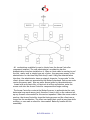
The combined use of Linux's dynamic IP firewalling capabilities and Windows'
keyboard/mouse locking makes Butterfly very effective at managing timing
issues in an Internet Café.
Noteworthy Features
Other noteworthy features of Butterfly include:
•
•
•
•
•
•
Butterfly allows you to charge your clients in quite a flexible manner. You can
have different charge groups e.g. members and non-members and for each of
these you can charge different amounts per minute depending on the time of
day or day of the week or the service requested.
You can record sales of items other than time on your computers. These could
include printing, photocopying, etc...
Butterfly keeps a detailed log of transactions, including a full trail of use for
each access code, sales made, etc...
Butterfly allows you to set up e-mail accounts/user-ids for your clients on your
Linux server with just a few mouse clicks from the Administration Interface.
You can charge for these accounts. You can instruct Butterfly to use password
disabling on accounts/user-ids that are not paid up. Butterfly is careful not to
modify any user-id on the server it did not create.
Much of the way Butterfly works is configurable. Do you hate the over-effective
keyboard locks? You can banish them! Do you want to charge your clients for
time in increments of 5 minutes? It can be done! Do you want to use an existing
database server elsewhere on your network instead of setting up a new one?
You can!
All services are charged on a prepayment basis only. This includes time on
workstations, e-mail accounts and any other services you may setup. When
clients don't have money, they do not use the service.
The purpose of this document is to explain in detail how the entire Butterfly
system works. We shall do this in stages. We'll describe how to install and
configure Butterfly, then we'll talk about what the backend daemon does, then
we'll describe the Access Controller, and finally the Administration Interface.
Contacting Us
For further information on Butterfly, to report a problem/bug, or simply get in
touch, please send an email to [email protected]. Please include all relevant
information if reporting a bug, for instance what you were doing when it
happened, which component died, etc...
BNE USER MANUAL - 3