1
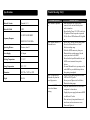
Specifications
Trouble Shooting / FAQ
Bluetooth Version
Bluetooth V 2.1
Bluetooth Profile
A2DP
Problem/Question
AIR03 cannot be powered
on.
L/R OUT:540HZ-20KHZ
Frequency Response
WOOFER OUT:44-200Hz
Operating Distance
10 meters, class II
Power Supply
AC adaptor
Working Temperature
0℃~55℃
Storage Temperature
-20℃~70℃
Dimensions
14.95"W x 7.48"D x 6.30"H
Weight
10.14 lb
AIR03 cannot connect to a
Bluetooth device.
AIR03 is connected to a
Bluetooth cell phone but
doesn’t play music.
The sound of AIR03 crackles
or has a loud hum or
buzzing.
Solution/Answer
1. Make sure that the DC cord is firmly
connected to the unit and that the power
outlet is turned on.
2. Ensure that the Power ON / OFF switch is at
ON position. When the speaker is powered
ON, the Power LED Indicator will be lighted
up.
1. Ensure AIR03 already entered pairing mode.
2. Ensure the Bluetooth device is in the
effective working range.
3. Delete the AIR03 name entry from your
Bluetooth device paired memory list and
re-pair your device with AIR03.
4. Ensure that both your Bluetooth device and
AIR03 are not connected to any other
devices.
5. On some Bluetooth device, you may need to
select AIR03 as your default output device
after pairing is completed.
1. Ensure your cell phone supports Bluetooth
A2DP or AVRCP profile.
2. Ensure your cell phone is in the effective
Bluetooth working range.
1. Turn your Bluetooth device or other source
component’s volume down.
2. Unplug the power supply and connect AIR03
to a different AC outlet.
3. Move unit away from potential sources of
interference, such as microwave ovens,
fluorescent lights, etc.
5