1
User’s Manual
BPP-420 • v4.0 • 2/03 • pg 4
Control Codes and Special Feaures
Table 1 lists the BPP-420 control codes. To send control codes from a terminal program, hold down
Control and press another key. For example, to send cntl-E (underline cursor) hold down Control and
press E. To send control codes from a program, send the ASCII value as a single byte (not as a text
representation of the number). Using cntl-E as an example, send a single byte containing the value 5
(00000101 binary). Control codes not listed in the table are ignored by the BPP-420 and have no effect.
Table 1. Display Control Codes
Function
Null (ignored prior to buffer)
Cursor home
Start big characters
End big characters
Hide cursor
Show underline cursor
Show blinking-block cursor
Bell (pulse piezo-buzzer output)
Backspace
Horizontal tab (cursor to next multiple-of-4 column)
Smart linefeed (cursor down one line)
Vertical tab (cursor up one line)
Formfeed (clear screen)
Carriage return
Backlight on
Backlight off
Accept cursor-position entry
Format right-aligned text
Begin special instruction*
Code
ASCII
cntl-@
cntl-A
cntl-B
cntl-C
cntl-D
cntl-E
cntl-F
cntl-G
cntl-H
cntl-I
cntl-J
cntl-K
cntl-L
cntl-M
cntl-N
cntl-O
cntl-P
cntl-R
ESC (cntl-[)
0
1
2
3
4
5
6
7
8
9
10
11
12
13
14
15
16
18
27
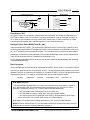
*NOTE: New (rev 4.0) custom-character instructions (ESC-D and ESC-E) begin with the Escape
character; see listings under Escape at the end of this section.
Null (control-@, ASCII 0)
Nulls are ignored; sending a null to the display has no effect. However, unlike other unused codes, nulls
are not even stored in the display buffer. They may be used as a brief time delay whose length depends
on the baud rate: 2400 bps = 4.16 ms delay; 9600 bps = 1.04 ms.
Cursor Home (control-A, ASCII 1)
Move the cursor to the first character position of the first line.
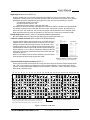
Begin Big-character Display (control-B, ASCII 2)
Put the display into big-character display mode. In this mode, characters are displayed as four-line-tall
graphics. The display can show up to four big characters at a time. The big character set includes numbers
0—9, letters A—Z (uppercase only), and symbols period (.), hyphen (-), colon (:) and space. The display
remains in big-character mode until it receives a character other than the ones listed, or a control-C. Note
that null (ASCII 0) will not end big-character mode because it is discarded before being buffered.
The numbers and letters are four columns wide followed by one blank column; punctuation and spaces
are two columns followed by one blank column.
Tips for using big characters: Give the display approximately 10 ms to ‘draw’ the characters. If you have
used ESC-D to redefine any of the custom characters, send ESC-E 1 to reset them to defaults before
displaying large characters.
End Big-character Display (control-C, ASCII 3)
End big-character mode without otherwise affecting the display.
Scott Edwards Electronics, Inc.
1939 S. Frontage Road, Suite F, Sierra Vista, AZ 85635 USA
ph: 520-459-4802 • fax: 520-459-0623 • www.seetron.com