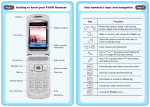
1
Page III.
How do I...
How do I...
These operations need to be performed in standby mode. When
the left soft key function is Menu, the phone is in standby mode.
To return to standby mode, press
.
Turn Vibration
on/off
Press and hold
until the
Page IV.
(green)
indicator appears/disappears.
WARNING: Prior to placing or receiving calls, the WiFi phone must be
Turn phone on/off
Press and hold
.
Make a call
Key in the phone number and press
Answer a call
Press
End or reject
a call
Press
(Hangup) or
flip cover.
Clear a keypad
entry
Press
Use speed dial
Press and hold the speed dial key to
display the phone number, and then
press
.
Adjust listening
volume
While on a call, press
connected to a Wireless Access Point and registered with the service
.
network. See Section 3, "Connecting to a Wireless Network" for detailed
instructions.
Press
(Answer) or
, or close the
(Clear) .
to reach the desired
submenu/option, and then press
Under the Phonebook menu:
Add a contact
Select Add Entry; follow screen prompts.
Delete a contact
Select Delete; follow screen prompts.
Edit a contact
Select Search; scroll to name; press
(Detail); press
to reach the intended
item; press
(Option); select Edit;
follow screen prompts.
Search
phonebook
Select Search; key in the first letter(s) of
the name; press
to scroll.
Assign a speed
dial key
Contact name must already be in the
phonebook. Select Speed Dial; select the
desired key (2-9); scroll to the desired
name and press
(Ok); scroll to the
desired number and press
(Ok).
(Ok).
If there is a number in front of the
intended option, you can access the
option by directly pressing the
corresponding number key.
VoIPon
Phonebook
options:
.
(Menu) to access the main
menu. Press
Access menu
options
.
www.voipon.co.uk
[email protected]
Tel: +44 (0)1245 808195
Fax: +44 (0)1245 600030