1
Page 1
1. Overview
2. Charge the Battery
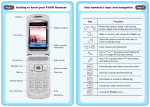
The UTStarcom F3000 Handheld is a wireless Voice over IP
(VoIP) telephone that, when coupled with VoIP phone service,
combines the benefits of Internet telephone service, with
mobility. This guide covers how to configure and use your F3000
to make VoIP phone calls via the service network. You can make
and receive calls as long as you are within range of a wireless
access point. See the F3000 User Manual for more information
on all features.
Page 2
When the battery power is low and needs recharging, the battery
indicator
will flash continuously, and the phone will sound a
low battery alarm, reminding you that the battery is running low
and the phone will be switched off automatically. To charge the
battery, follow the steps below:
1. Connect the charger to an AC wall outlet (100 - 240V).
2. Connect the lead from the charger to the charging socket of
the phone. The battery indicator bar starts to scroll (
a
a
a
). If the phone is off, the text "Charging..."
is also displayed on the LCD screen.
n
In
al
git
Di
ov
ion
at
n
In
al
git
Di
ov
at
ion
D
nn
lI
ta
igi
ov
at
ion
Internet
Note: Before using your F3000 handheld, you should have high-speed
Internet access, a wireless router, and a voice account set up.
3. When the battery indicator bar stops scrolling, charging is
complete. The text "Fully Charged!" is also displayed on the
LCD screen, if the phone is off.
Note: The phone takes about 3-4 hours to charge and the exact time may
vary depending on the circumstances.
VoIPon
www.voipon.co.uk
[email protected]
Tel: +44 (0)1245 808195
Fax: +44 (0)1245 600030