1
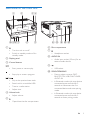
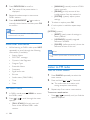
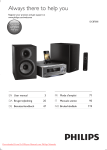
Overview of the main unit
a
b
cd
4
FM AERIAL
( 75 )
j i hg
f
e
k l
m n o
f Disc compartment
a
• Turn the unit on or off.
• Switch to standby mode or Eco
standby mode.
b Display panel
g
• Headphone socket.
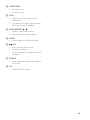
h AUDIO IN
• Audio input socket (3.5mm) for an
external audio device.
c Control buttons
i
• Start, pause, or resume play.
• USB socket.
j SOURCE/PAIRING
• Stop play or erase a program.
/
• Skip to the previous/next track.
• Search within a track/disc/USB.
• Tune to a radio station.
• Adjust time.
d Volume knob
• Adjust volume.
e
• Press to select a source: DISC,
BLUETOOTH, USB, DAB, TUNER,
AUDIO IN.
• In Bluetooth mode with two devices
connected, press and hold for 3
seconds to disconnect the first
connected device and enter pairing
mode.
• In Bluetooth mode with one device
connected, press and hold for 3
seconds to enter pairing mode.
• Open/close the disc compartment.
EN
5