1
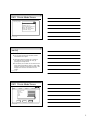
LMS: Private Mode Screen
Select an operation
Check Resources In
Check Resources Out
Generate interlibrary loan request
Manage online catalogue
Manage patron library numbers
Search online catalogue
4
Janice Regan, 2008
(cont’d)
D. Main flow of events:
The use case starts when Librarian selects
CheckInResource option.
Librarian enters the Dewey call number for
the resource then commits the entry by
pressing the accept button
If the Dewey call number for the resource has
been entered successfully and it is valid, LMS
finds the resource and finds its borrower, then
displays the resource information on the
screen.
5
Janice Regan, 2008
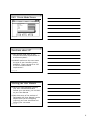
LMS: Private Mode Screen
LMS
Check
Search
Patron
Resource
Enter
number
Enter Call
Patron
ID
Due Date
Enter
Resource ID
Date
of
Loan
Title
Title
Author
Author
Call
Number
Status
Call Date
Accept
Janice Regan, 2008
Cancel
Finish
6
2