1
Setting the Decimal point on the SD Card
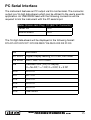
1) When the lower display shows “dEC”, use the Up or Down Buttons
to toggle between “bASIC” (“.” Decimal Point) or “Euro” (“,” Decimal Point).
2) After the Decimal point character has been selected, press the
Enter Button to save the setting as the default. To exit “Advanced
Settings”, press the Esc Button.
Auto power OFF management
1) When the lower display shows “PoFF”, use the Up or Down Buttons to select the value “yES” (Enable Auto Power Off) or “no”
(Disable Auto Power Off.
2) After selecting “yES” or “no”, press the Enter Button to save the
setting as the default. To exit “Advanced Settings”, press the Esc
Button.
Set Beeper Sound ON/OFF
1) When the lower display shows “bEEP”, use the Up or Down Buttons to select “yES” (Beeper Sound is ON) or “no” (Beeper Sound
is OFF).
2) After selecting “yES” or “no”, press the Enter Button to save the
setting as the default. To exit “Advanced Settings”, press the Esc
Button.
Select the Temperature unit to °C or °F
1) When the lower display shows “t-CF”, use the Up or Down Buttons
to select “C” (for °C) or “F” (for °F).
2) After selecting “C” or “F”, press the Enter Button to save the setting as the default. To exit “Advanced Settings”, press the Esc
Button.
Pantone 534 Blue
Pantone 123 Yellow
Blue - 100/80/30/5
Yellow - 0/27/100/0
Pantone 485 Red
Pantone 123 Yellow
Red - 10/100/100/5
Yellow - 0/27/100/0
Pantone 534 Blue
Blue - 100/80/30/5
Black
Pantone 534 Blue - 100/80/30/5
Pantone 485 Red - 10/100/100/5
www
reedinstruments
Rich Black 20/20/20/100
Only if you REALLY need them:
com
13