1
Section 3 - Configuration
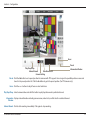
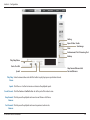
Focus
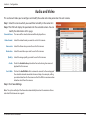
Play/Stop/Drop
View Remote I/O
Manual Record
General Setting
Preset
Information Window
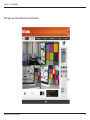
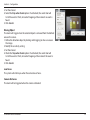
Preset: Click the Set button to set a preset position for a camera with PTZ support. Users can give the specified position a name and
store it in the preset position list. Click the Go button to go to the preset position. (for PTZ cameras only)
Focus: Click the + or - buttons to adjust focus or select auto focus.
Play/Stop/Drop: Select a camera/video and click this button to play/stop/disconnect a particular channel.
Information Display video information including camera name, video status, and bit rate for a selected channel.
Window:
Manual Record: Click to start recording immediately. Click again to stop recording.
D-Link DNR-326 User Manual
47