1
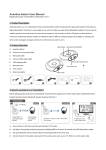
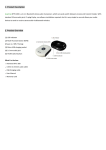
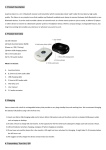
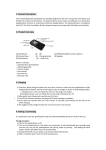
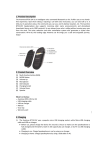
3. Charging Avantree Pluto Air uses a popular micro USB charging socket. You can recharge it using the enclosed USB charging cable by PC or other suitable charger. 1). Connect the USB lead to the port of the speaker and insert the other end in the port of your PC or other suitable USB outlet. 2). Afterwards, each charge cycle may take 3 hours. 3). LED will indicate red while charging and turn to blue when charging is complete. Note: 1. Only use Avantree certified charger, or consult Avantree support if you intend to use a third party charger. 2. When the battery is low, LED will flash red and beep sound will come out every 20 seconds. Please recharge it. 4. Basic Operations 4.1 Using 3.5mm audio cable 1). Connect the 3.5mm audio cable from the speaker to your music player. 2). Switch the Wire/OFF to Wire position and the LED keeps blue when Line in is working. 3). Adjust the volume using the controls on your music player. 4). After use, switch off the speaker and disconnect the audio cable. 4.2 Using Bluetooth 1). Switch the ON/OFF/Bluetooth to the Bluetooth position - LED will flash blue and red alternately which means it is searching devices around. 2). Turn on the Bluetooth of your mobile phone or music device, search for Bluetooth device. 3). Select “Avantree Pluto Air” in the list of Bluetooth devices, then follow the steps and enter pin code 0000 to pair. 4). Once paired and connected, LED will stay blue. The Bluetooth speaker will be automatically connected to your mobile phone or music device whenever you turn the Bluetooth speaker on again and the device is in the range. NOTE: 1). When losing connection, the speaker will automatically switch itself off after 5minutes, please restart it again when connect. 2). When the battery is nearly running out, LED will not show up if you switch to Bluetooth side. But it may work fine on the Line in side. Please charge it. 3). Please go through the pairing procedure and make sure the speaker doesn’t connect with other Bluetooth device when you change to a new device. 4). Do not play music at excessive levels as damage to the equipment may result. 5). Do not use outdoors in the wet or in damp surroundings. 5. Product Specification Dimension: 45mm x 45mm × 55mm Net weight: 70g