1
Simple Paging Solution - User Manual
User Manual
Simple Paging Solution
Document Name:
User Manual
Document ID:
20131206DG
Document Date:
26th March 2015
Document Version:
1.1
Product Name / Version
Simple Paging Solution / 1.1
BARIX AG | 1. Apr. 2015 | | Page 1/35
Simple Paging Solution - User Manual
Table of Contents
1 Introduction
4
1.1 About this document
4
1.2 About the Barix Simple Paging Solution
4
1.3 Features
4
2 System Overview
5
2.1 System diagram
5
2.2 System components
5
2.3 Supported hardware
6
3 Steps to setting up a customised PA system
7
4 Getting Started
8
4.1 Connecting the devices
8
4.2 Making your frst announcement from a fxed Paging Head
4.2.1 Paging from PS1
4.2.2 Paging from PS16
8
8
8
4.3 Make your frst announcement from an iPhone or iPad
4.3.1 Prerequisites
4.3.2 Connecting to the system.
4.3.3 Paging from iDevice
9
9
9
9
4.4 Paging Groups
10
4.5 Zone Names and IDs
4.5.1 Explaining Paging Zone Names and IDs
4.5.2 Assigning Zone Names and IDs with the confguration tool
11
11
12
4.6 Setting up Paging Groups
12
4.7 Secure mobile paging: set a password on the Gateway device
15
4.8 Paging to a Group
15
4.9 Integration with Background Music and Emergency Notifcation systems
16
5 Using Simple Paging
17
5.1 Making Announcements
17
5.2 System Feedback
17
6 Simple Paging App options
18
6.1 Multiple Paging Group profles
18
6.2 Detailed status drilldown
18
6.3 Paging to Group(s) in 'Warning' state
19
6.4 Changing the default IP address and Port used for the audio messages
19
6.5 Limitation
19
7 Simple Paging Confguration Tool features
20
BARIX AG | 1. Apr. 2015 | | Page 2/35
Simple Paging Solution - User Manual
7.1 'Advanced' menu: Network Interface selection
20
7.2 Discover Zones view
7.2.1 Text Colour coding
7.2.2 Refresh
7.2.3 Push Confg
7.2.4 Password handling
7.2.5 Print / Save
7.2.6 Web UI button
7.2.7 Set Groups button
20
20
20
20
20
21
21
21
7.3 Set Groups view
7.3.1 Text Colour coding
7.3.2 Refresh
7.3.3 Save and Send
7.3.4 Import File
7.3.5 Defning Paging Groups
21
22
22
22
22
22
8 Device Confguration via Web Interface
23
8.1 Simple Paging web UI Confguration
8.1.1 Basic Confguration: parameters
8.1.2 Basic confguration: Group Setup
8.1.3 Advanced settings: Network confguration
8.1.4 Advanced Settings: Paging
8.1.5 Advanced Settings: Emergency Audio
24
24
24
25
26
26
8.1.5.1 Setting up a Simple Paging device to receive Emergency Notifcation audio ..................................................................................................... 27
8.1.5.2 Device behaviour with Emergency Audio.................................................................................................................................................................. 27
8.1.6 Advanced Settings: Background music and PA integration
27
8.1.6.1 Setting up a device to receive Background Music.................................................................................................................................................... 28
8.1.6.2 Device behaviour with Background Music................................................................................................................................................................ 28
8.1.7 Advanced Settings: Security
29
8.1.7.1 Discovery function......................................................................................................................................................................................................... 30
8.1.7.2 Status Page....................................................................................................................................................................................................................... 30
8.1.7.3 Defaults............................................................................................................................................................................................................................. 31
8.1.7.4 Update.............................................................................................................................................................................................................................. 32
8.1.7.5 Reboot.............................................................................................................................................................................................................................. 33
9 Document Management
34
9.1 Version History
34
10 Legal Information
35
BARIX AG | 1. Apr. 2015 | | Page 3/35
Simple Paging Solution - User Manual
1
1.1
Introduction
About this document
This document explains the Barix Simple Paging Solution; explaining the main system
concepts and how to set up and use it. A simple worked example shows the steps involved to
set up and use a Barix Simple Paging PA / Paging system. The document also details the
confguration options available for installation in more complex environments.
1.2
About the Barix Simple Paging Solution
The Barix Simple Paging Solution enables users to make public address announcements to up
to 14 individual target groups, each of which can have one or more paging zones. Target
selection can be made dynamically, combining individual Groups, or Paging to all zones.
Announcements can be made from Barix Annuncicom Paging Stations (PS1 / PS16), or from
iPhones and iPads, using the freely available Barix Simple Paging app.
1.3
Features
The Barix Simple Paging solution works out of the box; key features are:
•
Make announcements from a fxed Paging head, or using an iPhone when on the move
•
Superior audio quality
•
Mobile paging restricted to authorized users
•
Multiple Paging Heads
•
Paging Heads indicate when Zones are busy with announcements from other devices
•
Supports simultaneous paging to independent targets
•
Dynamic status indication to make maintenance easy
•
Modular and easily expandable
•
Supports zoned Background Music playback via multicast for low network trafc
•
Emergency Notifcation priority interrupt – highest priority page, interrupts normal
announcements and Background Music
•
Optional 'pre-gong' chime before paging announcements
•
Supports multiple mobile paging confgurations: one set of Groups for the Principal,
another for Security!
•
Uses existing network infrastructure; no need for expensive, dedicated wire runs
•
A variety of hardware end points to suit each area in a facility
•
Independent volume setting for each Paging Zone
•
System secured using passwords
BARIX AG | 1. Apr. 2015 | Introduction | Page 4/35
Simple Paging Solution - User Manual
2
2.1
System Overview
System diagram
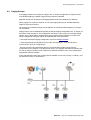
I
llustration 1: Simple Paging solution components
2.2
System components
The Barix Simple Paging solution is based on a number of Barix devices that come ready to
use, enabling to you set up a paging system in minutes.
Paging Heads, also referred to as Paging Masters, are devices where a public address
announcement (page) can be made from. They can be Barix desktop units, or an iDevice for
paging when you are on the move.
Announcements are relayed to Paging Endpoints, also known as Paging Zones. Simple Paging
supports up to 14 distinct target Groups, consisting of 1 or more Zones. Paging Groups can be
addressed individually, or dynamically combined to belong to a custom Paging Group relevant
to the announcement being made at the time.
In case an iDevice is used, the system also need a Paging Gateway device, which acts to
interface the iDevice into the Simple Paging solution. The Gateway is a standard Barix
Exstreamer with the “Gateway” frmware loaded.
The Simple Paging solution requires that all devices are on the same LAN subnet, and when
mobile paging is required, a wif connection to this subnet must be provided. Use on VLANs is
also supported.
By default, the system uses DHCP and broadcast messages, keeping bandwidth use to a
minimum; multicast addresses can also be confgured for both Paging announcements and
background music if required..
BARIX AG | 1. Apr. 2015 | System Overview | Page 5/35
Simple Paging Solution - User Manual
2.3
Supported hardware
Barix hardware
Paging Head
Paging Zone
Paging Gateway
Exstreamer 1xx
✓
✓
Exstreamer 2xx
✓
Exstreamer P5
✓
Annuncicom PS16
✓
Annuncicom PS1
✓
Annuncicom 60
✓
Table 1: Device by function
Annuncicom Annuncicom Annuncicom Exstreamer
PS16
PS1
60
1xx
Exstreamer
2xx
Exstreamer
P5
Mic In (Bias)
✕
Electret
Electret
✕
✕
✕
Built in Mic
✓
✓
✕
✕
✕
✕
Headphone
out
✕
✓
✓
✓
✓
✕
1 * 5W
✕
2 * 25W
1 * 5W
Speaker Out
Built in 2W & Built in 1W &
speaker
speaker
Line Level
Output
✕
✕
Mono
Balanced
Stereo
Unbalanced
Stereo
Unbalanced
PoE
✓
✓
✓
✕
✕
✓
Display
✓
✕
✕
✓
✕
✕
✕
Table 2: Device hardware features
BARIX AG | 1. Apr. 2015 | System Overview | Page 6/35
Simple Paging Solution - User Manual
3
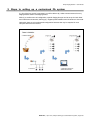
Steps to setting up a customised PA system
(1.) Out of the box and (2.) connected, you will be able to (3.) make announcements from any
Paging Master station to all Paging Zones.
With (4.) a small amount of confguration, specifc Paging Groups can be set up for both fxed
and mobile announcements, allowing (5.) targeted public address announcements to be made.
Optionally, there are a few advanced confguration features that may be required in more
complex network environments.
BARIX AG | 1. Apr. 2015 | Steps to setting up a customised PA system | Page 7/35
Simple Paging Solution - User Manual
4
4.1
Getting Started
Connecting the devices
Every Barix device comes packed with a Quick Installation Guide, which shows how to
physically connect them up. Once all components are in place, the system is ready to use.
All Simple Paging devices must be either on the same subnet, or the same VLAN as broadcast
messages are used by the system to exchange status and control messages.
Depending upon the devices to be used, physical set up will typically involve connection of the
device to network, power, loudspeakers and in some cases a microphone.
Depending upon the model, Exstreamer Paging Zones can be connected directly to
loudspeakers, or in to some form of amplifcation system; for example an existing PA system.
Out of the box, the Simple Paging Solution is pre-confgured with all devices set in Group 1.
This means that after the physical installation an announcement can be made that will
automatically be heard everywhere when paging to Group 1.
Masters also serve as Endpoints, playing out announcements addressed to them. This means
that they will also replay any announcement from another Master, in this default confgured
state.
The default confguration is designed as a way to easily verify that everything is connected
correctly. Before doing any further confguration work, validate the hardware by paging from
the diferent Masters:
4.2
4.2.1
Making your frst announcement from a fxed Paging Head
Paging from PS1
The PS1 Master has two buttons on the front 'A' and 'B'. By default button 'A' is preconfgured
to Group1. Button 'B' is not confgured.
Press and hold button 'A' while talking, you will make an announcement to all Zones. Releasing
button 'A' will end the announcement. By default the PS1 will play a 'pre-gong' attention chime
when the paging button is frst pressed; wait until this has fnished before speaking.
4.2.2
Paging from PS16
The PS16 Master has two rows of buttons mapped as shown;
By default all Zones are available in Group1 and no other Groups are confgured.
Select Group 1 by pushing the button “Select Group 1” once, two yellow LEDs will indicate the
Group is selected. Press and hold down the “Page” button; the PS16 will play a 'pre-gong'
chime when the 'Page' button is pressed; wait until this has fnished before speaking, keeping
the button pressed until fnished (PTT). Releasing the “Page” button will end the
announcement. To clear the Group selection, press the Group button again.
BARIX AG | 1. Apr. 2015 | Getting Started | Page 8/35
Simple Paging Solution - User Manual
4.3
4.3.1
Make your frst announcement from an iPhone or iPad
Prerequisites
The Barix Simple Paging app is free to download from the Apple app store and requires iOS
6.0 or later. Download the App onto your iDevice.
To make announcements from an iDevice, you must have a Paging Gateway device installed
and confgured with the Paging Groups that you want to use (see section 4.6 Setting up Paging
Groups).
4.3.2
Connecting to the system.
Select the correct wif network on the iDevice, and then start the Simple Paging App. On
startup the App will automatically search the network for the Gateway device.
The Paging Gateway is the interface between the iDevice and the Simple Paging Solution, it
must be present on the network to enable paging from iDevices. When the Gateway is found
by the Simple Paging App, it will automatically show the Groups available for paging. Before
any confguration is done, all devices are automatically created in a default 'Group 1'.
4.3.3
Paging from iDevice
To make an announcement from the iDevice, tap the
'Group 1' icon;
confrms that the group is selected.
Tap the microphone icon
then start talking.
By default all Zones are in Group1 and the announcement
will go to all Zones.
To end the announcement, tap “Stop Paging”
Note: You cannot page to an iDevice
BARIX AG | 1. Apr. 2015 | Getting Started | Page 9/35
Simple Paging Solution - User Manual
4.4
Paging Groups
If the paging needs are as simple as 'Page to All', no further confguration is required, but if
more fexible paging is needed, Paging Groups need to be defned.
Bespoke Groups can be setup on all Paging Masters and on the Gateway for iDevices.
When paging from a PS16 or iDevice, one or more Paging Groups can be selected as the
target for the announcement.
On the PS1 two individual Groups can be defned, on the PS16 and the Gateway 14 Groups
can be defned.
Paging Groups can be defned using either the Simple Paging confguration tool, or directly on
the device using the web UI. The confguration tool allows you to set up your Simple Paging
solution from a single place, simplifying the work to be done and requiring much less time.
Group confguration using the web UI is explained later in this document.
• Download the Simple Paging Confguration Tool from the Barix website
• Unzip the package and double-click on the fle “ConfgTool.jar”, or run the fle from a
command line “java -jar ConfgTool.jar”
The tool will start and automatically discover all online Barix Simple Paging Solution
components on the network. If no devices are shown, try changing the network interface that
the tool is using by clicking on the “Advanced / Network Interface” menu, then selecting the
appropriate network interface.
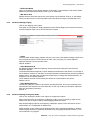
In the example below there are 3 Paging Zones available: a lone unit in Group 1 'Hallway' and
two devices in Group 2 'Classrooms'.
BARIX AG | 1. Apr. 2015 | Getting Started | Page 10/35
Simple Paging Solution - User Manual
4.5
4.5.1
Zone Names and IDs
Explaining Paging Zone Names and IDs
Every Simple Paging device has an “address” called the “Zone ID”, which is used within the
system to identify them, send audio to them and to exchange status information. 'Out of the
box' every device has a Zone ID of 1, and all Masters are setup to have a Paging Group 1 that
talks to devices with the ID of 1.
This means that when devices are connected up for the frst time, a Paging Announcement,
made to Group 1 will go to all Paging Zones and all other Masters.
Optionally, a Zone Name can also be assigned to each Zone. This name is used in the Web UI,
Confg Tool and iPhone App to refer to the Zone to make it easier to remember.
•
Creating diferent Paging Groups is simply a case of telling each Paging Head “this Paging
Group consists of the following IDs”, and assigning the IDs to the relevant devices.
•
Many devices can share the same Zone ID if required, the result is that these devices will
always make announcements at the same time – useful if you have 3 Paging Endpoints in
a long corridor, for instance.
•
A Zone ID can be included in multiple Paging Groups.
•
If a device must be individually addressable, it needs a unique Zone ID assigning to it.
•
All of the Barix Simple Paging devices share information, which allows them to understand
what other components are present and display status information about the system as a
whole.
The example uses the following IDs and names for the devices:
Zone ID
Zone Name
Device
Group
10
Administration
Annuncicom PS16
128
Paging Gateway
Exstreamer 100
11
Assembly Hall
Exstreamer P5
Group 1 Hallway
21
Juniors
Exstreamer P5
Group 2 Classrooms
22
Seniors
Exstreamer P5
Group 2 Classrooms
The Zone ID can be any integer from 1 to 127. The ID=128 is reserved for the Gateway and
should not be used by any other device.
The Zone Name is a 15 character string allowing use of characters, numbers and blanks.
BARIX AG | 1. Apr. 2015 | Getting Started | Page 11/35
Simple Paging Solution - User Manual
4.5.2
Assigning Zone Names and IDs with the confguration tool
On startup the tool automatically fnds and reports all Simple Paging devices on the network.
The felds in the columns Zone ID and Zone Name are editable. Click on the cell and enter the
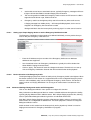
desired ID or Name. One or more devices can be edited. Modifed felds not yet sent to devices
are shown in blue.
Once all changes are made, click 'Push Confg'. The new settings will then be sent to the
devices, which will automatically reboot to activate them.
To abandon changes before sending them to the devices: clicking “Refresh” will reload the
current settings from all devices.
During the update the tool will report the devices going of-line and then being available again
with their new ID and Name.
Setting the Zones / IDs for our example above, the tool will now display:
4.6
Setting up Paging Groups
Once the Zone IDs have been allocated, Paging Groups can be set up. This is done by adding
one or more IDs to a Group. The process is the same for both Paging Heads and Paging
Gateways. Groups defned on the Gateway automatically appear on connected iDevices
running the App.
Any Zone can be used in one or more Groups. There is no practical limit to the maximum
number of devices in a Group.
BARIX AG | 1. Apr. 2015 | Getting Started | Page 12/35
Simple Paging Solution - User Manual
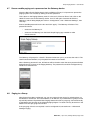
Defning Paging Groups using the confguration tool
With the tool running in the “Discover Zones” view, either click on the “Set Groups” button on
the right hand side of the relevant device's entry, or change to the “Group Setup” view by
clicking on the tab above the device information and then select the desired Master from the
drop down list box. This example uses the group setup for the Gateway.
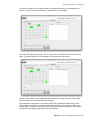
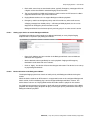
The tool switches to the Group Setup view, showing a matrix with 128 IDs on the left and
current Group members on the right. IDs highlighted in green are active on the network.
Above the matrix is a series of Group tabs, by default only 'Group 1' is set. First select the
Group to defne by double clicking on its tab and giving it a name, then simply click on the IDs
in the matrix to add them to the Group. As IDs are added, all devices with that ID appear in the
“Members” box to the right.
BARIX AG | 1. Apr. 2015 | Getting Started | Page 13/35
Simple Paging Solution - User Manual
To setup the system in the worked example, frst select the Gateway, then double click on
'Group 1' and set the name to “Hallways”, then tick ID=11 in the Matrix.
Then select the second group tab, name it “Classrooms” and select ID=21 and ID=22 in the
matrix. The Group Setup on the confguration tool should now look like this;
Click on “Save & Send”. The confguration fle will be saved locally, then sent to the device,
which will reboot to save and activate the changes.
To set the same confguration on the PS16, select it from the Master pulldown list on the
'Group Setup' tab, then click “Import fle”and select the fle just saved. After it loads, click
“Save & Send”. The device will reboot and have the same Group confguration. Each Master
can also have completely independent groups if required.
BARIX AG | 1. Apr. 2015 | Getting Started | Page 14/35
Simple Paging Solution - User Manual
4.7
Secure mobile paging: set a password on the Gateway device
Since the Barix Simple Paging App is freely available on iTunes, it is important to protect the
paging system from misuse, by setting an access password.
This is done on the Paging Gateway web UI. In the tool's “Discover Zones” tab, click on the
“Web UI” button next to the Gateway device. Your PC will open a browser tab with the
Gateway's web UI being displayed. Click on “Confguration”, then “Advanced Settings”, then
“Security”.
Enter a sensible password into the box and click “apply”. The Gateway will reboot. This
password controls:
•
access to the Gateway UI
•
access to the Gateway from the Barix Simple Paging app: needed to make
announcements
The Gateway will prompt for a UserID / Password whenever you try to access the web UI. The
UserID should be left blank, only the password needs to be entered.
After a Gateway password is set, all iDevices will be forced to enter the same password before
being allowed to connect to the Paging Gateway. The password is stored in the App and only
needs to be entered once.
4.8
Paging to a Group
After Groups have been confgured, you can now page to these groups by selecting them on
the Master or the iDevice. On a PS16 Master, or an iDevice, any combination of groups can be
dynamically selected. By default Barix Paging Heads will make a 'pre-gong' chime both locally
at the Master and remotely at the selected paging targets. Live audio will only be sent from the
Master once this pre-gong has sounded.
If the pre-gong chime is not required, it can be confgured of; see section 8.1.4 Advanced
Settings: Paging.
BARIX AG | 1. Apr. 2015 | Getting Started | Page 15/35
Simple Paging Solution - User Manual
4.9
Integration with Background Music and Emergency Notifcation systems
Many Public Address systems also incorporate zoned background music playback and the
requirement for an Emergency Notifcation override; Barix Simple Paging supports both of
these features per device, enabling the creation of a multiple zoned background music
environment.
Audio Volume: Typically Emergency messages are required to be at a higher volume than
BGM or standard Paging announcements, with Simple Paging, each audio source has its own
associated volume.
Audio Format: The incoming audio for BGM and Emergency Audio must be contained in an
RTP stream in a Barix supported audio format: mp3, PCM uLaw/aLaw.
Audio Source Priority:
Emergency audio has the highest priority and will override any other audio source,
A Paging message has middle priority – will interrupt BGM playback, but in turn be dropped if
an Emergency Announcement is made
Background Music has the lowest priority and only plays if no other source is active.
Refer to chapter 8 for details of how to confgure individual Simple Paging devices to support
these services.
BARIX AG | 1. Apr. 2015 | Getting Started | Page 16/35
Simple Paging Solution - User Manual
5
Using Simple Paging
The Simple Paging solution supports simultaneous announcements from diferent Masters and
at the same time provides a number of features for reporting status and potential issues.
Below is an overview of the actions and notifcation features.
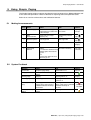
5.1
Making Announcements
Step
Action
PS16
PS1
iPhone
1
Select Group(s)
Press each of the target
Group buttons to select: the
LEDs will light.
Press and Hold “A” or
“B” button
Tap target
Groups
2
Make
Announcement
Press and hold “Page”
button (PTT)
Keep button pressed
(PTT)
Tap
Mute microphone
Not supported
Not supported
3
Tap
5.2
4
End Announcement
Release Button
Release Button
5
Clear Group
selection
Either:
No action necessary
1. Press each selected Group
button again, the LEDs will
go out.
Or
2 Press the 'Select All' until
all LEDs go out
Tap “Stop
Paging”
No action
necessary
System Feedback
Meaning
PS16
PS1
iPhone
System Idle
Simple Paging Ready
Solid Green on 'A'
No Icon
Group(s) selected
Solid yellow LED on Group
key(s)
---
Sending Page
Paging
Flashing Red on 'A'
Paging
Incoming page
Receiving From
Flashing white on 'B' and
green on 'A'
----------
Device(s) in Group
Busy
Flashing yellow LED on Group
key(s), 'Buzz' when Group is
selected indicates the Group
is blocked.
Flashing Red on 'A'
'Buzz' when Group is selected
indicates the Group is
blocked.
Device(s) in Group
Ofine
Flashing yellow LED on Group Flashing Red on 'A'
key(s)
Group will
not select
BARIX AG | 1. Apr. 2015 | Using Simple Paging | Page 17/35
Simple Paging Solution - User Manual
6
Simple Paging App options
The App has a number of helpful features not needed in normal operation:
6.1
Multiple Paging Group profles
By setting up several Paging Gateways on the system, it is possible to support Profles for
diferent User Groups. For example the Principal and the Security Department may need one
set of privileges, 1st Grade teachers a diferent one.
Each iDevice can be tethered to a specifc Paging Gateway, by confguring the Gateway's MAC
and IP addresses in the Simple Paging Settings option via the iPhone 'Settings'. Assigning
diferent passwords for each Gateway ensures that Users stay in their assigned Profle.
This mechanism also allows the Simple Paging system to be on a diferent subnet to the wif;
the Paging Gateway bridges all of the necessary control and audio signals between the app
and the devices.
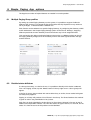
Illustration 2: Unset, the app will search
and attempt to connect to any Gateway
6.2
Illustration 3: By defning a particular
Gateway, the App locks to it on startup
Detailed status drilldown
If a Group shows busy, or a device in error, it is possible to identify which device is afected.
From the 'Paging' screen, tap the 'Details' button in the top right corner: a list of groups will
appear.
In the list of groups, those marked with red are either busy or of-line, those marked with green
are ready to be paged to.
Tapping on a Group will produce a list of Zones in the Group. The Zones listed are also marked
in green or red for easy identifcation of any issues.
Each Zone is clearly identifed in the frst line by its Zone Name, followed in line two by the IP
address and unique MAC address. The Third line shows the type of device, it's Zone ID, and its
status. It is here the source of the problem can be identifed.
BARIX AG | 1. Apr. 2015 | Simple Paging App options | Page 18/35
Simple Paging Solution - User Manual
Illustration 4: App showing warning for a
Group. Tap on the warning icon.
6.3
Illustration 5: details of Paging Zones
within Group, showing the problem
Paging to Group(s) in 'Warning' state
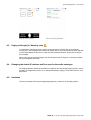
It is possible to select and make a paging announcement to a Group that is showing the
warning icon. The message will be sent to all Paging Zones in the Group that are NOT afected.
It is the responsibility of the user to make sure they understand which Zones will not receive
the message.
When users see the warning triangle, they should advise their IT Support, so that the problem
can be investigated and fxed.
6.4
Changing the default IP address and Port used for the audio messages
The Paging Gateway interfaces the audio from iDevices into the Simple Paging System, refer to
the Web UI confguration section 8.1.4 “Advanced Settings: Paging“ of this document for more
information.
6.5
Limitation
The current release of the Simple Paging App supports a maximum of 32 Paging Zones.
BARIX AG | 1. Apr. 2015 | Simple Paging App options | Page 19/35
Simple Paging Solution - User Manual
7
7.1
Simple Paging Confguration Tool features
'Advanced' menu: Network Interface selection
Many PCs have multiple network interfaces. To select which one the Confguration Tool uses,
click 'Advanced' / 'Network Interface' then select the network interface you want to use.
7.2
Discover Zones view
The Confguration Tool starts up in the 'Discover Zones' view, showing all discovered Simple
Paging components. The online / ofine status indicates whether the device is responding at a
low level to discovery requests; note, it does not guarantee that the device is ready for Paging.
The basic use of the Simple Paging Confguration Tool to set device Zone IDs and Names and
to set up Paging Groups was described in Chapter 4. There are other useful features:
7.2.1
Text Colour coding
Text in the tool is displayed in Black normally.
Blue text shows that a device parameter has been changed, but the change has not yet been
pushed / sent to the device.
Red text indicates when there has been a problem communicating updates to a device.
7.2.2
Refresh
This button will cause the tool to get and display the current active confguration details for the
devices, it can be used to abandon any changes made, but not sent.
7.2.3
Push Confg
The Push Confg button is used to send updated Zone ID / Names to the afected devices.
A progress bar is shown during the push operation and user interaction with the tool is blocked
until the operation is fnished.
The tool sends the updates to each device in turn. When a device requires a password for
authentication, a pop-up window appears for the user to supply it.
Note: the User has only one attempt per device. When the password is not entered correctly,
the corresponding device is marked in red and the Zone ID and Name values are restored to
previous values, discarding the changes. The User can inspect devices in error and then redo
confg changes in a second attempt.
7.2.4
Password handling
Any or all of the Barix devices can have security passwords set. When required, the tool will
prompt the user to enter the necessary passwords.
The tool remembers the last used password in every session and will try this frst when it is
next required to supply a password.
If the stored password does not work, the tool prompts for a new one to be entered
If the password is not successfully entered, the tool will abandon the current operation. The
tool tackles multiple device updates sequentially, so it is possible that some devices receive an
update and others don't. In this case, the afected devices are highlighted in red text.
BARIX AG | 1. Apr. 2015 | Simple Paging Confguration Tool features | Page 20/35
Simple Paging Solution - User Manual
7.2.5
Print / Save
navigates to a view containing the device information, plus a freely editable column for
Installers' notes. This view can then either be printed, or saved as a .csv format fle, for
inclusion in the user's own installation documentation.
7.2.6
Web UI button
On each Device entry in the 'Discover Zones' view, there is a 'Web UI' button, which will launch
a browser session directly on the device's web interface, giving access to more advanced
confguration options for that specifc device, see chapter 8 “Device Confguration via Web
Interface“.
7.2.7
Set Groups button
Switches to the Set Groups view
7.3
Set Groups view
This view shows the Group confguration for a specifc Paging Master device. The Master can
be selected from the drop down list in the top left of the view.
•
On the left there is a matrix representing 128 Zone IDs under the heading “Target Zone
IDs”.
•
Above the matrix is a series of tabs, one for each of the Paging Groups supported by
the device. Zone IDs assigned to the current Group are indicated by a tick in the
matrix.
•
On the right is a box displaying details of the members of the currently selected Group
•
Underneath the matrix, the keyboard layout for the current Master is shown.
BARIX AG | 1. Apr. 2015 | Simple Paging Confguration Tool features | Page 21/35
Simple Paging Solution - User Manual
7.3.1
Text Colour coding
Text in the tool is displayed in Black normally.
Yellow text shows that a device parameter has been changed, but the change has not yet
been pushed / sent to the device.
Red text indicates when there has been a problem communicating updates to a device.
7.3.2
Refresh
This button will cause the tool to get and display the current active confguration details for the
devices, it can be used to abandon any changes made, but not sent.
7.3.3
Save and Send
Click to push changes to the Master device. The confguration data is frst saved in a “.ini” fle
in the application folder, using a predefned name pattern (DevType_DevName_IP.ini), which the
tool reports. Next the updated confguration is sent to the device, which will apply it and
reboot.
If the user selects a diferent master from the drop-down list without frst saving any changes
that have been made, a warning pop-up will appear. This gives the user the opportunity to save
or abandon the changes before changing the view.
7.3.4
Import File
Using the confguration tool it is possible to load a saved confguration into a device, enabling
quick an easy setup of multiple Paging Heads.
This button opens a fle browser control to fnd and load a previously saved group
confguration “.ini” fle. Note that all tabs will become shaded after this operation to indicate
that confguration is obtained by means of the import functionality. The User can further
modify the groups before updating the device using the Save & Send button.
7.3.5
Defning Paging Groups
To change the Group Name, double click on the tab and then change the text as required.
'Enter' fnalises the change.
To change the Group members, select the Group by clicking on its tab and then within the
matrix, click with the mouse in the box corresponding to the ID(s) you wish to select / remove.
A tick indicates that the ID is selected and the details of the device will appear in the members
list if the device is online.
IDs shown grey in the matrix are ofine, green highlighting means that at least one device with
that ID is online.
BARIX AG | 1. Apr. 2015 | Simple Paging Confguration Tool features | Page 22/35
Simple Paging Solution - User Manual
8
Device Confguration via Web Interface
In some cases it may be necessary to perform extra confguration to ensure perfect operation
of the Paging solution. The web UI for the Paging Master, Endpoint and Gateway are broadly
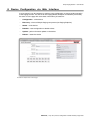
the same: A home page with some basic information, plus tabs for:
•
Confguration – of the device
•
Discovery – shows all Simple Paging components (not Paging Endpoint)
•
Status – of the device
•
Defaults – reset confguration to default values
•
Update – perform frmware update on the device
•
Reboot – restart the device
Illustration 6: Sample device UI Home page
BARIX AG | 1. Apr. 2015 | Device Confguration via Web Interface | Page 23/35
Simple Paging Solution - User Manual
8.1
8.1.1
Simple Paging web UI Confguration
Basic Confguration: parameters
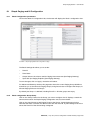
Click on the Web UI 'Confguration' tab, the browser will display the 'Basic' confguration view.
Illustration 7: Simple Paging Master basic confguration UI page
The Basic Settings tab allows you to set the:
•
Zone ID
•
Zone Name
•
Output Volume: the volume used for Paging Announcements (Not Paging Gateway)
•
Input Gain (not Paging Endpoint) (Not Paging Gateway)
To save changes, click on 'Apply'; the device will reboot.
For Master and Gateway devices, this page also shows the current Paging Group defnitions
and allows you to set names for Paging Groups, and gives access to confgure the Groups, to
allocate Paging Zones to the Groups.
By default just Group 1 is defned, including Zone ID 1. All other groups are empty.
8.1.2
Basic confguration: Group Setup
Click on the “Setup” button for the Group you want to confgure: the UI displays a matrix the
same as that used in the Simple Paging Confguration tool, as shown below.
Click on the check boxes to add Paging Zones to the Group. A green background colour
indicates that there is at least one device online with this Zone ID. A yellow background colour
shows the Zone ID of the device being confgured.
BARIX AG | 1. Apr. 2015 | Device Confguration via Web Interface | Page 24/35
Simple Paging Solution - User Manual
After selecting the Zones IDs to belong to the Group, click “Apply” to save the details. The
device will reboot, saving the new Group defnition. This process must be repeated for every
Group to be set up. For this reason, it is recommended to use the Confguration Tool, as all
Groups can be easily set in one operation.
8.1.3
Advanced settings: Network confguration
From the Confguration page, click on 'Advanced'; further options will be displayed, starting at
the Network Settings page:
• Use SonicIP
If set to "yes", the device will announce its IP address during device startup. Default: "yes"
• IP Address
Enter the desired device IP address e.g. "192.168.0.12" for an internal LAN. "0.0.0.0" sets the
device for automatic discovery using DHCP. Default: "0.0.0.0"
• Netmask
If DHCP is being used, then this can be left at the default 0.0.0.0, otherwise, enter the 4 values
of the desired IP e.g. "255.255.255.0" for a C class network.
• Gateway IP Address
Enter the 4 values of the desired Gateway IP address e.g.:
"0.0.0.0" for no Gateway
"192.168.0.1" for a Gateway in a LAN
Note: The Gateway has to be set only when connecting to other devices over the WAN
(through a router).
Default: "0.0.0.0"
• Syslog Address
Destination address for syslog messages. Set this to your syslog logging machine address, if
your syslog messages are recorded centrally. If set to 0.0.0.0 syslog messages are sent over
local network as a broadcast.
Default: "0.0.0.0"
BARIX AG | 1. Apr. 2015 | Device Confguration via Web Interface | Page 25/35
Simple Paging Solution - User Manual
• DHCP Host Name
Name of the device sent in DHCP requests. If left empty, a name based on the device's MAC
address is generated automatically. Enter up to 15 Characters.
• Web Server Port
Defnes the port where the web server of the device can be reached. If set to "0" the default
HTTP port 80 is used. It is recommended to leave this alone if using the Confguration Tool.
8.1.4
Advanced Settings: Paging
Click on the 'Paging' menu option.
This option is not needed on Paging Endpoints as the Simple Paging control protocol ensures
that the Endpoints listen out for announcements correctly.
• Chime
The fxed head Simple Paging masters can play a two-tone chime before taking the audio from
the microphone when an announcement is made. This 'pre-gong' is to attract listeners'
attention before the announcement starts.
Default: enabled
• Audio Destination IP
By default the Paging Head and Gateway devices send audio using the local network's
broadcast address.
The broadcast address depends on the IP address and Netmask of the device. For example, if
the IP address of device is 192.168.0.12 and the Netmask is 255.255.255.0, then the broadcast
address will be 192.168.0.255. Confgure this parameter to change this default behaviour, for
example to use a multicast address.
The IP address set here will be used by this device to forward audio to the zones.
Default: 0.0.0.0
• Audio Destination Port
Controls the UDP port number to be used for sending the audio. This may be required in the
case that the local network has some restriction to use only certain port numbers. Otherwise
leave this parameter untouched.
Default: 0
8.1.5
Advanced Settings: Emergency Audio
Click on the 'Emergency Audio' menu option to confgure this option.
Many institutions have an emergency notifcation system, which is typically a single source
distinct from the PA system with its multiple paging Heads and users.
Barix Simple Paging supports an Emergency Notifcation socket, which will receive an RTP
audio stream on a confgurable IP address:Port.
Audio received on this socket has the highest priority and is relayed immediately by all Barix
Simple Paging hardware, irrespective of whether they are playing background music, or if an
announcement is in progress.
BARIX AG | 1. Apr. 2015 | Device Confguration via Web Interface | Page 26/35
Simple Paging Solution - User Manual
Note:
1.
each audio source has an associated volume; typically Emergency messages will be at
a higher volume than BGM or standard Paging announcements
2.
The incoming audio for BGM and Emergency Audio must be an RTP stream in a Barix
supported audio format: mp3, PCM uLaw/aLaw
3.
Emergency audio has the highest priority and will override any other audio source,
A Paging message has middle priority – will interrupt BGM playback, but in turn be
dropped if an Emergency Announcement is made
Background Music has the lowest priority and only plays if no other source is active.
8.1.5.1
Setting up a Simple Paging device to receive Emergency Notifcation audio
The Emergency Notifcation socket needs to be defned individually on every device that you
wish to relay the emergency notifcations on.
8.1.5.2
•
Enter the IP Address and port number of the Emergency Audio source. Multicast
addresses are supported.
•
Set the desired volume for Emergency Notifcations: typically this will be louder than
either BGM or Paging Announcements
•
Click on 'Apply', the device will save the changes and restart. The device is now set up
with an Emergency Notifcation channel that will override all other audio playback.
Device behaviour with Emergency Audio
The Simple Paging system has 3 levels of audio priority, Emergency Audio is the highest. When
the device receives an RTP stream in a supported format on the confgured Emergency Audio
socket, it will immediately relay it at the confgured Emergency Audio volume. The device UI
status is shown as 'Playing Notifcation' for as long as an audio stream is received on this
socket.
8.1.6
Advanced Settings: Background music and PA integration
Click on the 'Background Music' menu option to confgure this function.
Many institutions use Background Music to create a suitable ambience throughout the facility,
typically playing diferent audio in diferent areas. Barix Simple Paging supports this, allowing
users to personalise Background Music right down to individual device level.
Each Barix Simple Paging Endpoint supports a Background Music socket to receive an RTP
audio stream on a confgurable IP address:Port. The audio playback is made at a confgured
Background Music volume.
Audio received on this socket has the lowest priority and is played only if there is no active
Paging announcement or Emergency Notifcation in progress.
Note:
BARIX AG | 1. Apr. 2015 | Device Confguration via Web Interface | Page 27/35
Simple Paging Solution - User Manual
1. Each audio source has an associated volume; typically Emergency messages will be at
a higher volume than BGM or standard Paging announcements
2. The incoming audio for BGM and Emergency Audio must be an RTP stream in a Barix
supported audio format: mp3, PCM uLaw/aLaw
3. Paging Master stations do not support Background Music playback.
4. Emergency audio has the highest priority and will override any other audio source,
A Paging message has middle priority – will interrupt BGM playback, but in turn be
dropped if an Emergency Announcement is made
Background Music has the lowest priority and only plays if no other source is active
8.1.6.1
Setting up a device to receive Background Music
The Background Music socket needs to be defned individually on every Simple Paging
Endpoint that is required to play Background Music.
8.1.6.2
•
Enter the IP Address and port number of the Background Music source. Multicast
addresses are supported.
•
Set the desired volume specifcally for music playback. Paging and Emergency
Notifcation audio have their own volumes.
•
Click on 'Apply', the device will save the changes and restart. The device is now set up
to play Background Music.
Device behaviour with Background Music
The Simple Paging system has 3 levels of audio priority with Background Music having the
lowest.
When the device receives an RTP stream in a supported format on the confgured Background
Music socket, it will immediately play it at the confgured Background Music volume. The
device status is shown as 'Playing BGM' whilst this audio stream is played on this socket.
Any Paging announcement or Emergency Audio will cause immediate interruption of the BGM
playback, the Simple Paging Endpoint will play out the higher priority audio before returning to
Background Music playback.
BARIX AG | 1. Apr. 2015 | Device Confguration via Web Interface | Page 28/35
Simple Paging Solution - User Manual
8.1.7
Advanced Settings: Security
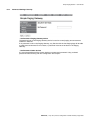
• Set Password: Paging Gateway device
The password set on the Paging Gateway device is used to control paging announcements
made from iDevices.
If no password is set on the Paging Gateway, any iDevice with the free Paging App will be able
to make announcements! For this reason, a password must be set at least on the Paging
Gateway.
• Set Password: Other devices
It is recommended that all the system devices are password protected. Using a shared
password makes working with the confguration tool simpler.
BARIX AG | 1. Apr. 2015 | Device Confguration via Web Interface | Page 29/35
Simple Paging Solution - User Manual
8.1.7.1
Discovery function
This tab shows the list of simple paging devices online on the local network, reporting the
following parameters for each device:
•
•
•
•
•
•
8.1.7.2
Zone Id
Zone Name
Status: “idle”,”busy” or “Unavailable”; this status refers to Paging messages only
Station: This is the type of device; “Gateway”, “End Point” or “Master”.
IP: The IP address of the device.
MAC: the mac address of the device.
Status Page
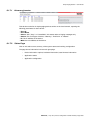
Click on this tab to see a summary of the system status and working confguration.
The page shows information in three main groupings:
•
Device information: uptime, hardware information, base frmware information
•
Application status
•
Application confguration
BARIX AG | 1. Apr. 2015 | Device Confguration via Web Interface | Page 30/35
Simple Paging Solution - User Manual
8.1.7.3
Defaults
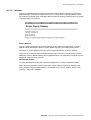
Clicking on Defaults displays a page that allows the user to reset the frmware to the factory
default settings, which can be useful when errors in confguration are giving problems. Note,
this software-controlled action does NOT afect the network settings, so that there is no danger
of losing access to the device!
Factory Defaults
Click on "Revert to defaults" to revert all settings except "Network confguration" to factory
defaults. While restarting the device a screen appears showing a number counting down.
On startup, a screen appears confrming the successful application of factory defaults.
This function is important when changing frmware types, since they use the device memory
diferently. If factory default settings are not applied when a new application is loaded, the new
application might not work correctly.
Hard default settings
To revert all settings (including the "Network confguration") to factory defaults the Reset
button has to be pressed for about 10 seconds while the device is powered. Restoring the
factory defaults using the Reset button is not possible if the “Factory Default” option in the
“Security” web page is disabled.
BARIX AG | 1. Apr. 2015 | Device Confguration via Web Interface | Page 31/35
Simple Paging Solution - User Manual
8.1.7.4
Update
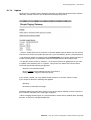
Clicking on the “Update” button displays functionality to update the device frmware. Visit the
“BarixAG” youtube channel to see a video demonstrating this process.
• Click on "Please click here to continue" to start the update process. Before you click the link
note that once started, the update process can only be cancelled by power cycling the device.
• The device will restart in a special mode called Bootloader and a screen appears showing a
number counting down. In Bootloader mode the standard http port 80 is always used.
• To upload a resource click on "Browse..." to locate the frmware or application fle you want
to update. Once selected, click on "Upload". This process can take a few minutes. After a
successful upload the following text appears:
"Resource" successfully loaded.
Click on update before updating the next component or
unplug the power supply to reboot the device.
If you choose "update" you may upload another resource, or click the "reboot" button.
If you choose to reboot the following text appears:
rebooting...
Click here to reload the main page.
The device takes a few seconds to reboot. If you have a fxed IP address or DHCP resolves to
the IP address used before, the main page will appear.
• When changing frmware types, it is recommended to restore factory defaults after uploading
frmware, to avoid any unexpected behaviour.
BARIX AG | 1. Apr. 2015 | Device Confguration via Web Interface | Page 32/35
Simple Paging Solution - User Manual
8.1.7.5
Reboot
Click on the link “Reboot the device” to reboot the device.
BARIX AG | 1. Apr. 2015 | Device Confguration via Web Interface | Page 33/35
Simple Paging Solution - User Manual
9
9.1
Document Management
Version History
Version
Author
Description
Date
1.0
DG
First release
6 December 2013
1.1
DG
Addition of Pre-gong, Emergency Notifcation and Background Music
features
26th March 2015
th
Table 3: Document version history
BARIX AG | 1. Apr. 2015 | Document Management | Page 34/35
Simple Paging Solution - User Manual
10
Legal Information
© 2015 Barix AG, Zurich, Switzerland.
All rights reserved.
All information is subject to change without notice.
All mentioned trademarks belong to their respective owners and are used for reference only.
Barix and Simple Paging Solution are trademarks of Barix AG, Switzerland and are registered in
certain countries.
For information about our devices and the latest version of this manual please visit
www.barix.com.
Barix AG
Seefeldstrasse 303
8008 Zürich
SWITZERLAND
T
F
+41 43 433 22 11
+41 44 274 28 49
www.barix.com
[email protected]
[email protected]
BARIX AG | 1. Apr. 2015 | Legal Information | Page 35/35