1
Table of Contents............................. 2
Usage Notice.................................... 3
Safety Information.................................. 3
Precautions.............................................. 4
Introduction...................................... 6
Package Overview................................... 6
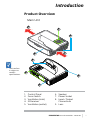
Product Overview.................................... 7
Main Unit.................................................. 7
Control Panel............................................ 8
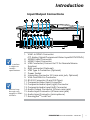
Input/Output Connections...................... 9
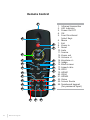
Remote Control...................................... 10
Installation...................................... 11
Connecting the Projector......................11
Connect to Computer/Notebook.......... 11
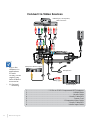
Connect to Video Sources...................... 12
Powering the Projector On / Off..........13
Powering On the Projector.................... 13
Powering Off the Projector.................... 14
Warning Indicator.................................. 14
Adjusting the Projected Image.............15
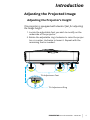
Adjusting the Projector�s Height ........... 15
Adjusting the Projector�s Focus............. 16
Adjusting Projection Image Size
(Diagonal)................................................ 17
User Controls................................. 19
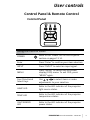
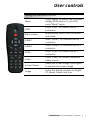
Control Panel & Remote Control.........19
Control Panel.......................................... 19
Remote Control...................................... 20
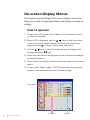
On-screen Display Menus....................22
How to operate ...................................... 22
Picture..................................................... 23
Screen...................................................... 25
Setting...................................................... 27
Volume.................................................... 29
Options.................................................... 30
Options | Laser Settings........................ 32
3D............................................................. 33
LAN........................................................... 34
2
www.i3-learning.com
Multimedia..................................... 40
Accessing Multimedia Files...................40
How to access Multimedia mode......... 40
Appendices..................................... 47
Installing and Cleaning the Optional
Dust Filter...............................................47
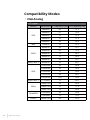
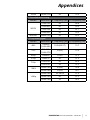
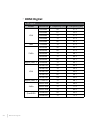
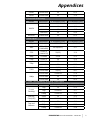
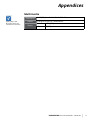
Compatibility Modes.............................48
VGA Analog.............................................. 48
HDMI Digital............................................ 50
RS232 Commands and Protocol
Function List..........................................52
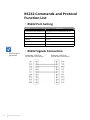
RS232 Port Setting.................................. 52
RS232 Signals Connection..................... 52
Commands Set List................................ 53
Regulation & Safety Notices.................56
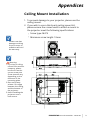
Ceiling Mount Installation....................59