1
User controls
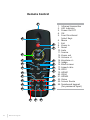
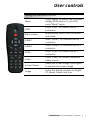
Using the Remote Control
Menu
Press “Menu” to launch the on-screen
display (OSD) menu. To exit OSD,
press “Menu” again.
VGA1
Press “VGA1” to choose VGA IN 1
connector.
Black screen
Momentarily turns off/on the audio
and video.
HDMI1
Press “HDMI1” to choose HDMI IN 1
connector.
HDMI2
Press “HDMI2” to choose HDMI IN 2
connector.
VGA2
Press “VGA2” to choose VGA IN 2
connector.
Video
Press “Video” to choose Composite
video source.
Screen freeze
Pause the screen image. Press again
to resume the screen image.
Image
Select the display mode from Bright,
PC, Movie, Game, and User.
i3PROJECTOR manual L3302FHD - L3002UW
21