1
Installing GFI MailEssentials
Introduction to installing GFI MailEssentials
This chapter shows you how to install and configure GFI
MailEssentials. GFI MailEssentials can be installed in two ways:
Installation option 1: Installing GFI MailEssentials on the
Microsoft Exchange Server 2000/2003/2007 machine
Simply install GFI MailEssentials on the Microsoft Exchange Server
2000/2003/2007 machine. If you are installing on Microsoft Exchange
Server 2007, you either need to have Mailbox Server Role and Hub
Transport Server Role installed or Hub Transport Server Role
installed. GFI MailEssentials cannot be installed on a Microsoft
Exchange Server 2007 machine with only Mailbox Server Role
installed. See 'Installing GFI MailEssentials on the Microsoft Exchange
Server 2000/2003/2007 machine’ for instructions on how to install this
deployment option.
NOTE: If you are installing GFI MailEssentials on Microsoft Exchange
Server 2000/2003 or Microsoft Exchange Server 2007 with both
Mailbox Server Role and Hub Transport Role installed, you can
configure GFI MailEssentials to direct email marked as spam directly
to the user’s junk email folder. This makes it easy for users to
periodically review spam email for false positives. If you install GFI
MailEssentials in the DMZ, or in front of Microsoft Exchange Server
2000/2003, or on a Microsoft Exchange Server 2007 machine that
does not have the Mailbox Server Role installed, this feature will not
be available.
Installation option 2: Installing GFI MailEssentials on a
separate machine
If you are not running Microsoft Exchange Server 2000/2003/2007 or
wish to separate the GFI MailEssentials installation from the Microsoft
Exchange Server 2000/2003/2007 machine, you can install GFI
MailEssentials on a separate machine.
NOTE: In a Microsoft Exchange Server 2007 environment, the mail
relay server in the DMZ can be a machine running Microsoft
Exchange Server 2007 with the Edge Transport Server Role installed.
This also allows you to keep your corporate mail server behind the
firewall. GFI MailEssentials will act as a smart host/mail relay server in
the perimeter network (also known as DMZ, demilitarized zone, and
screened subnet).
Additional advantages are:
•
You can perform maintenance on your mail server machine, whilst
still receiving email from the Internet.
GFI MailEssentials 14 user manual
1BInstalling GFI MailEssentials • 5
•
You use less resources on your mail server machine
•
The GFI MailEssentials machine can have a lower specification
then the mail server machine and can process email faster
•
Additional fault tolerance – if anything happens with your mail
server you can still receive email, which is queued on the GFI
MailEssentials machine.
NOTE 1: This separate machine does not need to be dedicated to GFI
MailEssentials; it can run other applications, such as GFI MailSecurity.
If you choose this option, you have to configure IIS before installing
GFI MailEssentials.
NOTE 2: If installing on a Microsoft Exchange Server 2007 machine
with the Edge Transport Server Role, you do not need to install or
configure the IIS SMTP service, since Microsoft Exchange Server
2007 has its own built in SMTP server.
Go to the paragraph 'Installing GFI MailEssentials on a separate
machine' for instructions on how to do this.
IMPORTANT: Do not judge the spam detection rate of GFI
MailEssentials until you have allowed the Bayesian filter to run for at
least one week. GFI MailEssentials can achieve the highest detection
rate compared to other anti-spam solutions because it adapts
specifically to your emails. Be patient and wait at least a week before
you evaluate it.
Upgrading from previous versions
If you are currently using a previous version of GFI MailEssentials,
you can upgrade your current installation whilst retaining all your
existing configuration settings. You will need to enter the fully
purchased license key within 10 days of installing the upgrade. For
information on how to obtain the new license key, visit
http://customers.gfi.com.
NOTE: Only GFI MailEssentials version 9, 10, 11 and 12 can be
upgraded to GFI MailEssentials 14. Upgrades cannot be undone i.e.
you cannot revert to older versions once you have installed the latest
version.
To upgrade:
1. Launch the GFI MailEssentials 14 setup file on the machine on
which you have installed GFI MailEssentials. Setup will prompt you
whether you wish to remove the current version of GFI MailEssentials
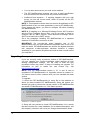
and install GFI MailEssentials 14. Click Yes to proceed.
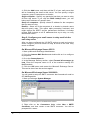
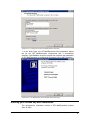
Screenshot 4 - Confirm the upgrade
2. Setup will now proceed to install GFI MailEssentials 14 in exactly
the same manner as a new installation (for a detailed description, see
this chapter), however it will not let you change the destination folder.
6 • 1BInstalling GFI MailEssentials
GFI MailEssentials 14 user manual
This section applies to GFI MailEssentials 9 users only
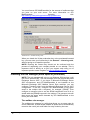
When the GFI MailEssentials 14 setup has copied all the installation
files, it will notify you that it needs to convert the Bayesian weights file
to the new format used in GFI MailEssentials 10 onwards. The new
format is more compact and uses less memory. During this conversion
process, a progress dialog box is displayed on screen. Once the
conversion is ready, click Finish to complete the upgrade.
Installing GFI MailEssentials on the Microsoft Exchange Server
2000/2003/2007 machine
System requirements
•
Windows Server 2008 (x64) or Windows Server
Standard/Enterprise (x86 or x64) or Windows
Professional/Server/Advanced Server (SP1 or higher)
•
Microsoft Exchange Server 2007, 2003, 2000 (SP1)
2003
2000
NOTE 1: GFI MailEssentials also supports Microsoft Exchange
Server 2007 (SP1)
NOTE 2: When using Small Business Server, ensure you have
installed Service Pack 2 for Exchange Server 2000 and Service
Pack 1 for Exchange Server 2003.
NOTE 3: To install GFI MailEssentials on Microsoft Exchange
Server 2007 you also need to install the Microsoft Exchange
Server MAPI Client and Collaboration Data Objects 1.2.1.
NOTE 4: When installing GFI MailEssentials on a Microsoft
Exchange Server 2007 machine, only the 64-bit production version
of Microsoft Exchange Server 2007 is supported.
•
Microsoft .NET Framework 2.0
•
If you are going to use the GFI MailEssentials reporter, Microsoft
XML core services is required. This is included in the GFI
MailEssentials installation and will be installed automatically if your
operating system is UK/US English.
•
For list server only: The list server feature requires the
installation of Microsoft Message Queuing Services. This is a
scalable event processing system service developed by Microsoft.
It is included with every Microsoft Windows 2000/2003 version,
although not always installed by default. For more information on
how to install it, please see the chapter ‘Configuring the list server’.
If you do not plan to use the list server feature, you do not need to
install Microsoft MSMQ.
IMPORTANT: Disable anti-virus software from scanning the GFI
MailEssentials, Microsoft IIS, and Microsoft Exchange Server
directories. Anti-virus products are known to both interfere with normal
operation as well as slow down any software that requires file access.
In fact, Microsoft does not recommend running file based anti-virus
software on the Microsoft Exchange Server. For more information
read
the
following
article:
http://kbase.gfi.com/showarticle.asp?id=KBID001824
GFI MailEssentials 14 user manual
1BInstalling GFI MailEssentials • 7
IMPORTANT: Make sure that backup software is not backing up any
of the GFI MailEssentials directories at any point.
NOTE: If you have a cluster please read the following Knowledge
Base
article
prior
to
installing
GFI
MailEssentials:
http://kbase.gfi.com/showarticle.asp?id=KBID001639
GFI MailEssentials will need to start and stop the Microsoft Exchange
Server services during installation.
Running GFI MailEssentials setup
1. On the Microsoft Exchange Server machine, log-on as administrator
and run the GFI MailEssentials setup file.
2. Select the language in which you would like to install GFI
MailEssentials (English or German).
3. A welcome dialog will appear. Close all the other running Windows
programs and click Next to continue.
NOTE: At this stage GFI MailEssentials will be performing backend
checks such as searching for installed applications and it might take
some time for the Next button to appear.
4. GFI MailEssentials will prompt you to check for a more recent
version or build. Always use the latest version.
5. Read the licensing agreement carefully. To proceed with the
installation, select I accept the license agreement and click Next.
6. To install GFI MailEssentials to the default location, click Next to
continue. Alternatively, to specify a custom installation folder click
Browse, select a new installation path and click Next to continue.
7. Enter your name, company name, and license key. If you are
evaluating the product, leave the default ‘Evaluation’. Click Next.
8. Setup will ask you for the administrator email. GFI MailEssentials
will use the administrator email to send critical notifications.
9. If you are installing GFI MailEssentials on a Microsoft Exchange
Server 2000/2003 configured as a front-end server, or on a Microsoft
Exchange 2007 Edge Transport Server Role machine (i.e. in a DMZ in
front of another Microsoft Exchange Server), you can choose whether
you want to install GFI MailEssentials in Active Directory mode or in
SMTP mode. Active Directory mode allows you to select users present
in Active Directory for user-based configuration/rules, such as a
disclaimer. However, on a front-end server not all users are available.
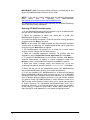
In this case, it is better to select SMTP mode, which allows you to
input the SMTP email address for user based configuration/rules.
8 • 1BInstalling GFI MailEssentials
GFI MailEssentials 14 user manual
Screenshot 5 - Selecting SMTP mode or Active Directory mode
10. If you do not have Microsoft Message Queuing Services (MSMQ)
installed, setup will ask you whether you wish to install it. The list
server feature requires this service. Microsoft Message Queuing
Service is a scalable event processing system service developed by
Microsoft. It is included with every Microsoft Windows 2000/2003 and
XP version, although not always installed by default. If you do not plan
to use the list server feature, or if you wish to install it later, you can
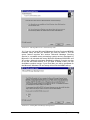
click No to continue set-up. If you click Yes, you will be prompted for
the Microsoft Windows CD and setup will launch the MSMQ set-up.
Screenshot 6 - Installing Microsoft Message Queuing Service
GFI MailEssentials 14 user manual
1BInstalling GFI MailEssentials • 9
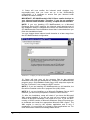
11. Setup will now confirm the inbound email domains (e.g.
mycompany.com) that you have set up in the IIS/Exchange
configuration. It is important to ensure that your inbound email
domains are listed correctly.
IMPORTANT: GFI MailEssentials ONLY filters emails destined to
your inbound email domain. Therefore, if you do not configure
your inbound email domains correctly, no spam will be detected.
NOTE: If you are installing GFI MailEssentials on a Microsoft
Exchange Server 2007 machine, the inbound email domains step of
the installation wizard is skipped since these are determined from the
GFI MailEssentials Post-Installation wizard that is launched when you
finish this installation wizard.
You can change these inbound email domains at a later stage from
the GFI MailEssentials configuration.
Screenshot 7 - Configure your inbound email domain
12. Setup will now copy all the program files to the selected
destination and finish the installation by creating a GFI MailEssentials
program group. Click Finish to finish setup. After setup has copied all
the files, it will ask if it can restart the SMTP service.
NOTE 1: If you are installing GFI MailEssentials on x64 machine, the
files will be installed under the c:\program files (x86)\ folder.
NOTE 2: If you are installing on a Microsoft Exchange Server 2007
machine, you will not be prompted to restart the SMTP service.
13. After the installation, setup will check if you have the Microsoft
XML engine installed. If you do not, and you are running a US/UK
version of Microsoft Windows it will install it for you. If you are NOT
running a UK/US version of Microsoft Windows, setup will prompt you
to download and install the appropriate Microsoft XML engine. The
XML engine is used by the reporter application and is only 2
megabytes. It is most likely to be used by other applications too. For
more information read this Knowledge Base article:
10 • 1BInstalling GFI MailEssentials
GFI MailEssentials 14 user manual
http://kbase.gfi.com/showarticle.asp?id=KBID001584.
NOTE: If you are installing on a Microsoft Exchange Server 2007
machine, the installation will launch the GFI MailEssentials PostInstallation Wizard. Refer to the ‘GFI MailEssentials Post-Installation
Wizard’ section further on in this chapter for information on how to use
this wizard.
14. Upon first installation, GFI MailEssentials will display the Quick
Start Guide that introduces the GFI MailEssentials Configuration
console and explains how to quickly configure/customize the most
powerful GFI MailEssentials anti-spam filters.
Installing GFI MailEssentials on a separate machine
If you install GFI MailEssentials on a separate machine that is not your
gateway SMTP server, ensure that you configure the Perimeter
SMTP Servers option in the GFI MailEssentials configuration after
you finish the installation. The perimeter SMTP server is the gateway
SMTP server which receives your emails directly from the internet and
you will have to specify the IP address of your perimeter SMTP server
in GFI MailEssentials, especially if you are going to use the SPF filter
feature. For more information on how to setup your gateway SMTP
server, please refer to the ‘Defining your Perimeter (Gateway) SMTP
Server’ section of the ‘Configuring Anti-spam’ chapter in this manual.
Effectively GFI MailEssentials will act as a mail relay server between
the perimeter (gateway) SMTP server and the recipients’ inboxes.
System requirements
•
Windows Server 2008 (x86 or x64) or Windows Server 2003
Standard/Enterprise (x86 or x64) or Windows 2000
Professional/Server/Advanced Server (Service Pack 1 or higher)
or Windows XP
NOTE: Since the version of Internet Information Services (IIS)
included in Windows XP is limited to serving only 10 simultaneous
client connections, installing GFI MailEssentials on a machine
running Windows XP could affect its performance.
•
Microsoft .Net framework 2.0
•
Microsoft IIS SMTP service installed and running as an SMTP
relay to your mail server. This means that the MX record of your
domain must be pointing to the machine on which you will install
GFI MailEssentials. For more information on how to configure IIS5:
http://support.microsoft.com/support/kb/articles/Q293/8/00.ASP.
NOTE: If you are going to install GFI MailEssentials on the
Microsoft Exchange 2007 Edge Transport Server Role, you do not
need to install the IIS SMTP service since Microsoft Exchange
Server 2007 has its own built in SMTP server.
•
If you are going to use the GFI MailEssentials reporter, Microsoft
XML core services is required. This is included in the GFI
MailEssentials installation and will be installed automatically if your
operating system is UK/US English.
•
For list server only: The list server feature requires the
installation of Microsoft Message Queuing Services. This is a
scalable event processing system service developed by Microsoft.
GFI MailEssentials 14 user manual
1BInstalling GFI MailEssentials • 11
It is included with every Microsoft Windows 2000/2003 version,
although not always installed by default. For more information on
how to install it, please see the chapter ‘Configuring the list server’.
If you do not plan to use the list server feature, you do not need to
install Microsoft MSMQ.
•
Access to a mail server machine such as Microsoft Exchange
Server 2007, 2003, 2000 (SP1), 5.5, 5, 4, or Lotus Notes 4.5 and
up, or any SMTP/POP3 mail server.
IMPORTANT: Disable anti-virus software from scanning the GFI
MailEssentials, Microsoft IIS, and Microsoft Exchange Server
directories. Anti-virus products are known to both interfere with normal
operation as well as slow down any software that requires file access.
In fact, Microsoft does not recommend running file based anti-virus
software on the Microsoft Exchange Server. For more information
read
the
following
article:
http://kbase.gfi.com/showarticle.asp?id=KBID001824
IMPORTANT: Make sure that backup software is not backing up any
of the GFI MailEssentials directories at any point.
Installing & configuring IIS SMTP service
GFI MailEssentials uses the Microsoft IIS SMTP service as its SMTP
Server and thus the SMTP server must be configured as a mail relay
server first.
NOTE: If you have a Microsoft Exchange Server 2007 environment
and are going to install GFI MailEssentials on the Microsoft Exchange
2007 Edge Transport Server Role machine, you do not need to install
or configure the IIS SMTP service since Microsoft Exchange Server
2007 has its own built in SMTP server.
About the Microsoft IIS SMTP service
The SMTP service is part of Microsoft IIS, which is part of Microsoft
Windows 2000/2003. It is used as the message transfer agent of
Microsoft Exchange Server, except Microsoft Exchange Server 2007
which has its own built in SMTP server, and has been designed to
handle large amounts of email traffic. The Microsoft IIS SMTP service
is included in every Microsoft Windows distribution.
NOTE: If you have a cluster please check this Knowledge Base article
prior
to
installing
GFI
MailEssentials:
http://kbase.gfi.com/showarticle.asp?id=KBID001639
To install and configure the Microsoft IIS SMTP service as a mail relay
server, follow these steps:
Step 1: Verify the Installation of the SMTP Service
1. From the Start menu access the Control Panel.
2. Open the Add or Remove Programs and click on the Add or
Remove Windows Components.
3. Click the Internet Information Services (IIS) component and click
the Details button.
4. Verify that the SMTP Service checkbox is selected. If it is not
selected, click it to select it.
12 • 1BInstalling GFI MailEssentials
GFI MailEssentials 14 user manual
5. Click the OK button, and then follow the installation instructions that
are displayed.
Step 2: Specify mail relay server name and assign an IP
1. From the Start menu, access the Administrative Tools.
2. Click on the Internet Information Services (IIS) Manager icon.
3. Expand the tree under the server name. Right click on the Default
SMTP Virtual Server and select Properties.
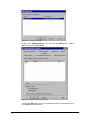
4. Assign an IP address to the server and click the OK button.
Screenshot 8 - Specify mail relay server name and assign IP
Step 3: Configure the SMTP Service to relay email to your
mail server
In this step, you configure the SMTP service to relay inbound
messages to your mail server.
NOTE: During installation, GFI MailEssentials will perform this step for
you automatically. GFI MailEssentials will ask for your local domain
name, and create it as a remote domain. You will see the domain
listed in the right pane. However, if you do this step manually, you can
confirm that your relay server is working properly before running the
GFI MailEssentials installation.
Creating a local domain in IIS to route email
Click the Start menu, point to Programs, click Administrative Tools,
and then click Internet Services Manager.
GFI MailEssentials 14 user manual
1BInstalling GFI MailEssentials • 13
Expand the tree under the server name, and then expand the Default
SMTP Virtual Server. By default, you should have a Local (Default)
domain with the fully qualified domain name of the server.
Configure the domain for inbound:
1. Right click the Domains icon, click New, and then click Domain.
2. Click Remote, click Next, and then type the domain name in the
Name box. Click Finish.
Screenshot 9 - Configure the domain
IMPORTANT: Ensure that you add all your inbound email
domains, for example ‘mycompany.com’, otherwise inbound
email will not be filtered for spam.
NOTE: Upon installation, GFI MailEssentials will import inbound email
domains from the IIS SMTP service. If you want to add additional
inbound email domains, you have to add these domains in the GFI
MailEssentials configuration. For more information, see ‘Adding
additional inbound email domains’ in the ‘Miscellaneous options’
chapter.
If you add additional inbound email domains in IIS SMTP service, they
will not be automatically recognized until you enter them in the GFI
MailEssentials configuration. This allows you to setup remote smart
hosts for particular domains that are not local.
14 • 1BInstalling GFI MailEssentials
GFI MailEssentials 14 user manual
Configure the domain to relay email to your mail server:
1. Access the Properties dialog for the domain that you just created
and check the Allow the Incoming Mail to be Relayed to this
Domain checkbox.
2. If this is being set up for an internal domain, you should specify the
server that receives email for the domain name by the IP address in
the Route domain dialog box.
3. Click the Forward all mail to smart host option, and then type the
IP address of the server that is responsible for email for that domain in
square brackets. For example: [123.123.123.123]
NOTE: Typing the IP address of the server in brackets is necessary
so that the server recognizes that this is an IP address, and thus
avoids any attempts at performing a DNS lookup.
4. Click the OK button.
Step 4: Secure your mail relay server
In this step, you will specify your mail server name, and any other mail
servers that will send email via this mail relay server. Effectively you
will limit the servers that can send email to the internet through this
server. If you do not create restrictions, anyone can use your mail
relay server as an open relay for spamming. To prevent this follow
these steps:
1. Open the Properties of the Default SMTP Virtual Server.
2. On the Access tab, click Relay.
Screenshot 10 - Relay options
3. Click Only the list below.
GFI MailEssentials 14 user manual
1BInstalling GFI MailEssentials • 15
4. Click the Add button, and then add the IP of your mail server that
will be forwarding the email to this server. You can specify a single
computer, group of computers or a domain:
Single computer - Specify one particular host that you want to relay
off from this server. If you click the DNS Lookup button, you can
lookup an IP address of a specific host.
Group of computers - Specify a base IP address for the computers
that you want to relay.
Domain - Select all of the computers in a domain by domain name
that will openly relay. This option adds processing overhead, and
might reduce the SMTP service performance because it includes
reverse DNS lookups on all IP addresses that try to relay, to verify
their domain name.
Step 5: Configure your email server to relay email via the
mail relay server
After you have configured the IIS SMTP service to send and receive
email, configure your mail server to relay all email to the mail relay
server as follows:
On Microsoft Exchange Server 4/5/5.5:
1. Start up Microsoft Exchange Administrator.
2. Go to the Internet Mail Service and double-click on it to configure
its properties.
3. Go to the Connections tab.
4. In the Message Delivery section, select Forward all messages to
host. Enter the computer name or IP of the machine running GFI
MailEssentials.
5. Click the OK button and restart the Microsoft Exchange Server.
This can be done from the services applet.
On Microsoft Exchange Server 2000/2003:
You will need to setup an SMTP connector that forwards all email to
GFI MailEssentials:
1. Start up Exchange System Manager.
Screenshot 11 - Forwarding email to GFI MailEssentials machine
2. Right click on the Connectors Node, select New > SMTP
Connector, and then create a new SMTP connector. You will be
prompted for a name.
16 • 1BInstalling GFI MailEssentials
GFI MailEssentials 14 user manual
3. Select the option Forward all mail through this connector to the
following smart host, and type in the IP of the GFI MailEssentials
server (the mail relay server) enclosed within square brackets, for
example: [100.130.130.10].
Screenshot 12 - Specifying IP of GFI MailEssentials machine
4. Click Add in the Local bridgeheads section, and select the
appropriate virtual SMTP Server instances that you want to forward
email for.
GFI MailEssentials 14 user manual
1BInstalling GFI MailEssentials • 17
Screenshot 13 - Adding a bridgehead
5. Go to the Address Space tab, and click the Add button. Select
SMTP and click the OK button.
Screenshot 14 - Adding SMTP as address space
6. Click the OK button to exit. All emails will now be forwarded to the
GFI MailEssentials machine.
18 • 1BInstalling GFI MailEssentials
GFI MailEssentials 14 user manual
If you have Lotus Notes or an SMTP/POP3 server:
Check the mail server documentation on how to forward email to the
GFI MailEssentials machine.
Step 6: Point the MX record of your domain to the mail relay
server.
Since the new mail relay server must receive all inbound email first,
update the MX record of your domain to point to the IP of the new mail
relay server. Otherwise, email will continue to go to your mail server
and by-pass GFI MailEssentials.
If you run your own DNS server, you need to update this in your DNS
server. If your ISP manages it for you, you need to ask your ISP to
update the MX record for you. After you have done this, check if the
MX record is correct using the following procedure.
Checking if the MX record for your domain is set correctly
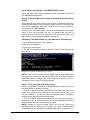
1. Open command prompt. Type nslookup
2. Now type 'set type=mx'
3. Enter your mail domain.
4. The MX record should return a single IP. This IP must be the mail
relay server.
Screenshot 15 - Checking the MX record of your domain
NOTE: If you wish to send out email using a smart host (used when
using dial-up) or receive email using ETRN, you will need to perform
additional steps to configure IIS 5 as a mail relay server. For more
information, refer to the IIS 5 documentation.
Step 7: Test your new mail relay server
Before you proceed to install GFI MailEssentials, verify that your new
mail relay server is working correctly.
1. Test IIS 5 SMTP inbound connection of your mail relay server by
sending an email from an external account to an internal user (you
can use hotmail, if you do not have an external account available).
Verify that the mail client received the email.
2. Test IIS 5 SMTP outbound connection of your mail relay server by
sending an email to an external account from an internet email client.
Verify that the external user received the email.
NOTE: Instead of using an email client, you can use Telnet and
manually send an email. This will give you more troubleshooting
information. Here is the link to the Microsoft KB article on how to do it:
GFI MailEssentials 14 user manual
1BInstalling GFI MailEssentials • 19
http://support.microsoft.com/support/kb/articles/Q153/1/19.asp
Step 8: Running GFI MailEssentials setup
1. On the newly configured mail relay machine, log-on as
administrator and run the GFI MailEssentials setup file.
2. Select the language in which you would like to install GFI
MailEssentials (English or German).
3. A welcome dialog will appear. Close all the other running Windows
programs and click Next to continue.
NOTE: At this stage GFI MailEssentials will be performing backend
checks such as searching for installed applications and it might take
some time for the Next button to appear.
4. GFI MailEssentials will prompt you to check for a later GFI
MailEssentials version. Always use the latest version.
5. Read the licensing agreement carefully. To proceed with the
installation, select I accept the license agreement and click Next.
6. To install GFI MailEssentials to the default location, click Next to
continue. Alternatively, to specify a custom installation folder click
Browse, select a new installation path and click Next to continue.
7. Enter your name, company, and license key. If you are evaluating
the product, leave the default ‘Evaluation’. Click Next
8. If you are installing GFI MailEssentials on Microsoft Exchange
Server, Setup will now ask you to specify your mail server IP, port and
your local domain:
•
Specify the IP of your mail server (e.g. Microsoft Exchange Server
name) and the port of the mail server.
•
Specify your local domain. The local domain is the last part of your
internal email address, for example gfi.com.
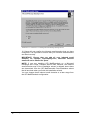
Screenshot 16 - Specify mail server IP and domain
20 • 1BInstalling GFI MailEssentials
GFI MailEssentials 14 user manual
9. Setup will ask you for the administrator email. GFI MailEssentials
will use the administrator email to send critical notifications.
10. If you are installing GFI MailEssentials on a machine that is part of
a domain and has Active Directory, setup will ask you whether you
want to install in Active Directory mode or in SMTP mode. Active
Directory mode allows you to select users present in Active Directory
for user-based configuration/rules, such as a disclaimer. However, if
your machine is in the DMZ, then it is better to select SMTP mode. In
this mode, all user-based configuration/rules will require you to input
the SMTP email address.
Screenshot 17 - Selecting SMTP mode or Active Directory mode
11. If you do not have Microsoft Message Queuing Services (MSMQ)
installed, setup will ask you whether you wish to install it. The list
server feature requires this service. Microsoft Message Queuing
Service is a scalable event processing system service developed by
Microsoft. It is included with every Microsoft Windows 2000/2003 and
XP version, although not always installed by default. If you do not plan
to use the list server feature, or if you wish to install it later, you can
click No to continue set-up. If you click Yes, you will be prompted for
the Microsoft Windows CD and setup will launch the MSMQ setup.
GFI MailEssentials 14 user manual
1BInstalling GFI MailEssentials • 21
Screenshot 18 - Screenshot 15- Installing Microsoft Message Queuing Service
12. Setup will now confirm the inbound email domains that you have
configured. It is important to ensure that your inbound email domains
are listed correctly.
IMPORTANT: Ensure that you add all your inbound email
domains, for example ‘mycompany.com’, otherwise inbound
email will not be filtered for spam.
NOTE: If you are installing GFI MailEssentials on a Microsoft
Exchange 2007 Edge Transport Server Role machine, the inbound
email domains step of the installation wizard is skipped since these
are determined from the GFI MailEssentials Post-Installation wizard
that is launched when you finish this installation wizard.
You can change these inbound email domains at a later stage from
the GFI MailEssentials configuration.
22 • 1BInstalling GFI MailEssentials
GFI MailEssentials 14 user manual
Screenshot 19 - Confirm your inbound email domain
13. Setup will now copy all program files to the selected destination,
and finish the installation by creating a GFI MailEssentials program
group. Click Finish to end setup. After setup has copied all the files, it
will ask if it can restart the SMTP service.
NOTE 1: If you are installing GFI MailEssentials on a x64 machine
with Microsoft Exchange Server 2007, the files will be installed under
the c:\program files (x86)\ folder.
NOTE 2: If you are installing on a Microsoft Exchange 2007 Edge
Transport Server Role machine, you will not be prompted to restart the
SMTP service.
14. After installation, setup will check if you have the Microsoft XML
engine installed. If you do not, and you are running a US/UK version
of Microsoft Windows it will install it for you. If you are NOT running a
UK/US version of Microsoft Windows, setup will prompt you to
download and install the appropriate Microsoft XML engine. The XML
engine is used by the reporter application and is only 2 megabytes. It
is most likely to be used by other applications too. For more
information read the following Knowledge Base article:
http://kbase.gfi.com/showarticle.asp?id=KBID001584
If you have IIS services running, GFI MailEssentials will need to stop
these services during installation to install certain files. After it has
done that, it will offer to restart these services.
NOTE: If you are installing on a Microsoft Exchange 2007 Edge
Transport Server Role machine, the installation will launch the GFI
MailEssentials Post-Installation Wizard. Refer to the following section
for information on how to use this wizard.
15. Upon first installation, GFI MailEssentials will display the Quick
Start Guide that introduces the GFI MailEssentials Configuration
console and explains how to quickly configure/customize the most
powerful GFI MailEssentials anti-spam filters.
GFI MailEssentials 14 user manual
1BInstalling GFI MailEssentials • 23
GFI MailEssentials Post-Installation Wizard
NOTE: This section applies only when installing GFI MailEssentials on
a Microsoft Exchange Server 2007 machine.
IMPORTANT: You need to complete this wizard for GFI
MailEssentials to work with Microsoft Exchange Server 2007.
The GFI MailEssentials installation wizard launches the GFI
MailEssentials Post-Installation Wizard when you click Finish. The
GFI MailEssentials Post-Installation Wizard registers GFI
MailEssentials with the local installation of Microsoft Exchange Server
2007 so that it can process the emails passing through the server.
To complete the GFI MailEssentials Post-Installation Wizard, follow
these steps:
1. Click Next in the welcome page.
Screenshot 20 - GFI MailEssentials Post-Installation Wizard welcome page
2. The wizard will collect information from the Microsoft Exchange
Server 2007 installation, such as the list of inbound email domains
and the server roles installed, for example Hub Transport Server Role.
24 • 1BInstalling GFI MailEssentials
GFI MailEssentials 14 user manual
Screenshot 21 - Collecting information from Microsoft Exchange Server 2007
3. The wizard will display the accepted domain list collected from
Microsoft Exchange Server 2007. If you need to specify another local
domain, type it in the Inbound email domains box and click Add. If
you want to remove a domain that you added from this page, click on
it from the list, and then click Remove.
NOTE 1: The inbound email domains you add from this page affect
the GFI MailEssentials installation only. The Microsoft Exchange
Server 2007 accepted domains list is not modified.
NOTE 2: GFI MailEssentials does not support the use of wildcards
when specifying inbound email domains. Thus, for example,
specifying *.gfimalta.com as an inbound email domain is not
supported.
NOTE 3: An asterisk (*) next to an inbound email domain is used to
differentiate between domains detected by Microsoft Exchange, and
those added manually. Inbound email domains shown with an asterisk
next to them are domains detected by Microsoft Exchange.
GFI MailEssentials 14 user manual
1BInstalling GFI MailEssentials • 25
Screenshot 22 – Inbound email domains list
4. Click Next to continue.
5. The wizard displays a list of the Microsoft Exchange Server 2007
server roles detected on this machine, and a list of the GFI
MailEssentials components it needs to register for it to be able to
process and scan emails passing through the server.
Screenshot 23 - Server roles detected and list of components to install.
6. Click Next to install the required GFI MailEssentials components.
26 • 1BInstalling GFI MailEssentials
GFI MailEssentials 14 user manual
Screenshot 24 - Installing the required GFI MailEssentials components
7. In the finish page, the GFI MailEssentials Post-Installation wizard
will list the GFI MailEssentials components that it successfully
installed. Click Finish to close the wizard and complete the installation
of GFI MailEssentials on a Microsoft Exchange Server 2007 machine.
Screenshot 25 - GFI MailEssentials Post-Installation Wizard finish page
Entering your license key after installation
The unregistered, evaluation version of GFI MailEssentials expires
after 10 days.
GFI MailEssentials 14 user manual
1BInstalling GFI MailEssentials • 27
You must license GFI MailEssentials for the amount of mailboxes that
you have on your mail server. For more information on GFI
MailEssentials
licensing
visit:
http://www.gfi.com/pricing/pricelist.aspx?product=me.
Screenshot 26 – General licensing node
When you obtain the 30-day evaluation key or the purchased licensed
key, you can enter your license key in the General > Licensing node,
without having to re-install the product.
NOTE: Entering the license key should not be confused with the
process of registering your company details on our website. This is
important since it allows us to give you support and notify you of
important product news. Register on http://customers.gfi.com.
Installing the rule manager (sorts spam to junk folder)
NOTE: The rule manager will only run on Windows 2000 and up. It will
not run on Windows NT. The rule manager does not support Microsoft
Exchange Server 2007. If you have a Microsoft Exchange Server
2007 environment, and GFI MailEssentials is not installed on the
Microsoft Exchange 2007 Mailbox Server Role machine, you can
configure Transport rules from the Microsoft Exchange Server 2007
configuration. To do this, configure GFI MailEssentials to tag spam
email in the subject with a keyword, for example, [SPAM]. Then
configure a transport rule to set the SPAM confidence level to 9 on
emails with the [SPAM] keyword in the subject. The transport rule will
then move the spam email detected by GFI MailEssentials to the
users’ junk mail folder.
The mailbox rule manager
The mailbox rule manager is a utility that allows you to setup rules for
users' mailboxes, so that emails marked as spam can be automatically
moved to the user's junk mail folder for easy review by the user.
28 • 1BInstalling GFI MailEssentials
GFI MailEssentials 14 user manual
How it works
You need to install the rule manager on the Microsoft Exchange
Server and specify the mailboxes which you wish to install the rule on.
Then you specify in the GFI MailEssentials configuration that all spam
email must be tagged.
NOTE: If you want to use the rule manager, select the TAG action
only. If you select any other type of action, the emails detected as
spam will not reach the mailbox of the user, and therefore the
rule will never be activated.
Screenshot 27 - Tag email to work in conjunction with Rules Manager
This way all spam will be tagged as [SPAM], and subsequently the
rules installed on the mailbox will then move the email tagged as
[SPAM] to another folder of choice, for example, the user’s junk mail
folder. The mailbox rule manager is applicable to:
•
Companies who have not installed GFI MailEssentials on the
Microsoft Exchange Server 2000/2003, but rather installed it as a
mail relay, for example in the DMZ
•
Companies using Microsoft Exchange 5.5
If you have installed GFI MailEssentials on the Microsoft Exchange
Server 2000/2003 machine itself, you do not need to run the mailbox
rule manager, because GFI MailEssentials will be able to route the
email itself to the user’s junk mail folder.
GFI MailEssentials 14 user manual
1BInstalling GFI MailEssentials • 29
Installing the rule manager and the Bayesian wizard
To install the rule manager and the Bayesian wizard:
1. Copy the file bayesianwiz.exe, located in the MailEssentials\bsw
folder, to the machine on which you wish to install these utilities.
2. Run bayesianwiz.exe, click Next and specify the path were the
Bayesian wizard and rule manager files will be extracted.
3. Click Yes to start installing the Bayesian Wizard.
NOTE: The Bayesian Wizard can only be installed on a separate
machine as a stand-alone tool. The server version of GFI
MailEssentials includes the Bayesian wizard by default, and thus can
be used without further configurations.
NOTE: The Bayesian wizard (bayesianwiz.exe) installation does not
create any icon or additional components in the GFI MailEssentials
program group. In order to launch the rule manager, run
rulemgmt.exe.
Configuring the rules on user’s mailboxes
To configure the rules on users’ mailboxes:
1. Run the rule manager application (rulemgmt.exe) from the GFI
MailEssentials
program
folder
(by
default
C:\Program
Files\GFI\MailEssentials).
Screenshot 28 - The rules manager
2. The main screen will show all the mailboxes it found on your server.
Now select the mailboxes which you want to install a rule on. You can
create two types of rules:
•
A rule which moves email marked as spam to the user’s junk mail
folder
30 • 1BInstalling GFI MailEssentials
GFI MailEssentials 14 user manual
•
A rule which deletes email marked as spam (This rule can be used
for users who wish to delete their spam automatically).
NOTE: You can select multiple mailboxes and configure rules for all of
them in one go (as long as the same rule applies to all).
3. Click Configure. By default, the rule will check for [SPAM] in the
subject. You should enter the exact phrase you configured in the GFI
MailEssentials configuration tag action box.
NOTE: If you change this, you will have to change the tag appended
by GFI MailEssentials at server level too.
4. Select whether you want to delete the spam emails or move the
spam emails to a separate folder. If you select to move spam email,
you will need to specify the folder name. If you specify for example
inbox\junk, then that folder will be created under the inbox folder. If
you specify just ‘junk’, then the folder will be created at the top level,
i.e. next to the inbox, for example.
5. Click Apply.
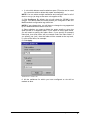
Screenshot 29 - Create a rule
6. All the mailboxes for which you have configured a rule will be
marked as blue.
GFI MailEssentials 14 user manual
1BInstalling GFI MailEssentials • 31