1
This section applies to GFI MailEssentials 9 users only
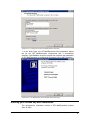
When the GFI MailEssentials 14 setup has copied all the installation
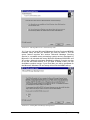
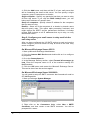
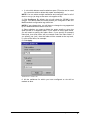
files, it will notify you that it needs to convert the Bayesian weights file
to the new format used in GFI MailEssentials 10 onwards. The new
format is more compact and uses less memory. During this conversion
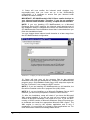
process, a progress dialog box is displayed on screen. Once the
conversion is ready, click Finish to complete the upgrade.
Installing GFI MailEssentials on the Microsoft Exchange Server
2000/2003/2007 machine
System requirements
•
Windows Server 2008 (x64) or Windows Server
Standard/Enterprise (x86 or x64) or Windows
Professional/Server/Advanced Server (SP1 or higher)
•
Microsoft Exchange Server 2007, 2003, 2000 (SP1)
2003
2000
NOTE 1: GFI MailEssentials also supports Microsoft Exchange
Server 2007 (SP1)
NOTE 2: When using Small Business Server, ensure you have
installed Service Pack 2 for Exchange Server 2000 and Service
Pack 1 for Exchange Server 2003.
NOTE 3: To install GFI MailEssentials on Microsoft Exchange
Server 2007 you also need to install the Microsoft Exchange
Server MAPI Client and Collaboration Data Objects 1.2.1.
NOTE 4: When installing GFI MailEssentials on a Microsoft
Exchange Server 2007 machine, only the 64-bit production version
of Microsoft Exchange Server 2007 is supported.
•
Microsoft .NET Framework 2.0
•
If you are going to use the GFI MailEssentials reporter, Microsoft
XML core services is required. This is included in the GFI
MailEssentials installation and will be installed automatically if your
operating system is UK/US English.
•
For list server only: The list server feature requires the
installation of Microsoft Message Queuing Services. This is a
scalable event processing system service developed by Microsoft.
It is included with every Microsoft Windows 2000/2003 version,
although not always installed by default. For more information on
how to install it, please see the chapter ‘Configuring the list server’.
If you do not plan to use the list server feature, you do not need to
install Microsoft MSMQ.
IMPORTANT: Disable anti-virus software from scanning the GFI
MailEssentials, Microsoft IIS, and Microsoft Exchange Server
directories. Anti-virus products are known to both interfere with normal
operation as well as slow down any software that requires file access.
In fact, Microsoft does not recommend running file based anti-virus
software on the Microsoft Exchange Server. For more information
read
the
following
article:
http://kbase.gfi.com/showarticle.asp?id=KBID001824
GFI MailEssentials 14 user manual
1BInstalling GFI MailEssentials • 7