1
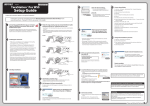
12If the formatting process completed normally, “Healthy” is displayed.
If the message “The request cannot be completed because the volume is open or in use” is displayed
The partition was created, but the format didn’t complete. Click OK to format the partition as below.
(1) Right-click the newly created partition and select Format.
(2) If necessary, set the file system to “NTFS” and enter a name for the volume in the “Volume label” field. Click OK.
If Perform a quick format is checked, the format will be completed much quicker.(3) Follow the on-screen
instructions.
17