1
mControl v2 (Home Edition) User Manual
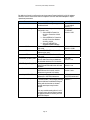
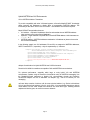
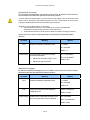
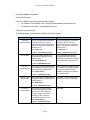
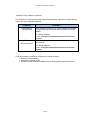
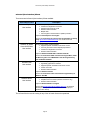
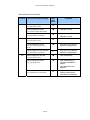
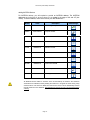
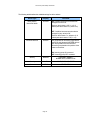
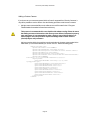
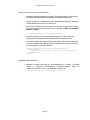
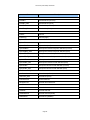
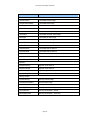
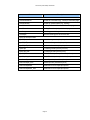
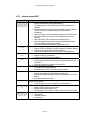
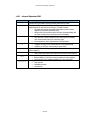
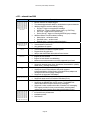
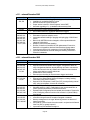
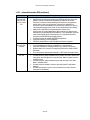
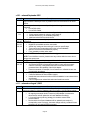
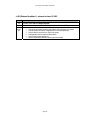
Make the following changes to the parameters associated with the new <module>:
Element
module
mparam
Name
base
CLASS
Value
string value
“CAMERA”
mparam
DISPLAY-AS
string value
mparam
mparam
Description
MProtocol
string value
string value
mparam
DefaultImage
string value
mparam
mparam
param
CLASSID
CODEBASE
…
string value
string value
…
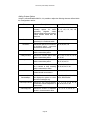
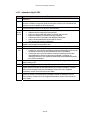
Description
Name of the camera type
Used by mControl to
designate camera device
String to show in camera
selection page
Long description of camera
Protocol associated with
the camera
Image to associate with the
camera
GUID of the object
Location of code for object
Depends on object –
please refer to the
technical documentation
associated with the
camera’s (ActiveX) object
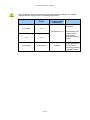
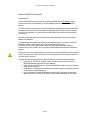
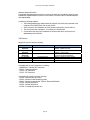
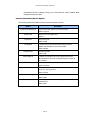
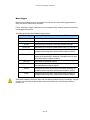
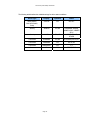
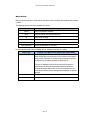
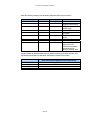
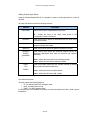
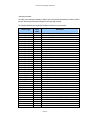
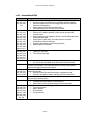
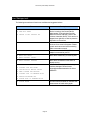
It is also possible to add parameters which are based on values stored within mControl. Use
the following nomenclature to add stored values within mControl to the module:
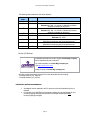
Parameter
{0}
{1}
{2}
{3}
Substituted Value Loaded at Run-time
(from the mControl database for the camera device)
IP Address
HTTP Port Number
Username
Password
Page 234