1
Duplicate Analyzer 2007 SR2
User manual
Installation and configuration
System requirements
Duplicate Analyzer 2007 requires:
•
SuperOffice CRM version 6.0 up to 6.1.
•
Microsoft SQL Server 2000 or Microsoft SQL server 2005, Oracle 9.
•
PC requirements: Equivalent to SuperOffice 6.1
Backup/Upgrade Recommendation
Duplicate Analyzer 2007 creates so called 'detached' tables in the SuperOffice database. Using SuperOffice tools, such as
dbsetup.exe, will NOT include these tables. Therefore, to maintain the Duplicate Analyzer Log you should make sure theses
tables and the data therein are maintained.
Installation
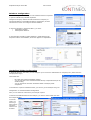
Duplicate Analyzer does not require a Server installation, but should be installed on one or more workstations.
•
Run the Installation script available from www.kontineo.com/download/DuplicateAnalyzer2007install.exe
•
Follow the on-screen instructions.
Technical Configuration
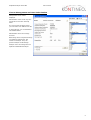
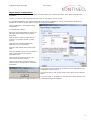
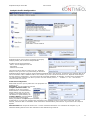
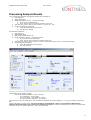
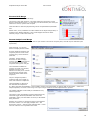
At first run, Duplicate
Analyzer 2007 will verify if
the tables required to run
Duplicate Analyzer 2007
exist. If not – or if it fails
to connect to the
SuperOffice SQL database,
it will launch the Database
Configuration screen.
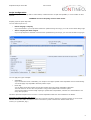
In the left side you must
provide an SQL Server
login with system
administrator rights on
the SuperOffice SQL
server database.
Usually the CRM5 user has
these rights. Click the
‘Test’ button to test that
the user has sufficient
rights. When successful,
click the ‘Verify Tables’
button. When table
verification succeeds, the
‘Close’ button is enabled.
Tech Note: Duplicate Analyzer
require 5 tables to be created in
the SuperOffice SQL Database
(Please remark, this tables are so
called ‘detached tables’ which are
unknown to SuperOffice and therefore the do not in any way inflict on SuperOffice Replication. The tables will not be included if you use the SuperOffice dbsetup.exe
application to rebuild/backup a database – but the tables will be included in an SQL Backup of the SuperOffice SQL Server database).
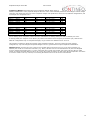
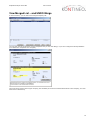
In the right pane, you can optionally configure Duplicate Analyzer with a SuperOffice Backup Database. This is not required
to run Duplicate Analyzer, but it is required to enable the ‘Undo Merge’ functionality in Duplicate Analyzer.
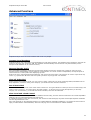
ODBC Timeout is as default set to 15 seconds. Large databases may require a longer timeout. If you get timeout errors in
Duplicate Analyzer, you should increase this value.
Revision 5.803.40
11. Marts 2008
3