1
MPAC-01
User Manual
Back Panel
GAIN
ON
HPF
Phase
ON
ON
48V
Mic Pre/Compressor
OFF
THRESHOLD
IN (0°)
Power
OFF
A
50Hz
0
10
OUT (180°)
High Pass
Filter
OFF
175Hz
B
OdB
Pad
Gain
Reduction
-20dB
ATTACK
RATIO
RELEASE
MAKE-UP
4
0
Output
Level
3
KNEE
SOFT
2
C
HARD
0
5
dBu
6
ON
-20
+20
Fast
Slow
1
8
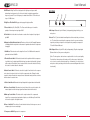
D. HPF Knob: A High Pass Filter is designed to let high frequencies pass while
attenuating lower frequencies. Use this control knob to minimize unwanted low
frequency sounds. The cut-off frequency is variable from 50Hz to 175Hz with a set
slope of 12dB/octave.
Fast
Slow
-10
COMPRESSOR
+10
OFF
E. High Pass Filter On/Off: Engage or disengage the high pass filter.
MIC INPUT
F. Phase Switch: In (0°) – Out (180°): The Phase switch allows you to invert the
polarity of the microphone input signal 180°.
G.Pad Switch: Use this switch to attenuate or reduce the microphone’s input signal
by 20dB.
H. Output Level/Gain Reduction Switch: The meter on the front of the Preamp/Compressor
can display either the output level or the amount of gain reduction when the compressor
is engaged.
I. dBu Meter: This meter shows the output level from -5 to 22dBu and the amount of
gain reduction from 0-24dBu.
J. Threshold Control Knob: The threshold control sets the point at which the compressor
circuit will act on the input signal. When the input goes above the threshold, the signal
will be reduced. Turning this control counterclockwise lowers the threshold. Turning
this control clockwise raises the threshold.
INSERT
MIC OUTPUT
24V~/ 1000mA
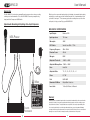
A. Mic Input: Balanced 3-pin XLR cable (sold separately) plugs directly to your
microphone
B. Insert: This ¼” jack is intended for auxiliary devices like reverb, delay, voice boxes, etc. The insert jack comes before the compressor circuit so you can send a dry signal for processing or input a line level signal to the preamp for compression. T=Send R=Return S=Ground
C. Mic Output: Balanced 3-pin XLR cable (sold separately). Plug the output signal
(Balanced line level) into your recording device.
[Note: The microphone cable can have a profound effect on the sound quality.
Even the finest microphones will sound poor if the interconnect cable allows
noise to enter, or causes distortion and loss of information. Use only the best
microphone cable your budget will allow. We recommend Mogami cable for the
best results.]
K. Attack Control Knob: This knob controls the length of time it takes for the compressor to reduce the volume to the level set by the compression ratio. Turning the knob
counterclockwise will make the compressor react faster and turning the knob clockwise
will slow down the reaction time.
L. Ratio Control Knob: Determines the input/output ratio for signals above the threshold.
M. Release Control Knob: Determines how long it takes for the sound to return to the
normal output level after the input signal has returned below the threshold.
N.Make-up Control Knob: This knob sets the output volume of the compressed
signal. Since compressing a signal makes it quieter, use the Make-up Control Knob
to restore the signal to its original volume.
O.Knee - Hard/Soft: This switch will control whether the bend in the response curve is
a sharp angle or has a rounded edge.
P. Compressor On/Off: Bypasses the compressor.
4
5