1
EDC
1 Introduction
The Mirvac EDC is an Internet based Document Management System created within Mirvac’s corporate Web
Site. Being Internet based, the only software requirements are Internet Explorer and an Internet Connection.
Secure Access to the system is provided within the scope of Mirvac’s Web Site.
The OBJECTIVE of the system is:
1.
To effectively manage all Project related Drawings and Documents and their revisions in an electronic format.
2.
To enable controlled distribution of Drawings and Documents between HPA, Mirvac Construction,
Consultants and Sub-Contractors.
3.
To enable members of each Project Team (HPA, Mirvac Construction, Consultants and Sub-Contractors) to
communicate with standard forms including RFI’s, AI’s, SI’s and Transmittals, ensuring each member of the
Project Team always has the up to date revision of specified documents.
4.
Simplify the printing and viewing of issued documents.
1.1
Login Through the Internet
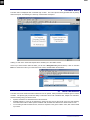
By using the Internet, the Mirvac EDC is found at http://edc.mirvac.com.au/edc/ where a login page is first
displayed (right). Enter your user name and then your password in the appropriate boxes.
Your session will lockout after 20 minutes of
idle time for security reasons, at which time
you will need to re-enter your user name and
password.
User Names:
Your User Name will normally be your first
name and the first letter of your last name.
Eg: David Hunton will be DavidH.
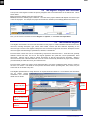
Password:
You default password will be mirvacedc. At
your first successful login, you will be
prompted to type in a new password (below
right). Type the same password in both
boxes.
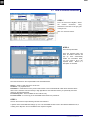
There are some more default settings for your profile, as pictured
at right.
These can be changed at any time using the
myPreferences from the main Tasks menu.
Default Download Folder: is the location on your system where
you would normally file any downloaded files.
Electronic Docs: This is normally ticked if you are to participate in
the project by using the EDC system from your office. If it is
unticked, any correspondence generated in the system will have to
be printed and faxed.
Notifications: These settings determine how and when email
notifications are sent to you when someone on the project team
creates a correspondence to you.
Friday, 29 February 2008
Mirvac Pty Limited
Page 2
Consult EDC User Manual.doc