1
Chapter 3. Physical Description
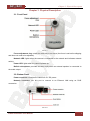
Reset button: press this button to reset the camera to factory settings. Press and hold this
button for at least 10-15 seconds to reset the camera to factory settings. If user holds this button
during less than 10 seconds, the camera will reboot without reset to factory settings.
Speaker (Audio out): a line out for external speakers (e.g. earphones or speakers with a
built-in amplifier).
3.3. Rear Panel
The rear panel contains the screw hole for attaching the supplied bracket to the camera.
N1000 Installation User Manual
7