1
7 - THE HOT QUICK CODER DURING USE
7.1
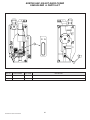
Changing the text head
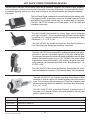
Texts can be changed particularly quickly by changing the text head.
!
WARNINGS:
If the text head is removed during normal operation, it’s temperature is approximately 120°C!
Failure to remove the handle from the text head can damage the HQC.
1.
2.
3.
4.
5.
6.
7.
8.
9
10.
11.
Stop the supply of products.
Remove the product under (or in front of) the HQC or turn the HQC in its entirety away from the belt.
Activate the HEAD-OUT button on the Control Panel.
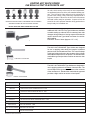
Twist the handle into the text head.
Use the handle to extract the text head from the text head holder.
Use the handle to position the (new) text head in the text head holder (check for blockages).
Twist the handle out of the text head.
Activate the HEAD-IN button on the Control Panel. This moves the text head back into neutral position.
Allow the new text head to reach operating temperature (approx. 2 minutes).
Replace the product under (or in front of) the HQC or turn the HQC in its entirety back towards the belt.
Start the supply of products.
7.2
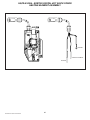
Replacing the Ink Roll
If the print becomes less legible, the Ink Roll should be replaced. Replace the used roll with a roll which has already been
brought up to the correct temperature in the preheating chamber of the HQC.
!
WARNINGS:
Failure to follow the rules below when replacing an Ink Roll leads to damage to the text material, the Ink Roll and the
HQC itself!
The temperature of the text head is approximately 248°F!
1.
2.
3.
4.
5.
6.
7.
8.
9.
10.
11.
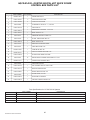
Activate the STOP button on the Control Panel.
Stop the supply of products;
Activate the HEAD-OUT button on the Control Panel;
Extract the used Ink Roll from the coding part of the HQC;
Remove the new Ink Roll from the preheating chamber;
Slide the new Ink Roll into the coding part of the HQC; the cartridge must be pushed in until it clicks;
Replace the removed product under (or in front of) the HQC;
Activate the HEAD-IN button on the Control Panel;
Activate the START button on the Control Panel.
Restart the supply of products;
Place a new Ink Roll in the preheating chamber.
KORTHO Hot Quick Coder Manual
21