1
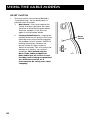
Quick Reference
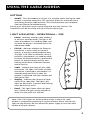
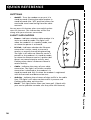
Buttons
•
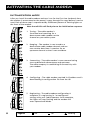
On/Off – Turns the modem on or puts it in
stand-by mode. Placing the cable modem in
stand-by mode (the “off” position) allows for
continued status monitoring from the cable
network.
Do not press this button when transmitting data
over the internet. The information will be lost
along with your ethernet connection.
Light Indicators
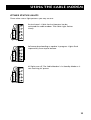
Power – Indicates whether cable modem is in
active or stand-by mode. The light is off
when the modem is in stand-by mode, and
on when the power is activated.
•
PC Link – Indicates whether the Ethernet
connection is active, ready to transmit/
receive, or actually transmitting/receiving.
The light is off when no Ethernet carrier is
present or the modem is in stand-by mode,
on when the Ethernet carrier is present but
there’s no transmit/receive activity, and
flashing when there is Ethernet transmit/
receive activity.
•
Cable – Indicates the status of your cable
connection. The light is off when no cable
connection is detected or the modem is in
stand-by mode and fully lit when the modem is registered
with the network and data can be sent.
•
Activity – Indicates the existence of data traffic in the cable
lines. The light is off when no data traffic is present and
flashing when data activity exists.
•
Email – This light flashes when you have mail. (Check with
your service provider to make sure they offer this feature.)
✂
•
Detach Here
16