1
PT-AE1000U.book
Page 11
Monday, October 16, 2006
1:40 PM
Preparation
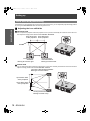
About Your Projector
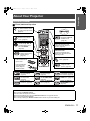
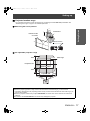
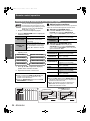
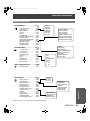
Remote control
J Front, back and top view
Remote control signal emitter
While the MAIN POWER is
on, switch between standby mode and project mode.
(page 20)
Turn the button
backlight of Remote
control on/off.
(page 22)
Display the Main menu.
Return to the previous
menu. (page 29)
Navigate through the
menus with F G H I,
and activate the menu
item with ENTER.
(page 28)
Function buttons
Assign the frequently used
functions from the option for
shortcut. (page 39)
Learning Remote control
buttons and LCD
Program and operate other
devices. See “Remote Control
Operating Guide”.
Reset some of the
settings to the factory
default settings.
(page 22)
Return to the previous
menu. (page 28)
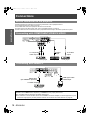
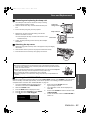
Battery compartment
1. Press the tab and lift
up the cover.
Capture the projected
image as a still
picture. (page 22)
2. Insert the batteries
according to the
polarity diagram
indicated inside.
Switch to cycle through
the input method.
(page 23)
Adjust the focus and
size of the image.
(page 25)
Turn off the POWER
automatically by setting
the duration. (page 22)
Switch to cycle through
the aspect ratio.
(page 23)
Switch to cycle through
the PICTURE MODE.
(page 25)
Display the MEMORY
LOAD menu. (page 25)
Display the input
waveform. (page 24)
Display the PICTURE
menu. (page 25)
Display the COLOR
MANAGEMENT menu.
(page 26)
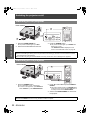
NOTE:
Do not drop the Remote control.
Avoid contact with liquids or moisture.
Remove the batteries if not using the Remote control for a long period of time.
Do not use rechargeable batteries.
Do not keep pressing the Remote control buttons as this may shorten battery life.
ENGLISH - 11