1
57-77-03-16
Page 13
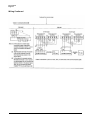
WIRING PRECAUTIONS
3. Noise Generating Sources and Countermeasures
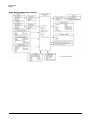
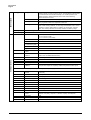
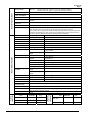
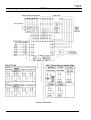
1. Isolating Inputs and Outputs inside the Controller
Solid lines — show isolated items,
Dotted lines ----show non-isolated
Control output
PV input CH1
Generally, the following generate electrical noise:
Relays and contacts, electromagnetic coils, solenoid valves,
power lines (in particular, 90V ac min.), induction loads,
inverters, motor commutators, phase angle control SCR radio
communications equipment, welding equipment, high-voltage
ignition equipment.
Auxilliary output CH1
PV input CH2
Loader communications
Digital
circuit
External switch input
Communications
Auxilliary output CH2
(1) Fast-rising noise
Event Output
CR filters are effective in countering fast-rising noise.
(2) Noise with a high wave height
2. Noise Countermeasures for Instrument Power Supplies
(1) Reducing noise
Connect the DCP551 to a single-phase power supply for
instruments, and take measures to the influence
of electrical noise.
Varisters are effective in countering noise with a high
wave height. However, note that the varister may become
circuited when trouble occurs. Pay attention to this when
providing a varister on a controller.
4. Ground
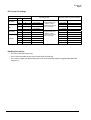
Use only the FG terminal 52 or 53 on the DCP551 for grounding. Do not ground across other terminals. When it is difficult
to ground shielded cable, prepare a separate GND terminal
plate (earth bar).
Ground type:
100 Ω max.
Ground cable: 2 mm’ min. annealed-copper wire (AWG14)
Cable length: Max. 20 m
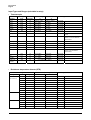
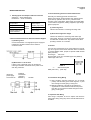
(2) When there is a lot of noise
If there is a lot of electrical noise, we recommend
inserting an insulation transformer in the power circuit
and using a line filter.
Instrument
power supply
100 to 240V ac
Insulating
Transformer
(100/100 v,
200/200 V)
Line filter
6000
—
GND terminal plate
GND (100 Ω min.) (earth bar)
5. Precautions during Wiring
(1) After providing anti-noise measures, do not bundle
primary and secondary power leads together, or pass
them through the same piping or wiring duct.
(2) Maintain a distance of at least 50 cm between I/O
signal leads or communications leads and the power
lead. Also, do not pass these leads through the same
piping or wiring duct.
6. Inspection after Wiring
After wiring is completed, be sure to inspect and check the
wiring state. Wrong wiring may cause controller malfunction or
accidents.