1
PX5_kihon_e.book
36 ページ
2014年3月17日 月曜日 午後2時2分
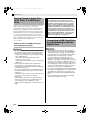
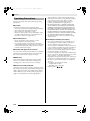
Connecting to a Computer
You can connect the Digital Piano to a computer and
exchange MIDI data between them. You can send play
data from the Digital Piano to commercially available
music software running on your computer, or you can
send MIDI data from your computer to the Digital
Piano for playback.
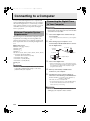
Minimum Computer System
Requirements
The following shows the minimum computer system
requirements for sending and receiving MIDI data.
Check to make sure that your computer complies with
these requirements before connecting the Digital Piano
to it.
z Operating System
Windows® XP (SP2 or later)*1
Windows Vista® *2
Windows® 7 *3
Windows® 8 *4
Mac OS® X (10.3.9, 10.4.11, 10.5.X, 10.6.X, 10.7.X, 10.8.X)
*1: Windows XP Home Edition
Windows XP Professional (32-bit)
*2: Windows Vista (32-bit)
*3: Windows 7 (32-bit, 64-bit)
*4: Windows 8 (32-bit, 64-bit)
z USB port
Connecting the Digital Piano
to Your Computer
IMPORTANT!
• Make sure you follow the steps of the procedure
below exactly. Connecting incorrectly can make data
send and receive impossible.
1.
• Do not start up the music software on your computer
yet!
2.
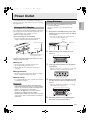
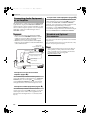
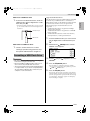
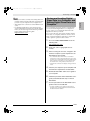
After starting up your computer, use a
commercially available USB cable to connect
it to the Digital Piano.
B connector
USB cable
(A-B type)
A connector
Digital Piano USB port
Computer USB port
3.
Turn on the Digital Piano.
• If this is the first time you are connecting the Digital
Piano to your computer, the driver software required
to send and receive data will be installed on your
computer automatically.
IMPORTANT!
• Never connect to a computer that does not conform
to the above requirements. Doing so can cause
problems with your computer.
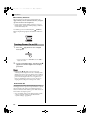
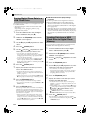
Turn off the Digital Piano and then start up
your computer.
4.
Start up commercially available music
software on your computer.
5.
Configure the music software settings to
select one of the following as the MIDI device.
CASIO USB-MIDI : For Windows Vista, Windows 7,
Windows 8, Mac OS X
USB Audio Device: For Windows XP
• For information about how to select the MIDI device,
see the user documentation that comes with the
music software you are using.
IMPORTANT!
• Be sure to turn on the Digital Piano first before
starting up your computer’s music software.
E-36