1
PX5_kihon_e.book
1 ページ
2014年3月17日 月曜日 午後2時2分
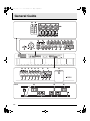
General Guide........................... E-2
Using the Stage Setups .........E-26
Saving Settings and Using Panel Lock....................... E-4
Returning the Digital Piano to Its
Factory Default Settings ............................................. E-4
Separate Tutorial Manual ........................................... E-4
Overview ................................................................... E-26
Recalling a Stage Setup............................................ E-26
Other Useful Functions..........E-27
Power Outlet ............................. E-5
System Settings ........................................................ E-27
Deleting Data ............................................................ E-28
Using an AC Adaptor .................................................. E-5
Using Batteries ........................................................... E-5
Turning Power On or Off............................................. E-6
USB Flash Drive .....................E-29
Connections.............................. E-7
Connecting Headphones ............................................ E-7
Connecting a Pedal .................................................... E-7
Connecting Audio Equipment or an Amplifier ............. E-8
Bundled and Optional Accessories............................. E-8
Operations Common to
All Modes .................................. E-9
Changing a Number or a Value .................................. E-9
Inputting Text Characters ......................................... E-10
Saving Data .............................................................. E-11
Starting and Stopping Playback................................ E-11
Starting and Stopping Recording.............................. E-12
Using the Editing Function........................................ E-13
Meanings of Symbols Next to Numbers ................... E-13
Using Built-in Tones .............. E-14
Selecting a Tone....................................................... E-14
Editing a Tone........................................................... E-14
Using the Bender Wheel........................................... E-15
Modifying Notes with the Modulation Wheel,
Knobs and Sliders..................................................... E-15
Playing Demo Songs.............. E-16
Storing Standard Audio Data (WAV Files)
to a USB Flash Drive................................................. E-30
Connecting a USB Flash Drive to and
Detaching It from the Digital Piano............................ E-30
Formatting a USB Flash Drive .................................. E-31
Saving Digital Piano Data to a USB Flash Drive....... E-32
Loading Data from a USB Flash Drive to
Digital Piano Memory ................................................ E-32
Deleting Data from a USB Flash Drive...................... E-33
Renaming a USB Flash Drive File ............................ E-33
Playing Back Audio Data Stored on
a USB Flash Drive..................................................... E-34
Playing Back a MIDI File Stored on
a USB Flash Drive..................................................... E-34
Error Messages......................................................... E-35
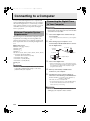
Connecting to a Computer ....E-36
Minimum Computer System Requirements .............. E-36
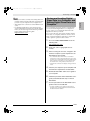
Connecting the Digital Piano to Your Computer ....... E-36
Saving and Loading Digital Piano Data
to a Computer and Editing Digital Piano Data
on a Computer .......................................................... E-37
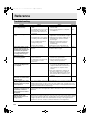
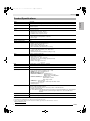
Reference ................................E-38
Troubleshooting ........................................................ E-38
Product Specifications............................................... E-39
Operating Precautions .............................................. E-40
Sounding Arpeggios
Automatically.......................... E-17
To use the Arpeggio Function................................... E-17
Recording and
Playing Back Phrases ............ E-18
Recording a New Phrase.......................................... E-18
Listening to a Phrase ................................................ E-20
Recording Over Another Phrase (Overdubbing)....... E-21
To save a phrase ...................................................... E-21
Creating a Song (Song Sequencer).......................... E-21
Recording Your
Keyboard Play ........................ E-23
Recording to a USB Flash Drive............................... E-23
Company and product names used in this
manual may be registered trademarks of others.
E-1
English
Contents