1
The Point of Sale Solution
Hardware & Software Installation
user’s manual
Ver. 99.330.A323.001
Intelligent Surveillance Solution
Table of Contents
TABLE OF CONTENTS
TABLE OF CONTENTS ..............................................................................................1
SYSTEM INTRODUCTION .........................................................................................2
Definition of Terms ..........................................................................................2
Product Specification ....................................................................................3
HARDWARE INSTALLATION ....................................................................................4
SCB-C31 POS data capture convertor .......................................................4
SOFTWARE INSTALLATION ......................................................................................6
SCB-C31 POS data capture convertor .......................................................6
NUUO NVR/DVR/Hybrid system installation ................................................8
SOFTWARE SETUP ....................................................................................................9
1. POS Device Management........................................................................9
1.1. Insert/Delete/Configure POS device................................................9
1.2. New/Edit/Delete/Import/Export Tag Filter .....................................11
1.3. Setup POS Display Font .....................................................................15
2. Smart Guard Detection ...........................................................................16
2.1. POS Event............................................................................................16
2.2. Instance Action on POS Event.........................................................18
3. Playback ....................................................................................................19
4. Remote Network Service.........................................................................20
OPERATION TOOLS ...............................................................................................21
1. Live Display ................................................................................................21
2. Log Viewer Search ...................................................................................22
3. POS transaction data Search.................................................................24
4. Playback video with POS data ..............................................................25
5. Backup video with POS data .................................................................26
6. Remote Access.........................................................................................28
page-1
Intelligent Surveillance Solution
System Introduction
SYSTEM INTRODUCTION
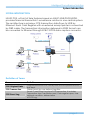
NUUO POS, a Point of Sale Systems based on NUUO NVR/DVR/NVDR,
provides financial transaction’s surveillance solution in one central system.
The architecture is as below; POS transaction data flows to NVR by
Ethernet. Each Cash Register with an external receipt printer is connected
by DB9 cable. The transaction information delivered in R232 format can
be converted to Ethernet through SCB-C31POS data capture convertor.
Definition of Terms
Terms
POS Original Data
POS Transaction
POS Event Log
Definition
Original data from POS. Usually with a lot of symbols and no
line feed.
Filtered result by user-defined tag-filter.
Smart Guard Event Log from POS transaction. It includes
Transaction start, Transaction end, Cash register open, User
defined condition. Abbreviation
of POS Log.
page-2
Intelligent Surveillance Solution
System Introduction
Product Specification
Input
Output
DC In
Power consumption
Operating Temperature
Operating Humidity
NUUO Capture Box
SCB-C31
RS232
Ethernet
DC +10V to +15V
500 mA
-20 to 65℃
0-90 % Non-Condensing
Baud Rate
Data Bits
Stop Bits
Parity
Flow Control
110 bps to 230.4 kbps
5, 6, 7 or 8
1, 1.5 or 2
None, Even, Odd, Mark, Space
None, RTX/CTS, XON/XOFF, DTR/DSR
page-3
Intelligent Surveillance Solution
Hardware Installation
HARDWARE INSTALLATION
SCB-C31 POS data capture convertor
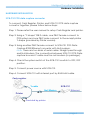
To connect Cash Register, Printer, and SCB-C31 POS data capture
convertor together, please follow below steps:
Step 1: Please refer the user manual to setup Cash Register and printer.
Step 2: Using a “Y-shape” DB-9 cable, one DB-9 female connect to
POS system and one DB-9 male connect to the receipt printer
Y-shape (provided by Printer vendor).
Step 3: Using another DB-9 female connect to SCB-C31 POS Data
Capture R232/Ethernet convertor with Null modem.
Note: There are two kinds of serial cable: Straight pass-through
and Null-Modem. The connection between SCB C31 POS Data
capture box and Y-cable must be null modem (in package).
Step 4: Check the system switch of the SCB-C31 is switch to OFF, OFF
position.
Step 5: Connect power source with SCB-C31.
Step 6: Connect SCB-C31 with internet port by RJ45 LAN cable.
Cash register
F
Y-cable
SCB-C31
Null Modem
M
Printer
F
Ethernet
F
M
Provided by printer
page-4
Intelligent Surveillance Solution
System Introduction
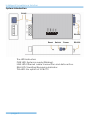
RJ-45
RS-232
Reset
Switch
Power
The LED Indicators:
PWR LED: System is ready (Blinking).
LINK LED: Ethernet cable connection and data active.
RXA LED: Transiting/Receiving Indicator.
TXA LED: No option of SCB-C31
page-5
RS-232
Intelligent Surveillance Solution
Software Installation
SOFTWARE INSTALLATION
SCB-C31 POS data capture convertor
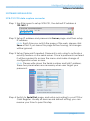
Step 1: Use IE-browser to setup SCB-C31, the default IP address is
192.168.1.1
Step 2: Setup IP address and password in Server page, and then setup
IP address.
Note: Each time you switch the page of the web, please click
Save at first. If you leave this page without saving, all changes
will be ignored.
Step 3: Setup Password if needed. Password is only using to activate a
security feature on the serial server. Once a password is entered
it will be required to access the menu and make change of
configuration when access.
Note: Please write down the Serial number and MAC address,
these two parameters are necessary when user forget your
password.
Step 4: Switch to Serial Port page, and setup according to your POS or
Cash Register. Usually all devices are default setting, you can
reserve your time to pass this step.
page-6
Intelligent Surveillance Solution
System Introduction
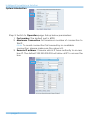
Step 5: Switch to Operation page. Setup below parameters:
1. Port number: The default port is 4000.
2. Maximum Connection: Set maximum number of connection to
this IP.
Note: To avoid connection fail caused by no available
connection, please make sure the value is 8,
3. Remote IP address: It means which IP have authority to access
box IP. The default 255.255.255.255 will allow all IP to access the
box.
page-7
Intelligent Surveillance Solution
Software Installation
Step 6: Please restart/reset the box after changing configurations to
active setup.
To reset the unit manually apply power, insert a small plastic
tool, and press lightly depressing reset located between the
switch (refer page 5). Hold for 3 seconds and release. The Link
and Run light will go out and turn back on. The SCB-C31 will
revert to the last setting.
Note: Ever time you change the configuration of SCB-C31,
please check above setting, especially maximum connection
and Remote IP address to avoid connection fail.
NUUO NVR/DVR/Hybrid system installation
Please refer Main Console user manual to install software which come
with NVR/DVR/Hybrid systems installation CD.
page-8
Intelligent Surveillance Solution
System Setup
SOFTWARE SETUP
1. POS Device Management
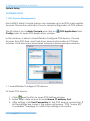
Each NUUO Main Console system can manage up to 64 POS cash register
devices. This section will instruct how to setup configuration of POS system.
The first step is to run Main Console and click on
Config menu to open POS Application window.
POS Application from
In this window, it allow to Insert/Delete/Configure POS device. Choose
devices from POS Tree, and it will show device information in POS Info
window. It will also show associated camera in below preview window.
POS Tree
POS Info
Associated Camera
1.1. Insert/Delete/Configure POS device
To Insert POS device
1. Click
Insert button to open POS Setting window
2. Setup basic data source; include Name, IP address, Port.
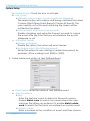
3. After setting, click Test Connection to test POS device connection. If
all the settings are correct, the system will popup “POS “name (IP)”
is available” message to confirm the setting is successful.
page-9
Intelligent Surveillance Solution
System Setup
4. Setup Miscellaneous options, including Record POS Transaction and
Display on Videos Preview.
a. Record POS Transaction:
Select this checkbox to record POS transaction data and to
transfer into MS database. The MS data will allow searching and
display on associated recording video, and the MS data files
can also provide third-party application to analysis.
b. Display on Video preview:
Select this checkbox to display POS transaction data overlay on
associated camera live videos.
Two types of transaction data display time: Always means keep
transaction data on video until receiving next transaction data.
Last for 10 seconds means each transaction data only last on
video for 10 seconds.
5. Select Tag Filter (refer Tag Filter sectionon on page 11).
6. Enable checkbox to select Associated Cameras users wish to
display POS transaction data overlay on live video.
7. In Display Region Definition option, setup display area for each
camera video.
a. Default: The default display area is below the camera OSD.
b. User Define: Right-click on video preview and drag rectangle to
define display area.
8. Click OK to save.
page-10
Intelligent Surveillance Solution
System Setup
To delete POS device
1. Choose POS device.
2. Click
Delete button to remove this POS device from system.
To configure POS device
1. Choose POS device.
2. Click
Configure button to open POS Settings window.
3. Please refer To insert POS device section (page 9 ) to modify
configuration.
1.2. New/Edit/Delete/Import/Export Tag Filter
The original transaction data from POS system is hard to read. Users can
define filters to make it comprehensible. NUUO also provide a simple
default tag filter to help filter out same common EPSON command, user
can based on this default tag filter to edit other customized filter.
To add new Tag Filter
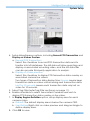
1. Click on New button to open Tag Filter window.
This window includes below sections:
a. General: Setup Tag Filter name and connect button.
b. Original Data: Show original transaction data from POS device.
c. Filtered Data: Show filtered data after defined filter.
d. Filter Function button: Tool used to define filter type.
e. Filter List: List all filters.
f. Data tool: Include import/export button to import/export original
binary data, and clear button to clear original/filtered data
windows.
g. Filter tool: Include upper/down tool to arrange priority of each
filters, or remove filters form list.
page-11
Intelligent Surveillance Solution
System Setup
General
Data Tool
Original Data
Filtered Data
Filtered Function
Filtered Tool
Filtered List
Encoding
2. Enter name of tag filter.
3. Click Connect button to capture POS transaction data from POS
device.
4. Please operate POS device to send transaction data to filter.
The original transaction data will show on the left window.
Note: If you don’t want the data keep importing when editing filter,
please click Disconnect button to stop connecting.
5. Data Tools:
Export: Capture and export original Binary data;
Import: Reload exported Binary data.
Clear: Remove data form Original Data window and Filtered Data
window.
6. Start to edit tag filters:
Click and drag to select text from Original Data window, and then
use the below six buttons to define filters. The filtered transaction
data will show on the right window.
page-12
Intelligent Surveillance Solution
System Setup
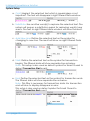
a. Omit: Neglect the selected text which is meaningless or not
important. The text will disappear in right filtered data window.
b. Substitute: Use another word(s) to replace the selected text. The
system will popup a substitution panel for replacing word(s) user
wants. The text on right filtered data window will show the result.
c. Add New Line: Define the selected text as the symbol for
changing to new line. The result will show on right Filtered Data
table.
d. Start: Define the selected text as the symbol for transaction
begins. The filtered data will show separate line as below.
Note: This setup is also used as detect symbol for Smart Guard to
detect Transaction Start event.
e. End: Define the selected text as the symbol for transaction ends.
The filtered data will show separate line as below.
Note: This filter is necessary for transaction data. No transaction
end will due to display disappear or error.
This setup is also used as detect symbol for Smart Guard to
detect Transaction End event.
page-13
Intelligent Surveillance Solution
System Setup
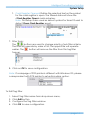
f. Cash Register Opened: Define the selected text as the symbol
for the cash register is open. The filtered data will show the
<Cash Register Open> mark as below.
Note: This setup is also used as detect symbol for Smart Guard to
detect Open Cash Register event.
7. Filter Tools:
The
buttons are used to change priority of sub filter criteria.
The filter will operate by order of list; the upper filter will operate
earlier. The
forever.
button will remove the filter from this tag filter
8. Click on OK to save configuration.
Note: If codepage of POS printer is different with Windows OS, please
correspondent with POS printer to setup Encoding option.
To Edit Tag Filter
1.
2.
3.
4.
Select Tag Filter name form drop-down menu,
Click Edit button
Configure the Tag Filter window.
Click OK to save configuration.
page-14
Intelligent Surveillance Solution
System Setup
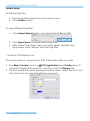
To Delete Tag Filter
1. Select Tag Filter name from drop-down menu,
2. Click Delete button
To Import/Export Tag Filter
1. Click Import/Export button and select Import/Export URL.
2. Click Open/Save to Import/Export Tag Filter.
3. After Import Tag Filters, users can simply select tag filter form
drop-down menu without edit new tag filter.
1.3. Setup POS Display Font
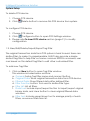
This option allows to setup font of POS transaction data on video.
1. Run Main Console, click on
POS Application from Config menu to
open POS Application window, and then switch to Display tab.
2. For POS transaction data displayed overlay video, select the font, font
size, font color and any font effects user wants.
page-15
Intelligent Surveillance Solution
System Setup
2. Smart Guard Detection
2.1. POS Event
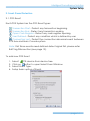
Each POS System has five POS Event types:
Transaction Start - Detect any transaction beginning
Transaction End - Detect any transaction ending
Open Cash Register - Detect any cash register opening
User Defined - Detect any condition which is defined by user
Connection Lost - Detect the connection abnormal event between
POS box and Main Console system.
Note: First three events need defined detect signal first, please refer
Edit Tag Filter section (see page 12).
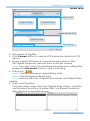
To add new POS Event
1.
2.
3.
4.
Select
POS device from device tree.
Click on button to open Select Event Window.
Select Event Type.
Setup basic option of Event.
page-16
Intelligent Surveillance Solution
System Setup
a. Enable Event: Check the box to activate.
b. Life Cycle:
¾ Manually cancel event or event continues triggered:
The alarm/action will continue until being canceled from Main
Console (Start>Open Event Report>Cancel All Events). The
user currently not at the seat watching the screen will be
notified by the alarm.
¾ Cancel event after timeout xx seconds:
Enable checkbox and setup the timeout seconds to cancel
the event after the time that you set whatever the events
disappear or not.
c. Activated Period:
¾ Always Activated:
Enable this option, the system will react always.
¾ Activated only in the following period:
Setup the system to react during a certain time period; for
example, office working hours (8:58 to 18:02).
5. Setup advanced option of User Defined Event.
a. Event name: Enter the name of user defined event.
b. Alert Condition:
¾ Test:
Enter the text user wants to detect in Keyword column.
Enable Match case to search for names where the case
matches the letters you entered. Or enable Match whole
word to search for the terms you entered as a whole word.
¾ Numeric value:
Enter a number as the condition of event and then choose
page-17
Intelligent Surveillance Solution
System Setup
one of the symbols ( ≦ < = > ≧ ) to define the numeric
value.
For advanced settings, use Prefix text/Postfix text to detect
special text before/after the value’s condition.
For Example: detect Coke > 100 US, please defined as below.
Note: The value is also case sensitive, you must key in “,”
symbol to search for 10,000US.
¾ External rule:
This condition allows developer to customize event rule. Main
Console will send filtered transaction data to third-party
application, and received alarm open or not. Please mail to
[email protected] for detail.
To Copy Event to other POS Devices
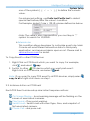
1. Right-Click on POS Event which you want to copy. For example,
click , and select
copy.
2. Switch to other
POS device which you want past event:
Right-click on POS device, and select
past.
Note: IF you want to copy POS event to all POS devices, simply select
copy to all of right-click menu on step 1.
2.2. Instance Action on POS Event
Each POS Event can be setup nine instant response actions:
On Screen Display - A red warning message will be flashing on the
screen of associated cameras.
Play Sound – Play sound warning.
Send E-mail - Send E-mail with event type, time, and snapshot of
first associated camera.
Phone Call – dial pone call.
page-18
Intelligent Surveillance Solution
System Setup
PTZ Preset Go – Control PTZ camera move to a preset point or patrol
around preset points.
Signal Digital Output - Triggers traditional alarming output devices.
Send a SMS message - Send a SMS message with event type and
time.
FTP – Upload snapshot of first associated camera to FTP.
Popup E-Map on Event – Auto popup E-map window to show POS
device location.
Note: For detail configuration please refer chapter 4.2 Action section
of Main Console user manual.
3. Playback
To enable POS overlay option
1. Click
to open Setting window, and then switch to POS tab.
2. Check the box of Enable POS overlay, the transaction data will be
overlaid on associated camera’s recording video.
3. Set up overlay configuration; select the font, size, font color and
any font effects user wants.
4. Setup option of Display on Video Preview to display POS transaction
data overlay on associated camera live videos.
Always Display: To keep transaction data on video until receiving
next transaction data.
Last for 10 seconds: Each transaction data is displayed last on
video for 10 seconds.
page-19
Intelligent Surveillance Solution
System Setup
4. Remote Network Service
NUUO systems allow users to access POS data on remote sites.
To Start Network Service of Main Console
1. Open Config menu and click Network Service to open Network
service window
2. Switch to
Live Streaming tab.
3. Setup the options of connection and then click start to allow
remote view POS Transaction with live videos.
Note: Port 5150 in first line is used when use NUUO Remote Live
Viewer application to remote access and web server port 80 in third
line is used when remote access via IE-browser. Please refer the
chapter 5.14 Network Service section of Main Console user manual
for detail.
4. Switch to
Remote Playback tab.
5. Setup the options of connection and then click start to allow
remote access database of POS Transaction.
Note: Port 5160 in first line is used when use NUUO Playback
application to remote access and web server port 80 in third line is
used when remote access via IE-browser. Please refer the chapter
5.14 Network Service section of Main Console user manual for
detail.
page-20
Intelligent Surveillance Solution
Operation Tool
OPERATION TOOLS
1. Live Display
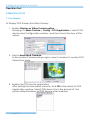
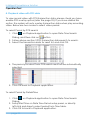
To Display POS Transaction Data Overlay
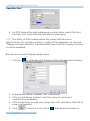
1. Enable Display on Video Preview option.
Please go to Main Console > Config > POS Application > select POS
device and Configuration window, and then check the box of this
option.
2. Select Associated Cameras.
In Associated Cameras setup region, select cameras to overlay POS
transaction data.
3. Enable the POS device application
After setting the associated camera, click OK button back to POS
Application window. Select POS device form the device list, the
system default enables all POS device when inserted.
page-21
Intelligent Surveillance Solution
Operation Tool
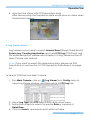
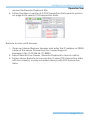
4. View the Live Video with POS transaction data
After above setup, the transaction data would show on video when
transactions happen.
2. Log Viewer Search
Log Viewer is a tool used to search Unusual Event (Smart Guard Event),
System Log, Counting Application result, and POS Log (POS Event Log).
For detail description, please refer chapter 5.12 Log Viewer section of
Main Console user manual.
Note: If you want to search the transaction data, please use POS
Search tool on next section 3. POS Transaction Data Search on page
24.
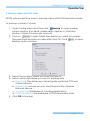
To Search POS Event via Main Console
1. Run Main Console, click on
Log Viewer from Config menu to
open Log Viewer window, and then switch to POS Log tab.
2. Select Log Type and POS device form drop-down menu.
3. Setup time criteria to search for special Date or a period of
Date&Time.
4. Click on Search, and search result will list on table.
page-22
Intelligent Surveillance Solution
Operation Tool
Note: IF you want to copy the search result to other application, simply
click on Export to… button to save result as an excel table.
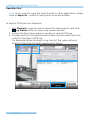
To Search POS Event via Playback
1. Run Playback, open record to select the video period, and click
Log Viewer button to open Log Viewer window.
2. Follow the step 2-4 on previous section to search POS Log.
3. Double-click on POS log from result table, and the video will auto
switch to the time of POS log.
For Example: When clicking on log form list, the video will auto
switch to the time of event happened as below.
page-23
Intelligent Surveillance Solution
Operation Tool
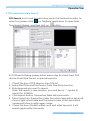
3. POS transaction data Search
POS Search tool is used to search key word of all transaction data, to
open tool, please click
on Playback application to open Date
Time Search Dialog, and then click on
button.
In POS Search Dialog, please follow below step to search from POS
device, Date Time Period, or special keyword.
1. Check the box of POS devices form POS list.
2. Setup Start Time and End Time in Data Time Period section.
3. Enter keyword you want to search.
Note: This search is case sensitive, you must key in “,” symbol to
search for 10,000US.
4. Click Search button, Transaction table will show results.
5. Select items form Transaction table, the whole transaction detail will
show in right-down table and the record video of first associated
camera will show in right upper corner.
6. Check the box of Search within result and enter keyword, it will
search again within the results.
page-24
Intelligent Surveillance Solution
Operation Tool
4. Playback video with POS data
To view record video with POS transaction data, please check you have
enable POS overlay option (refer the page 25). If you have started this
option, the system will auto overlay transaction data when play recording
video. Below are two modes to select video period.
To select Period by POS search
1. Click
on Playback application to open Date Time Search
Dialog, and then click on
button
2. Follow above section 3 POS Transaction data search to search.
3. Select the transaction data for result list, and click OK.
4. The period you select form POS search result will be automatically
selected.
5. Click OK back to Playback application.
To select Period by Date&Time
1. Click
on Playback application to open Date Time Search
Dialog.
2. Setup Start Time on Date Time Period setup panel, or directly
left-click and draw to select period form Time table.
3. Click OK to back to Playback application.
page-25
Intelligent Surveillance Solution
Operation Tool
5. Backup video with POS data
NUUO system has three ways to backup video with POS transaction data.
To backup via Main Console
1. Open Config menu and then click
Backup to open backup
system window (For detail, please refer capture 5.13 backup
section of Main Console user manual).
2. Click on
to select data time period you want to backup.
The period will be listed on table after click OK. Click
to open
Backup option window.
3. Select the location where you want backup to.
4. Select which data base you want to backup with.
a. Event Log: The database of smart guide detected POS and
Camera Events.
b. System Log: Include recycle, start/stop/modify schedule,
Network service…
c. Counter Log: Database of Counting Application.
d. POS Transaction: The database of POS transaction data.
5. Click OK to backup.
page-26
Intelligent Surveillance Solution
Operation Tool
To backup via Backup System
1. Click on Start > All Programs > NUUO Surveillance System >
NUUO Backup System to open NUUO Backup System window.
2. Following above step 2-5 on backup on Main Console to backup
video with POS transaction data.
To backup via Playback
1. Start Playback Application and use
Open Record tool to open
video you want to backup.
2. Click
Backup to open backup dialog.
3. Check the period and cameras are what you want to backup.
4. Setup the location where you want backup to.
5. Select which data base you want to backup with.
6. Click OK to backup.
page-27
Intelligent Surveillance Solution
Operation Tool
6. Remote Access
NUUO systems have three remote tools to remote access POS data: NUUO
Remote Live Viewer application tool, Playback application tool, and web
browser. All access functions are the same as launch on local machine
(please refer 3.2 POS Transaction Data search section on page 24).
Note: Before using remote access tool, please check the network service
of Main Console has been started (please refer chapter 4 Remote
Network service on page 20).
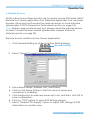
Remote Access via Remote Live Viewer Application
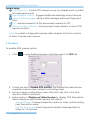
1. Click General Setting to obtain LiveView Setting dialog.
General Setting
2. Select “Server” to open Server Setting window.
3. Setup Server Name, Address, Port, User Name.
4. Click on Test Server button to test the setup of server and
connection is available.
5. Click Add button to add new server site to list, and then, click OK to
save configuration.
6. Click on “POS” setting to open POS Setting window.
7. Select “Enable POS overlay” option to adjust OSD settings of POS
information on monitor view.
page-28
Intelligent Surveillance Solution
Operation Tool
8. For POS transaction data displayed overlay video, select the font,
font size, font color and any font effects user wants.
Note: The status of POS overlay will be the same with the one in
MainConsole. Go to Main console> Config >POS Application to check if
“Display on Video Preview” is enabled first, then the POS Overlay function
could be enabled.
Remote Access via Playback Application
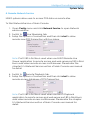
1. Click on
to open Remote Playback Site Management window.
2. Setup Server Name, Address, Port, User Name
3. Click on Test Server button to test the setup of server and
connection is available.
4. Click Add button to add new server site to list, and then, click OK to
save configuration.
5. Click
page-29
icon on the top of the
Open Record window to
Intelligent Surveillance Solution
Operation Tool
access the Remote Playback Site.
6. Follow the step on section 3.2 POS Transaction Data search section
on page 24 to search POS transaction data.
Remote Access via IE-browser
1. Open an Internet Explorer browser and enter the IP address or DDNS
name of the server followed by the connecting port.
Example: http://169.254.54.171:8080/
2. Select Remote Live Viewer / Remote Playback to launch option.
3. Follow above Remote Access section to view POS transaction data
with live video(s), or play recorded video(s) with POS transaction
data.
page-30