1
scan or a reset, the scan will be halted, and the controller will be in Track Mode.
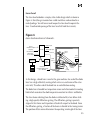
Back Panel and Laser Head Connections
There are several input and output connectors on the back panel of the controller. They allow you to operate your laser with external analog or digital
signals.
There are two connectors, labeled Cable A and Cable B for the cables that go
from the controller to the laser head. Cable A carries analog signals to the laser
head while Cable B carries digital information.
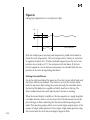
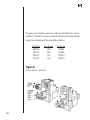
Figure 7.
Back panel of laser controller.
An Interlock connector is provided for external safety systems. The laser will
not emit light unless the Interlock terminals are shorted. Five BNC connectors
are provided for external analog control. GPIB (IEEE-488) and RS-232 are
available for computer interfacing. For information on computer control,
please see the next section of the manual, “Computer Control.” Analog BNC
inputs and outputs are available for Frequency Modulation, Current
Modulation, Wavelength Input, Wavelength Output, and Detector Input. In
addition there is an SMA connector on the laser head for high-speed current
21