1
Multiple USB Video Adapter Installation
Ensure you have the latest version of the drivers installed, otherwise, please download
them from the StarTech.com website (www.startech.com).
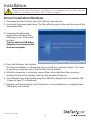
1. Complete the standard driver installation steps, up to when you plug in the first USB
Video Adapter.
2. Connect another monitor/display to the second USB Video Adapter, then turn on
the display.
3. Connect the USB type A connector on the second USB Video Adapter to an available
USB 3.0 port on the host computer. The driver installation will begin automatically.
Repeat these steps for each additional USB Video Adapter you wish to install. Once all
USB Video Adapters are installed, reboot the computer. After rebooting, you may be
prompted to reboot one final time; please do so.
Verifying Installation
From the main desktop, right click on “computer” or “My Computer”, then select
Manage. In the new Computer Management window, select Device Manager from the
left window panel.
Double-click the Universal Serial Bus Controllers category and the USB adapter should
be visible.
Instruction Manual
3