1
4
Defining the VA-4H 4-Channel HDMI EDID
Controller
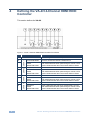
This section defines the VA-4H.
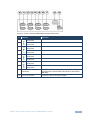
Figure 1: VA-4H 4-Channel HDMI EDID Controller Front Panel
#
Feature
1
ON LED
6
7
8
9
6
CHAN. 1
5
Press to choose the channel 1 EDID source
Upper LED illuminates red when default EDID is chosen,
both LEDS illuminate when pass-through is chosen, lower
green LED illuminates when the monitor EDID is chosen
CHAN. 2
4
CAPTURE Button
DEFAULT
PASS
MONITOR LEDS
DEFAULT
PASS
MONITOR LEDS
CHAN. 3
3
DEFAULT
PASS
MONITOR LEDS
CHAN. 4
2
Function
Illuminates green when 5V DC power is connected
CAPTURE Button
Press to choose the channel 4 EDID source
DEFAULT
PASS
MONITOR LEDS
Upper LED illuminates red when default EDID is chosen,
both LEDS illuminate when pass-through is chosen, lower
green LED illuminates when the monitor EDID is chosen
CAPTURE Button
Press to choose the channel 2 EDID source
Upper LED illuminates red when default EDID is chosen,
both LEDS illuminate when pass-through is chosen, lower
green LED illuminates when the monitor EDID is chosen
CAPTURE Button
Press to choose the channel 3 EDID source
Upper LED illuminates red when default EDID is chosen,
both LEDS illuminate when pass-through is chosen, lower
green LED illuminates when the monitor EDID is chosen
VA-4H - Defining the VA-4H 4-Channel HDMI EDID Controller