1
3. Utility Software Installation ( Only in Model 5000 ):
Here is the list of default companion utility software. Check our website for future software.
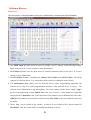
TNM Nand Programmer: Nand flash memories (memories for flash disks, MP3 Players & Digital
cameras ) can only be programmed by this software. Install this program from installation menu or
from “CD-Drive:\Nand Programmer\Setup.exe” . After the installation you can read instruction
manual by pressing the Help button.
Serial Port Emulator: Please copy the contents of the “Serial Port Emulator” folder in the CD-ROM
to your favorite location in your hard disk, then run Serial.exe . Your TNM-5000 programmer will
emulate a serial port, then you must install the serial port driver from “Serial_DRIVER” folder.
Then by connecting the ISP cable of programmer directly to RX/TX pins of microcontrollers , you can
program them by many free ISP softwares like Atmel Flip or ST-Flasher.
You will find more information in Serial.exe software helps.
Note: Before Using the Utility Programs, you must install TNM Programmer Software first. (part2)
6