1
1. Minimum System Requirements:
• A desktop or laptop computer with Intel Pentium or an equivalent processor.
• Windows XP / Windows Vista / Windows 7 or Windows 8 operating system.
• At least 1 GB free space on your hard drive, for Nand Chips,1GB+Nand Capacity
• At least one standard (USB 2.0) connector for Model 5000.
2. Software Setup
You can install your software either from the CD-ROM or by downloading the program from our
website. Instructions for both methods are described below.
NOTE: Do Not Connect The Programmer to The Computer USB before Software Installation!
Installation from TNM Electronics Website
You can download the software at : http://www.tnmelectronics.com/English/Downloads.htm.
Once you have saved the file to your computer, run it to setup the software.
NOTE: For future Upgrades you can click on Upgrade link inside the software from menu
help/About.
Installation from CD-ROM
1. Insert the CD into the CD-ROM drive.
2. Autorun program will be started automatically, Select the “Install Product” item. If the setup
program does not start automatically, run SETUP.EXE located in the CD.
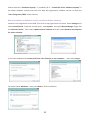
After Running SETUP.EXE , The system displays a dialog box , Press the Next button ,then in the
next box, you can change the default installation path (Not Recommended), Then press Next Again
and at the end, Press Finish. After the software installation, please connect the USB cable to the
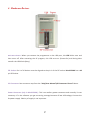
programmer and your PC. “Found New Hardware Wizard” box will be opened like picture below.
Windows Vista, Windows 7
Windows XP
3