1
1
Software Licenses
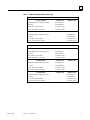
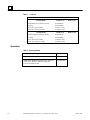
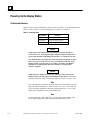
CIMPLICITY System software for this system is licensed in one of configurations listed in
Table 1-3.
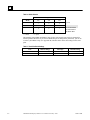
Table 1-3. Software Configurations
License
Features
Runtime - Multiple Devices
(Windows 95)
Full CIMPLICITY Base System runtime features plus Communications to
unlimited GE Fanuc PLCs via SNP or TCP/IP protocols (16 MB memory)
Development & Runtime
(Windows NT)
Full CIMPLICITY Base System runtime and project development features
plus Communications to unlimited GE Fanuc PLCs via SNP or TCP/IP
protocols (32 MB memory)
If you purchase additional product options (see “Options and Upgrades”) to run on the Display
Station, it is necessary to contact GE Fanuc to update the system licensing. Use one of these two
numbers to reach GE Fanuc to update your registration:
Phone:
518-464-4619
Fax:
518-464-4581
Faxes and phone calls will be processed between 8 AM and 5 PM Eastern time, Monday through
Friday, except for regularly scheduled holidays. Faxes and calls received after hours, on weekends,
or holidays will be processed as soon as possible on the following business day.
When you phone, please be prepared to provide GE Fanuc with the following information:
GFK-1220B
•
Your User information
•
CIMPLICITY serial numbers
•
The System Key Code generated during the registration procedure
Chapter 1 Introduction
1-5