1
US 8,378,875 B2
7
8
Alternative Embodiments
In a different embodiment, the invention may be used to
What IR-codes are actually sent-out depend on the
progress in the algorithm. It may be a precon?gured IR-code
set-up the URC-functionally of a set-top box, PVR, . . . . This
or an IR-code for Which the user indicated that it didn’t Work
may happen When the set-top-box controls other devices like
(see step 78).
a Satellite or cable receiver.
6. The algorithm checks for a user reaction (indicating a
sent IR-code triggers some function on the target device).
Instead of IR-codes, the idea can also be applied to RF
codes.
This reaction is often the press (or release) of a key (step 76).
SMS-Keyboard Entry of the Brand
When the user doesn’t react, the algorithm continues at
step 74. When the user does react, the algorithm continues at
In the description above, the Brand-id is represented as an
x-digit code (x:4 in the examples). This alWays requires
step 77.
7. Assume that code-set i is selected. Keys that previously
lookup in the manual. To make it even easier the SMS-key
board can be used instead. On a GSM phone the ‘2’ key also
has the letters ‘ABC’ assigned, ‘3’ has ‘DEF’. The SMS
keyboard is a Way to compose Words using the numerical
Weren’t associated With an IR-code or Were indicated to be
associated With non-Working IR-codes, Will be associated
With IR-codes from code-set i (Step 77).
keypad as found on phones. Because on remotes the same
8. The user can noW try pressing the keys on the URC to test
‘keyboard’ is used (so these letters are also printed on the digit
if they Work as expected (step 78). He has means to indicate
Whether the keys function correctly or not.
keys), it is possible to perform similar composing.
Assuming the ‘single-tap’ SMS keyboard, one can spell ‘P
H I L I P S’ as: ‘7445477’ (so each digit once), Sony becomes
‘7669’, etc. Alternatively, the use of ‘multi-tap’ is possible:
PHILIPS becomes ‘7 44 444 555 444 7 7777’. (3 taps ofthe
7 key generate the 3-rd letter R (the 7 key also refers to
In different embodiments the Way to indicate that differs. In
20
ments the user can, after pressing a key, press a thumbs-up or
thumbs-doWn key to indicate if the previous key sent the
PQRS). LED-lights may be used to communicate a user that
the entry of a brand Was successful or not. Whether to use 25
single-tap, multi-tap or any other variation is not relevant for
the present invention.
Any number of digits is alloWed, but it’s possible to cap the
maximum number of digits. In case of overlap (tWo different
brands result in the same digit-sequence), a resolution can be
to concatenate the list of Code-sets for both brands and iterate
correct command. Or alternatively, each key has a green and
red backlight. Red means that the key doesn’t Work, green
means that it does. Many alternatives can be conceived of.
If the user is happy With the result, he can choose to end the
algorithm and store the current code-sets. (step 80).
30
9. The algorithm determines if the user indicated if a key
doesn’t Work (step 79). If the user indeed indicates a key
doesn’t Work continue at step 74 (noW taking into account the
user’s feedback for Working and non-Working keys), other
through these all in the scan process.
The SMS-keyboard entry of the brand may be used With the
Wise return to step 78.
method as described With reference to FIG. 5 but also With the
prior art method Brand-search (method 3).
a preferred embodiment the algorithm assumes all keys Work
OK unless the user keeps the key pressed. In other embodi
35
10. When the user is satis?ed With all keys after step 77, the
algorithm stops (step 80). It installs IR-codes from one or
Combine IR Codes from Different Code-Sets During the
more IR-codesets.
Scan Process.
Optionally, the user can indicate that he’s still not happy
With the current results and Wants to start from scratch. In that
case the user can jump to step 73 after indicating this.
Often, the scanning process Will ?nd multiple code-sets
that trigger a reaction on the CE equipment. This is because
there can be overlap betWeen multiple code-sets. I.e. for code
set X the PoWer, digits and Teletext Works ok, but volume
does not, While for code-setY the PoWer, digits and volume
Work but Teletext does not. In this case it’s very practical
When a user can indicate for a given matching code-set Which
codes do Work and/or Which codes do not. The URC can track
40
45
this and combine the Working codes of multiple code-sets into
a neW ‘custom con?guration’ code set, Which contains func
tions from multiple code-sets.
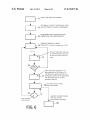
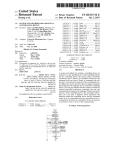
The scanning process is depicted in the ?owchart shoWn in
FIG. 6:
In an alternative embodiment of this algorithm, key-groups
are taken into account. This means that all keys that logically
belong together Will alWays be using IR-codes from the same
IR-codeset. For example, the volume keygroup consists of
‘volume up’, ‘volume doWn’ and ‘mute’. The teletext key
group consists of all keys controlling teletext modes, the
digits keygroup consists of all digits. In practice it is very
likely that if one key of a certain keygroup Works, all keys Will
Work if their functions are taken from the same IR-codeset.
50
1. Start the set-up process, e. g. by pressing the right
(magic) key (-combination).At this time none of the keys Will
have associated IR-codes (step 71).
2. Optionally select the device-type and optionally select
the brand (step 72). This can be done in either order and may
in practice be combined With step 71.
3. The algorithm determines What Code-sets may Work for
the user’s device. Suppose there are N different Code-sets
selected. These set of code-sets Will be iterated through, start
55
ing With the ?rst (step 73).
60
This Will speed up the set-up of the remote.
According to an alternative embodiment, the algorithm
may abandon the concept of the keygroups in the folloWing
situation: if the ?rst key of a keygroup Works but the second
(or subsequent) key of the key group does not Work. In that
case, the algorithm treats all keys in the keygroup, individu
ally Which means that the keys from the keygroup may use
codes from different IR-code sets.
It is also possible to use the given feedback in steps 77 and
78 to limit or extend current set of remote control codesets
While the algorithm is running. For example, When in step 78
When the users indicates so (by pressing (and holding) a
key) continue to next step.
the user feeds-back that a certain button is or isn’t Working,
this information can be used to remove codesets from the set
one or more IR-code(s) and Wait some time to give the user
of codesets that haven’t been iterated through yet. So if the
user Would indicate that the ‘volume up’ IR-code isn’t Work
ing the remote-control can omit trying another codeset With
that same IR-code for the volume up function. Also When the
user Would indicate that the ‘program doWn’ function Would
the chance to react (step 75).
be correct this information can be used.
4. The algorithm iterates through the next Code-set (step
74): Codeset x Where x ranges from 1 to N.
5. For each Code-set in the iteration, the algorithm sends
65