1
US 8,378,875 B2
6
5
means for replacing non-Working codes by codes from at
Steps to Con?gure a URC Using a Preferred Method of the
Invention.
least a further remote control code-set,
means for combining codes from the remote control code
sets and storing them for use by the remote control.
The User Interaction can resemble a typical Brand-search
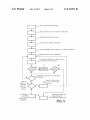
approach. The steps are shoWn in FIG. 5 and may actually be
in a different order in different embodiments. The different
steps are described beloW.
BRIEF DESCRIPTION OF THE DRAWINGS
The user starts the con?guration mode of the URC (step 1).
The invention Will be better understood and its numerous
There may be different mechanisms to do this, such as press
ing a setup-key for a longer time, or by means of a ‘magic’
objects and advantages Will become more apparent to those
skilled in the art by reference to the following draWing, in
key-press Where different buttons are pressed simultaneously.
conjunction With the accompanying speci?cation, in Which:
If the remote is universal for more than one Device-type,
the user selects the Device-type he Wants to setup the URC for
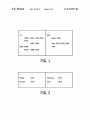
FIG. 1 shoWs entries for a code-set from a user manual
according to the prior art.
(step 2). This could be TV, VCR, DVD, Sat, Amp, . . . as
FIG. 2 shoWs a part of a manual that the useruses to look up
supported by the URC. This step is optional.
the brand-ids according to the prior art.
Alternatively, the device type is not selected and the scan
ning process described herein after includes code sets for all
device types for Which the URC is suitable. Note that this
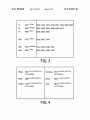
FIG. 3 shoWs a table that links brand-ids per device-type to
a list of code-sets that a brand-search Will iterate through
according to the prior art.
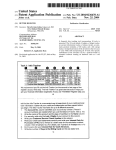
FIG. 4 shoWs an example of a table With actual pointer to a
list of code-sets.
FIG. 5 shoWs steps to con?gure a URC using a preferred
method.
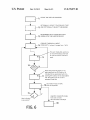
FIG. 6 shoWs steps to con?gure a URC using a further
20
The user looks up the Brand-id or the single code-set-id in
the instructions for use of the remote and enters it on the URC
(step 3). As explained herein above, to the user all these ids
preferred method.
FIG. 7 shoWs a block diagram of a remote control suitable
selection may be combined in step 1 if the magic key-press
contains the button for the device-type to be con?gured.
25
for implementing the present invention.
Throughout the ?gures like reference numerals refer to like
elements.
appear to be ‘Brand-ids’. Optionally a LED may be used to
con?rm the successful or unsuccessful acceptance of the
entered digits. Optionally there is an id to press if the Brand is
unknoWn or not in the list (eg 0000, a so called “Wild card”).
The user starts the ‘ scanning’ process (step 4). They may be
implemented by pressing a button on the URC or by pressing
DETAILED DESCRIPTION OF THE PRESENT
INVENTION
30
The URC determines the code-sets to iterate through (step
5). If the entered ID Was a pointer to a set of code-sets, the
softWare iterates through all these codesets (step 6). If the ID
The table of FIG. 4 shoWs an example of a table With actual
pointers to a list of code-sets. Ids starting With a 9, the brand
ids, (Philips, Pioneer, Samsung, Sony) are actually a pointer
& holding a button.
Was a speci?c Code-set-id only, the list Will only contain that
35
single Code-set and proceed (step 6). During the iteration, the
to a list of code-set-ids for a certain brand/device-type com
URC sends a speci?c (or multiple speci?c) IR-functions per
bination. All other ids (Philco, Sanyo) are actually single
code-set-ids. The digit convention is just to illustrate the
code-set (step 7). In step 8 it is checked if there is a user
reaction. If there is no user reaction, the algorithm Waits a
invention. For the user there is no difference betWeen the
brand-ids and the single code-set-ids, the URC’s softWare
40
handles the tWo different kinds of ids.
and a speci?c (or multiple speci?c) IR-functions is/are sent.
For Philips the softWare-algorithm Will look up the code
sets to use by using the brand-scan process in the softWare.
For Philco it Will only use Code-set-id 5689. Another Philco
code-set-id (4566) Will not be used since it is very unlikely to
be the correct code-set anyWay.
When there is a user reaction (by pressing a key or by releas
45
Another advantage of this approach is that because the
actual code-set-ids can be entered in the setup, it is possible
for the user to type in the correct code-set in one go. This
alloWs the support of brands that Were not in the brand-list at
the time the remote Was produced, but use a code-set that is
already available in the Database. In that case the instructions
for use should be amended accordingly or the helpdesk could
50
instruct the user Which ID to enter. In case that a neW brand
appears, the instructions for use should re?ect this neW brand
certain time. Then it is checked if the iteration through the
code-sets is ?nished (step 11). If this is not the case the
iteration is continued (step 6). The next code-set is retrieved
55
ing the pressed key) or When the last IR-code is sent, the
iteration stops.
If the user reacted, he is (optionally) offered to try the
buttons of the URC for the selected code-set (step 9). Steps 7,
8 and 9 together form the step of testing said remote control
code-sets.
In step 1 0 the user indicates if he accepts the current remote
control code-set or not. If the user accepts, then the algorithm
stops and the user approved code-set is installed (step 14). If
the user doesn’t accept, the scanning process is continued by
going to step 11.
In step 12 the algorithm checks if the iteration, that Was
by means of the code-set-id of the basic IR-code-set that it
?nished in step 11, Was an iteration of code sets belonging to
uses. To the user this code-set-id appears to be the brand-id of
the neW brand. This assumes that this basic IR-code-set is
a brand (“?rst level” iteration). If so, the algorithm proceeds
already in the IR-Database (Which is often the case).
The instructions for use may be in the form of a paper
manual or in electronic form for example on a user support
60
‘second-level’ set could for instance consist of a list contain
ing 1) all Brands for the device-type and/ or 2) a list of back-up
code-sets knoWn to be likely candidates. Then the algorithm
Web site.
This approach Works best if the remote control is universal
for only one device-type (i.e. TV), Which is the majority. In
other cases a different brand-list should be present in the
instructions for use for each device-type. Alternatively, a
single list could be used for all device types.
to step 13. This means that no code-set Was found by iterating
through the available code-sets. In step 13 a “second-level”
set of code sets is selected and the iteration is re-started. This
continues With this neW list to iterate through at step 6.
65
If in step 12 the algorithm determines that the iteration, that
Was ?nished in step 11, Was a second-level iteration, the
algorithm stops Without installing a code-set (step 15).