1
8051 TRACER
SIMULATOR
DEBUGGER www.8951.com -
Chapter 3
6
51TRACER simulator operation guide
51TRACER simulator works with powerful KEIL IDE( in the CD, the evaluation version is provided). If you
feel this software is good, you can contact software vendor to get a professional version.
( Due to the complex of the KEIL software, if you are a beginner, please follow below operation guide! )
Hardware
install:
first
connect
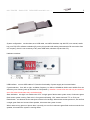
simulator to PC with a USB cable,
you will find a sound from speaker
and also a green flash on the
indicator,
which
means
system
testing is OK. Insert simulation cap
into target board. Pay attention to
insertion direction!
Software install: copy CD\developing tool\KEIL to C:\, remove readonly attribute of all
files.(must be C:\, other directory does not work)
Execute keil\uv2\uv2.exe.(You can create a shortcut at the desktop as your wish.)
create your first project (software operation guide):
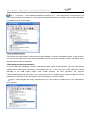
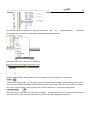
1.click “Project” menu,select “New Project”, input project name, like "test". The extension of the saved file is
“.uv2”, which is project file extension name of KEIL uVision2.After this, we can click this file to open the project.
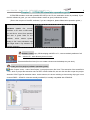
Attention: DON’T type file extension name. At this moment, it is shown a dialog to choose sing chip type. Let us
choose ATMEL---AT89C51. Note we actually use 89s52, it is totally compatible with AT890C52.