1
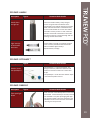
PCD PART: HANDLE
Description
Figures
Recommended solution
Handle does
not light up
Check the handle’s battery is fully charged.
Ensure the green LED at the bottom of the
handle lights up to indicate charging is complete.
Make sure that the blade is mounted correctly
on the TruLED handle. Do not use other makes
of handles. Ensure you hear a “click” when the
handle is connected to the blade. If the handle
still does not light up, replace cartridge. Still not
working? Contact home office.
Light intensity
of the handle
decreases
Ensure battery cartridge is completely charged
and is correctly connected inside the handle.
Still not sufficient light intensity?
Replace battery cartridge.
PCD PART: OPTISHAPE ™
Description
Figures
Recommended solution
The OptiShape ™ is a pre-formed stylet. The
design is based on professional literature and
extensive research to achieve its current ideal
shape.
The OptiShape ™ can be bent into another shape
if the clinician prefers to do so.
How do I bend
the OptiShape™
PCD PART: FIBRECLIP
Description
Fibre optic light
failure
Figures
Recommended solution
Clean the ends of the FibreClip with lint free cloth
and alcohol. Ensure FibreClip is correctly inserted
into the blade. First place tip of light guide pipe
into groove on blade. Then press the base of the
FibreClip into the recess in the base of the blade
ensuring it is firmly secured.
19