1
1.
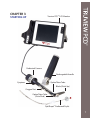
Ensure that Truview PCD™ LCD monitor is fully charged.
Important notes:
*monitor must be turned off while charging
*charging should be done outside of the operating room
2.
Ensure that batteries in the handle are fully charged.
Note: When plugged in the green LED at the bottom of the TruLED PCD handle lights up
to indicate that batteries are fully charged.
3.
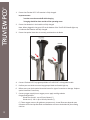
Ensure that optical view tube is correctly positioned on the blade.
4.
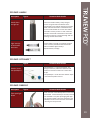
Connect Truview PCD™ laryngoscope blade to TruLED PCD™ rechargeable handle.
5.
Perform pre-use check to ensure laryngoscope blade and handle light up.
6.
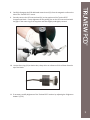
Before every use check optical view tube lenses for signs of scratches or damage. Replace
optical view tube if necessary.
7.
Connect oxygen supply line to oxygen port or apply anti-fog solution.
Oxygen flow guidance:
Blade sizes 0 and 1 - up to 5 liters/minute (*)
Blade sizes 2, 3 & 4 - up to 10 liters/minute (*).
(*) These oxygen rates are for guidance purposes only. Actual flow rates depend upon
numerous clinical and professional considerations and are to be decided by the treating
clinician.
8