1
8.
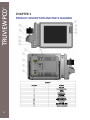
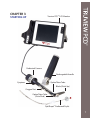
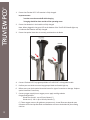
Carefully disengage the PCD dedicated camera head (11) from the magnetic cradle on the
side of the Truview PCD™ screen.
9.
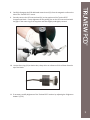
Securely connect the PCD camera head (11) to the eyepiece of the Truview PCD™
laryngoscope blade. Ensure alignment of the guiding pins on the PCD camera head with
the gaps in the outer ring of the eyepiece and twist slightly until tightly secured.
10. Use the focus ring (12) to obtain clear, sharp vision at a distance of 10 to 20mm from the
tip of the blade.
11. If necessary, modify brightness of the Truview PCD™ monitor by adjusting the ‘brightness
buttons’ (9, 10).
9