1
Your XGA / Audio Switcher
4.2 VP-161xl 16x1 XGA / Audio Switcher
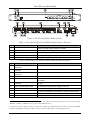
The VP-161xl is a 16x1 switcher for VGA / XGA signals and balanced audio
stereo signals that lets you route one of up to 16 inputs to one output.
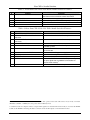
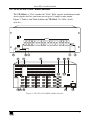
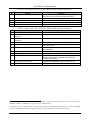
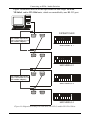
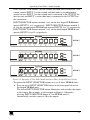
Figure 2, Table 3 and Table 4 define the VP-161xl 16x1 XGA / Audio
Switcher:
REMOTE
AUDIO
16 15 14
13 12 11
10 9 G
8 7 6
5 4 3
2 1 G
OUTPUT
OUTPUT
+ LG - + RG -
INPUT 16
INPUT 1
INPUT 16
INPUT 15
INPUT 14
INPUT 13
INPUT 12
INPUT 11
INPUT 10
INPUT 9
+ LG - + RG -
+ LG - + RG -
+ LG - + RG -
+ LG - + RG -
+ LG - + RG -
+ LG - + RG -
+ LG - + RG -
+ LG - + RG -
INPUT 1
INPUT 2
INPUT 3
INPUT 4
INPUT 5
INPUT 6
INPUT 7
INPUT 8
+ LG - + RG -
+ LG - + RG -
+ LG - + RG -
+ LG - + RG -
+ LG - + RG -
+ LG - + RG -
+ LG - + RG -
+ LG - + RG -
ID BIT
16
15
INPUT 15
INPUT 14
ID BIT
INPUT 2
INPUT 3
1
2
ID BIT
14
13
INPUT 13
INPUT 12
ID BIT
INPUT 4
INPUT 5
3
4
ID BIT
12
11
INPUT 11
INPUT 10
ID BIT
INPUT 6
INPUT 7
5
6
G + -
RS-232 IN
ID BIT
10
9
INPUT 9
ID BIT
INPUT 8
7
8
RS-232 OUT
RS-485
SETUP
Figure 2: VP-161xl 16x1 XGA / Audio Switcher
5