1
BIOS SETUP
Exit Setup
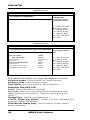
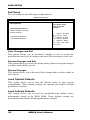
The exit setup has the following settings that are:
BIOS SETUP UTILITY
Main
Advanced
PCIPnP
Boot
Security
Exit Options
Save Changes and Exit
Discard Changes and Exit
Discard Changes
Load Optimal Defaults
Load Failsafe Defaults
Chipset
Exit
Exit system setup
after saving the
changes.
<-
Select Screen
↑↓
+Tab
F1
F10
ESC
Select Item
Change Field
Select Field
General Help
Save and Exit
Exit
Save Changes and Exit
This option allows you to determine whether or not to accept the
modifications and save all changes into the CMOS memory before exit.
Discard Changes and Exit
This option allows you to exit the Setup utility without saving the changes
you have made in this session.
Discard Changes
This option allows you to discard all the changes that you have made in
this session.
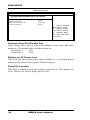
Load Optimal Defaults
This option allows you to load the default values to your system
configuration. These default settings are optimal and enable all high
performance features.
Load Failsafe Defaults
This option allows you to load the troubleshooting default values
permanently stored in the BIOS ROM. These default settings are
non-optimal and disable all high-performance features.
50
MB966 User’s Manual