1
I
I
USING THE SNACKS
BUTTON
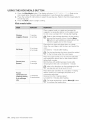
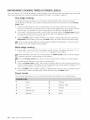
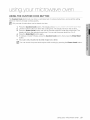
1. Press the Snacks button. The display will show _4_F7
_77 /_/_'_iX/U
1 7-(?4. (Refer to the snack
bar table). Press the button repeatedly to cycle through the available items.
2. Press the number 1 or 2 buttons to select the serving size. Only number 1 (serving) is
available for Nachos. (Refer to the snack bar table for the serving size).
3. Press the Start button to begin cooking.
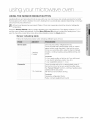
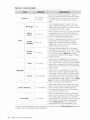
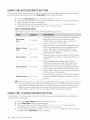
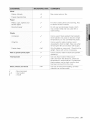
Snack
bar table
Place the nachos on a plate without letting them
overlap. Sprinkle cheese evenly over them.
Nachos
1 serving
Chicken
5-6 oz.
7-8 oz.
Use precooked, refrigerated chicken wings.
Place the chicken wings around the plate in a spokelike fashion and cover with wax paper.
Let stand for 1 to 2 minutes.
1 cooked potato
2 cooked
potatoes
Cut the cooked potato into 4 even wedges. Scoop or
cut out the potato flesh, leaving about a 1/4in. of skin.
Place the skins in a spoke-like fashion around the
plate.
Sprinkle with bacon, onions and cheese.
Do not cover.
Let stand 1 to 2 minutes.
wings
Potato skins
Contents:
2 cups tortilla chips
1/3 cup grated cheese
Place the cheese sticks on a plate in a spoke-like
fashion. Do not cover.
Let stand for 1 to 2 minutes after heating.
Cheese sticks
(frozen)
5-6 pcs
7-10 pcs
The sizes of the cheese sticks may vary. For
smaller size cheese nuggets, use the Less (1}
button to decrease the heating time. For larger
size cheese sticks, use the More (9} button to
increase the heating time.
using your mcrowave
oven 25