1
Qsadd66-EN-3.12-Rev. 05B
Addendum to the
Quickstart - Overview Sheet
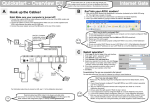
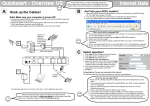
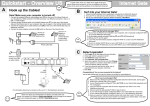
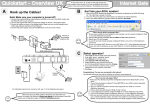
To install your Internet Gate, follow the A, B and C steps of the
Quickstart sheet!
If you run into problems or need further information, this Addendum will help with the most common
issues.
After the installation, you can configure the Internet Gate for your specific needs through the built-in
web interface. For detailed instructions, use the Online User Guide on the Internet:
www.igmanual.com.
Contents
1
Basic Set Up .....................................................................................................................................3
2
Getting Help ......................................................................................................................................3
3
Detailed Instructions .........................................................................................................................4
3.1 Connecting a Local Network (LAN)...........................................................................................4
3.2 Check Your PC’s Settings.........................................................................................................4
3.2.1 Using the Internet Gate with Dynamic IP Addresses on the LAN ..................................5
3.2.2 Using the Internet Gate with Static IP Addresses on the LAN .......................................6
3.3 Check the Proxy Settings of Your Web Browser ......................................................................7
3.4 Diagnostic Test .........................................................................................................................8
3.5 Reset to Factory Defaults..........................................................................................................8
4
Configure Your Internet Gate............................................................................................................9
4.1 Network Settings .......................................................................................................................9
4.2 Security Profiles ..................................................................................................................... 10
5
Requirements................................................................................................................................. 11
END USER SOFTWARE LICENSE AGREEMENT .............................................................................. 12
2
1
Basic Set Up
Please refer to step A, B and C of the Quickstart sheet for the basic set up of your Internet Gate. It will
guide you in installing the Internet Gate and in doing the necessary settings.
2
Getting Help
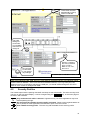
HELP!
There are several ways to get information about the Internet Gate:
•
Quickstart Overview Sheet – Helps you install and do some basic configurations.
•
Addendum to the Quickstart – Overview Sheet (this document) – Helps you to troubleshoot
the most common issues.
•
Built-in Help – Every configuration page on the built-in web server has help texts that describe
the different parameters. Just click the question marks.
•
Online User Manual – In the online manual, you will find the latest information tailored for your
specific version of the Internet Gate. You access it via links in the Built-in Help, via the link on
the first web page of the Internet Gate or directly at www.igmanual.com.
•
Support – If you experience problems when installing or using the Internet Gate that cannot be
solved by the help indicated above, contact your retailer for assistance.
•
Using SIP: Telephony, Video, Messaging... – This online information, accessible from the first
page of the web interface, helps you get your IP Telephony and SIP environment up and
running.
Upgrade?
Click to check
whether a newer
firmware is available!
Surf to your Internet
Gate by typing its
default IP Address:
192.168.0.1 to
configure it or to get
further help!
3
3
Detailed Instructions
Do you have problems getting your Internet Gate to work? Read the installation tips and the detailed
instructions on the following pages for help!
3.1
Connecting a Local Network (LAN)
If you have a Local Area Network (LAN) with several computers connected, you can connect the
network hub to your Internet Gate and allow all computers to share the Internet connection.
If your network uses dynamic IP-addressing (recommended), then the built-in DHCP server of your
Internet Gate will provide IP addresses to all PC:s on the LAN. Refer to 3.2.1 for more information.
Does your network use static IP addresses? Refer to 3.2.2!
Note:
•
Only one computer can be connected to the USB port on the Internet Gate. No LAN can be
connected to the USB port. Instead, use the Ethernet port and a hub to connect the LAN.
•
Some simpler models of the Internet Gate are locked so they are only able to connect a single
computer through the LAN interface. This lock is then indicated on the bottom of the web page
Network (refer to 4.1). To connect a LAN to such models, the firmware must be upgraded to a
version with LAN functionality.
3.2
Check Your Computer’s Settings
The Internet Gate is delivered with factory defaults that fit most users. If your PC has the default network
and web settings, then everything should work at once. If not, please check your PC’s settings.
(The steps described here are for Windows XP. Other operating systems have similar menus and
options, though accessing them may be done differently.)
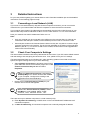
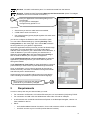
•
Select Network Connections in Windows Control Panel.
(Click Start and choose Control Panel). Right click on the
network connection that you use and select
Properties.
I have no “Network Connections” icon on my
desktop! Why? You need a network card installed
in your computer. Configure it according to the
instructions from the manufacturer.
•
Double click on Internet Protocol (TCP/IP) for your
network card on the list that appears.
There is no ”Internet Protocol (TCP/IP)” in the
list! Why? It is not installed. Select ”Install”,
”Protocol”, “Add”, ”Microsoft TCP/IP”, “OK”.
There are two ways to address computers in a local network (LAN):
a) Either Dynamic IP addressing, a DHCP server on the LAN distributes IP addresses to all
connected computers,
b) or Static IP addressing, all connected computers use a manually assigned IP address.
4
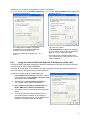
Check how your computer is configured to receive an IP address:
a) If it is configured to use dynamic addressing,
the settings look like this:
b) If it uses static IP addresses the setting look
something like this:
No configuration is needed. The DHCP
server built into your Internet Gate will
distribute correct IP addresses.
Check your setting according to 3.2.1, 3.3,
and 4.1.
3.2.1
You have two options:
1 (recommended): Configure all computers
on your LAN to use dynamic IP addressing.
Refer to 3.2.1 for more information.
2: Configure your Internet Gate and your
PC:s so they fit your LAN. Refer to 3.2.2 for
more information.
Using the Internet Gate with Dynamic IP Addresses on the LAN
The Internet Gate is delivered configured for dynamic IP addressing on the LAN. The Internet Gate acts
as a DHCP server and provides IP addresses.
(The steps described here are for Windows XP. Other operating systems have similar menues and
options, though accessing them may be done differently.)
All PCs on your LAN should be configured like this:
1. Select Network Connections in Windows Control
Panel. Right click on the network connection that
you use and select Properties.
2. Double click on Internet Protocol (TCP/IP) for
your network card on the list that appears.
3. Select Obtain an IP address automatically and
Obtain DNS server address automatically.
4. Click OK to save and close all windows and reboot
the PC.
5. You may check that the built-in DHCP server of
your Internet Gate is enabled, by checking the
settings of the LAN port (ET1 or ET2 dependent on
model) in the Network Settings web page.
5
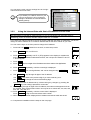
You can see the most common settings here to the right.
These should suit most users.
If you already run a DHCP server on your
LAN you should turn it off or change its
settings to distribute the Internet Gate as
default gateway.
3.2.2
Using the Internet Gate with Static IP Addresses on the LAN
Note:
This information is intended for advanced users. If you are not familiar with terms like static IP
addressing you do not need to read this chapter. Refer to 3.2.1 instead.
If you want your Internet Gate to be part of an existing LAN that uses static IP addresses, you have to
change its LAN IP address to an unused IP address that fits the same subnet as your LAN.
You can use the keys on the front panel to change the IP address:
1. Press and hold SET pressed for 3 seconds, to enter setup mode.
AD
2. Press SELECT once, so CFG is lit.
AD
3. Press SELECT repeatedly until ”E 2” (ET2) appears in the display for models with
built-in ADSL. For firewall models without ADSL, the LAN port is instead ET1 and “E
1” should appear.
AD CFG DHP RST
CFG DHP RST
LQ
TX
RX
CFG DHP RST
LQ
TX
RX
LQ
TX
RX
4. Press SET .
5. Press SET . The first 3 digits of the IP address are shown and the first digit flashes.
AD
CFG DHP RST
LQ
TX
RX
6. Press ALT CFG repeatedly, until the correct digit is displayed.
7. Press SELECT : The next digit flashes, and can be changed using ALT CFG .
AD
CFG DHP RST
LQ
TX
RX
8. Use SELECT to step through all digits of the IP address.
Use SET to step back to the previous digit if you have made any error.
Use ALT CFG to change the value of the flashing digit.
You can cancel the IP address set-up, without saving any changes, by pressing the
SELECT key and holding it pressed for 2 seconds.
9. After stepping through all digits of the IP address, the subnet mask appears and can
be modified. Each subnet mask number can only be set to values 255, 254, 252, 248,
240, 224, 192, 128, or 0.
AD
CFG DHP RST
LQ
TX
RX
10. Press ALT CFG repeatedly, until the correct value is displayed.
Press SELECT to step to the next subnet mask number.
11. When all digits have been displayed the IP address and subnet mask are saved.
AD CFG DHP RST
LQ
TX
RX
12. Complete the installation with the steps on the next page.
6
Is your Internet Gate not equipped with display and keys?
Do like this:
• Connect a PC to the LAN port (ET2 for ADSL models, ET1 for firewall
models) on your Internet Gate and configure the PC to use dynamic IP
addressing. Refer to 3.2.1.
• Change the setting for the LAN port on your Internet Gate through the builtin web interface. Refer to 3.1.
• Change PC IP configuration back to its static settings.
• Complete the installation with the steps on this page.
(The steps described here are for Windows XP. Other operating systems have similar menus and
options, though accessing them may be done differently.)
The procedure below has to be performed for all
computers connected to your local network (LAN).
1. Select Network Connections in Windows Control
Panel. Right click on the network connection that
you use and select Properties.
2. Double click on Internet Protocol (TCP/IP) for your
network card on the list that appears.
3. Select Use the following IP address.
4. Enter the IP address and Subnet mask of the
computer. As Default gateway enter the IP
address of your Internet Gate. Either the default
192.168.0.1 or the one you entered in the previous
section.
5. Enter the IP address of the Preferred and
Alternate DNS server.
6. Click OK.
3.3
Check the Proxy Settings of Your Web Browser
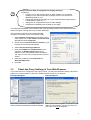
If your web browser is configured to use a proxy server, you may have problems reaching the built-in
pages of your Internet Gate. In that case, disable the proxy server in your browser:
Netscape Navigator:
Internet Explorer:
Select Edit, Preferences, Advanced, Proxies:
”Direct connection to the Internet” should be selected.
Select Tools, Internet Options, Connections, LAN
settings. The checkbox ”Use a proxy-server for
your LAN” must not be selected.
7
3.4
Diagnostic Test
If you cannot access the Internet, your Internet Gate can attempt to localise the problem.
Note: The diagnostic test is only available in models with keys and display.
Start the diagnostic test like this:
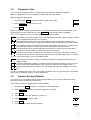
1. Press and keep SET pressed 3 seconds to enter setup-mode.
AD
2. Press SELECT 4 times until “LQ” is lit.
AD
CFG DHP RST
LQ
TX
RX
CFG DHP RST
LQ
TX
RX
3. Press SET .
It takes a couple of seconds to perform the test. Any errors discovered are shown in the display. The
diagnostic test can find multiple errors, press SELECT to flip through all error messages.
”E 1” to ”E 9” indicate errors in your external Internet connection (WAN):
AD CFG DHP RST
LQ
TX
RX
AD CFG DHP RST
LQ
TX
RX
AD CFG DHP RST
LQ
TX
RX
AD CFG DHP RST
LQ
TX
RX
AD CFG DHP RST
LQ
TX
RX
No WAN link connection (ADSL or Ethernet dependent on model). Check all cables. Contact
your broadband-supplier if the error remains.
No WAN DHCP server found. This may be OK, but check configuration according to 4.1.
Reboot your Internet Gate. Contact your Internet Service Provider (ISP) if the error remains.
No Gateway found. This may be OK, but check configuration according to 4.1. Reboot your
Internet Gate. Contact your Internet Service Provider (ISP) if the error remains.
No DNS server found. Check configuration according to 4.1. Reboot your Internet Gate.
Contact your Internet Service Provider (ISP) if the error remains.
No Internet connection. You do have a connection to your ISP, but they have no Internet
connection for the moment. Contact your Internet Service Provider (ISP) if the error remains.
”E11” to ”E19” indicate error in your local network (LAN):
AD CFG DHP RST
LQ
TX
RX
AD CFG DHP RST
LQ
TX
RX
AD CFG DHP RST
LQ
TX
RX
No Ethernet link. Check the cable connected to port ET1 on firewall models and ET2 on
ADSL models.
No DHCP addresses requested. The DHCP server of the Internet Gate is on, but no PC:s on
the LAN have requested addresses. This may be OK, but check your settings, see 3.2.1.
No Ethernet packets at all received. This may be OK, but check your settings, see 3.2 and
4.1.
If no error messages are shown, then your Internet connection is OK. Any remaining error is probably
due to your PC’s settings. See 3.2 for more information!
3.5
Reset to Factory Defaults
If you wish to you can reset all settings to their original values, so your Internet Gate is set up the
same way as when delivered from the factory.
If your ADSL modem is equipped with keys and a display:
1. Press and hold SET pressed for 3 seconds, to enter setup mode.
AD
2. Press SELECT repeatedly until ”RST” appears in the display.
AD
CFG DHP RST
LQ
TX
RX
CFG DHP RST
LQ
TX
RX
3. Press SET .
4. The question ”Clear all?” appears, and then ”no”.
5. Press SELECT to choose ”YES”.
AD CFG DHP RST
LQ
TX
RX
6. Press SET .
7. The modem now resets and then restarts.
AD CFG DHP RST
LQ
TX
RX
8
If your ADSL modem is not equipped with keys and display:
1. Gently insert a straightened paperclip in the hole at the right of the
front panel.
2. Keep the paperclip pressed for 3 seconds, until all front panel LEDs
are switched off.
3. After a while, the LEDs are lit one after the other, starting with RXD.
4. When exactly 3 LEDs are lit (WAN, TXD, RXD) insert the paperclip
again.
5. The Internet Gate now resets to factory default and then restarts.
4
Configure Your Internet Gate
Your Internet Gate is delivered with factory settings that fit most users. In some situations however,
you need to change the configuration of your Internet Gate. All the configuration pages can be
reached from the main menu in the Internet Gate. You can also easily set up the Internet Gate to fit
your specific needs.
In the following sections you will find information about two of the configurable features in the Internet
Gate. For more information refer to the built in help or the online user manual, see also section 2.
To access the built-in network configuration pages in the Internet Gate, do the following:
1. Start a web browser, such as Internet Explorer or Netscape Navigator, on your PC.
2. Write the IP address of your Internet Gate, 192.168.0.1, in the address field of the browser. The
first web configuration page should appear.
3. Click Log in.
4. Enter User name and Password. (At delivery: User name=admin, Password=admin. You
should change the password!)
4.1
Network Settings
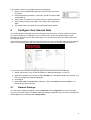
You can edit the network settings by choosing Network under Configurations on the menu page.
If you have received a static IP address, DNS and Gateway addresses from your service provider they
should appear here, otherwise select Get by DHCP.
9
These fields are filled
automatically if Get by
DHCP is selected.
The USB
settings fit
most users.
You probably
don’t have to
change is.
Do not forget
to click Save
if you change
any settings!
How do I configure
the LAN connection
(ET1 or ET2)?
Refer to 3.2, 3.2.1,
and 3.2.2!
Note: Image differs for firewall models.
Note:
Each of the interfaces LINE, USB, ET2, ET1 must reside on separate subnets. Two interfaces cannot
have the same IP address – even if one of them is blocked! However, if you e.g. want your LAN
Ethernet port to be on the same subnet as the USB port, you should instead change the “ET1/ET2
used as” from “inside” to “bridged with USB”.
4.2
Security Profiles
The firewall supervises the passing data traffic and stops unauthorised traffic. The active security level
is shown on the front panel display. It can be changed using the ALT CFG key, or the menu page on
the built in web interface.
AD CFG DHP RST
LQ
TX
RX
AD CFG DHP RST
LQ
TX
RX
AD CFG DHP RST
LQ
TX
RX
Only web and email traffic is allowed - Highest security, but some applications may have
trouble passing through.
All outgoing and legitimate incoming traffic is allowed - Same security against attacks as
the Hi profile, but more applications are allowed to pass out to the Internet.
User editable security profile - The user may edit the details for this security profile.
10
AD CFG DHP RST
LQ
TX
RX
AD CFG DHP RST
LQ
TX
RX
Blocked - No traffic is allowed to pass. You are disconnected from the Internet.
Bridged - Firewall and NAT bypassed. Warning! Not Recommended. (Note: The bridged
mode does not work on PPPoA connections.)
Does your application have trouble getting out on
the Internet?
Do you get error messages?
Change security profile to “Lo”!
If you have:
•
Servers that you want to make Internet accessible,
•
a VPN client to work from home, or
•
use network games (games played together with other users
on the Internet),
you have to configure the firewall to allow such traffic to pass.
You can edit the firewall settings by choosing Security under
Configurations on the menu page. Then choose AC to edit the
security profile to fit your games or applications.
Select the applications and/or protocols you want to allow through
the firewall. For some applications you need to state the IP
address of the computer on your LAN that will receive the traffic. It
is the IP address to your local computer you should enter. In
Windows choose Start, Run, and enter cmd. Write ipconfig to
find out what IP address your computer is assigned to.
Under Allowed applications and Port redirection you state the
applications, ports and protocols you want to allow to pass in
through the firewall.
Under Applications from inside you state applications, ports and
protocols that you want to allow to pass out through the firewall.
Once an application, port or protocol has been let through the
firewall, a two-way connection is established through the firewall
and data can pass in both directions.
Advanced users may manually redirect ports and even edit the
rules controlling the firewall in a powerful command language.
Do not forget to click Save and change the
profile to AC if you make any changes!
5
Requirements
In order to set up and use your Internet Gate you need:
•
For connection via Ethernet: a PC with an Ethernet port or a local network (LAN) using TCP/IP.
•
For connection via USB: a PC with Windows 98 / 2000 / Me / XP and an USB port.
•
A web browser such as the Microsoft Internet Explorer or the Netscape Navigator, version 4 or
later, installed on the PC.
•
Either:
o
An RJ45 Broadband Internet Connection, from a wall connector, ADSL or Cable modem.
o
An ADSL account at your local ISP (Internet Service Provider).
11
END USER SOFTWARE LICENSE AGREEMENT
BY ENTERING INTO A BINDING AGREEMENT FOR THE PURCHASE, LEASE, HIRE OR OTHER USE OF
SOFTWARE, WHETHER OR NOT EMBEDDED IN PURCHASED HARDWARE, ALL AS SPECIFIED IN SUCH
AGREEMENT, AND WHERE THIS END USER SOFTWARE LICENSE AGREEMENT IS EITHER ATTACHED
TO SUCH AGREEMENT OR TO ORDER CONFIRMATION OR SIMILAR DOCUMENT SENT TO YOU ON OR
BEFORE DELIVERY, YOU HAVE AGREED TO THE TERMS OF THIS LICENSE AGREEMENT (NO LATER
THAN) UPON ACCEPTING DELIVERY.
1.
THE LICENSE
INTERTEX Data AB, Rissneleden 45, 174 44 Sundbyberg, Sweden (“LICENSER”), authorizes you (the
“Licensee”) to use the software programs (the “Software”) specified in the purchase/lease/hire or similar
agreement (“the Purchase Agreement”) for the use of such Software, to which this License Agreement is
appended or otherwise connected, and/or which is embedded in hardware equipment specified in the Purchase
Agreement, and the Licensee accepts a non-exclusive, non-transferable License to "Use" (as hereinafter defined)
the Software on or connected to a single computer system (the "System") for use by the maximum number of
concurrent users and for the maximum number of concurrent sessions as specified in the Purchase Agreement,
upon the terms and subject to the conditions contained herein.
2.
USE OF THE SOFTWARE
For the purposes of this License "Use" shall mean and include:
(i)
utilization of the Software by copying, transmitting or loading the same into the temporary memory (RAM)
or installing into the permanent memory (e.g. hard disk, CD ROM or other storage device) of the System
for the processing of the System instructions or statements contained in such Software;
(ii) in the case of Software embedded in hardware equipment; by operating the hardware equipment;
(iii) storing the whole or any part of the Software on the System or other storage unit or disk;
(iv) utilizing (but not copying) the instructional and/or operational manuals relating to the Software.
For the purposes of this License "concurrent use" shall mean simultaneous use of the Software by the number of
users of the Licensee specified in the Purchase Agreement PROVIDED however that Software installed on a file
server for the sole purpose of distribution to other workstations or computers is not being Used for the purposes of
ascertaining the number of concurrent users.
3.
LICENSEE'S UNDERTAKINGS
The Licensee may not perform any of the acts referred to in (i)-(iii) below except to the extent and only to the
extent permitted by the applicable law to the Licensee as a lawful user of the Software and only then for the
specific limited purpose stated in such applicable law or hereunder. Licensee may not
(i) copy the Software (other than for normal System operation) or otherwise reproduce the same
provided that the Licensee may copy the Software for back-up purposes;
(ii) translate, adapt, vary or modify the Software;
(iii) disassemble, decompile or reverse engineer the Software or any other action attempting to
discover or disclose the source code or the methods or concepts embodied in the source code
(iv) modify the software in any way so that copyrights, trademarks and other proprietary notices are
removed or altered
The Licensee further undertakes:
(v) not to provide or otherwise make available the Software in whole or in part (including where
applicable, but not limited to program listings, object code and source program listings, object
code and source code), in any form to any third party without prior written consent from
LICENSER;
(vi) within 14 days after the date of termination or discontinuance of this License for whatever
reason, to destroy the Software and all updates, upgrades or copies, in whole and in part, in any
form including partial copies or modifications of the Software received from LICENSER or made
in connection with this License, and all documentation relating thereto.
4.
LIMITED WARRANTIES
Limited warranties are granted to the Licensee by the reseller of LICENSER products from which the Licensee
has purchased the Software, in accordance with a separate Warranty Statement attached to the Licensee’s
purchase agreement or to order confirmation or included in the delivery.
12
5.
LIMITATION OF LIABILITY
Without prejudice to the Licensee’s rights against the reseller according to a separate Warranty Statement as
provided in Section 4, the Licensee hereby acknowledges that software in general is not error-free and agrees
that the existence of such errors shall not constitute a breach of this License. THE SOFTWARE IS FURNISHED
AS IS AND LICENSER DISCLAIMS, TO THE EXTENT PERMITTED BY THE APPLICABLE LAW, ALL
WARRANTIES WITH RESPECT TO THE SOFTWARE, EITHER EXPRESS OR IMPLIED, INCLUDING BUT NOT
LIMITED TO ANY IMPLIED WARRANTIES OF MERCHANTABILITY, NON-INFRINGEMENT OR FITNESS FOR
ANY PARTICULAR PURPOSE.
LICENSER shall not be liable for any loss or damage whatsoever or howsoever caused arising directly or
indirectly in connection with this License, the Software, its use or otherwise, except to the extent that such liability
may not be lawfully excluded under the applicable law. Notwithstanding the generality of the preceding sentence,
LICENSER expressly excludes liability for indirect, special, incidental or consequential loss or damage which may
arise in respect of the Software, its use, the System or in respect of other equipment or property, or for loss of
profit, business, revenue, goodwill or anticipated savings.
In the event that any exclusion contained in this License shall be held to be invalid for any reason and LICENSER
becomes liable for loss or damage that may lawfully be limited, such liability shall be limited to the License fee
paid for the Software.
LICENSER does not exclude liability for death or personal injury to the extent only that the same arises as a result
of the negligence of LICENSER, its employees, agents or authorized representatives.
6.
COPYRIGHT, PATENTS, TRADE MARKS AND OTHER INTELLECTUAL PROPERTY RIGHTS
The Licensee acknowledges that any and all of the copyright, trademarks, trade names, patents and other
intellectual property rights subsisting in or used in connection with the Software including all documentation and
manuals relating thereto are and remain the sole property of LICENSER or other third party where this is
specifically indicated. The Licensee shall not during or at any time after the expiry or termination of this License in
any way question or dispute the ownership by LICENSER.
7.
TERMINATION
LICENSER may by notice in writing terminate this License if the Licensee is in breach of any term, condition or
provision of this License or required by the applicable law and fails to remedy such breach (if capable of remedy)
within 30 days of having received written notice from LICENSER specifying such breach. Termination, howsoever
or whenever occasioned shall be subject to any rights and remedies LICENSER may have under this License or
under the applicable law.
13
DECLARATION OF CONFORMITY
according to EN 45014
The manufacturer Intertex Data AB, Rissneleden 45, 174 44 Sundbyberg, Sweden, herewith declares
the firewalls/modems in the Intertex IX66 Internet Gate series are in compliance with the essential
requirements and other relevant provisions of the following EC directives:
1999/5/EC
Radio & Telecommunications Terminal Equipment Directive (R&TTE)
and that the following harmonised standards and/or technical specifications have been applied:
Electromagnetic Emission:
Electromagnetic Immunity:
Safety:
EN 50081-1:1992, EN 50081-2:1993, EN 55022:1998
EN 50082-1:1997, EN 61000-6-2:1999, EN 55024:1998
EN 60950
Stockholm September 30, 2001
Karl Erik Ståhl, President Intertex Data AB
DECLARATION OF CONFORMITY
according to FCC Part 15
The firewalls/modems in the Intertex IX66 Internet Gate series comply with Part 15 of the FCC Rules.
Operation is subject to the following two conditions:
1. the devices may not cause harmful interference, and
2. the devices must accept any interference received, including interference that may cause
undesired operation.
NOTE: This equipment has been tested and found to comply with the limits for a Class B digital
device, pursuant to part 15 of the FCC rules. These limits are designed to provide reasonable
protection against harmful interference in a residential installation. This equipment generates, uses
and can radiate radio frequency energy and, if not installed and used in accordance with the
instructions, may cause harmful interference to radio communications. However, there is no guarantee
that interference will not occur in a particular installation. If this equipment cause harmful interference
to radio or television reception, which can be dermined by turning the equipment off and on, the user
is encouraged to try to correct the interference by one or more of the following measures:
•
Reorient or relocate the receiving antenna.
•
Increase the separation between the equipment and receiver.
•
Connect the equipment into an outlet on a circuit different from that to which the receiver is
connected.
•
Consult the dealer or an experienced radio/TV technician for help.
Any changes or modifications not expressively approved by Intertex Data AB could void the user’s
authority to operate this equipment.
To preserve the environment, you should return the product to where you
purchased it or directly to an accredited electronics recycling station.
Intertex uses accredited companies and organisations for recycling and disposion
of electronics, packing materials and emballage.
14
Notes:
15
This product is developed and manufactured by Intertex Data AB.
Copyright © 2005 Intertex Data AB
All rights reserved.
This manual and any associated artwork, software, and product designs are copyrighted with all
rights reserved. Under the copyright laws this manual, artwork, software, and product designs
may not be copied, in whole or part, without the written consent of Intertex. Under the law,
copying includes translation to another language or format.
Intertex Data AB
Rissneleden 45
SE-174 44 Sundbyberg
Sweden
www.intertexdata.com
16