1
4100/4200 Router User’s Guide
Troubleshooting
Resolving Specific Issues
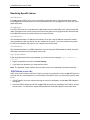
pwr LED Not Lit
If the pwr (power) LED is not lit, it is not connecting to the power source. Verify that the power cord is
firmly plugged into the back panel of the router and that the other end is plugged into an active AC wall or
power-strip outlet.
dsl LED Not Lit
If the DSL LED is not lit, it is not detecting a valid signal from the Central Office (CO). Verify that the DSL
cable is plugged into the correct router port and the router power cord is plugged into the electrical outlet.
If the cables are secure, you should contact your Service Provider.
enet LED Not Lit
This indicates that there is no Ethernet link detected. If you are using the Ethernet connection method,
check the Ethernet cable connection from the computer to the router. If you have used the wrong cable,
the LED on the Ethernet (NIC) card in your computer will not be lit either.
USB LED Not Lit
This indicates that there is no USB link detected. If you are using the USB installation method, check the
USB cable connection from the computer to the router.
Login Password Error
If after being prompted for the login password, you receive the error message: Login Password is
invalid:
• Retype the password, and then click Save Settings.
• If you forget your password, you must reset the router.
Note: The password is case-sensitive. Be sure that you have not accidentally activated the Caps key.
POST Failure (red pwr LED)
POST is the router’s “power-on self-test.” When you power on or reboot the router, the pwr LED goes to a
solid red until one of two things occurs: it either fails its initial POST tests, or it comes fully up and is ready
to run.
• If POST passes, the router continues through the rest of its initialization, and the pwr LED changes to
solid green.
• If the initial POST diagnostic tests fail, the pwr LED will remain red, indicating a POST failure, and will
lock the router. You will need to contact Efficient Networks Technical Support to resolve this issue.
65