1
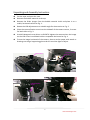
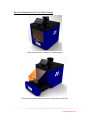
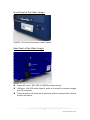
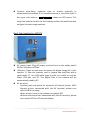
Camera: Auto‐focus, exposure time or shutter manually or automatically controlled. If it is needed to zoom in, scroll the zoom in shown on LCD screen. This bar up to ruler scale as helps the camera contain the full viewing surface of transilluminator and gets the best image contrast. Back Side Application NOTICE AC power input: Plug AC power cord and turn on the safety switch ON for utilization of Slider. USB port: There are two ways to access the digital image file in the camera. 1). Take out memory card in camera and read files with a card reader. 2). Use USB cable (type A male to A male) to connect Slider USB port and PC. The digital files in the camera will be automatically read by PC. AV terminal: ‐ Terminal jack and switch for accessory of thermal printer. With thermal printer connected with the AV terminal, please turn switch ON for printing. ‐ When printer is not in use, please turn switch OFF. ‐ Without thermal printer connected with the AV terminal, please turn switch OFF for LCD normal display. 11 www.maestrogen.com